
Tripgoo | Flutter App Travel Booking Platform With Admin Panel
Description
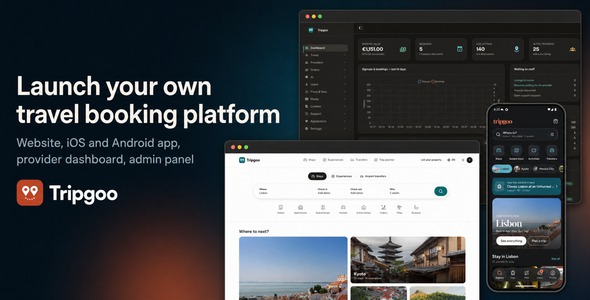
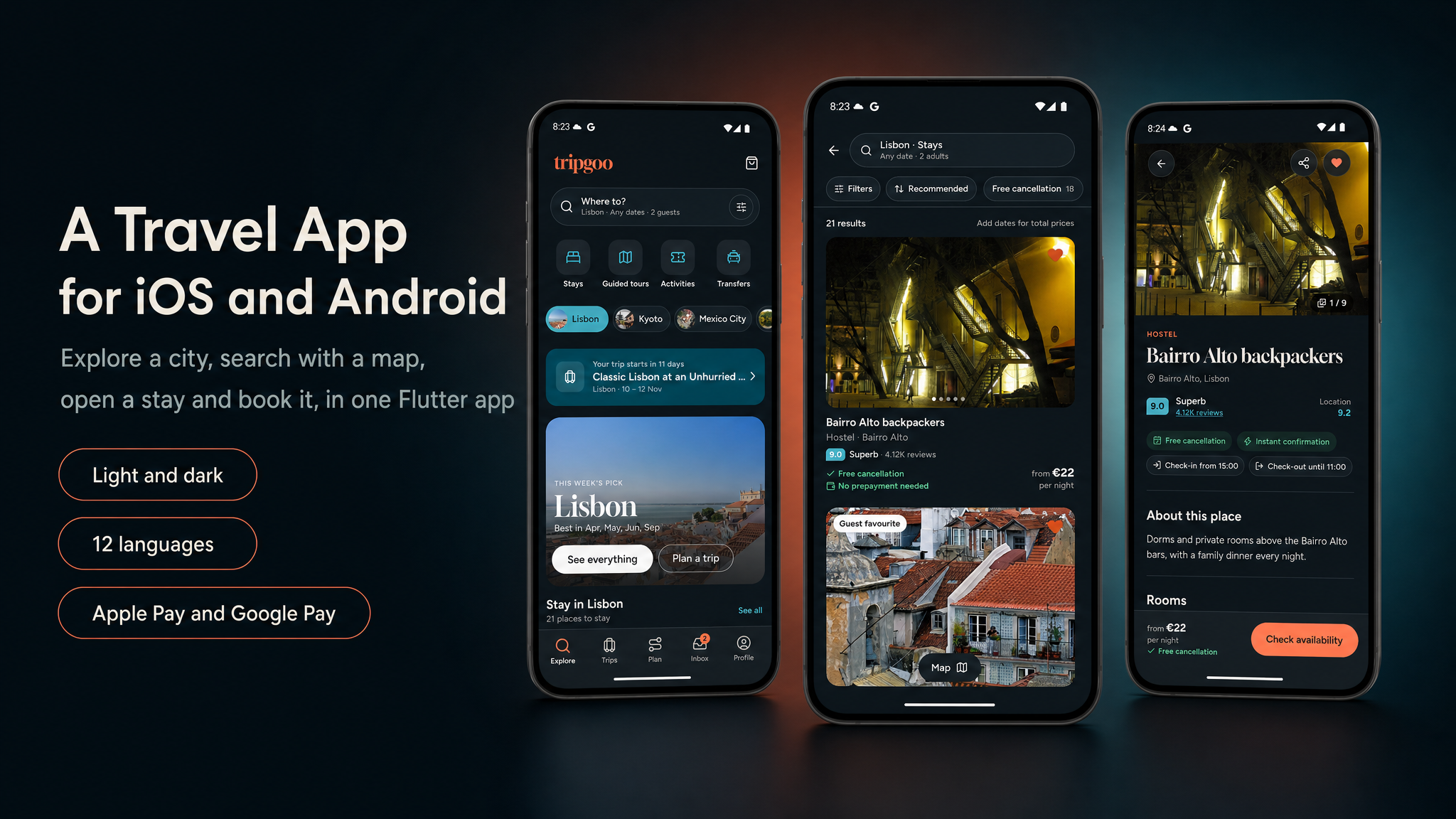
Tripgoo is a full-stack travel booking platform: a cross-platform Flutter mobile app (iOS & Android) and a
companion web platform built with the Laravel PHP framework (booking website, provider dashboard,
admin panel and the mobile API). It combines a calm, photo-first app with a production-ready backend: the included
PHP / MySQL API (built with Laravel), Stripe with Stripe Connect for booking payments and provider payouts (plus
Dodo Payments, Paddle, Creem, Polar, Lemon Squeezy, Midtrans and Duitku as further payment options), an AI provider
of your choice (paid, your own key) for the AI trip planner, Firebase for sign-in and push notifications, and
RevenueCat for the Tripgoo Plus subscription.
One platform sells four kinds of travel: stays (rooms with rate plans, meal plans and city tax),
tours and activities (options with scheduled departures and private groups) and
airport transfers (routes priced per vehicle, with the flight number taken at checkout).
Travellers search a destination by list or map with real availability for their dates and party, put a stay, a
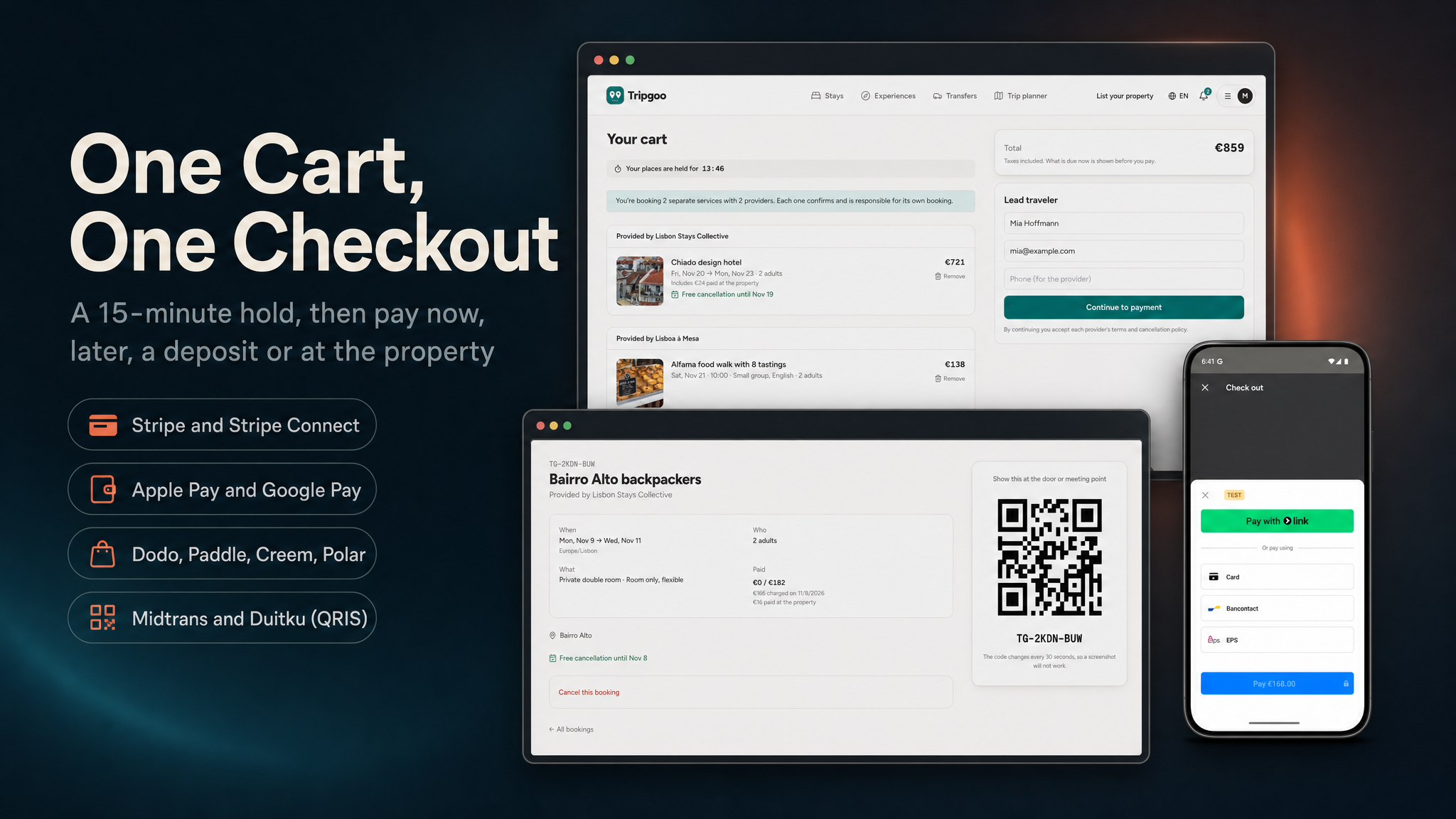
tour and a ride from different providers in one cart, hold them for 15 minutes, pay once with a card, Apple Pay or
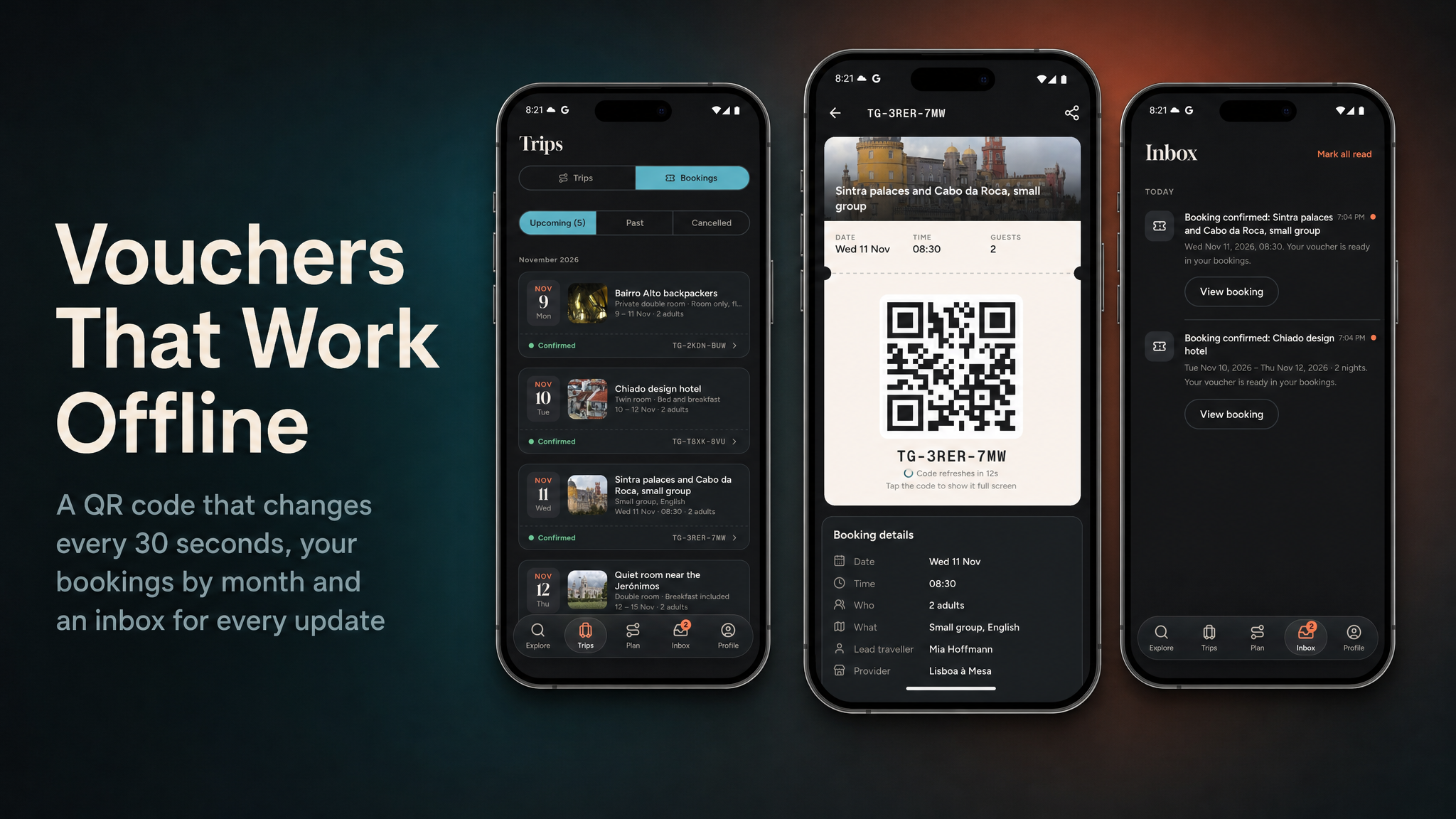
Google Pay, and get a voucher whose QR code changes every 30 seconds and keeps working without signal. An
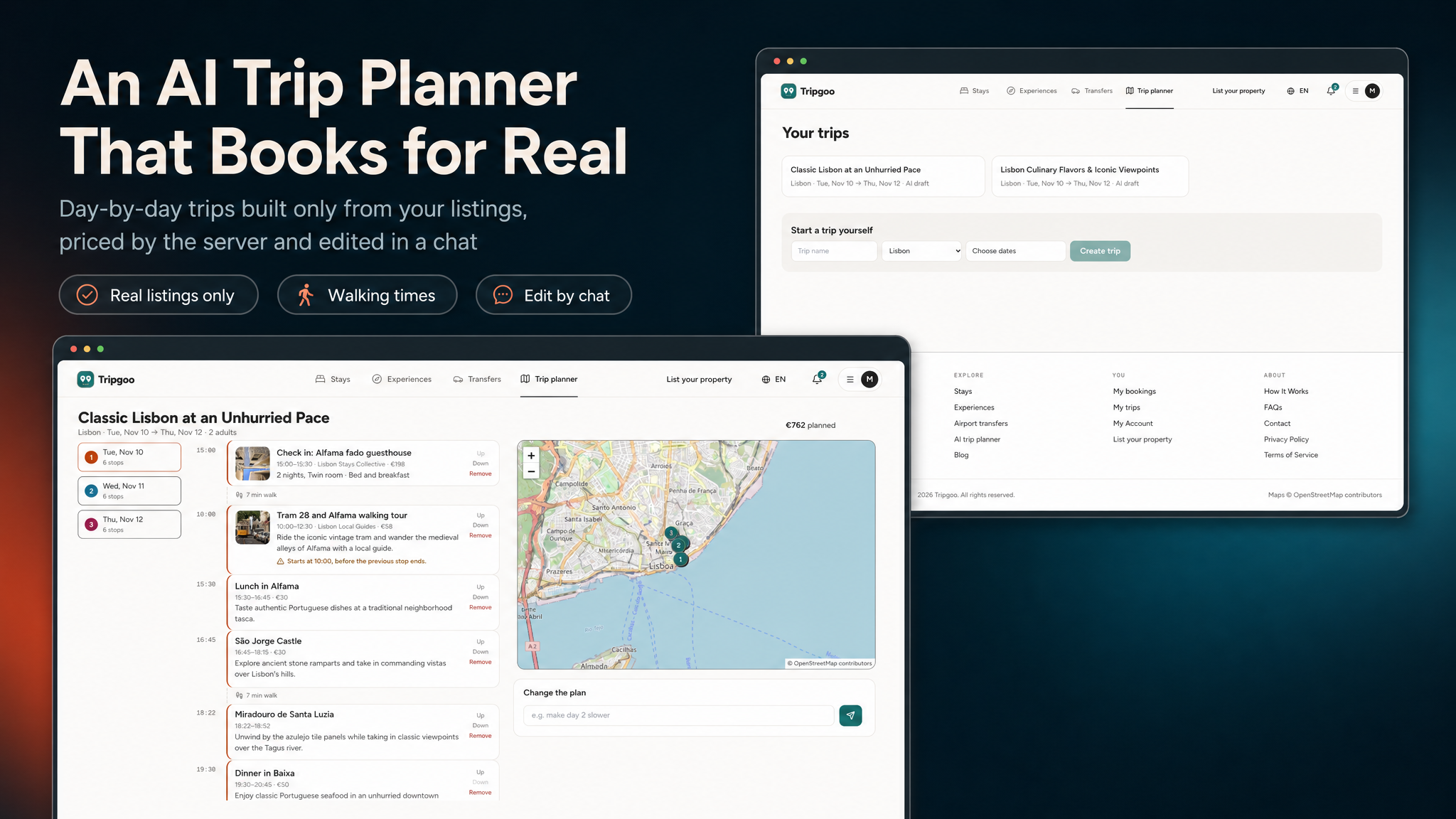
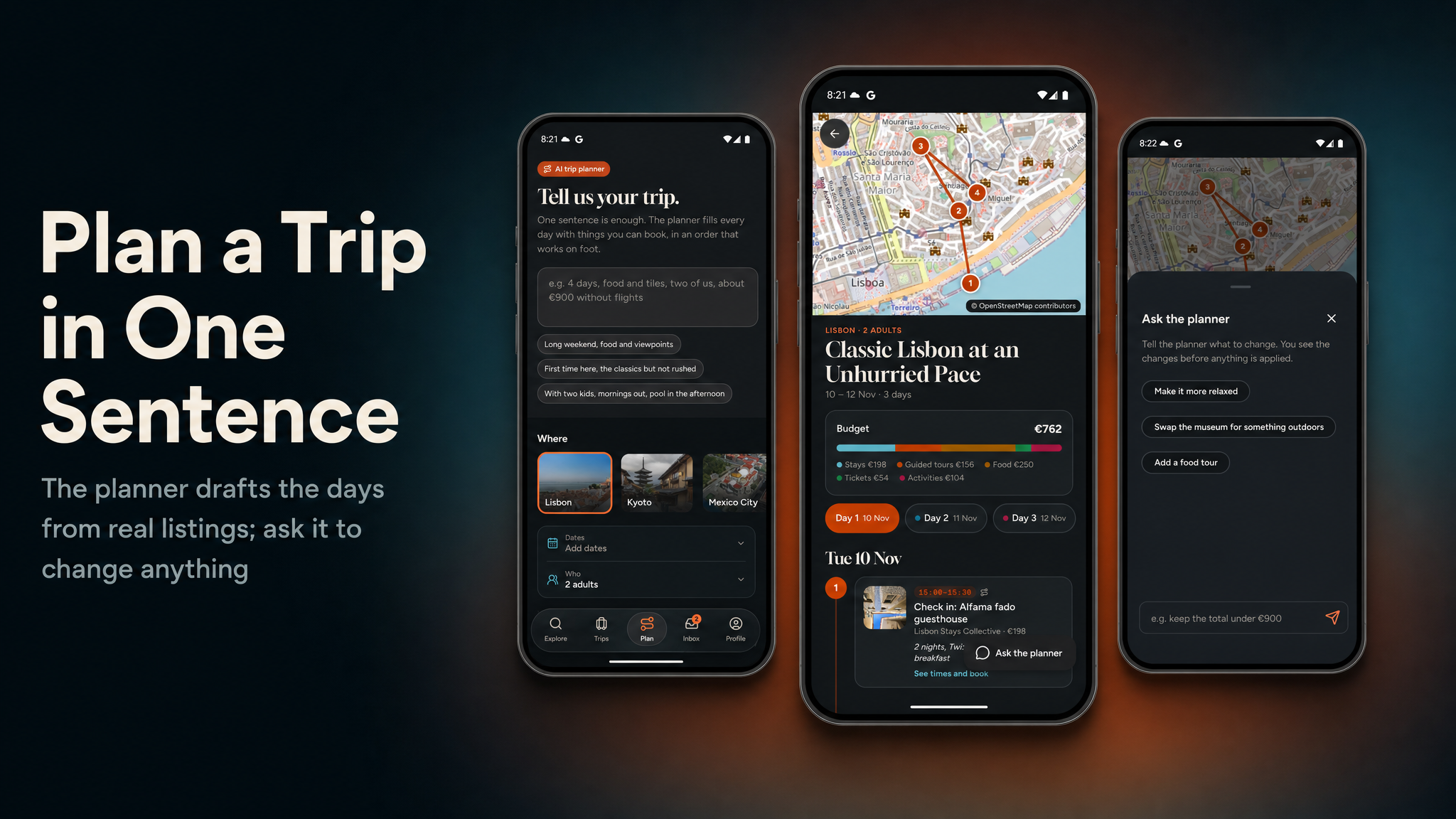
AI trip planner turns one sentence into a day-by-day trip built only from your real, bookable
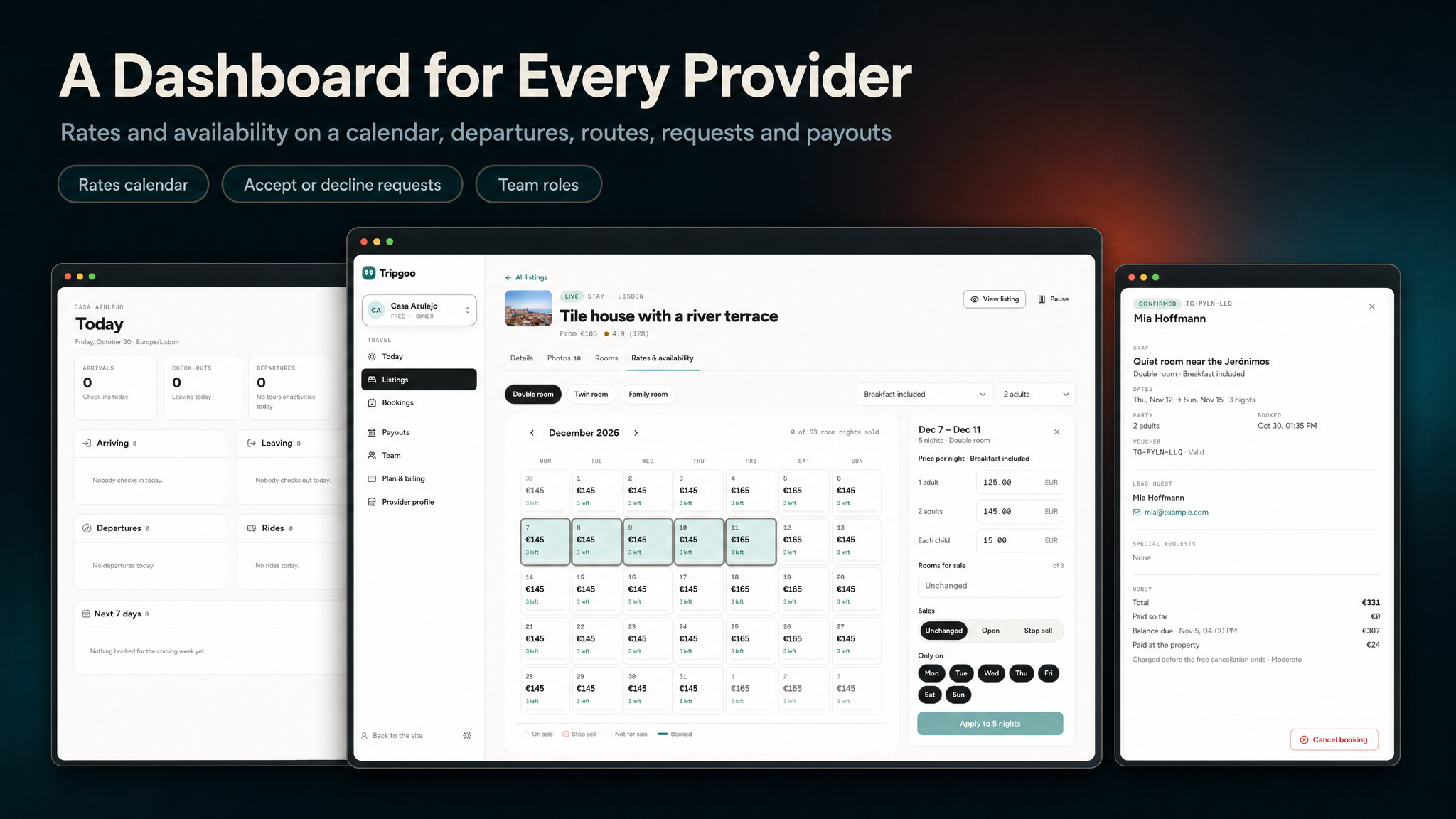
listings, and a chat then changes it. Providers run their rooms, rates, departures, routes and requests from their
own dashboard; the platform keeps a commission per listing kind and pays providers out through Stripe Connect or
by bank transfer. The booking commission and Tripgoo Plus for travellers pay for it.

Test card: bookings and Tripgoo Plus are paid through the web payment provider you choose
(Stripe by default; Dodo Payments, Paddle, Creem or Polar as hosted checkouts for bookings, and Lemon Squeezy
for Plus only), and the app always pays with Stripe PaymentSheet. Stripe checks out in test mode with card
number 4242 4242 4242 4242, any future expiry date and any CVC (3-D Secure test card
4000 0027 6000 3184); the hosted checkouts each have their own sandbox or test mode.
Note: All supported payment services (Stripe and Stripe Connect, Dodo Payments, Paddle, Creem, Polar, Lemon Squeezy, Midtrans and Duitku) are third-party services and may charge transaction fees or other service fees depending on their pricing plans. Most require merchant account approval and verification before accepting live payments, and Stripe Connect requires you to onboard and verify each provider you pay out automatically. Merchant-of-record providers (Dodo Payments, Paddle, Creem, Polar, Lemon Squeezy) mainly resell digital products and may not accept travel bookings in your country: confirm with them before going live; Stripe is the safe default. These services are not included in the purchase price, and buyers are responsible for creating their own accounts, completing any required approval processes, configuring API keys, and covering all applicable fees. In-app purchases of Tripgoo Plus on iOS and Android go through Apple and Google (via RevenueCat) and are subject to their store commissions; stays, tours and rides are real-world services and are paid with Stripe, Apple Pay or Google Pay.
Before you buy: paid third-party services (not included)
This item uses services run by other companies. You must register your own account with each one, accept its terms and pay its fees yourself. No author accounts or API keys are included. This is the complete list of external services the code integrates with.
- Firebase (required): your own Firebase project (app sign-in, push, Remote Config). Usage above the free plan is billed by Google.
- RevenueCat (paid service, required for in-app subscriptions): Tripgoo Plus is sold in the app through RevenueCat and Google Play Billing / the App Store. You need your own RevenueCat account and API keys; RevenueCat charges its own fees above its free tier, and Apple and Google take their store commission. Without RevenueCat keys the app hides the paywall and everything else works.
- AI provider (paid service, required for every AI feature): the AI features advertised in
this description (the AI trip planner, editing a trip by chat, and reply drafts for support staff)
do not work without an active, paid account and API key with Google Gemini, OpenAI,
Anthropic, Mistral, Groq, DeepSeek, OpenRouter or xAI. Every AI request is billed per use by that provider
to you. No AI credits are included. The AI code is the free, MIT-licensed
laravel/aipackage (installed by Composer). Ollama on your own server is the only alternative, and that server is yours to run and pay for. - Payment providers (paid services; you need at least one to take payments): the code
integrates all of the following, each with its own account approval, transaction fees and terms:
- Stripe and Stripe Connect: bookings on the website and in the app, Apple Pay / Google Pay, provider payouts
- Dodo Payments (hosted checkout)
- Paddle (hosted checkout)
- Creem (creem.io, hosted checkout)
- Polar (polar.sh, hosted checkout)
- Lemon Squeezy (Tripgoo Plus and plans only)
- Midtrans (Indonesia, QRIS, rupiah listings)
- Duitku (Indonesia, QRIS, rupiah listings)
- Upstash QStash (paid service, optional): used as the queue connection
(
QUEUE_CONNECTION=qstashandTRIPGOO_AI_QUEUE_CONNECTION=qstash) on shared hosting where a queue worker cannot stay running. QStash calls back into the app over HTTPS to run background jobs (booking emails and push, AI trip drafts, payment follow-ups). Needs your own Upstash account; Upstash bills per message above its free tier. Not needed if you run the included database queue with workers on a VPS. - Other optional services, each with its own account and pricing: Mailchimp (newsletter sync from the website footer), Cloudflare Turnstile or Google reCAPTCHA (spam protection), media storage / CDN (Amazon S3, Cloudflare R2, DigitalOcean Spaces, Backblaze B2, Wasabi, Google Cloud Storage, MinIO, Bunny, CloudFront), Google Analytics 4, Facebook / Meta sign-in and App Events, SMTP email delivery (or Mailgun / Postmark), and a map tile provider and geocoder for busy sites (OpenStreetMap’s public tiles and Nominatim have usage policies).
Credentials and licences (no author keys included)
Every credential in the download is an empty value or a placeholder that you replace with your own.
- RevenueCat: no RevenueCat API key, secret or webhook secret of ours is in the source. The app
reads its RevenueCat public key from your own Firebase Remote Config (
revenuecat_android_api_key/revenuecat_ios_api_key, empty by default), and the server readsREVENUECAT_WEBHOOK_SECRETfrom your.env(empty in every example file). With no key set, the Plus purchase stays off; purchases can only ever reach your own RevenueCat account. - Firebase: No
google-services.json, noGoogleService-Info.plistand no service-account JSON are included. The only Firebase files are templates with placeholder values (storage/firebase/service-account.example.json,google-services.example.json,GoogleService-Info.example.plist). You create your own Firebase project and add your own files, so sign-in, push and Remote Config run on your Firebase account only. - Stripe and the other payment providers: no publishable key, secret key or webhook secret of ours is included.
Payments reach only the accounts whose keys you enter in
.envor the admin panel. - AI (
laravel/ai):laravel/aiis Laravel’s official package, released under the MIT licence (Copyright Taylor Otwell), which permits use in commercial products. It is not bundled: the download contains novendor/folder, and Composer installs the package from Packagist on your server. You need your own paid API key from the AI provider you choose (Google Gemini, OpenAI, Anthropic, Mistral, Groq, DeepSeek, OpenRouter or xAI); every AI key in the example.envfiles is empty. - Other services: mail, queue (QStash), storage / CDN and map keys are empty in every example file
and are entered by you in
.envor the admin panel.
AI Disclosure
The AI features use the open-source (MIT)
laravel/ai package, which calls an external AI provider over the internet at runtime:
Google Gemini by default, or OpenAI, Anthropic, Mistral, Groq, DeepSeek, OpenRouter or xAI if you choose one
(Ollama runs on your own server instead). These are paid services: you need your own account and API key
with that provider, and every AI request is billed to you by the provider. No AI credits are included. A
monthly platform spending cap (US$20 by default, TRIPGOO_AI_MONTHLY_BUDGET_CENTS) stops new AI calls
once reached, and TRIPGOO_AI_ENABLED=false switches every AI feature off.
Data sent to the provider is only the content of the feature in use: the traveller’s trip
request (the sentence and the chosen destination, dates, party, pace, interests and budget) with the public details
of the listings, departures and places the planner’s search tools return; the trip and the traveller’s chat
message when editing; and, for staff reply drafts, the support-ticket text with help articles and the account’s
order details. Passwords, payment details and access tokens are never sent. Travellers see that a trip is an AI
draft before they change or book anything. The AI features do not work without an active, paid account with one
of these providers; without one, nothing is sent and every AI feature is unavailable.
RevenueCat. In-app subscriptions use RevenueCat. You must create your own RevenueCat account, accept RevenueCat’s own Terms of Service and use your own API keys; no author RevenueCat key or app identifier is included. The RevenueCat client SDK is not bundled: the app declares it as a dependency, and it is governed by RevenueCat’s MIT licence and terms, not by this item’s licence. No Facebook App ID or client token is included either; you add your own in the build settings, and without one the Facebook button stays hidden.
AI tools were used to make this item. The source code (the Flutter app, the Laravel admin panel and web API, and the React website), the documentation and the graphics were created with AI assistance (Claude Code with Anthropic’s Claude Opus 5.5 model for code and documentation; an AI image model for the app icon, the description banners and the preview image, composed from real screenshots). Our team reviewed and tested the result and maintains and supports the item. Gallery and documentation screenshots are captures of the running product.
Demo Instructions
Try everything before you buy — no install needed. The live demo is a sandboxed installation with fictional data and test payments; demo mode blocks changes to commission, settings, keys and users. These logins are public on purpose.
- Admin panel: https://tripgoo.laravelbeginner.net/en/admin
Emailadmin@tripgoo.test· Passwordpassword123456 - Provider dashboard: https://tripgoo.laravelbeginner.net/en/provider/dashboard
Emailprovider@tripgoo.test· Passwordpassword - Website (traveller): https://tripgoo.laravelbeginner.net/en → Sign in
Emailmia@example.com· Passwordpassword(Tripgoo Plus member:priya@example.com·password) - Mobile app (Android): download the demo APK and sign in with a traveller login above.
- Test card for every Stripe checkout:
4242 4242 4242 4242, any future date, any CVC.

Documentation
The package includes a full guide in HTML and PDF (tripgoo-docs/) with screenshots throughout: the
installation (a one-command local setup and a browser installer), how a booking works end to end, a walkthrough of
every website, provider dashboard, admin panel and app screen, running the Flutter app and connecting it to your
backend, setting up each third-party service (Firebase, Stripe and Stripe Connect, the hosted checkouts, Midtrans
and Duitku, RevenueCat, AI providers, push, maps, media storage), a step-by-step guide for the app name,
icon and splash screen, colours and fonts, the mobile API reference, and the Play Store and App Store
release steps.
Third-party services: important notice
This item connects to services run by independent companies. Each one operates under its own terms of service, its own account approval process and its own fee structure, and using them may involve costs entirely outside this item’s purchase price. You create every account yourself and pay every fee yourself. No author accounts, API keys, merchant ids, Firebase projects or measurement ids are included.
- Firebase (Google), required for the app: Authentication, Cloud Messaging (push), Remote Config, Crashlytics and Analytics. Requires your own Firebase project. Usage beyond the free Spark plan is billed by Google (Blaze plan) and is the buyer’s responsibility.
- Stripe and Stripe Connect: separate service with its own terms. Requires your own Stripe account, Stripe’s business verification before live payments, and Connect (Express) onboarding of every provider you pay out automatically. Stripe charges its own transaction, Connect and payout fees.
- Dodo Payments, Paddle, Creem.io, Polar.sh, Lemon Squeezy (paid, switch on the one you use): separate merchants of record for hosted checkouts on the website, each with its own terms, seller review, policy on travel services and fees.
- Midtrans, Duitku (paid, switch on the ones you use): Indonesian gateways for QRIS on listings priced in rupiah, each requiring your own approved merchant account and charging its own fees. They have no refund API: refunds are paid back in their dashboards and marked in the admin panel.
- RevenueCat, Apple App Store, Google Play: required to sell Tripgoo Plus in the app; your own accounts, store registration fees, store commissions and RevenueCat’s own pricing above its free tier. You supply your own RevenueCat account and API keys; no author RevenueCat key or app id is included.
- AI providers, required for the AI features (paid, per use): Google Gemini (default), OpenAI,
Anthropic, Mistral, Groq, DeepSeek, OpenRouter, xAI or a self-hosted Ollama, called through the open-source
laravel/aipackage. Requires your own separate API account; usage costs apply and are billed by the provider you choose. - Upstash QStash, optional (paid): queue connection for shared hosting
(
QUEUE_CONNECTION=qstash), so background jobs run without a queue worker. Separate service with its own terms; your own Upstash account, billed per message above its free tier. - Google Analytics 4, optional: the measurement id is not hardcoded. It is a
buyer setting (
GOOGLE_ANALYTICS_ID) that ships blank; when blank, analytics never loads. - Facebook / Meta, optional: Facebook sign-in and Meta App Events with your own Facebook app; no app id ships, and without one the button is hidden and the SDK never starts.
Backend (included)
The mobile app runs on the backend included in the package:
- Admin panel / Web API (built with Laravel) — the included
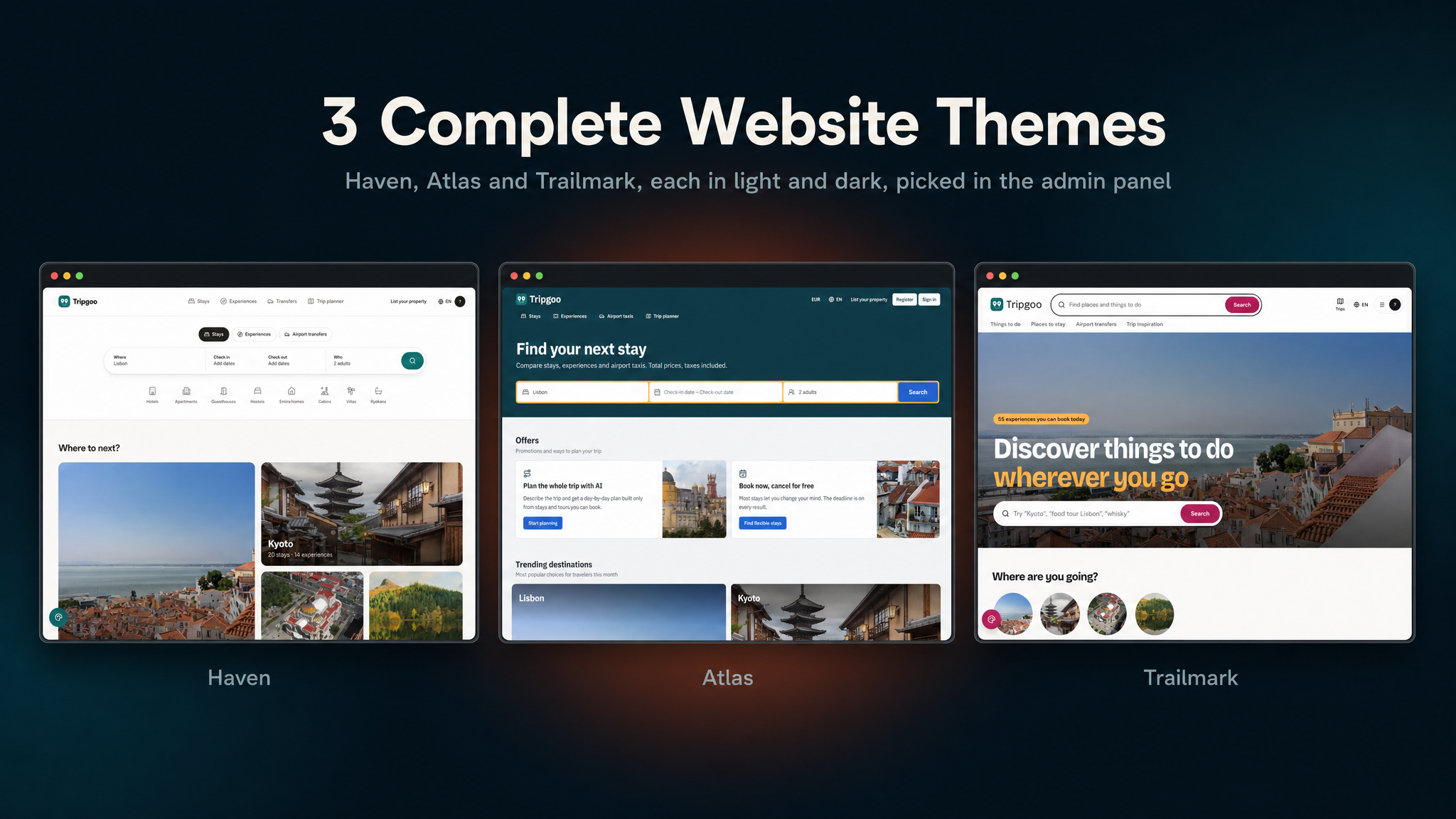
travel-booking-admin-panelplatform: a PHP web app built with the Laravel framework, with an admin panel that runs the marketplace (listings, bookings, refunds, destinations, reviews, commission, payouts, AI and settings), a provider dashboard, database migrations + seeders, and the mobile REST API (/api/v1) the app talks to. It also ships a booking website (Inertia + React) in 12 languages (including Arabic, right to left) with three complete website themes, each in light and dark, booking checkout through Stripe, four hosted checkouts and two regional gateways, Tripgoo Plus on the web, a media library with CDN support, editable email templates, deep links for the app and Google and Facebook sign-in. Ideal if you already run on classic PHP/MySQL hosting or prefer the Laravel ecosystem.
Deploy the web project once and the app talks to that same origin (set in Firebase Remote Config). The queue runs on a VPS worker, or on Upstash QStash on shared hosting where no process can stay running; the scheduler needs one cron entry (it expires holds every minute, handles unanswered requests and reconciles payments hourly).
Note: all of our items are built on the same base project (built with Laravel) and use the same setup system, so this installation video applies to every one of them, including this one.

Key Value Propositions
- For Travellers: search a destination by list or map with real availability for their dates and party, the full price with taxes included, a stay, a tour and an airport ride in one checkout with a card, Apple Pay or Google Pay, an AI trip planner built on real listings, and a voucher whose QR works without signal.
- For Providers: a web dashboard to create listings, set rooms and rates on a calendar, schedule departures, add transfer routes, see today’s arrivals, accept or decline booking requests, manage a team and request payouts.
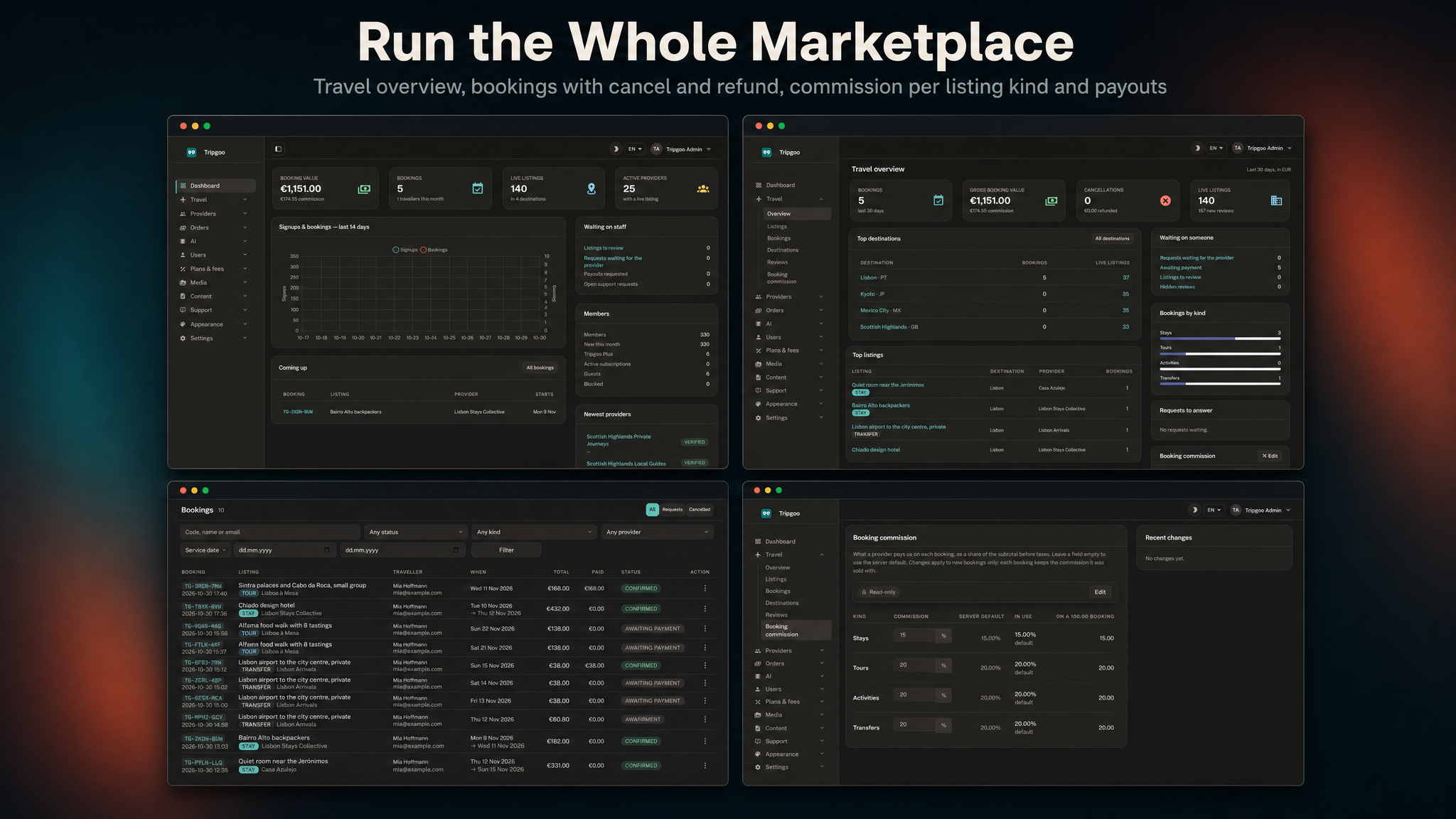
- For Operators: a complete, monetizable travel marketplace — a commission per listing kind, Tripgoo Plus, a travel overview with GMV and commission, listing moderation, booking search with cancel and refund, destinations and points of interest, review moderation, payouts, push campaigns and AI caps — managed from one admin panel.
- For Developers: Laravel 13 + MySQL, a documented mobile API under
/api/v1, one set of booking services for the website, the app and the panel, a theme layer for the website, a test suite on in-memory SQLite, and a Flutter app with Riverpod and go_router.
Content Disclosure
Tripgoo ships as a complete travel platform with demo content so you can run it end-to-end out of the box:
- The demo providers, listings, reviews and people (four destinations: Lisbon, Kyoto, Mexico City and the Scottish Highlands; about 140 listings from 25 providers) are fictional and meant for local and staging installs only; they are never seeded in production. The demo photos are fetched at seed time from Wikimedia Commons under their individual licences, with credits shown in the gallery; they are not part of the package.
- The countries, currencies, settings, email templates, CMS pages, FAQs, blog posts and the legal pages are original and editable in the admin panel; the interface is translated into all twelve languages.
- The legal pages (privacy policy, terms) are starting templates, not legal advice; have them reviewed for the countries you operate in.
Running a booking marketplace makes you responsible for the providers you allow, for paying them out, for refunds, tourist taxes, and the consumer-protection, tax, privacy and data-protection rules of the countries and app stores you publish in. Tripgoo provides the app, the web platform, the backend and the moderation tools; the marketplace and its moderation are yours. You are also responsible for following each AI provider’s terms of use; AI provider accounts and their usage are up to you.
AI Usage Disclosure
Graphics. The feature banners in this description and the item preview images were composed by an AI image tool from real screenshots of the product. The screenshots in the item gallery and the documentation are captures of the running app and website.
AI as a feature. Some features rely on a third-party generative AI service at runtime. The provider is not hard-coded — Gemini (default), OpenAI, Anthropic, Mistral, Groq, DeepSeek, OpenRouter, xAI and Ollama are supported, and you choose the provider and model per feature in Admin → AI. Every AI feature can be switched off:
- AI trip planner: one sentence, or guided choices (where, when, who, pace, interests and budget), becomes a day-by-day trip of up to 14 days. The planner may only use listings, departures and places its search tools return from your catalogue; every price comes from the server’s quote services, never from the model, and the day is scheduled with walking and riding times and warnings for stops that do not fit.
- Edit the trip by chat: “make day 2 slower” returns proposed changes (add, move, update, remove); nothing changes until the traveller accepts them.
- Support reply drafts: a suggested answer for staff in Admin → Support, from the ticket and your help articles, never sent without a person.
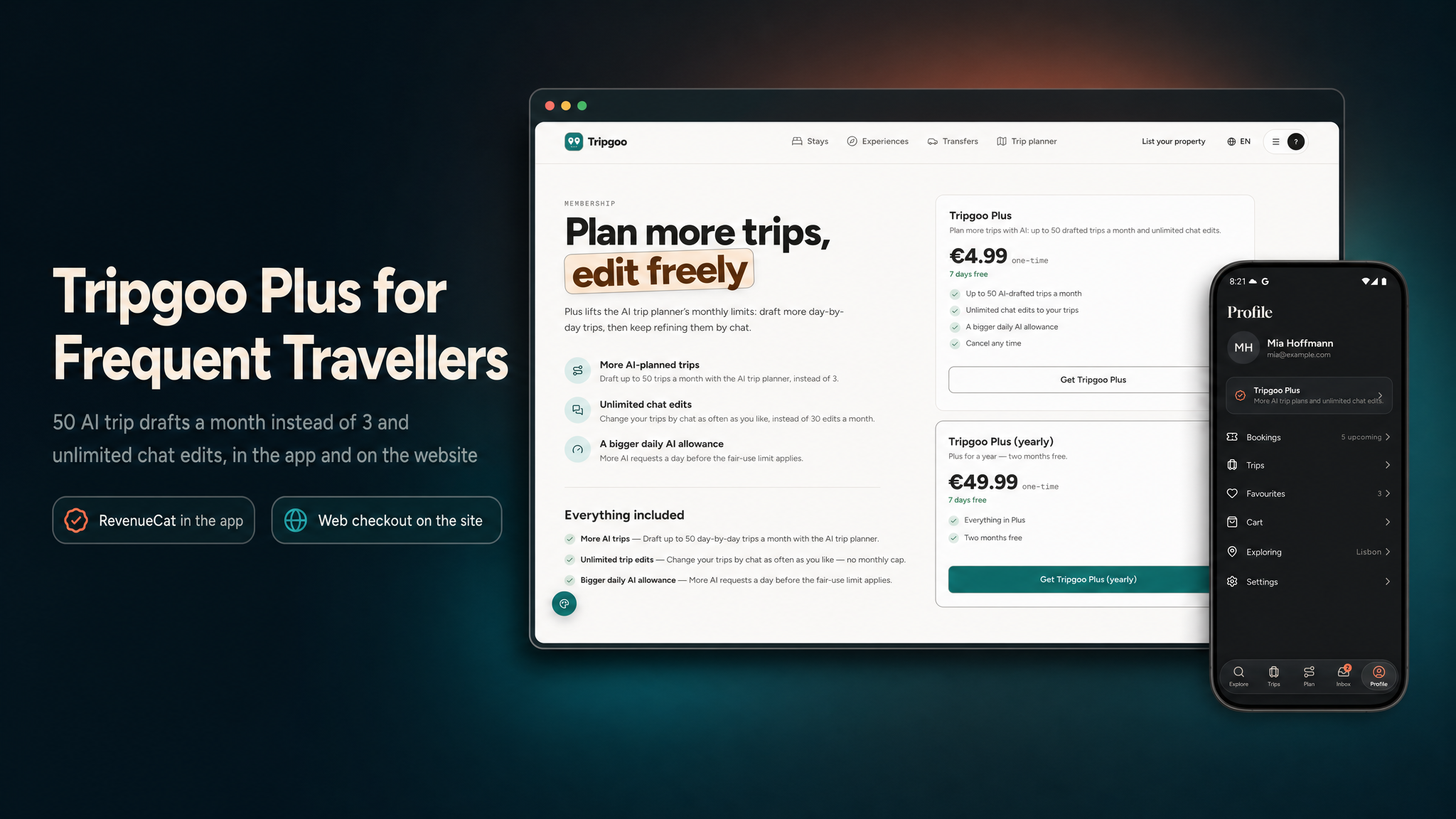
Everything the AI writes is machine output and may be wrong: trips are drafts the traveller checks before booking, and reply drafts are edited before they are sent. To use the AI features you must create your own account with the provider you choose and supply your own API key. Keys are read only on the server and never reach the app or the browser. Free accounts get 3 AI trip drafts and 30 chat edits a month and 30 AI requests a day; Tripgoo Plus raises that to 50 drafts, unlimited edits and 200 requests a day; the operator sets a monthly cap and sees usage and cost per feature in the admin panel.
laravel/ai. The AI features run on laravel/ai, Laravel’s official open-source (MIT)
package installed with Composer. It needs no Laravel Cloud, Forge or other Laravel subscription: requests go
directly from your server to the provider you choose, and nothing passes through the author.
Required Third-Party Services and Costs (please read before buying)
Tripgoo depends on external services that are not included in the purchase. You create every
account yourself, under your own name, and all fees, usage charges and approval processes are your
responsibility. The package ships no author-owned accounts, API keys, merchant ids, analytics
ids or other credentials: every key in .env.example is blank, the mobile app ships no
Firebase configuration files, and no revenue or data is routed to the author.
- Firebase (required): a separate Firebase project is required for the app to function. You
create your own project and add its
google-services.jsonandGoogleService-Info.plist. The app uses it for sign-in (including guest sessions), push (FCM), Remote Config, Crashlytics and Analytics, and the server uses it to verify sign-ins and send push. The free Spark plan covers testing; production use can require the pay-as-you-go Blaze plan. - Stripe (required to take payments): your own Stripe account, approved by Stripe, plus Stripe’s processing fees; Connect is optional and needed only for automatic provider payouts (each provider completes Stripe’s own Express onboarding). Without Connect you pay providers by bank transfer and mark the payout paid.
- RevenueCat, Apple Developer Program and Google Play Console (required to sell Plus in the app and to publish the app): your own accounts. Apple and Google charge their membership / registration fees and store commissions; RevenueCat may charge above its free tier.
- Further payment providers (paid, switch on the ones you use): Dodo Payments, Paddle, Creem.io, Polar.sh, Lemon Squeezy, Midtrans and Duitku, each with its own approval rules, transaction fees and payout terms.
- AI providers (paid, required for the AI features): the AI features need your own API key with
Gemini, OpenAI, Anthropic, Mistral, Groq, DeepSeek, OpenRouter or xAI, billed per use by that provider, or a
self-hosted Ollama.
laravel/aiis Laravel’s free open-source (MIT) package and needs no Laravel Cloud or other Laravel subscription. Without an active, paid provider account the AI features do not work at all; only the non-AI parts of the product keep working. - Email delivery (required): SMTP, Mailgun or Postmark for verification codes, password resets and booking emails.
- Google Analytics 4 (optional): reports to your own GA4 property. No
measurement id is included; leave
GOOGLE_ANALYTICS_IDblank and no analytics loads. - Facebook / Meta (optional): your own Facebook app for sign-in and App Events. If you enable App Events, App Tracking Transparency compliance and App Store review are your responsibility.
- Upstash QStash (paid, optional): the queue connection for shared hosting
(
QUEUE_CONNECTION=qstash); your own Upstash account, billed per message above its free tier. - Other optional services: Mailchimp (newsletter sync), Cloudflare Turnstile or Google reCAPTCHA, Google and Facebook sign-in on the website, storage / CDN providers (Amazon S3 and S3-compatible storage, Bunny, Cloudflare, CloudFront), and your own map tile server and geocoder for heavy traffic (OpenStreetMap’s public tiles and Nominatim have usage policies). Each has its own terms and pricing.
- Hosting: PHP 8.3 / MySQL hosting, a queue worker (or QStash), one cron entry, bandwidth and storage costs are yours.
Privacy & Data
No telemetry. The package sends no data to the author and has no license phone-home. Every third-party identifier — Google Analytics, Firebase, Facebook / Meta, RevenueCat, Stripe and the AI keys — is blank and supplied by you, so the data each service collects goes to your own accounts. No advertising SDKs or ad-network IDs are included. The app asks for analytics consent in onboarding and in Settings, and accounts can be deleted from inside the app. The package contains source code only, no ready-built APK or IPA; the demo APK above is only for trying the app.
App Tracking Transparency. The tracking prompt is used only for Meta App Events, appears only when you add your Facebook keys, and can be removed if you do not use them. You are solely responsible for your own ATT compliance, privacy labels, privacy policy and App Store / Google Play review outcomes.
Disclaimer
This product is built to work with the included web API / admin panel (built with Laravel,
MySQL) — plus third-party services: Firebase (Auth, Cloud Messaging push, Remote Config, Analytics, Crashlytics),
Stripe (booking payments, Apple Pay and Google Pay, and Stripe Connect for provider payouts), RevenueCat (Tripgoo
Plus in the app stores), an AI provider such as Google Gemini (your own API key), a queue service for shared
hosting (Upstash QStash), optional regional gateways (Midtrans, Duitku), and optionally another web payment provider
(Dodo Payments, Paddle, Creem, Polar or Lemon Squeezy). Hosting, payment processing fees, AI usage, queue usage,
storage/CDN and email delivery are not included in the purchase — you will need to create your own accounts,
configure API keys, and manage usage yourself. Every AI request is billed by the AI provider that answers it, to
your account. Maps and address search use OpenStreetMap and Nominatim; a busy service should switch to its own
tile provider and geocoder under their usage policies. Mailchimp integration requires your own Mailchimp account
and API key. A separate Firebase project is required for the app to function; the package contains no Firebase
configuration files (google-services.json, GoogleService-Info.plist) and no
service-account key, so you must create and configure your own Firebase project and provide your own credentials.
Additional charges may apply depending on usage and the Firebase services you use. Basic familiarity with Flutter,
Xcode, Android Studio, Firebase, Stripe, PHP/MySQL hosting, App Store Connect and Play Console setup is recommended
before launching.
Laravel, Flutter, Stripe and all other product names, logos and trademarks mentioned here belong to their respective owners. Tripgoo is an independent product built with these frameworks and is not affiliated with or endorsed by any of them.
What’s Included
- Full Flutter application source code (
travel-booking-mobile) - Booking website + provider dashboard + admin panel + mobile Web API, built with Laravel
(
travel-booking-admin-panel) — the backend for the app, with migrations, seeders and a PHPUnit test suite - Seeded roles, countries, currencies, locales, settings, the booking commission, Tripgoo Plus, email templates, CMS pages, FAQs, blog posts and legal pages; plus a demo world with four destinations, about 140 listings and 25 providers for local and staging installs
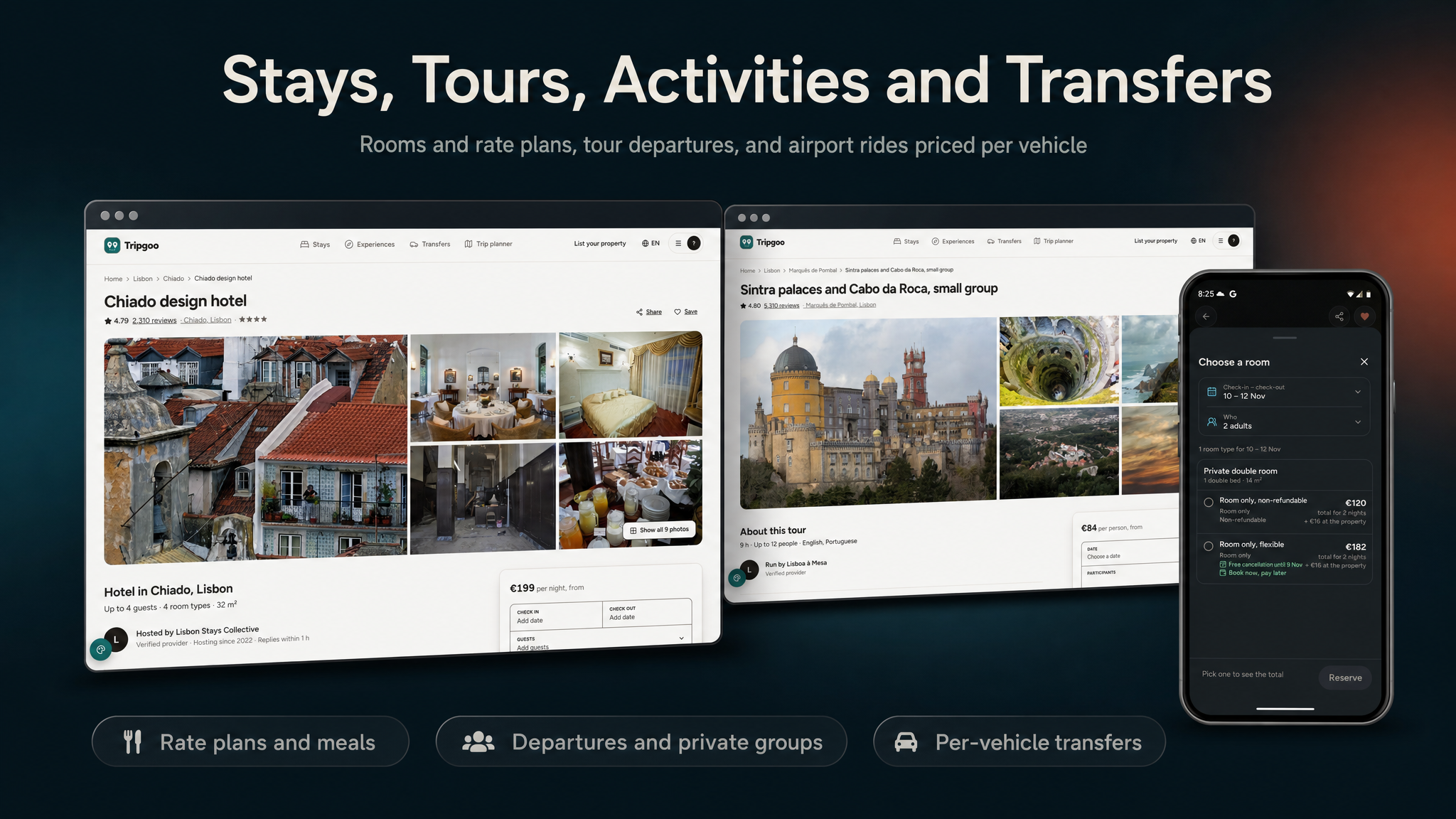
- Four listing kinds: stays (room types, rate plans, meal plans, per-date prices and inventory, city tax and VAT), tours and activities (options, recurring departures, private groups, multi-day programmes) and transfers (routes, vehicle classes, flight numbers)
- Booking: a multi-item cart with 15-minute holds, instant book or request to book, pay now, pay later, deposit or pay at the property, tiered cancellation policies with a refund preview, and rotating QR vouchers
- Payments: Stripe (Payment Element on the web, PaymentSheet in the app) with Stripe Connect payouts, Dodo Payments, Paddle, Creem and Polar hosted checkouts, Lemon Squeezy for Plus, Midtrans and Duitku, RevenueCat, signed webhooks, hourly reconciliation and a provider ledger
- An AI trip planner with chat edits, and support reply drafts, through your own AI provider keys
- Notifications: booking emails, push through Firebase Cloud Messaging and an in-app inbox, with categories, quiet hours and admin push campaigns
- One app design, light by default with a dark mode
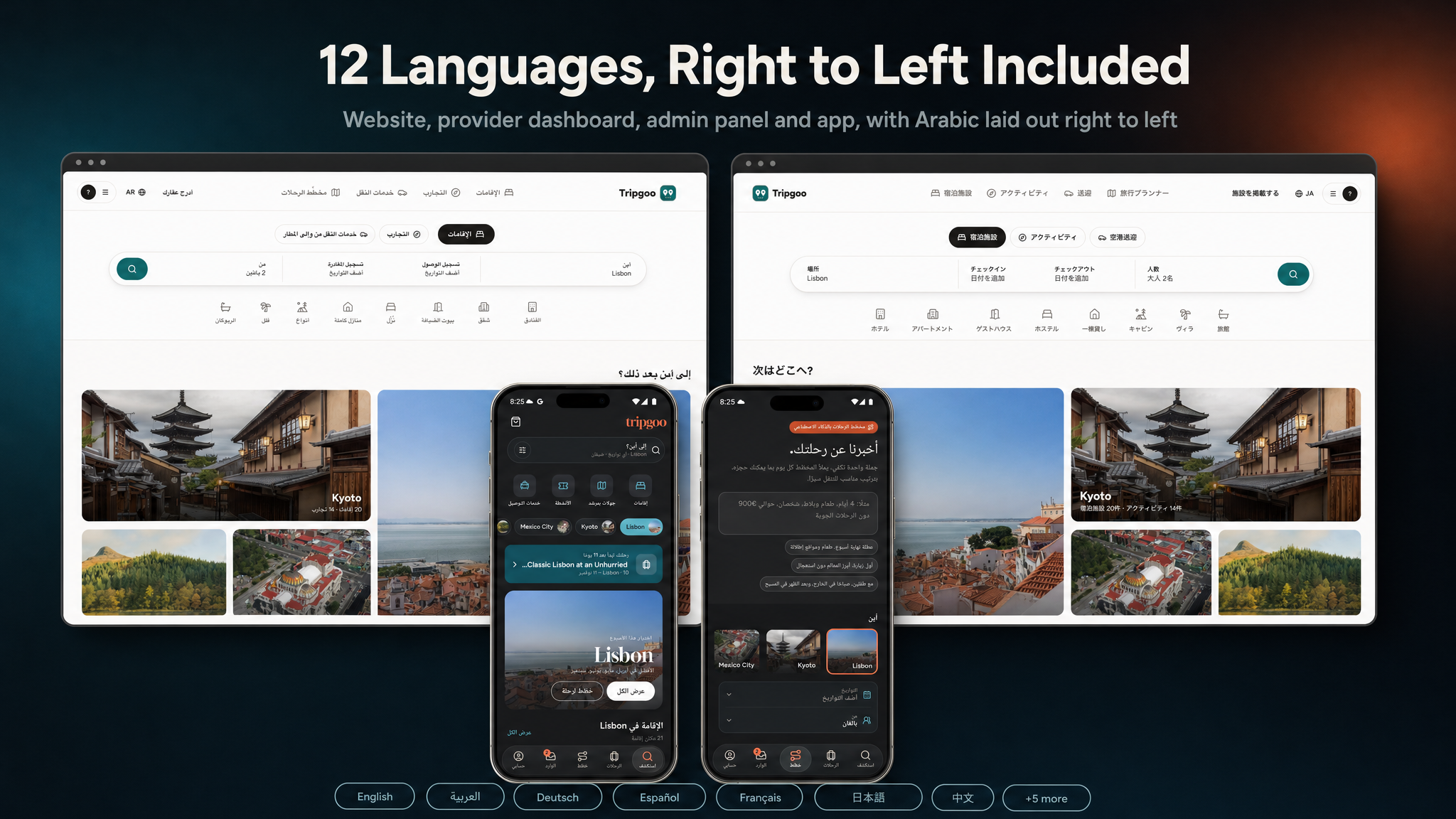
- 12-language app and website (ar, de, en, es, fr, it, ja, ko, pt, ru, tr, zh), with a right-to-left layout for Arabic
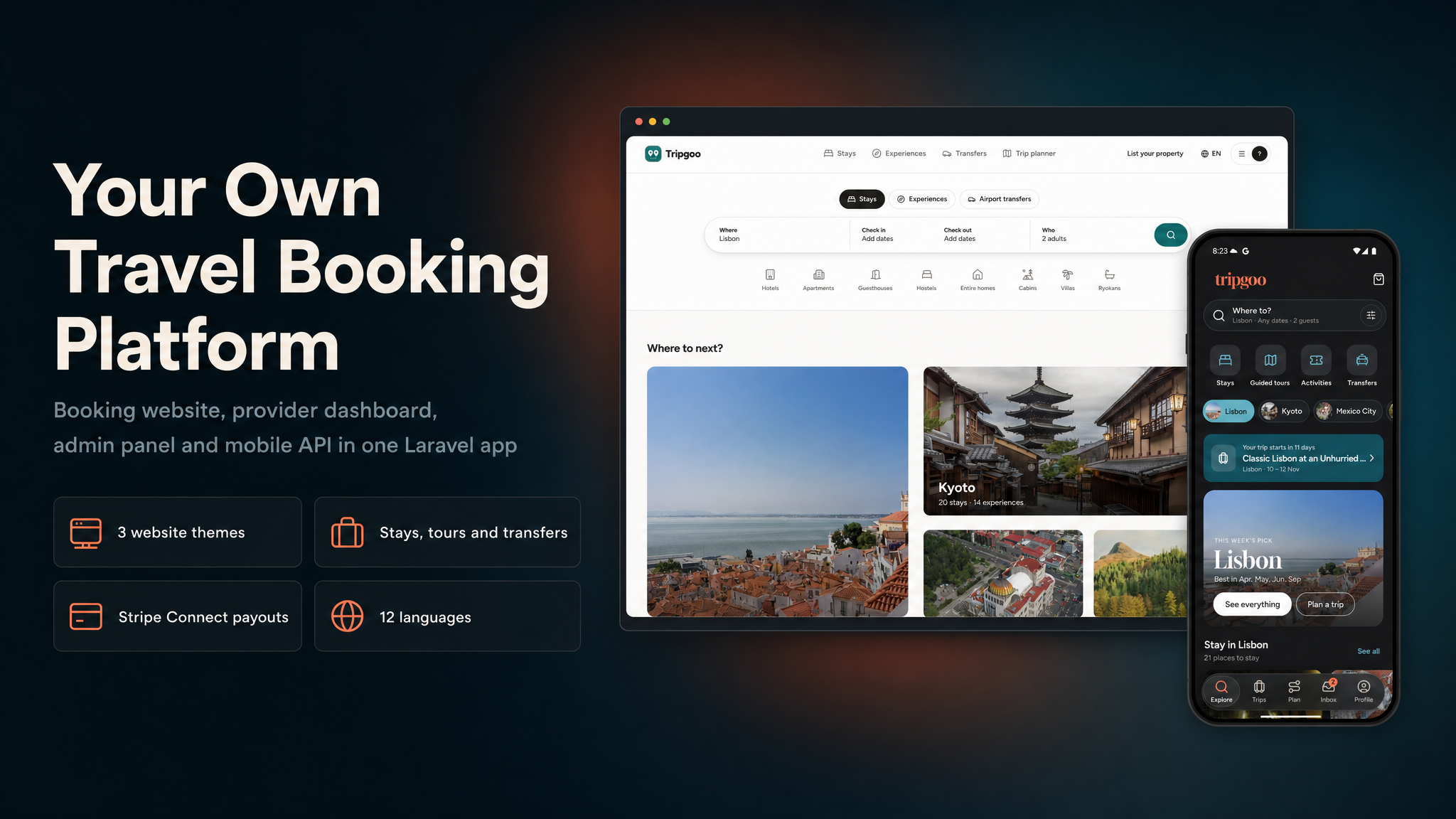
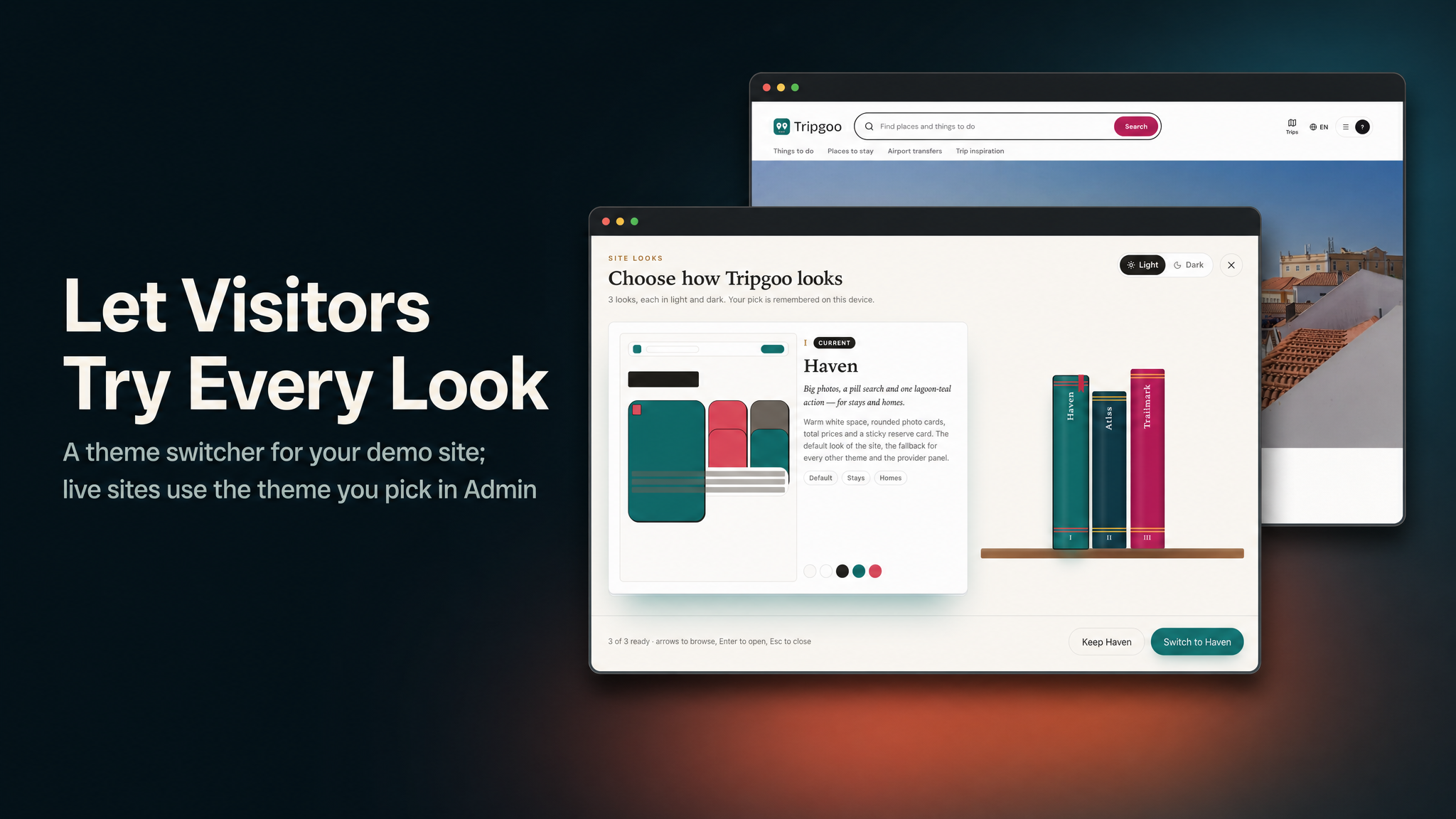
- 3 complete website themes (Haven, Atlas, Trailmark), each in light and dark, chosen from the admin panel
- A browser installer (
/setup), a one-command local setup script and a production doctor command (php artisan tripgoo:doctor) - Complete documentation in HTML and PDF with screenshots — installation, how a booking works, a feature walkthrough, payments and payouts, connecting the app, Firebase, RevenueCat, AI, queues, push, maps, branding (app name, icon, splash) and store release
Key Features
- Destinations and places: a hierarchy of country, region, city and area, each with a cover, time zone, currency and best months, plus points of interest (landmarks, museums, viewpoints, markets, restaurants, beaches, stations, airports) with opening hours, visit length and an estimated cost.
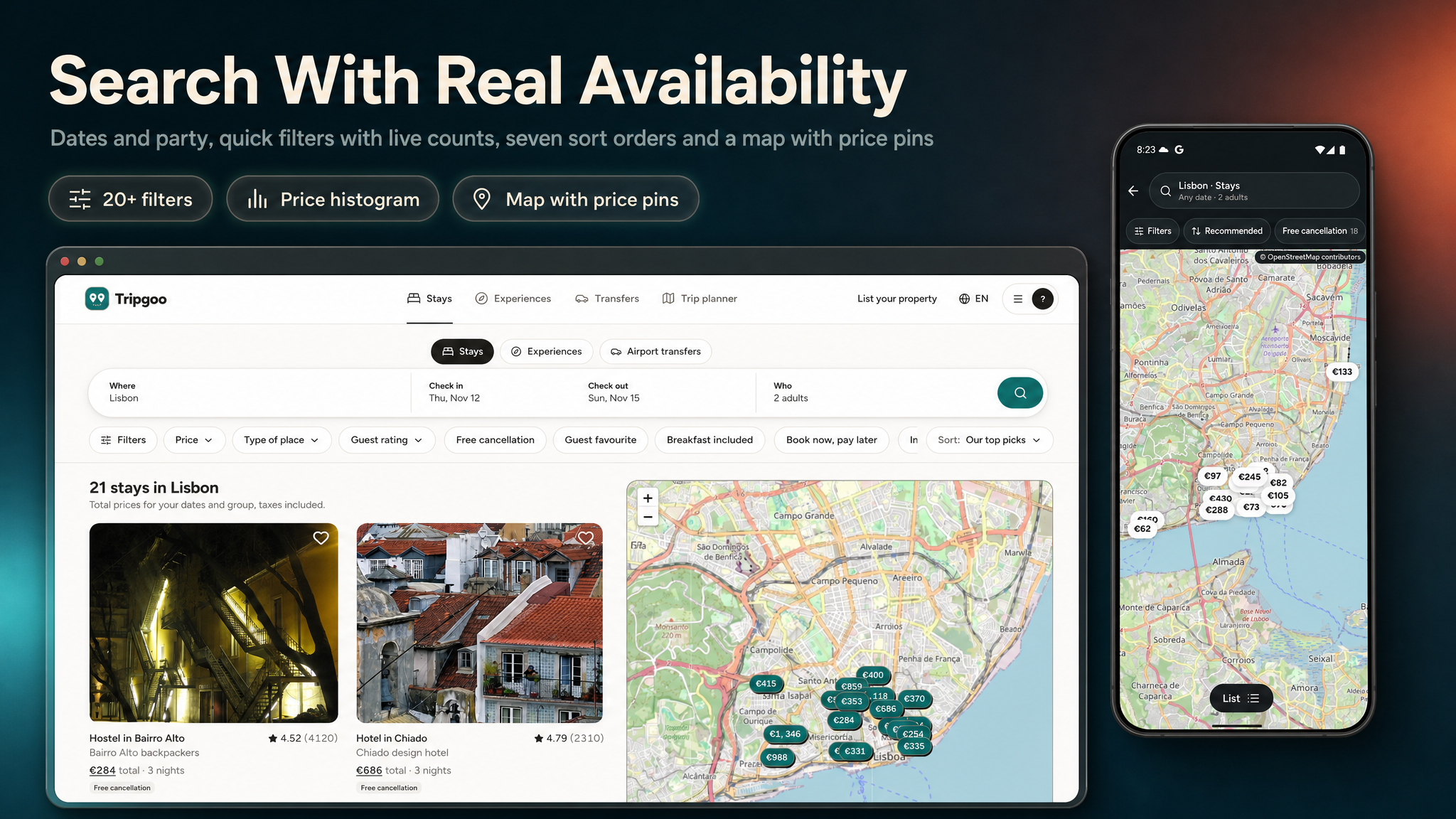
- Search with real availability: per destination, dates and party (adults and children), seven sort orders, a price histogram and more than twenty facets with live counts (type of place, stars, area, meals, duration, time of day, languages, vehicles, distance to centre, nearby landmarks, beds, views, facilities, payment, policy and more), plus a map with price pins.
- Stays: room types with beds, size and view; rate plans with meal plan, cancellation policy, payment mode, minimum and maximum stay and closed-to-arrival days; a per-date price and inventory calendar priced by occupancy; city tax and VAT rules per destination.
- Tours and activities: options with language, duration, pickup and private groups, adult and child prices, weekly departure schedules with capacity and cut-off, per-departure price overrides and multi-day programmes.
- Airport transfers: routes between an airport, a station or an area and a drop-off, a vehicle class (sedan, van, minibus), passenger and luggage limits, a price per vehicle and the flight number taken at checkout.
- One cart, one checkout: up to 12 items from any providers, inventory held for 15 minutes with a countdown so a room or seat can never be sold twice, prices re-quoted on the server, one checkout per currency, and bookings confirmed only by the signed webhook, exactly once.
- Instant book or request to book: request-to-book listings wait up to 24 hours for the provider to accept or decline; a decline or no answer refunds in full.
- Pay now, pay later, deposit or at the property: per rate plan, with the balance and its due date stored and shown to the traveller and the provider (balances are not charged automatically).
- Cancellation policies: flexible, moderate, strict and non-refundable presets, snapshotted on each booking, with a refund preview before the traveller cancels; providers and the platform cancel with a full refund.
- Vouchers that work offline: a TG-XXXX-XXX code and a QR that changes every 30 seconds, computed on the phone from an encrypted secret, so it keeps rotating without signal and a screenshot stops working. Redemption goes through the provider API (any scanner or front-desk tool); no scanner screen ships.
- AI trip planner: one sentence becomes a day-by-day trip built only from real listings, departures and places, priced by the server, with walking and riding legs, a map, a budget meter and a chat that proposes changes. Travellers can also build a trip themselves.
- Reviews: scores out of 10 with sub-scores, traveller types, provider replies, filters and sorting on the website and in the app, and hide or delete in the admin panel (the demo seeds the reviews; a traveller review form is not included).
- Favourites and sharing: saved listings synced between the website and the app, and share links that open the listing, the booking or the trip in the app when it is installed.
- Provider dashboard: Today (arrivals, check-outs, departures, rides and requests), a listings editor with a rates and availability calendar (bulk prices, rooms for sale, stop sell by weekday), departures, routes, bookings with accept, decline and cancel, payouts with a ledger, team roles (owner, manager, front desk, guide) and the provider profile.
- Admin panel: a travel overview with GMV and commission, listings, bookings with cancel and refund, destinations and places, reviews, commission per listing kind, providers and payouts, orders and subscriptions, AI usage and cost, users, media, content, support, themes and every setting, with two-factor sign-in and a light and dark mode.
- Commission and payouts: a commission per listing kind (seeded at 15% for stays and 20% for tours, activities and transfers, 0 to 50% in Admin), fixed on each booking; the provider’s share goes to a ledger and is paid out after the service through Stripe Connect or by bank transfer, with CSV export.
- Tripgoo Plus: 50 AI trip drafts a month instead of 3, unlimited chat edits and a bigger daily AI allowance — in the apps through RevenueCat and on the website through your web payment provider.
- Notifications people control: booking confirmed, request sent, accepted or declined, booking cancelled and payment failed — by email, push and the in-app inbox, with categories and quiet hours; providers’ teams are told about new bookings and requests.
- Sign-in: Google, Apple, Facebook and email in the app (new installs start as guests and keep everything when they sign in); email, Google and Facebook on the website.
- 3 Website Themes, Light and Dark: Haven (calm and roomy, stays first), Atlas (editorial and compact) and Trailmark (experiences first, a photo hero) — picked in Admin > Appearance > Themes, previewed privately first, and tried by visitors in a theme switcher on a demo site.
- 12 Languages: English, Arabic (right to left), German, Spanish, French, Italian, Japanese, Korean, Portuguese, Russian, Turkish and Chinese — on the website, in the provider dashboard, in the admin panel, in the emails and in the app.
- AI Providers per Feature: Gemini, OpenAI, Anthropic, Mistral, Groq, DeepSeek, OpenRouter, xAI or Ollama, with a provider and a model per feature, monthly caps and usage and cost reports.
- Media Library with Storage Back Ends & CDN: keep photos on this server, Amazon S3, Cloudflare R2, DigitalOcean Spaces, Backblaze B2, Wasabi, Google Cloud Storage, MinIO or Bunny Storage, with any CDN in front and responsive AVIF, WebP and JPEG variants.
- Runs on shared hosting: a browser installer, Upstash QStash instead of a queue worker, and a doctor command that checks the whole production setup without printing a secret.
Important Notice to Our Valued Customers
We are committed to building a reliable and continuous business system, with your satisfaction and the success of
this product as our top priorities. Your feedback is crucial, and we encourage you to share any bugs, suggestions,
or new feature ideas. Your input directly supports our ongoing improvement and innovation.
We’re here to help — send us a message anytime through the CodeCanyon messaging system.
Thank you for being part of our journey.
Warm regards,
The Morningstarcode Team
| Author | morningstarcode |
|---|---|
| Price | $19 |
| Sales | 0 |
| Rating | 0 (0) |
| Published | Nov 5, 2026 |
| Last Update | Nov 5, 2026 |
| Compatible Software | Flutter 3.x |
| Demo Url | https://tripgoo.laravelbeginner.net/en |
| Mobile Files Included | Dart, YAML, .kotlin, Layered PNG, JavaScript JS, CSS, PHP, HTML |
Categories
Tags
External listing. code.market does not sell this product and does not process payment for it. Pricing, payment, delivery, licensing, refunds, and support are handled by the third-party merchant on its own website. We may earn an affiliate commission from a referral. Details.
Products of the Week.
Submit🥇

Perceptle
Perceptle is a daily browser-based game that challenges you to test your sensory intuition through five quick estimation and rhythm-based rounds.
Other · 1 views · 0 clicksOther · Week 47 · 1 views · 0 clicks
🥈

Free LinkedIn Likes From Real
Get free LinkedIn likes on your posts from real members who react by hand. No
SaaS · 124 views · 2 clicksSaaS · Week 47 · 124 views · 2 clicks
🥉

STOP GUESSING WHAT TO POST
AI that learns your brand voice and builds a month of consistent, on-brand social content: carousels, posts and hooks that sound like you, not like everyone else's AI.
SaaS · 7,686 views · 71 clicksSaaS · Week 47 · 7,686 views · 71 clicks
#4

aaas.market
407 reliable micro tools for solo founders, marketers and creators. They work in your browser
SaaS · 122 views · 0 clicksSaaS · Week 47 · 122 views · 0 clicks