
Traffic Tornado | SEO Organic Website Traffic Windows App
Description
Traffic Tornado
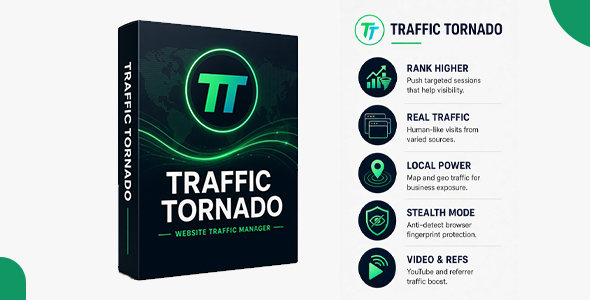
Traffic Tornado is a professional website traffic and browser automation software designed for SEO testing, analytics testing, and realistic traffic simulation.
Unlike basic traffic bots that simply send HTTP requests, Traffic Tornado uses real Chromium browser sessions powered by Playwright. Each visit fully loads your website, allowing scripts, pixels, and analytics to run normally while simulating user-like actions such as scrolling, mouse movement, hovering, and safe on-page interactions.
The software provides advanced campaign controls including proxy support, rotating proxies, automated proxy health checks, custom referrers, user-agent management, cookies, browser fingerprint randomization, campaign scheduling, and real-time campaign monitoring.
Each browser session can use a different browser identity and, when proxies are configured, a different IP address. This allows you to create configurable and varied browsing sessions for your testing and traffic campaigns.
With support for up to 20 concurrent browser sessions, Traffic Tornado provides a powerful yet simple solution for managing browser-based traffic campaigns from a single Windows application.
Stop Sending Ghost Traffic. Start Sending Real Visitors.
Most traffic tools send empty requests that analytics platforms instantly ignore. Traffic Tornado is different. It opens a real, fully functional browser for every single visit, complete with scrolling, hovering, and genuine on-site behavior. Your analytics will see real traffic, real session duration, and real engagement.
Why Traffic Tornado?
We built Traffic Tornado for professionals who need more than just “hits.” You need data that matters. Our application doesn’t just send requests; it simulates authentic user journeys that pass every quality check.
- Real Browser Engine: Powered by Playwright, each visit uses a genuine Chromium browser instance.
- Bypass Filtering: Because it’s real browser traffic, it’s not filtered out by advanced analytics platforms.
- Comprehensive Control: Manage proxies, referers, user agents, and behavioral patterns from a single, intuitive interface.
Key Features
Real Browser Visits
Every session opens a real browser that fully renders your page. This ensures that all scripts, pixels, and analytics fire correctly, providing you with accurate data.
Rotating Proxy Support
Integrate your own proxy lists or use our auto-rotation feature to ensure every visit comes from a different IP address. We support HTTP, HTTPS, and SOCKS5 proxies.
Automated Proxy Health Checks
Bad proxies slow you down and ruin your data. Traffic Tornado automatically tests and skips dead or failed proxies, ensuring your campaigns run smoothly.
Custom Referrer Sources
Make your traffic appear to come from anywhere. Choose from built-in sources like Google, Facebook, or Bing, or add custom URLs to perfectly mimic your desired traffic source.
Human-Like Behavior
Traffic Tornado doesn’t just load a page and leave. It scrolls, hovers over links, moves the mouse, and clicks on safe, non-navigating elements. This creates authentic session durations and engagement metrics.
High-Performance Concurrency
Run up to 20 concurrent browser sessions simultaneously. Scale your traffic campaigns without slowing down your system.
Dynamic Browser Fingerprints
Every visit uses a randomized browser identity, including different user agents (Chrome, Firefox, Safari on various devices) to avoid detection.
Live Dashboard & Analytics
Watch your campaigns run in real-time. The dashboard provides instant feedback on successful visits, failures, and progress, giving you full visibility.
Cookie Management
Maintain session states across visits. Import cookies from JSON, Netscape, or plain text files to simulate logged-in users or persistent sessions.
Campaign Scheduler
Set and forget. Schedule your campaigns to run at specific times, with daily repeat options, so your traffic arrives exactly when you need it.
Simple & Professional Interface
Designed with the user in mind. The modern, clean interface is powerful yet easy to navigate, requiring no technical knowledge to operate.
How It Works
- Install & Launch: Run the installer and open the application. No additional software is required.
-
Add Your Proxies (Optional):
Import a
.txtfile with your proxy list, or use the app without proxies for direct traffic. - Create a Campaign: Enter the target URL, set the number of visits, and choose your desired duration.
- Configure (Optional): Set your preferred referer, user-agent, or human behavior settings.
- Click Start: Watch the live dashboard as real visitors arrive at your website.
Who Is It For?
- SEO Professionals: Improve session metrics, click-through rates, and other engagement signals to build authority.
- Marketing Agencies: Deliver reliable traffic campaigns for clients with transparent and measurable results.
- E-commerce Owners: Generate momentum and social proof for new product pages or sales funnels.
- Developers: Test analytics implementations, load balancing, and website performance under realistic traffic conditions.
- Entrepreneurs: Give your new website or blog the initial traffic boost it needs to gain traction.
What Is Included
- Full Windows Application: A complete, self-contained executable (.exe) file.
- Comprehensive User Manual: Detailed documentation covering every feature and best practice (included as HTML).
- Free Future Updates: Get all upcoming features and improvements at no extra cost.
- Lifetime License: One-time payment for a perpetual license.
System Requirements
- OS: Windows 10 / 11 (64-bit recommended)
- Processor: Core i3 (Core i5+ recommended)
- RAM: Minimum 4 GB (8 GB recommended)
- Disk Space: 500 MB free, plus approximately 200 MB for Chromium
- Internet: Required for browser installation and license validation
- Internet Connection: Stable broadband connection required
- Proxies: External proxy service required
Proxy Not Included
Proxy services are not included with Traffic Pro. Users who want to run proxy-based traffic campaigns (for geographic targeting or IP rotation) must purchase their own proxy service separately. Proxy costs and proxy services are not included with the software.
Frequently Asked Questions
Q: Do buyers need to install anything extra?
A: No. Everything is bundled inside the installer. Once extracted and installed, you are ready to go.
Q: Does it work on any website?
A: Yes. It works universally on any website, whether it’s built with WordPress, Shopify, React, Angular, or plain HTML.
Q: Will the traffic show in Google Analytics?
A: Yes. Because Traffic Tornado uses real browsers, all analytics scripts (including Google Analytics) fire exactly as they would for a human visitor. Traffic is typically visible within 24 to 48 hours.
Q: What are the system requirements?
A: Windows 10 or Windows 11 (64-bit), minimum 4GB RAM (8GB recommended), and a stable internet connection.
Q: Can I use this for multiple websites?
A: Yes. You can create and manage campaigns for as many different websites as you want, all from a single interface.
Q: Is my data secure?
A: Yes. All your data (campaigns, proxies, settings) is stored locally on your machine. No data is sent to any external server.
| Author | ydulana |
|---|---|
| Price | $18 |
| Sales | 1 |
| Rating | 0 (0) |
| Published | Oct 13, 2026 |
| Last Update | Oct 13, 2026 |
| Application Runtime | Native |
| High Resolution | No |
| Operating System Versions | Windows 11, Windows 10 |
| Video Preview Resolution | 1918x1012 |
Categories
Tags
External listing. code.market does not sell this product and does not process payment for it. Pricing, payment, delivery, licensing, refunds, and support are handled by the third-party merchant on its own website. We may earn an affiliate commission from a referral. Details.
Products of the Week.
Submit🥇

STOP GUESSING WHAT TO POST
AI that learns your brand voice and builds a month of consistent, on-brand social content: carousels, posts and hooks that sound like you, not like everyone else's AI.
SaaS · 7,359 views · 67 clicksSaaS · Week 46 · 7,359 views · 67 clicks
🥈

Conversational Backlinks for Busy Founders
Place Backlink Relevant Conversation for your domain across Forums and Conversations
Website · 46,642 views · 232 clicksWebsite · Week 46 · 46,642 views · 232 clicks
🥉

upvote.club
Free Social Media Engagement that Helps Boost Your Content. Upvote Club supports 19 social networks with 100+ engagement actions in one dashboard. Add links to your posts and get free engagement from real users.
SaaS · 44,581 views · 127 clicksSaaS · Week 46 · 44,581 views · 127 clicks
#4

Substack Posting API
Onboard your Agent to Substack. Write Publish on Substack via API
SaaS · 63,469 views · 206 clicksSaaS · Week 46 · 63,469 views · 206 clicks
#5

Seenshot App
Free, Fast, MacOS Screenshot app. Make Screenshot cmd+shift+2 and send it via link
Desktop App · 32,719 views · 127 clicksDesktop App · Week 46 · 32,719 views · 127 clicks
#6

Hand-Placed Backlinks $9.99 per link. Flat rate.
Buy hand-placed forum, Q-A and directory backlinks. Flat $9.99 per link, no subscriptions — you only pay for approved listings.
Website · 8,339 views · 19 clicksWebsite · Week 46 · 8,339 views · 19 clicks
#7

Free Invoice Generator - PDF Invoices in Your Browser, No Sign-Up
A free invoice maker for freelancers and small businesses: fill in the invoice, check the live preview, and download a PDF that looks exactly like it. Any currency, tax per item, three templates, no sign-up, and nothing leaves your device.
6,965 views · 29 clicksWeek 46 · 6,965 views · 29 clicks
#8

Merge PDF Files Free - Combine PDFs in Your Browser, No Upload
A free PDF merger for office workers, students, and freelancers: combine PDFs and images into one file in the browser, reorder files and pages, pick page ranges, keep bookmarks, and open password-protected PDFs. Nothing is uploaded, no sign-up, no watermark.
6,445 views · 18 clicksWeek 46 · 6,445 views · 18 clicks