
TrackPulse | Real-Time GPS Tracking and Fleet Management App (iOS and Android)
Description
<!—
TrackPulse – CodeCanyon Item Submission Details (Compliant with Envato Review)
Item Title (79 chars, max 100, no HTML, no emoji, pipe separator, no ampersand): TrackPulse | Real-Time GPS Tracking and Fleet Management App (iOS and Android)
Category: Mobile / Flutter (Full Applications) Software Version: Flutter 3.x / Dart 3.x Operating System Compatibility: - Minimum iOS Version: iOS 13.0 (iOS 15.6+ recommended) - Minimum Android Version: Android 5.0 (API Level 21+) / Target SDK 36 (Android API Level 36) Files Included: Dart, YAML, JavaScript JSON, .java, .kotlin, HTML, CSS Tags (Exactly 15 consolidated keywords, lowercase, comma-separated, no keyword stuffing): gps tracking,fleet management,route playback,asset tracking,flutter,dart,mobile-app,vector maps,osm,geofence,telemetry,push notifications,getx,logistics,ios-android
—>
Connects to any backend via standard JSON REST API
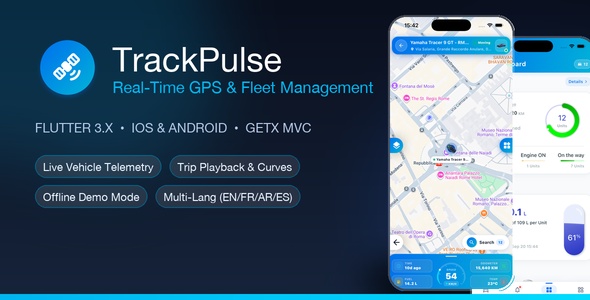
TrackPulse is an enterprise-grade Real-Time GPS Tracking and Fleet Management mobile application built with Flutter 3.x for iOS and Android. Engineered for logistics companies, delivery services, commercial fleets, and asset tracking providers, TrackPulse delivers ultra-low latency location streaming, smooth Catmull-Rom spline trajectory playback, sub-meter GPS accuracy, executive telemetry cockpits, and multi-provider satellite maps.
Whether you operate a small local delivery fleet or monitor hundreds of long-haul transport trucks, TrackPulse provides a turnkey, white-label solution with clean GetX state management, robust REST API connectivity, and an instant offline demonstration mode.
Demo Instructions & Instant Evaluation Access
Buyers can test and evaluate 100% of the features in TrackPulse immediately without deploying an external GPS server:
- Fast 1-Tap Offline Demo: On the Login screen, simply tap the “Demo Mode (Static Data)” button (or “Demo Mode / Mode Démo”) to immediately enter the live fleet cockpit.
- Demo Account:
demo - Demo Username / Email:
demo_admin(ordemo@trackpulse.io) - Demo Password:
password
What the Offline Demo Mode Simulates:
- Multi-vehicle fleet directory with live status filters (Moving, Idle/Engine ON, Stopped, Offline).
- Interactive map with custom directional vehicle markers, heading rotation, and marker clustering.
- Live Telemetry HUD displaying real-time speedometer gauge, battery percentage, fuel tank volume (L), and odometer.
- Historical trip playback scrubber with smooth Catmull-Rom spline road curves and 1x/2x/5x/10x replay speeds.
- Simulated geofence entry/exit alerts, speed warnings, and notification cards with pinpoint map inspection.
What the Offline Demo Mode Does NOT Simulate:
- Does not establish live network socket or HTTP connections to physical GPS tracking hardware units.
- Does not transmit physical engine immobilizer / fuel-cut commands over GSM/GPRS to vehicle relays.
- Does not dispatch billable SMS text messages or cellular carrier-billed alerts (all notifications remain local to the evaluation device).
Minimum OS & Technical Specifications
- Minimum iOS Version: iOS 13.0 (iOS 15.6+ recommended for optimal Metal/GPU rendering).
- Minimum Android Version: Android 5.0 (API Level 21+); compiled and targeted for Android API Level 36 (compileSdk = 36, targetSdk = 36) with explicit integer SDK declarations and Java 17 core library desugaring.
- Framework: Flutter 3.x / Dart 3.x (Null-safe).
- State Management: GetX Pattern (strict separation of Views, Controllers, Services, and Models).
- Code Quality: Passes standard Flutter lint analysis with no warnings at time of release; adheres to official Dart style guidelines.
Enterprise Security & Data Protection
- Encrypted Hardware Storage: Auth tokens are stored in hardware-backed encrypted storage (
flutter_secure_storagebacked by Apple Keychain on iOS and Android Keystore AES encryption). - Zero Password Persistence: User passwords are never saved or cached on the device storage under any circumstances.
- Strict HTTPS-Only Transport: Cleartext network exceptions are completely removed across both platforms (
cleartextTrafficPermitted="false"on Android and strict ATS enforcement on iOS). All API, tile, and geocoding traffic operates over encrypted HTTPS.
⚠️ Important Notice: Third-Party Services & Firebase Configuration
This application integrates with Firebase (Google Cloud) for Firebase Cloud Messaging (FCM) push alerts and device registration.
- Clean Placeholder Configs: Bundled with sanitized placeholder files (
google-services.jsonandGoogleService-Info.plist) to prevent data leakage. Buyers simply drop in their own Firebase config files as detailed in the documentation. - Firebase offers a generous free tier (Spark Plan) that includes 100% free, unlimited FCM push notifications to iOS and Android devices.
- Depending on your deployment scale, using additional Google Cloud/Firebase paid features (such as the Blaze Plan pay-as-you-go tier) or third-party paid tile providers may incur additional billing from those services.
- Buyers are solely responsible for creating their own Firebase / Cloud accounts, monitoring their usage limits, and managing any third-party credentials.
️ Geofencing Architecture, Triggers & Zone Rules
TrackPulse includes integrated perimeter monitoring for enhanced fleet security and cargo protection:
- Geofence Definition: Circular radial zones (Latitude, Longitude, Radius in meters) and custom multi-point polygonal delivery boundaries.
- Trigger Conditions:
geofence_enter: Triggered the moment a vehicle crosses into a designated depot, client facility, or warehouse.geofence_exit: Triggered when a vehicle departs an authorized operational boundary.geofence_dwell: Triggered if a vehicle remains idle or stationary inside a zone longer than a configured threshold (e.g. loading dock delay > 45 minutes).geofence_curfew: Triggered by unauthorized vehicle motion inside or out of a zone during night-time or non-working hours.
- Operator Experience: In-app notification bell counter updates instantly; tapping any geofence notification opens the pinpoint map (
SimpleMap) showing the vehicle’s exact position, speed, and timestamp.
Inline Core REST API Reference
Developers can build or validate their backend server with full confidence. The core REST endpoints are documented directly in the documentation portal and follow standard REST conventions:
- 1. User Authentication:
POST /api/v1/auth/login(accepts account, username, password, device info; returns Bearer JWT session token). - 2. Fleet Vehicles Directory:
GET /api/v1/devices(returns list of fleet vehicles with icon, driver details, and current ignition/speed metrics). - 3. Live Telemetry:
GET /api/v1/telemetry/{deviceId}(returns real-time coordinates, speed, heading, fuel level, battery voltage, and engine hours). - 4. Trip History & Playback:
GET /api/v1/trips?device={id}&from={start}&to={end}(returns trip distance, max speed, driving duration, and sequential coordinate points for Catmull-Rom spline road rendering).
Upgrade & Migration Notes (v1.2.x to v1.3.0)
Existing buyers upgrading from an earlier version will appreciate the streamlined migration path:
- Centralized Settings: All URLs, feature flags, default locale, and map tile layers are consolidated into
lib/config/app_config.dart. - Android Build Modernization: Migrated build scripts to Gradle Kotlin DSL (
build.gradle.kts) with explicit SDK targets (compileSdk 36, targetSdk 36, minSdk 21). - Permitted HTTPS Map Tile Providers: Upgraded default map layers to permitted HTTPS providers (Esri World Street Map, Esri World Imagery, Esri World Topo, Esri Dark Canvas, and OpenStreetMap Standard) with zero third-party API keys required out of the box.
- Offline Evaluation Engine: Added
mock_data_service.dartand bundledassets/data/mock_data.jsonfor instant zero-config testing. - Simple 5-Step Upgrade: Backup your Firebase config files (
google-services.json&GoogleService-Info.plist), update source files, restore configs, and runflutter clean && flutter pub get.
Key Highlights
- Dual Platform Excellence: Native 60fps performance on both iOS and Android with a unified Flutter 3.x codebase.
- Offline Demo / Static Mock Mode: Explore all screens, realistic route curves, fuel gauges, and trip playback instantly without backend configuration.
- White-Label Ready: Centralized configuration in a single file (
app_config.dart) to rebrand app names, logos, colors, and API URLs in under 10 minutes. - Multi-Language & RTL Support: Full localization in English (en_US), French (fr_FR), Arabic (ar_MA) with native Right-to-Left layout, and Spanish (es_ES).
- Permitted Multi-Tile Map Engine (HTTPS): Seamlessly switch between Esri World Street Map (default), Esri World Imagery (Satellite), Esri Topographic, Esri Dark Canvas, and OpenStreetMap Standard over secure HTTPS with real-time marker clustering.
Core Features
1. Real-Time Fleet Cockpit & Live Tracking
- Live sub-second position updates with animated vehicle bearings and heading rotation.
- Visual status indicators: Moving (Green), Idle/Engine ON (Amber), Stopped (Red), and Offline (Gray).
- Sliding Telemetry Cockpit displaying real-time speed gauge, ignition status, fuel level, GPS fix quality, internal temperature, and live street address geocoding.
- High-performance vehicle marker clustering for fleets with hundreds of units.
- Quick-action radial menu for vehicle commands, trip history, geofence audit, and live link sharing.
2. Interactive Trip History & Trajectory Playback
- Historical trip playback scrubber with forward/reverse timeline control and multi-speed adjustments (1x, 2x, 5x, 10x).
- Smooth Catmull-Rom spline road trajectory rendering with direction arrows and stop-point badges.
- Comprehensive trip logs detailing departure time, arrival time, total distance (km), top speed, average speed, and driving duration.
3. Executive Dashboard & Fleet Analytics
- Animated fuel level gauge with remaining tank capacity in liters and percentage.
- Interactive speed analytics curves powered by FL Chart with time-correlated milestones.
- Daily fleet mileage reporting, active hours breakdown, and engine idling diagnostics.
- One-tap quick search and fuzzy filter across vehicle registration, driver name, or status.
4. Security, Commands & Push Alerts
- Hardware-backed secure token storage and zero password persistence on device.
- Remote engine immobilizer command with safety confirmation dialog.
- Real-time push notifications via Firebase Cloud Messaging (FCM) for ignition on/off, speeding alerts, perimeter geofence triggers, and SOS events.
- Notification history screen with categorized event badges and direct link to vehicle coordinates.
What You Get in the Download Package
- Full Flutter Source Code: Clean, modular, and thoroughly documented source code for iOS and Android.
- Comprehensive Offline Documentation: Interactive HTML documentation portal with search, diagrams, and quick-links.
- Inline API Specifications: Core REST API specs with sample JSON payloads and quick-start test servers in Node.js.
- Firebase Push Notification Setup: Complete walkthrough with Android Gradle integration and exact file locations.
- Geofence Management & Upgrade Guides: Dedicated Markdown guides for boundary alerts and version migration.
- Interactive Pitch Deck: Standalone 28-slide presentation deck included in the Live Preview package ready to showcase to clients and stakeholders.
AI Transparency & Generation Disclosure
In accordance with Envato’s Author Hub policies regarding transparency, portions of this item (including technical documentation formatting, code optimization, presentation deck slides, and marketing graphics) were created and refined with the assistance of artificial intelligence developer tooling. All system architecture, GetX state management, hardware-backed secure storage, and API communications were authored, tested, and validated by human software engineers to ensure enterprise-grade stability and strict standard compliance.
Buyer Support & Updates
We are dedicated to providing continuous improvements, bug fixes, and compatibility updates for future Flutter and OS releases. If you need assistance setting up or integrating your custom backend, feel free to contact us through our CodeCanyon profile page.
| Author | ezouagh |
|---|---|
| Price | $49 |
| Sales | 0 |
| Rating | 0 (0) |
| Published | Oct 5, 2026 |
| Last Update | Oct 5, 2026 |
| Compatible Software | Flutter 3.x |
| Mobile Files Included | Dart, YAML, JavaScript JSON, .java, .kotlin, CSS, HTML |
Categories
Tags
External listing. code.market does not sell this product and does not process payment for it. Pricing, payment, delivery, licensing, refunds, and support are handled by the third-party merchant on its own website. We may earn an affiliate commission from a referral. Details.