
Tooly AI | Chatbot, Image Generator And PDF Tools Flutter App
Description
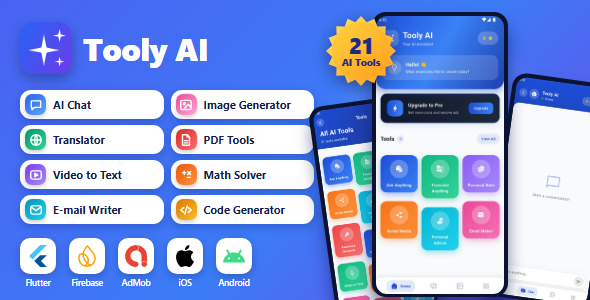
Tooly AI is a complete Flutter AI application for Android and iOS. It combines a chatbot, image generator, translation, writing tools, document processing, PDF utilities, and built-in monetization features in one modern application, backed by a secure Firebase backend (Authentication, Cloud Firestore and Cloud Functions). No separate server is required.
Built with modern Flutter architecture using BLoC/Cubit and GetIt dependency injection, Tooly AI provides a well-organized codebase that is easy to customize, rebrand, and extend. All AI requests are routed through your own Cloud Functions, which support Google Gemini, OpenAI and xAI Grok with automatic provider fallback. Your API keys are stored in Firebase Secret Manager and are never shipped inside the mobile app.
Monetization is built in. Users spend coins on AI requests, purchase coin packs through In-App Purchases (verified server-side with Google Play and App Store receipt verification), earn free coins by watching rewarded AdMob ads, claim a daily bonus, or invite friends through the Refer & Earn system. Coin balances are managed only by the backend and cannot be edited from the app, thanks to the included Firestore security rules.
Live Preview: https://toolyai.vertexstation.com (demo download, screenshots, complete feature list, and online documentation)
Key Features
- AI Chat – Ask Anything assistant with chat history
- AI Image Generator – Generate images from text prompts, then download or share them (images are produced by the third-party service image.pollinations.ai; coins are refunded automatically if generation fails)
- Image Describer and Image-to-Text
- PDF Toolkit – PDF to Text, PDF Summarizer, PDF Maker (real multi-page PDFs), Compress PDF (on-device; pages are re-rendered as images, so text in the result is not selectable) and Document to PDF (converts the text of .txt, .md and .docx files; formatting is not preserved)
- Audio Summarizer and Video-to-Text transcription
- Website Summarizer – Extract key points from website content
- Multilingual Translator with language swapping
- AI Code Generator – Generate code in Python, JavaScript, Java, C++, C#, Go, Kotlin, PHP, Swift and more, with one-tap copying
- AI Math Solver with step-by-step solutions
- Writing Tools – Email Writer, Social Media Post Generator, Hashtag Generator, Script Writer for YouTube, TikTok and Instagram, and AI Grammar Fixer
- Personal Assistance – CV Maker, gift ideas, birthday messages, anniversary wishes, and promotion messages
- Personal Notes (stored in Cloud Firestore) and secure Password Generator with a strength meter
- Firebase Authentication with Google Sign-In, Sign in with Apple (iOS), complete Email/Password sign-up (verification, password reset) and guest access
- Coin System with server-side balance management, daily bonus and Refer & Earn
- In-App Purchases with configurable coin packs and server-side receipt verification (Google Play and App Store)
- Google AdMob integration – Banner, Interstitial, and Rewarded ads
- Firestore security rules (included and documented) and optional Firebase App Check
- In-app account deletion, AI content filtering and a Report button for AI-generated content
- Light and dark themes
- 15 Languages with RTL support – English, Arabic, Bengali, German, Spanish, French, Hindi, Indonesian, Japanese, Portuguese, Russian, Turkish, Urdu, Vietnamese, and Chinese
- Modern, colorful, and responsive user interface
How the Coin Economy Works
Users get 20 welcome coins, a daily bonus (10-50 coins), referral coins and rewarded-ad coins (3 per ad, max 10 per day). In the coin store they pick a pack (100 / 525 / 1100 / 2800 / 5750 coins by default; prices come from Google Play / App Store), pay through the native purchase sheet, and the receipt is verified server-side before the coins are credited. Each AI tool shows its price (for example 1 coin per chat message, 5 per code generation, 20 per image); the coins are charged by the Cloud Function before the AI call and refunded automatically if it fails. On-device tools are free.
Where Ads Appear
- Banner: Home screen, below the tool grid.
- Interstitial: after a successful result in the generator and analysis tools (never in chat or on errors), at most once every 2 minutes.
- Rewarded: only when the user taps “watch ad” in the Menu (3 coins, max 10 per day).
Banner and interstitial ads are hidden for users who bought a coin pack. The source contains only Google’s public AdMob test IDs – you must add your own IDs before release; no author-owned ad units are included.
Rough API Cost Guide
A typical text request costs roughly $0.002-$0.003 on Gemini Flash (about $2-3 per 1,000 requests) and less on GPT-4o-mini; file analysis costs roughly $0.005-$0.02 and long audio/video more. These are estimates only – check the current provider prices. The documentation explains how to turn them into coin-pack prices.
Third-Party Image Service (Important)
Image generation uses image.pollinations.ai, a free third-party service that the author does not operate or control. Its availability, terms of service and content policy can change at any time. If it is unavailable, the user’s coins are refunded automatically and no other tool is affected; you can swap in an image API of your choice (documented).
Localization Note
15 languages are fully translated (every UI string key, RTL for Arabic and Urdu). Translations are AI-assisted; a native-speaker proofread is recommended before release.
Technical Requirements
- Flutter: 3.44.0 or later
- Dart: 3.12.0 or later (below 4.0.0)
- Android: Android 7.0 or later (minSdk 24, compileSdk 36, targetSdk 36), Java 17
- iOS: iOS 15.0 or later, Xcode 15+, CocoaPods (macOS required)
- Node.js 22 and the Firebase CLI (to deploy Firestore rules and Cloud Functions)
- State Management: BLoC / Cubit | Dependency Injection: GetIt
- Backend Services: Firebase Authentication, Cloud Firestore and Cloud Functions (Firebase Blaze plan required)
What You Will Get
- Complete Flutter source code with a clean, organized project structure
- Cloud Functions source code (AI proxy, coins, purchase verification, account deletion) and Firestore security rules
- Step-by-step HTML documentation covering installation, Firebase setup, AI provider keys, app renaming, app icon and splash screen customization, package name changes, AdMob, In-App Purchases, release signing, troubleshooting/FAQ and a changelog, with screenshots
- README, 15 localization files, assets, and template configuration files (no personal Firebase files or signing keys are included)
Download & Demo Access
Download the Tooly AI demo APK to explore the application’s interface and features.
Download Demo APK: Download Tooly AI Demo
Demo Instructions
Demo email: not required – create your own account in the app (Sign in with email > Create an account) or use Google / Apple sign-in
Demo password: not required
On the Welcome screen choose one of:
- Continue as a guest – try the on-device tools (PDF Maker, Compress PDF, Document to PDF, Password Generator).
- Sign in with Google (any Google account) – unlocks all AI tools, image generation, coins (20 free coins on first login plus a daily bonus), notes, reporting of AI content and in-app account deletion (Menu > Delete account).
Sign in with Apple (iOS) or an e-mail account created in the app gives the same access. AI tools require a signed-in user, so use any of the sign-in methods to test them.
Documentation & Support
Online Documentation: https://toolyai.vertexstation.com/docs
Need help with installation or have questions before purchasing? Contact us for assistance.
- Email: vertexstation@gmail.com
- WhatsApp: +880 1328-368537
Third-Party Services Used
Firebase (Authentication, Firestore, Cloud Functions, App Check), Google Gemini API, OpenAI API, xAI Grok API, image.pollinations.ai (AI image generation), Google AdMob, Google Play Billing, Apple StoreKit, Google Sign-In and Sign in with Apple.
Costs & Responsibility
- The buyer is responsible for all usage costs charged by third-party AI API providers (Google Gemini, OpenAI, xAI) and by Firebase / Google Cloud. No API credits or keys are included.
- Firebase Cloud Functions require an active Firebase Blaze billing account. Firebase and AdMob may incur costs or require active billing accounts for production use.
- The buyer is responsible for all service fees related to AdMob and in-app purchase processing (store commission, payment fees, taxes, developer program fees).
- You must configure your own Firebase, AdMob and In-App Purchase accounts. Google Play and Apple developer accounts are not included.
AI Disclosure
: AI-assisted tools were used to create portions of this item, including parts of the source code, parts of the written documentation, and the promotional graphics. All AI-generated content has been reviewed, tested and verified by the author, and the complete, human-curated source code is included in the download and all app screenshots are captured from the real app.
Important Notes
- Third-party services may require additional configuration, credentials, billing setup, or compliance checks before production use.
- The bundled AdMob IDs are Google test IDs and the package / bundle ID is a placeholder – replace them with your own as described in the documentation.
- iOS: run
pod installon a Mac and add your ownGoogleService-Info.plist, Google Sign-In URL scheme and signing team. - Actual AI functionality depends on your deployed backend, valid provider keys, service availability, and configuration.
| Author | vertexstation |
|---|---|
| Price | $19 |
| Sales | 0 |
| Rating | 0 (0) |
| Published | Nov 5, 2026 |
| Last Update | Nov 5, 2026 |
| Compatible Software | Flutter 3.x |
| Demo Url | https://toolyai.vertexstation.com/ |
| Mobile Files Included | Dart |
Categories
Tags
External listing. code.market does not sell this product and does not process payment for it. Pricing, payment, delivery, licensing, refunds, and support are handled by the third-party merchant on its own website. We may earn an affiliate commission from a referral. Details.
Products of the Week.
Submit🥇

Perceptle
Perceptle is a daily browser-based game that challenges you to test your sensory intuition through five quick estimation and rhythm-based rounds.
Other · 1 views · 0 clicksOther · Week 47 · 1 views · 0 clicks
🥈

Free LinkedIn Likes From Real
Get free LinkedIn likes on your posts from real members who react by hand. No
SaaS · 124 views · 2 clicksSaaS · Week 47 · 124 views · 2 clicks
🥉

STOP GUESSING WHAT TO POST
AI that learns your brand voice and builds a month of consistent, on-brand social content: carousels, posts and hooks that sound like you, not like everyone else's AI.
SaaS · 7,686 views · 71 clicksSaaS · Week 47 · 7,686 views · 71 clicks
#4

aaas.market
407 reliable micro tools for solo founders, marketers and creators. They work in your browser
SaaS · 122 views · 0 clicksSaaS · Week 47 · 122 views · 0 clicks