
Art School - Learn Origami Paper Craft | Tattoo design Art | Drawing, Coloring, Painting & Sketching
Description
Art School – Learn Origami Paper Craft | Tattoo design Art | Drawing, Coloring, Painting & Sketching
Supports iOS 14.5
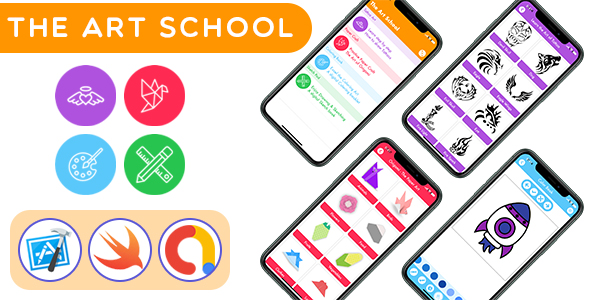
Art School – Learn Origami Paper Craft | Tattoo design Art | Drawing, Coloring, Painting & Sketching is a new generation all in one iOS application that helps you learn four important arts and explore your creativity. The four categories included in Art School are:
1. Origami Art & Paper Craft – Learn how to make origami | Art of paper folding through animated steps
2. Tattoo Art – Learn how to draw Tattoos with step by step tattoo design
3. Digital Coloring Book for Kids – Kids Drawing App for Painting and Coloring
4. Digitial Sketch Book for Kids – Let the kids splash up their creativity and skills on digital canvas
Art School – Learn Origami Paper Craft | Tattoo design Art | Drawing, Coloring, Painting & Sketching is a beautifully designed and developed iOS native application with amazing tutorials, step by step guidance to unleash various arts. It’s a full fledged Art tutorial and learning application in native iOS technology, with many exciting features, written in XCode using latest Swift version and compatible with all the latest iOS versions and supporting all the latest iOS devices.
The user interface design and usability experience are beautifully designed with modern and latest trends. Along with that integration of Admob Ads, both banner ads as well as interstitial ads, makes it a perfect and ultimate choice.
Let’s take an overview of this amazing and wonderful all in one Art School iOS application:
- Origami Craft: Learn the art of paper folding and how to make origami. Learn step by step through animated instrcutions of paper folding art across various categories of origami with more than 60 Origami Objects for Paper folding art to learn and many more will be added in upcoming updates
- Tattoo Art: How to draw tattoos is one of the fabulous tattoo maker & tattoo designer to help you learn how to draw tattoos step by step. Tattoo designs art serves you as a personal drawing assistant and helps you by dividing each drawing into small easy steps, & then follow these guides to draw tattoos step by step. How to draw tattoos design with step by step guide is spreaded across vast collection of tattoos to help you learn your favorite type of tattoo design. The application serves with fantastic collection of tutorials
- Kids Coloring Book for Drawing: Digital Coloring Book App for Kids Coloring app for kids allows the kids to color the coloring pages having outline drawings and help kids learn the art of drawing and coloring and have fun at same time using coloring games. The Painting and drawing app for kids contains 100+ coloring pages across 8 different categories designed for toddlers and kids to keep them entertained and busy.
- Digital Sketchbook for Painting: Sketching and Painting Book App for kids allows the kids to use the blank canvas and fill it with their imagination. With advanced tools for sketching like Pen, Brush, Shapes, Stickers, Colors and Eraser the sketchbook proves to be an ultimate paint book for kids to give wings to their creativity.
- Local notifications: Reminders to keep you inspired and motivated to learn the various types of arts daily without missing a single day
- Beautiful interface and intuitive experience: Eye pleasing interface, easy to use and flawless experience brings the extra charm to the app
- Offline Support: The app does not requires internet connection and works in Offline mode too
Get up and achieve your excellency in the arts of Origami, Tattoo, Drawing, Coloring, Sketching and Painting through this iOS application. Do drop us a message if you have any query before purchasing this Art School iOS application
| Type | iOS App |
|---|---|
| Author | AppLabs2205 |
| Price | $54 |
| Sales | 4 |
| Rating | 0 (0) |
| Published | Jun 10, 2020 |
| Last Update | Aug 9, 2021 |
| Compatible Software | iOS 12 |
| Compatible With | Swift |
| Mobile Files Included | .xib/.nib, Layered PNG |
Categories
Tags
External listing. code.market does not sell this product and does not process payment for it. Pricing, payment, delivery, licensing, refunds, and support are handled by the third-party merchant on its own website. We may earn an affiliate commission from a referral. Details.
Products of the Week.
Submit🥇

STOP GUESSING WHAT TO POST
AI that learns your brand voice and builds a month of consistent, on-brand social content: carousels, posts and hooks that sound like you, not like everyone else's AI.
SaaS · 7,369 views · 67 clicksSaaS · Week 46 · 7,369 views · 67 clicks
🥈

Conversational Backlinks for Busy Founders
Place Backlink Relevant Conversation for your domain across Forums and Conversations
Website · 46,653 views · 232 clicksWebsite · Week 46 · 46,653 views · 232 clicks
🥉

upvote.club
Free Social Media Engagement that Helps Boost Your Content. Upvote Club supports 19 social networks with 100+ engagement actions in one dashboard. Add links to your posts and get free engagement from real users.
SaaS · 44,593 views · 127 clicksSaaS · Week 46 · 44,593 views · 127 clicks
#4

Substack Posting API
Onboard your Agent to Substack. Write Publish on Substack via API
SaaS · 63,480 views · 206 clicksSaaS · Week 46 · 63,480 views · 206 clicks
#5

Seenshot App
Free, Fast, MacOS Screenshot app. Make Screenshot cmd+shift+2 and send it via link
Desktop App · 32,730 views · 127 clicksDesktop App · Week 46 · 32,730 views · 127 clicks
#6

Hand-Placed Backlinks $9.99 per link. Flat rate.
Buy hand-placed forum, Q-A and directory backlinks. Flat $9.99 per link, no subscriptions — you only pay for approved listings.
Website · 8,349 views · 19 clicksWebsite · Week 46 · 8,349 views · 19 clicks
#7

Free Invoice Generator - PDF Invoices in Your Browser, No Sign-Up
A free invoice maker for freelancers and small businesses: fill in the invoice, check the live preview, and download a PDF that looks exactly like it. Any currency, tax per item, three templates, no sign-up, and nothing leaves your device.
6,977 views · 29 clicksWeek 46 · 6,977 views · 29 clicks
#8

Merge PDF Files Free - Combine PDFs in Your Browser, No Upload
A free PDF merger for office workers, students, and freelancers: combine PDFs and images into one file in the browser, reorder files and pages, pick page ranges, keep bookmarks, and open password-protected PDFs. Nothing is uploaded, no sign-up, no watermark.
6,458 views · 18 clicksWeek 46 · 6,458 views · 18 clicks