TG_AUSender | Telegram Messaging Tool
Description
 TG_AUSender
– A simple and powerful Tool for auto-sending Telegram messages 24/7
TG_AUSender
– A simple and powerful Tool for auto-sending Telegram messages 24/7
ver. 1.50
 ☑️ An effective Tool for Your Business.
⚫️ General description

 ☑️ An effective Tool for Your Business.
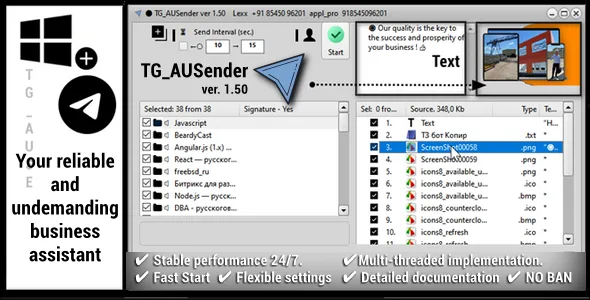
TG_AUSender is a simple, intuitive and powerful 24/7 auto-sending tool for the periods you set, which in just 5-10 minutes, getting to know it, and without documentation, will allow you to set up and automate the routine tasks of manually sending invitations, advertising and any other Telegram messages (plain text and | or any file, with or without a signature) to your target audience.
Nevertheless, despite the outwardly minimalistic design (all secondary options are prudently placed in separate pop-up menus), if you wish, you can easily and flexibly set up any number of target groups | channels | contacts, assigning each its own actual mailing periods, its own content and files. Intuitive settings for temporary deactivation of both entire target groups and sent messages | files, by simply selecting the checkboxes on them, with auto-saving of all changes made. However, we have also included very detailed documentation to help you get familiar with the additional features of the program and use it as quickly as possible! TG_AUSender works WITHOUT using TG-Bots as administrators on target recipients and sources. That allows you to work with it directly from your connected TG account (as if you were working directly from your Telegram application.
 ⚫️What does TG_AUSender do?
Range of tasks to be solved:
You are subscribed to many Telegram chats and channels, and you need to automate the distribution of messages through them, or you own them and want to keep the audience interested with fresh content, while rationally spending your time. Just set up once the target channels and groups where you want to send messages and you can safely forget about the program (if you wish, it can be minimized to a tray icon), thereby automating the whole process. TG_AUSender will start sending scheduled messages, and can work 24/7 with specified intervals and actual periods, informing you in real time about the progress of the distribution, (of course, if the main window is not hidden), for example, about upcoming tasks and the next sending time. A convenient solution for your business, which will be especially useful if you want to maintain the interest of potential customers with your business proposals and projects with minimal effort. ⚫Features:⚫️ Easy and quick start, without the need to initially learn all the functionality of the program mentioned below. For a quick start, watch the video in the header of this page.
⚫️ All supported message types: Text, Video, Picture, Document + Any File
⚫️ Work with various resources (Groups, Channels, Contacts)
⚫️ Send messages, single files | graphics and captions to them, in any groups, channels. Or directly to your contacts.
⚫️ You can also send messages to everyone else. To any other users, and even bots, as if you were doing it directly from the Telegram application (all your open chats are used)
⚫️ Support for cyclic (endless) sending
⚫️ Real-time display of the mailing log and personal work timings for each active site
⚫️ Support for changing and switching multiple accounts, both within a single running copy of the program, and in new ones..
⚫️ Send predefined content (plain text | images | any available files) for each group/channel from a source (for example, a folder with files on disk).
⚫️ Separate settings for each added target site. Both sending intervals and specific messages (plain text and / or attached files) addressed to the target site.
⚫️ Setting the posting time interval for each individual target site (group, channel, contact). For example, exactly every 5 minutes, or in a randomly selected range from 5 to 10 min. Easy interval selection (via drop-down menu) with exact number of hours, minutes and seconds.
⚫️ Additional customization of the current mailing period, for example from 08:30 to 15:00. Support for quickly applying such intervals to all marked groups in the list to save time.
⚫️ Support for SPINTAX syntax right in the text of your messages. Words inside curly braces will be selected accidentally. Thus making your content more unique.
Example: At the entrance: Thank you for {purchasing|your choice} the {product|service}.At the exit: 1. Thank you for purchasing the product 2. Thank you for your choice the service. 3…
⚫️ Parallel launch in new windows of other added accounts in 1 click, and related data (lists of recipients, files, all configured timings). Thus, the number of accounts connected at the same time is limited only by your free PC RAM. Auto save all changes made during the work for each running copy = account.
⚫️ Thoughtful minimalist interface design. All secondary auxiliary functions are hidden in a drop-down menu (with support for hotkeys on them) so as not to be distracted from the main task.
⚫️ Support for various alternative ways to add and edit new files. Both through a dialog for selecting individual files, and the whole directory (s) with all the files attached to it. The most convenient way is to drag them from windows explorer directly to the application window, to any of the tables.
⚫️ Flexible settings for the presentation, activity and order of all involved recipients and messages / files associated with them. For example, you can change the order and shift all positions in both tables, temporarily disable (deactivate) entire groups and/or their files, sort files by extension , message text and other columns. And also shuffle all files randomly, for example. achieve a different order of their transfer to the recipient.
⚫️ Transparent operation of the program during the start of the task. With detailed information about the current status of each pending mailing. For example, displaying the exact time of the next mailing for each site, as well as the elapsed time in seconds since the last time it was sent to this group. Highlighting the nearest task in time and temporarily inactive tasks that are still outside the configured schedule (period), for example. 8:00 – 12:00
⚫️⚫️⚫️→⚫️
⚫️Screenshots


 ⚫Software requirements:
Bit depth: x64 | x32 based computer
Language: English, Russian
OS: Windows 8-11.
The program is portable and does not require any third party additional libraries and runtimes already installed on your PC.
⚫️Registration Process: After the first launch of the program, you will see a dialog with the registration key. Send it to me in a convenient way for you. ⚫️Online Support If you have any questions,welcome to contact us:


Categories
Tags
External listing. code.market does not sell this product and does not process payment for it. Pricing, payment, delivery, licensing, refunds, and support are handled by the third-party merchant on its own website. We may earn an affiliate commission from a referral. Details.
Products of the Week.
Submit🥇

STOP GUESSING WHAT TO POST
AI that learns your brand voice and builds a month of consistent, on-brand social content: carousels, posts and hooks that sound like you, not like everyone else's AI.
SaaS · 3,969 views · 35 clicksSaaS · Week 45 · 3,969 views · 35 clicks
🥈

Conversational Backlinks for Busy Founders
Place Backlink Relevant Conversation for your domain across Forums and Conversations
Website · 41,616 views · 222 clicksWebsite · Week 45 · 41,616 views · 222 clicks
🥉

upvote.club
Free Social Media Engagement that Helps Boost Your Content. Upvote Club supports 19 social networks with 100+ engagement actions in one dashboard. Add links to your posts and get free engagement from real users.
SaaS · 39,644 views · 114 clicksSaaS · Week 45 · 39,644 views · 114 clicks
#4

Substack Posting API
Onboard your Agent to Substack. Write Publish on Substack via API
SaaS · 58,673 views · 198 clicksSaaS · Week 45 · 58,673 views · 198 clicks
#5

Seenshot App
Free, Fast, MacOS Screenshot app. Make Screenshot cmd+shift+2 and send it via link
Desktop App · 28,055 views · 122 clicksDesktop App · Week 45 · 28,055 views · 122 clicks
#6

Hand-Placed Backlinks $9.99 per link. Flat rate.
Buy hand-placed forum, Q-A and directory backlinks. Flat $9.99 per link, no subscriptions — you only pay for approved listings.
Website · 3,913 views · 19 clicksWebsite · Week 45 · 3,913 views · 19 clicks
#7

Free Invoice Generator - PDF Invoices in Your Browser, No Sign-Up
A free invoice maker for freelancers and small businesses: fill in the invoice, check the live preview, and download a PDF that looks exactly like it. Any currency, tax per item, three templates, no sign-up, and nothing leaves your device.
2,592 views · 17 clicksWeek 45 · 2,592 views · 17 clicks
#8

Merge PDF Files Free - Combine PDFs in Your Browser, No Upload
A free PDF merger for office workers, students, and freelancers: combine PDFs and images into one file in the browser, reorder files and pages, pick page ranges, keep bookmarks, and open password-protected PDFs. Nothing is uploaded, no sign-up, no watermark.
2,413 views · 13 clicksWeek 45 · 2,413 views · 13 clicks