
TG Hunter v14.7 | Telegram Username Availability Checker for Windows
Description
TG Hunter – Telegram Username Availability Checker for Windows
TG Hunter is a Windows desktop application designed to help users research Telegram username availability, manage large username lists, verify candidates through Telegram, and organize results in one streamlined workflow.
Use Fragment as a fast discovery layer, perform final Telegram verification with your authorized accounts, manage multiple sessions, pause and resume long checks, receive Saved Messages notifications, and export results for further analysis.
Independent third-party utility: TG Hunter is not affiliated with, endorsed by, sponsored by, or officially connected with Telegram or Fragment.
Key Features
- Three scan modes: Fragment Only, Telegram Only, and Dual Fragment → Telegram Verify.
- Fragment pre-scan: Quickly filter candidate usernames before final Telegram verification.
- Telegram verification: Verify username availability using your own authorized Telegram accounts.
- Multiple session support: Work with multiple Telegram session files from one desktop interface.
- Session rotation: Distribute verification work across available authorized sessions.
- Flexible timing controls: Configure delays, cooldown intervals, and per-account cooldown ranges.
- Pause and Resume: Pause an active workflow and continue without restarting from the beginning.
- Stop and Reset controls: Maintain direct control over active checking sessions.
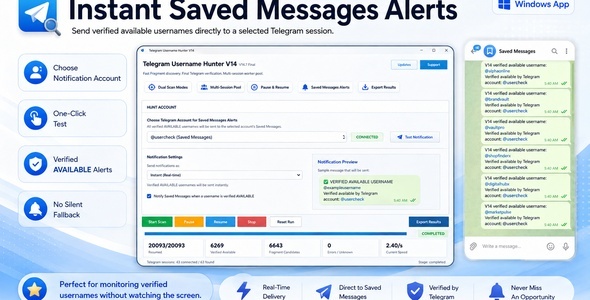
- Saved Messages notifications: Optionally receive a Telegram Saved Messages alert when a username is verified as available.
- Live progress: Review progress and results while the workflow is running.
- Import username lists: Load username candidates from TXT or CSV files.
- Export results: Export your results in CSV, TXT, or XLSX format.
- Windows desktop interface: No browser dashboard or separate server installation is required.
- No separate Python installation required: The required application runtime is packaged with the Windows executable.
How It Works
1. Load Your Username List
Enter or import the usernames you want to research. TG Hunter is designed for repeated list-based workflows and makes it easy to organize larger candidate sets.
2. Choose a Scan Mode
Select the workflow that matches your needs:
- Fragment Only – Use Fragment as the availability discovery layer.
- Telegram Only – Verify usernames directly through Telegram using your authorized sessions.
- Dual Fragment → Telegram Verify – Use Fragment for fast pre-screening and Telegram for final verification.
3. Configure Your Telegram Sessions
Use your own Telegram API ID, API Hash, and authorized Telegram session files. Multiple sessions can be managed from the application for supported verification workflows.
4. Start and Monitor the Workflow
Start the scan and monitor progress from the desktop interface. You can pause, resume, stop, or reset the current run when needed.
5. Review and Export Results
Review detected results directly inside TG Hunter and export them to CSV, TXT, or XLSX for additional research, filtering, or record keeping.
Designed for Username Research
TG Hunter is built as an availability research and results-management tool. It helps reduce repetitive manual checking when working with username candidate lists.
The application does not automatically claim, purchase, register, or transfer usernames.
Multiple Telegram Sessions
TG Hunter supports workflows using multiple authorized Telegram session files. Sessions can be loaded and managed from the application, allowing verification work to use the available session pool according to the configured workflow.
You remain responsible for the Telegram accounts and sessions you use with the application.
Pause, Resume and Persistent Workflow
Long username lists do not always need to be completed in one sitting. TG Hunter provides Pause, Resume, Stop, and Reset controls so you can maintain direct control over the current workflow.
Saved Messages Notifications
Choose an authorized session as your notification account and optionally receive a message in that account’s Telegram Saved Messages when TG Hunter verifies an available username.
No external notification service is required for this feature.
Import and Export
TG Hunter supports practical list-based workflows for research and reporting.
Import
- TXT username lists
- CSV username lists
Export
- CSV
- TXT
- XLSX
CodeCanyon Purchase Activation
This CodeCanyon edition uses purchase-code activation. Enter the purchase code associated with your CodeCanyon purchase when prompted by the application.
An internet connection is required for purchase verification.
System Requirements
- Windows 10 or Windows 11
- Internet connection
- Your own Telegram API ID
- Your own Telegram API Hash
- Your own authorized Telegram account session(s) for Telegram verification
- A valid CodeCanyon purchase code
No separate Python installation is required.
Important Telegram Requirements
TG Hunter does not provide Telegram API credentials or Telegram accounts.
To use Telegram verification features, you must provide and manage your own:
- Telegram API ID
- Telegram API Hash
- Authorized Telegram account sessions
- Internet connection
Keep your API credentials and session files private. Do not share them with unauthorized parties.
Responsible Use
TG Hunter is intended for legitimate username availability research and organization using accounts and credentials you are authorized to use.
TG Hunter does not include functionality for:
- Automatically claiming usernames
- Automatically purchasing usernames
- Username sniping
- Bypassing Telegram or Fragment service limits
- Anti-ban or restriction-evasion mechanisms
- Spam or unsolicited messaging automation
Telegram and Fragment Disclaimer
Telegram and Fragment are independent third-party services. TG Hunter is not affiliated with, endorsed by, sponsored by, or officially connected with Telegram or Fragment.
Third-party services may change their APIs, availability, limits, requirements, pricing, policies, or behavior independently of TG Hunter.
You are responsible for complying with the terms, policies, account requirements, usage restrictions, and applicable costs of any third-party services you use with the application.
Frequently Asked Questions
Does TG Hunter automatically claim available usernames?
No. TG Hunter researches availability and organizes results. It does not automatically claim, register, purchase, or transfer usernames.
Do I need Python installed?
No. The Windows executable includes the required application runtime.
Do I need my own Telegram API credentials?
Yes. Telegram verification requires your own Telegram API ID and API Hash.
Does TG Hunter include Telegram accounts?
No. You must use your own authorized Telegram accounts and session files.
Can I use multiple Telegram sessions?
Yes. TG Hunter supports multiple authorized Telegram sessions for supported verification workflows.
Can I pause a long workflow?
Yes. The application provides Pause and Resume controls together with Stop and Reset options.
Which export formats are supported?
CSV, TXT, and XLSX.
Is an internet connection required?
Yes. Internet access is required for online availability checks and CodeCanyon purchase verification.
Item Support
For support related to this CodeCanyon item, please use the official Support tab on the item page.
When requesting support, please include a clear description of the issue and the relevant application version. Never send Telegram API Hash values, private session files, passwords, or other sensitive credentials unless explicitly required through a secure and appropriate support process.
| Type | Windows App |
|---|---|
| Author | oshenes |
| Price | $51 |
| Sales | 0 |
| Rating | 0 (0) |
| Published | Sep 2, 2026 |
| Last Update | Sep 2, 2026 |
| Application Runtime | Native |
| High Resolution | No |
| Operating System Versions | Windows 11, Windows 10 |
Categories
Tags
External listing. code.market does not sell this product and does not process payment for it. Pricing, payment, delivery, licensing, refunds, and support are handled by the third-party merchant on its own website. We may earn an affiliate commission from a referral. Details.
Products of the Week.
Submit🥇

STOP GUESSING WHAT TO POST
AI that learns your brand voice and builds a month of consistent, on-brand social content: carousels, posts and hooks that sound like you, not like everyone else's AI.
SaaS · 7,369 views · 67 clicksSaaS · Week 46 · 7,369 views · 67 clicks
🥈

Conversational Backlinks for Busy Founders
Place Backlink Relevant Conversation for your domain across Forums and Conversations
Website · 46,653 views · 232 clicksWebsite · Week 46 · 46,653 views · 232 clicks
🥉

upvote.club
Free Social Media Engagement that Helps Boost Your Content. Upvote Club supports 19 social networks with 100+ engagement actions in one dashboard. Add links to your posts and get free engagement from real users.
SaaS · 44,593 views · 127 clicksSaaS · Week 46 · 44,593 views · 127 clicks
#4

Substack Posting API
Onboard your Agent to Substack. Write Publish on Substack via API
SaaS · 63,480 views · 206 clicksSaaS · Week 46 · 63,480 views · 206 clicks
#5

Seenshot App
Free, Fast, MacOS Screenshot app. Make Screenshot cmd+shift+2 and send it via link
Desktop App · 32,730 views · 127 clicksDesktop App · Week 46 · 32,730 views · 127 clicks
#6

Hand-Placed Backlinks $9.99 per link. Flat rate.
Buy hand-placed forum, Q-A and directory backlinks. Flat $9.99 per link, no subscriptions — you only pay for approved listings.
Website · 8,349 views · 19 clicksWebsite · Week 46 · 8,349 views · 19 clicks
#7

Free Invoice Generator - PDF Invoices in Your Browser, No Sign-Up
A free invoice maker for freelancers and small businesses: fill in the invoice, check the live preview, and download a PDF that looks exactly like it. Any currency, tax per item, three templates, no sign-up, and nothing leaves your device.
6,977 views · 29 clicksWeek 46 · 6,977 views · 29 clicks
#8

Merge PDF Files Free - Combine PDFs in Your Browser, No Upload
A free PDF merger for office workers, students, and freelancers: combine PDFs and images into one file in the browser, reorder files and pages, pick page ranges, keep bookmarks, and open password-protected PDFs. Nothing is uploaded, no sign-up, no watermark.
6,458 views · 18 clicksWeek 46 · 6,458 views · 18 clicks