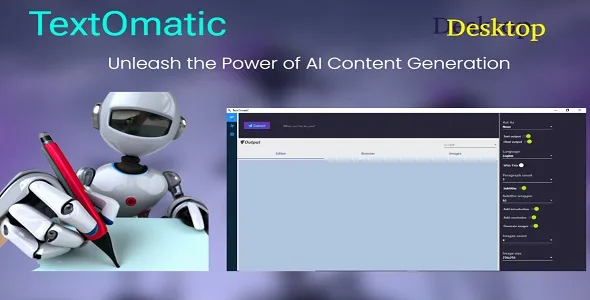
TextOmatic
Description
TextOmatic uses GPT-3 and DALL-E 2 from OpenAI. This is a paid API that incurs costs which you will need to pay as per your usage. For more info about these costs please click here.
Desktop
No code knowledge is not necessary to use it.TextOmatic : The perfect Desktop tool for quickly and easily generating text and images.
Get started today and see how easy it is to generate high-quality text and images for your projects.
Brief description
TextOmatic – is a Desktop automated text and images generator powered by OpenAI’s GPT-3 model. It is designed to help content creators generate high quality text with just a few clicks. The tool can be used to generate blog posts, product descriptions, articles, or any other form of content. It is easy to use and requires no coding or technical knowledge.TextOmatic is easy to use, featuring a user-friendly interface. You can easily generate text in any language of your choice, including English, French, Spanish, German, and more. You can also customize the generated text by adjusting the level of complexity, adding synonyms, and changing the length of the text.
Why TextOmatic?
- Desktop: No code knowledge is not necessary to use it.
- Automation : Generate text and images with a few clicks.
- Customizable : Customize text generation based on length, complexity, and topics.
- Versatile : Generate text for blog posts, articles, product descriptions, and more.
- Time Saving : Save time by automatically generating text.
Featchers
A fully customizable generated content
- Act As :if selected, TextOmatic generates the content based on the selected function, it behaves like a specialist.
- Text output : if selected, Editor tab will be activated, the content will be displayd in it.
- Html output : if selected, Browser tab will be activated, the content will be displayd in it as html.
- Language :content will be displayed in the selected language
- With Title :add or not a title to the content
- Paragraph count :the number of paragraphs to display
- Subtitles :add or not subtitles to generated paragraphs
- Subtitle wrapper :heading tag type.
- Add introduction :add or not a introduction to generated content.
- Add conclusion :add or not a conclusion to generated content.
- Generate images :generate or not images(please swith off Text output and Html output if you want images only).
- Images count :number of images to generate.
- Image size :the size of generated images.
- Editor tab:it’s a text editor, the content generated by TextOmatic will be displayed there, you can perform actions on the text: cut, copy, paste, selectAll.
- Browser tab:generated content will be displayed as Html,on right click, you can perform actions : print, print preview…
- Images tab:images will be displayed there, you can select and save them to your pc.
- Ai-Assist list : it take the selected text, and perform action base on your choise: – Write a paragraph on this – Generate ideas for this – Summarize – Paraphras – And more…
- Email composer
- Email Response
- Translator
- Text rewrite
- Content Expander
- Presentation (Slides generator)
- Table of content
- Question generator
- SMS and Notifications
- Job desription
- Blog post
- Press release
- Business Name generator
- Product description
- Business Trageting typs
- Product/service reviews
- Short post ads
- Product ideas
- SEO – Tilte Tags
- SEO – Meta keywords
- Google Ads w/ keywords
- Facebook Ads
- Youtube (video title, description, ideas)
- Linkedin Bio
- Pinterest description
- Pawssword generator
- Cooking Assist
Release Notes – Change Logs:
12.03.2023
    - Fix : Browser encoding.
    - Fix : Remove warning from the Images Tab.
28.02.2023
    - Initial Release.
Categories
Tags
External listing. code.market does not sell this product and does not process payment for it. Pricing, payment, delivery, licensing, refunds, and support are handled by the third-party merchant on its own website. We may earn an affiliate commission from a referral. Details.
Products of the Week.
Submit🥇

STOP GUESSING WHAT TO POST
AI that learns your brand voice and builds a month of consistent, on-brand social content: carousels, posts and hooks that sound like you, not like everyone else's AI.
SaaS · 5,828 views · 52 clicksSaaS · Week 46 · 5,828 views · 52 clicks
🥈

Conversational Backlinks for Busy Founders
Place Backlink Relevant Conversation for your domain across Forums and Conversations
Website · 44,271 views · 227 clicksWebsite · Week 46 · 44,271 views · 227 clicks
🥉

upvote.club
Free Social Media Engagement that Helps Boost Your Content. Upvote Club supports 19 social networks with 100+ engagement actions in one dashboard. Add links to your posts and get free engagement from real users.
SaaS · 42,288 views · 123 clicksSaaS · Week 46 · 42,288 views · 123 clicks
#4

Substack Posting API
Onboard your Agent to Substack. Write Publish on Substack via API
SaaS · 61,248 views · 203 clicksSaaS · Week 46 · 61,248 views · 203 clicks
#5

Seenshot App
Free, Fast, MacOS Screenshot app. Make Screenshot cmd+shift+2 and send it via link
Desktop App · 30,537 views · 124 clicksDesktop App · Week 46 · 30,537 views · 124 clicks
#6

Hand-Placed Backlinks $9.99 per link. Flat rate.
Buy hand-placed forum, Q-A and directory backlinks. Flat $9.99 per link, no subscriptions — you only pay for approved listings.
Website · 6,261 views · 19 clicksWebsite · Week 46 · 6,261 views · 19 clicks
#7

Free Invoice Generator - PDF Invoices in Your Browser, No Sign-Up
A free invoice maker for freelancers and small businesses: fill in the invoice, check the live preview, and download a PDF that looks exactly like it. Any currency, tax per item, three templates, no sign-up, and nothing leaves your device.
4,927 views · 17 clicksWeek 46 · 4,927 views · 17 clicks
#8

Merge PDF Files Free - Combine PDFs in Your Browser, No Upload
A free PDF merger for office workers, students, and freelancers: combine PDFs and images into one file in the browser, reorder files and pages, pick page ranges, keep bookmarks, and open password-protected PDFs. Nothing is uploaded, no sign-up, no watermark.
4,544 views · 15 clicksWeek 46 · 4,544 views · 15 clicks