
Textguard | Offline Text Message Spam Filter Flutter App for Android and iOS With Rule Packs
Description
AI disclosure: AI tools were used to assist with parts of the code, documentation and graphics of this item. The author reviewed and tested the result. The product itself contains no AI features: see Declarations below.
What it is
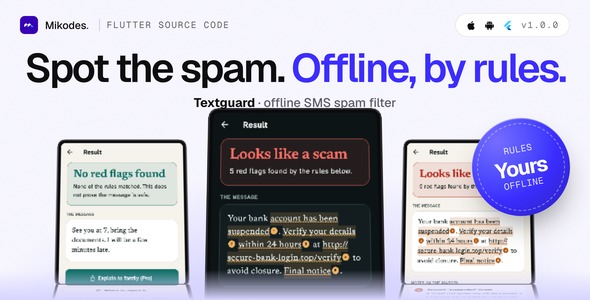
Textguard is a Flutter source code for a text message spam and fraud filter on Android and iOS, together with an iOS Message Filter extension (Swift) and an operator console (MIKODES Admin Kit, Node.js server) to run the app as a small business. The user pastes, shares or selects a text; the app compares it with written rules (keywords, patterns, sender rules and link rules), underlines and numbers the words that matched, and writes a plain note for each rule. There are three verdict levels, No red flags found, Suspicious and a clear warning level, and the app never says a text is safe. Everything runs on the phone and no message leaves it. You rename it, edit the rule packs in the console, add your store product ids and publish it under your own brand.
Two limits, stated up front. Android cannot filter incoming SMS unless the app is the user’s default SMS app, which Google Play allows only in narrow cases: the Android build checks text the user shares, selects (Check with Textguard) or pastes, and asks for no SMS permission. The iOS filter only sees texts from unknown senders; iOS never shows it messages from saved contacts.
Who it is for
Developers and small studios who want a ready utility app for the stores with a paid unlock and a rule console: you rename it, tune the rules for your market, add your store product ids, publish it under your account, and keep the store revenue. It is not a call blocker or a caller ID app, and the starter rule pack (46 rules, mostly English and Slovak) is a starting point, not a complete database of known scams.
Demo Instructions
The mobile app has no user accounts, so it has no login. The operator console demo is read-only (every change is refused). To try it:
- Open the demo page below and download the demo Android app (arm64 APK), or build the real app for Android and iOS from the download with flutter run.
- Finish onboarding. On the Check screen paste this invented example text: “Your bank account has been suspended. Verify your details within 24 hours. Final notice.” and tap Check this message.
- Read the result: the matched words are underlined and numbered, with a note for each rule. Then paste a harmless text such as “See you at 7, bring the documents” to see No red flags found.
- Open Settings, How we check, to read the whole rule list. The iOS filter needs a real iPhone and your own Apple team (see the documentation).
- Open the operator console with the read-only login below and look at Rule packs, App config: scoring and App config: paywall.
Live demo and docs
- Demo: https://textguard-demo.mikodes.com/ (demo page with a demo Android app; examples are labelled)
- Operator console, read-only: https://textguard-demo.mikodes.com/admin
Email: demo@textguard.demo · Password: textguard-demo-2026 (read-only demo account) - Documentation: https://textguard-demo.mikodes.com/docs/
How you earn with it
- Lifetime and yearly Pro unlock with restore, using the stores’ in-app purchase (store fees apply). Without Pro a user gets 5 checks a day (a setting); Pro adds unlimited checks, Explain to family and the user’s own filter words.
- Server-side purchase verification for Apple (signed transactions and Server API) and Google Play, off by default.
- A revenue page in the console showing gross verified store transactions.
- Paywall, product ids, daily limit, scoring thresholds, brand name, accent colour and feature flags are changed from the console without a new build.
Every money setting starts empty: no product ids ship, so the paywall reads “Purchases are not set up yet” until you add your own ids. Nothing in this item promises any income.
Third-party services and costs (not included in the price)
- Apple Developer and Google Play developer accounts, and the lifetime and yearly store products (no product ids ship)
- Release signing (Android keystore, your Apple team, your own App Group and bundle ids)
- Hosting, domain and https for the server (optional; the app works offline)
- Support, privacy and terms URLs (empty by default)
- Store listing text and screenshots for your own app
- Real-device testing before release
Core features
- Proof-sheet result: flagged words underlined and numbered, one plain note per rule with its category and weight, links read out (registered domain, look-alike letters, a name in front of an @) and never opened.
- Rule engine: keyword, pattern, sender and link rules with weights from 1 to 5 and a cap per category. Patterns pass a safety check in Dart, Swift and the console, so a bad rule cannot hang the phone. Thresholds are settings.
- iOS Message Filter extension: sorts texts from unknown senders into the spam, promotions and transactions folders, offline, with no network URL.
- Android: Share to Textguard and Check with Textguard on selected text. No SMS, call-log or notification-listener permission.
- Lessons and where to report: six lessons and nine report offices in eight countries, each with an official source and a review date. Add your own country in the console.
- History keeps only a verdict and a date, never the message, and can be switched off.
- Offline first: bundled rules, contacts and lessons; an offline config client with an ETag cache.
- Optional link expander on your server (off by default, refuses private and metadata addresses, asks the user first).
Workflow
Install, onboarding, paste or share a text, read the numbered notes, report or explain it to family. The app reads its rules and settings from your server with ETag caching (rate limit 60 requests per minute per IP, health check included) and works fully without it.
Admin: operator console
- Rule packs, report contacts and lessons, each with add, edit, disable, reorder and an audit entry
- Scoring thresholds (Suspicious, the top warning level, iOS filter spam level)
- Brand (name, accent, support URL) and legal URLs
- Paywall, daily check limit and store product ids; feature switches
- Announcement banner and force update screen
- Link expander switch and its safety test
- Opted-in installs (anonymous pings) and revenue
- Team, audit log, 2FA and notifications (MIKODES Admin Kit 0.7.0); read-only demo mode
Security
- Console with team roles, 2FA and an audit trail.
- Purchase verification checks Apple signed transactions (JWS) and Google Play on the server.
- Secrets live in server/.env (a .env.example without values is included).
- Usage pings are opt-in and anonymous; message text never leaves the phone.
Tech stack
App: Flutter 3.41, Dart 3.11, in_app_purchase, shared_preferences. iOS filter: Swift. Server: Node.js with Hono and better-sqlite3.
Requirements
- Flutter 3.41.4 or newer (Dart 3.11.1+); Android Studio for Android; Xcode for iOS and the filter extension (deployment target 16.0).
- Node.js 26 LTS (22.12 or newer also works) for the server; Linux or macOS.
- Apple Developer and Google Play developer accounts to publish and to create the store products.
- Optional: App Store Server API key and Google Play service account for purchase verification.
External paid services are not included in the item price: developer accounts, store fees, hosting, a domain with https for the server, and any service you connect.
What is included
- Flutter app source (Android and iOS) with the iOS Message Filter extension
- Node.js server with the operator console and the starter rule pack
- .env.example, third-party licence list and documentation
Good to know before you buy
- Android does not filter incoming SMS automatically (Google Play policy). Automatic filtering there would need you to build a default SMS app or obtain Google’s exception yourself.
- The iOS filter handles unknown senders only, needs your own Apple team and App Group (the id in the source is a placeholder you change).
- The 46 starter rules will miss some scams and flag some real texts. Tune them on your own messages before you describe accuracy anywhere. The lesson and report-office wording is general: have someone who knows each country read it.
- Nothing was tested on a real device: the iOS filter, the Android share-in and select-text entry, and real purchases need your own testing before release.
- The Android release build is debug-signed until you add your own key.
Installation summary
1) Server: copy .env.example to .env, then npm ci, npm run build, npm start. 2) App: set your brand and server URL in app/lib/brand.dart, set bundle ids, App Group and signing, then flutter run or build. 3) Create the two store products and enter their ids in the console. Full steps are in the documentation.
Declarations
AI declaration: AI tools were used to assist with parts of the code, documentation and graphics of this item. The author reviewed the result. The product itself contains no AI features: no model, no AI service and no cloud call judges a message, only the written rules you can read and edit.
Changelog
v1.0.0 (first marketplace release): proof-sheet result, rule engine with four rule types, iOS Message Filter extension, Android share and select-text entry, lessons, report offices, history, paywall with restore, announcement, force update, purchase verification, operator console.
Support
Support covers questions about the item and bugs in the included code. Help with your own store accounts, signing or custom changes is not part of item support. Contact: https://mikodes.com/support
Credits
Open-source packages are listed in THIRD-PARTY-LICENSES.md. Preview images are real screens with invented example texts, labelled as sample data; device frames are illustrations. Not affiliated with Apple or Google; their names only describe the platforms.
| Author | Mikodes |
|---|---|
| Price | $29 |
| Sales | 0 |
| Rating | 0 (0) |
| Published | Nov 19, 2026 |
| Last Update | Nov 19, 2026 |
| Compatible Software | Flutter 3.x |
| Demo Url | https://textguard-demo.mikodes.com |
| Mobile Files Included | Dart, YAML, JavaScript JSON, .kotlin, .plist, .swift, JavaScript JS, CSS, HTML |
Categories
Tags
External listing. code.market does not sell this product and does not process payment for it. Pricing, payment, delivery, licensing, refunds, and support are handled by the third-party merchant on its own website. We may earn an affiliate commission from a referral. Details.
Products of the Week.
Submit🥇

Perceptle
Perceptle is a daily browser-based game that challenges you to test your sensory intuition through five quick estimation and rhythm-based rounds.
Other · 1,800 views · 11 clicksOther · Week 47 · 1,800 views · 11 clicks
🥈

Free LinkedIn Likes From Real
Get free LinkedIn likes on your posts from real members who react by hand. No
SaaS · 1,935 views · 11 clicksSaaS · Week 47 · 1,935 views · 11 clicks
🥉

STOP GUESSING WHAT TO POST
AI that learns your brand voice and builds a month of consistent, on-brand social content: carousels, posts and hooks that sound like you, not like everyone else's AI.
SaaS · 9,478 views · 76 clicksSaaS · Week 47 · 9,478 views · 76 clicks
#4

aaas.market
407 reliable micro tools for solo founders, marketers and creators. They work in your browser
SaaS · 1,899 views · 5 clicksSaaS · Week 47 · 1,899 views · 5 clicks