
Text to Speech App for PC – Offline/Online
Description
Text to Speech App for PC – Offline/Online TTS
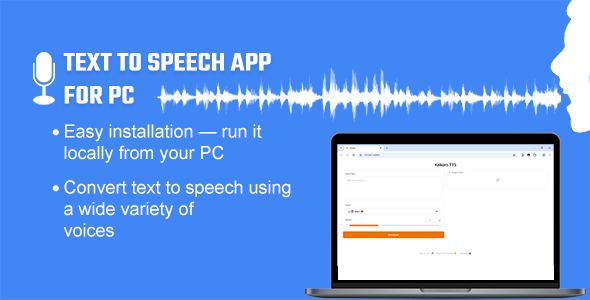
This Text to Speech App for PC is an open-weight, high-performance text-to-speech model designed to convert text into natural-sounding audio quickly. This one-click installable Python toolkit is specifically built for Windows users, offering an intuitive way to generate text-to-speech output. Simply install the Text-to-Speech app and run the application. You can enter your text, select a voice, and your input will be converted into audio. You can then download the audio and use it for your project.
Key Features:
- The offline models (Kokoro, Pocket & Piper) run locally on your PC and offer around 90+ voices: Kokoro provides US (20), GB ( 8 ), FR (1), IN (4) and IT (2), Pocket provides GB (21), DE (1), PT (1), IT (1), ES (1) and Piper provides US (20), GB (7), AR (1), FR (3), and DE (3).- The online model (Edge) works with an internet connection and offers 320+ voices from various languages. Click here for the tentative list.
Sample Audio Voices:
*There are currently about 90+ voices (offline) & More than 300+ (online) to choose from.Frequently Asked Questions
Q. What is Text to Speech App for PC – Offline/Online TTS?- Text to Speech App for PC is a lightweight text-to-speech (TTS) application for Windows that converts text into natural, expressive speech with a one-click installation.
- Kokoro primarily supports English, with one French, two Hindi and two Italian voices. Pocket has English, German, Portuguese, Italian and Spanish. Piper offers English, French, German, and Arabic. Edge, on the other hand, supports multiple languages. You can check the list of languages supported by Edge (here).
- Yes, this TTS App is a Python-based toolkit—you only need to download and install it on your PC.
- Kokoro, Pocket and Piper runs offline. It may require an internet connection the first time to download the necessary models, but after that, it works locally without internet access.
-
Edge, on the other hand, requires a continuous internet connection to function.
- No, you do not need to purchase any API keys. The software is built on top of the Kokoro, Piper and Edge TTS engines and integrates them with a custom interface using Gradio for ease of use. However, with a single setting, you can use Edge to create up to ten minutes of voice output (and continue generating in 10-minute batches), while Kokoro and Piper does not have such limitations.
- Yes, the source code for the setup is included with your purchase. You will receive a setup (.exe) file that extracts all the necessary files to your desired drive.
- Currently, TTS is designed specifically for Windows users. The app typically saves audio files in .wav & .mp3 format.
- One license allows you to use the software on one computer. Please check the licensing terms on CodeCanyon for more details.
Changelog
VERSION 1.5 ::
Added 25 new voices: EN, DE, PT, IT, ES.
VERSION 1.4 ::
Updated to the latest version
VERSION 1.3 ::
Minor Bug fixes
VERSION 1.2 ::
Added 4 new Hindi (Indian) voices.
VERSION 1.1 ::
Added 30+ new voices: EN, DE, FR, AR.
Easy Installable file
VERSION 1.0.1 ::
Edge TTS Integration: Now Supports Many Languages
Easy Installable file
VERSION 1.0.0 WAS RELEASED ::
Initial release
Support Facilities
If you have any questions about this item, feel free to email us before making a purchase. You can send your product-related queries, installation requests, customization projects, or any other inquiries to: info@heyletslearnsomething.com
| Type | Windows App |
|---|---|
| Author | HeyLetsLearnSomething |
| Price | $19 |
| Sales | 25 |
| Rating | 5 (3) |
| Published | May 8, 2025 |
| Last Update | Jun 17, 2026 |
| Application Runtime | Native |
| Operating System Versions | Windows 11, Windows 10, Windows 8 Desktop |
Categories
Tags
External listing. code.market does not sell this product and does not process payment for it. Pricing, payment, delivery, licensing, refunds, and support are handled by the third-party merchant on its own website. We may earn an affiliate commission from a referral. Details.
Products of the Week.
Submit🥇

STOP GUESSING WHAT TO POST
AI that learns your brand voice and builds a month of consistent, on-brand social content: carousels, posts and hooks that sound like you, not like everyone else's AI.
SaaS · 7,329 views · 67 clicksSaaS · Week 46 · 7,329 views · 67 clicks
🥈

Conversational Backlinks for Busy Founders
Place Backlink Relevant Conversation for your domain across Forums and Conversations
Website · 46,597 views · 232 clicksWebsite · Week 46 · 46,597 views · 232 clicks
🥉

upvote.club
Free Social Media Engagement that Helps Boost Your Content. Upvote Club supports 19 social networks with 100+ engagement actions in one dashboard. Add links to your posts and get free engagement from real users.
SaaS · 44,539 views · 127 clicksSaaS · Week 46 · 44,539 views · 127 clicks
#4

Substack Posting API
Onboard your Agent to Substack. Write Publish on Substack via API
SaaS · 63,425 views · 206 clicksSaaS · Week 46 · 63,425 views · 206 clicks
#5

Seenshot App
Free, Fast, MacOS Screenshot app. Make Screenshot cmd+shift+2 and send it via link
Desktop App · 32,671 views · 127 clicksDesktop App · Week 46 · 32,671 views · 127 clicks
#6

Hand-Placed Backlinks $9.99 per link. Flat rate.
Buy hand-placed forum, Q-A and directory backlinks. Flat $9.99 per link, no subscriptions — you only pay for approved listings.
Website · 8,298 views · 19 clicksWebsite · Week 46 · 8,298 views · 19 clicks
#7

Free Invoice Generator - PDF Invoices in Your Browser, No Sign-Up
A free invoice maker for freelancers and small businesses: fill in the invoice, check the live preview, and download a PDF that looks exactly like it. Any currency, tax per item, three templates, no sign-up, and nothing leaves your device.
6,925 views · 29 clicksWeek 46 · 6,925 views · 29 clicks
#8

Merge PDF Files Free - Combine PDFs in Your Browser, No Upload
A free PDF merger for office workers, students, and freelancers: combine PDFs and images into one file in the browser, reorder files and pages, pick page ranges, keep bookmarks, and open password-protected PDFs. Nothing is uploaded, no sign-up, no watermark.
6,408 views · 18 clicksWeek 46 · 6,408 views · 18 clicks