
TempoArcade - Laravel Game Portal

Description
TempoArcade is a ready-made PHP gaming portal designed for launching a large online games website with 30,000+ games, automated publishing, multiple frontend themes, player accounts, ad-free plans, payment gateways, SEO features and a powerful administration panel.
30,000+ Games Automated Game Import 6 Frontend Themes Player Accounts Ad-Free Plans Multiple Gateways Admin Panel SEO Ready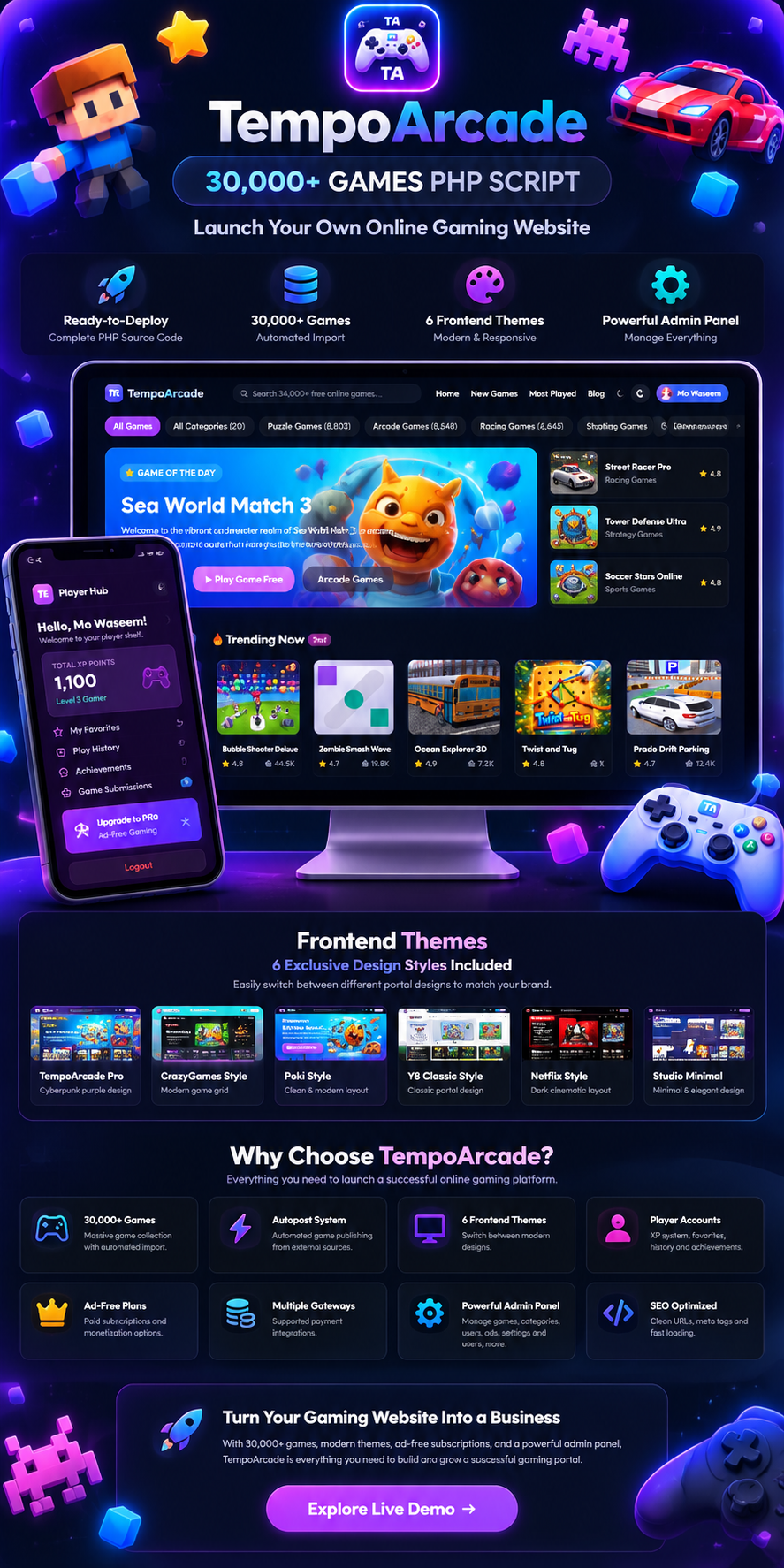 TempoArcade — Product Preview
30,000+ Games
Platform Highlights
Everything You Need to Build an Online Gaming Portal
30,000+ Games in Catalog 6 Frontend Design Themes 24/7 Automated Publishing Workflow 100% Responsive UI About TempoArcadeA Complete Ready-Made Gaming Website Solution
TempoArcade gives you the foundation for launching a professional online gaming website without developing the complete platform from scratch. The system combines a large game catalog with content management, player features, monetization options, multiple frontend experiences and a centralized admin dashboard.
From importing and publishing games to managing categories, players, subscriptions, payments and website content, TempoArcade is built around the workflow of running a modern web gaming portal.
Core FeaturesPowerful Features for Your Gaming Business
🎮30,000+ Online Games
Start with a large catalog of online games covering multiple genres and categories.
⚡Automated Game Publishing
Automate the publishing workflow and keep your gaming portal populated with new content.
🎨6 Frontend Themes
Switch between multiple frontend design styles to match your brand and preferred gaming portal layout.
👤Player Accounts
Give players personal accounts with profiles, favorites, play history, XP and achievements.
💎Ad-Free Subscription Plans
Offer paid plans and create a premium gaming experience with ad-free access and additional benefits.
💳Multiple Payment Gateways
Configure supported payment gateways for premium plans, subscriptions and monetization workflows.
⚙️Powerful Admin Panel
Manage games, categories, tags, players, reports, content, monetization and platform settings from one dashboard.
🔍SEO & Content Management
Manage categories, tags, blog posts and content-focused website sections for your gaming portal.
Admin DashboardManage Your Entire Gaming Website
TempoArcade includes a centralized administration interface for managing the core operations of your online gaming portal.
📊Dashboard Analytics
Track game counts, registered players, total plays and other platform activity.
🕹️Game Management
Manage your game catalog, publishing workflow, categories, tags and game-related content.
👥Players & Users
Manage player accounts and monitor your gaming community from the admin area.
📝Blog & Pages
Publish blog content and create custom website pages to expand your gaming portal.
Live DemoExplore the TempoArcade Gaming Portal
Visit the live portal to explore the frontend experience. You can also access the administrator and player demo accounts provided below.
🌐 Live Website
Explore the public gaming portal, categories, games and responsive frontend experience.
https://games.codester.shop/ Open Live Demo →🔐 Demo Access
Use the following credentials to explore the demo interfaces.
⚡ Demo Admin ADMINadmin@tempoarcade.com
admin123
https://games.codester.shop/admin
🎮 Demo Player
PLAYER
user@tempoarcade.com
user123
https://games.codester.shop/
Built For
Who Can Use TempoArcade?
- Gaming entrepreneurs launching a large online games website.
- Developers looking for a ready-made PHP gaming portal.
- Agencies building branded online gaming websites for clients.
- Publishers who want automated game importing and publishing.
- Website owners looking for player accounts and subscription monetization.
Launch Your Own Online Gaming Portal
Build a modern gaming website with 30,000+ games, automated publishing, multiple frontend themes, player accounts, monetization tools and a complete administration system.
🚀 Explore TempoArcade Open Admin DemoFeatures
Powerful FeaturesEverything You Need to Run a Modern Gaming Portal
TempoArcade combines a large game catalog, automated publishing, multiple frontend themes, player features, monetization tools and a complete administration system in one ready-made PHP platform.
All Features Games Portal Monetization Admin 🎮30,000+ Games Catalog
Start with a large collection of online games covering multiple genres and categories.
GAME CATALOG ⚡Automated Game Publishing
Automate your game publishing workflow and keep the portal populated with new gaming content.
AUTOPOST 🗂️Categories & Tags
Organize thousands of games using categories, tags and structured game content.
CONTENT 🎨6 Frontend Themes
Switch between six exclusive portal designs and choose the visual experience that fits your gaming brand.
THEMES 📱Responsive Gaming UI
Designed to provide a consistent experience across desktop, tablet and mobile devices.
RESPONSIVE 🔎Game Search
Help visitors quickly find games, players and content through fast and accessible search interfaces.
DISCOVERY 👤Player Accounts
Give players personal accounts with profiles, favorites, game history, achievements and XP progress.
PLAYER HUB 🏆XP & Achievements
Add progression mechanics that encourage players to return, play games and build their personal profiles.
GAMIFICATION 📰Blog & Custom Pages
Publish supporting content and create custom pages around your gaming portal.
CMS 💎Ad-Free Subscription Plans
Create premium plans that offer players an enhanced, advertising-free gaming experience.
SUBSCRIPTIONS 💳Multiple Payment Gateways
Connect supported payment gateways for paid plans and subscription-based monetization.
PAYMENTS 📈Built for Monetization
Combine subscriptions, advertising opportunities and premium player features to create multiple revenue channels.
REVENUE ⚙️Powerful Admin Panel
Manage the gaming platform, games, players, content and configuration from one centralized dashboard.
ADMIN 📊Dashboard Analytics
Monitor games, registered players, game plays and other platform-level activity.
ANALYTICS 🚨Game Reports
Maintain visibility into reported game content and platform management workflows.
MODERATION 🔧Platform Settings
Configure website options, themes, content, players, monetization and other system settings.
CONFIGURATION 30,000+ Games 6 Frontend Themes 100% Responsive 1 Complete Admin SystemRequirements
RequirementsServer Requirements & Setup
Make sure your hosting environment is ready before installing TempoArcade. The exact configuration can vary depending on your hosting provider, game feed and enabled platform features.
🐘PHP Hosting Environment
A compatible PHP hosting environment is required to run the TempoArcade application and its backend functionality.
REQUIRED 🗄️MySQL Database
A MySQL-compatible database is required for storing games, categories, users, player activity, subscriptions and platform settings.
DATABASE ⏱️Cron Job Access
Cron access is recommended for automated game publishing and scheduled background tasks. The platform includes an autopost workflow that can be triggered automatically.
AUTOMATION 🔒SSL / HTTPS
HTTPS is strongly recommended for production websites, especially when user accounts, player sessions and payment functionality are enabled.
RECOMMENDED 💾Server Storage
Your hosting account should provide sufficient storage for the application, game data, website assets, logs and any configured media.
HOSTING 🌐Domain & URL Configuration
A properly configured domain with working DNS and a compatible web server environment is required for the public gaming portal.
DOMAIN 🔄Scheduled Autopost Access
If you enable automated game publishing, your hosting environment should allow scheduled requests or cron-based execution for the configured autopost links.
AUTOPOST 💳Payment Gateway Configuration
Payment gateway requirements depend on the payment providers you choose to enable for your ad-free plans and other paid features.
OPTIONAL🚀 Recommended Installation Checklist
01 Prepare Hosting Set up your PHP hosting account, database and domain. 02 Upload the Script Upload the TempoArcade application files to your configured web directory. 03 Configure Database Create the required database and connect the application to your database environment. 04 Configure Your Domain Point your domain to the hosting environment and enable HTTPS for production. 05 Configure Autopost Add the required scheduled task if you want automatic game publishing. 06 Configure Monetization Enable ad-free plans and supported payment gateways according to your business setup. Important: Server specifications, PHP/database versions, cron configuration, required extensions and payment gateway requirements may vary depending on your hosting provider and the features you enable. Always check the included documentation before deploying the application to production.Instructions
Installation InstructionsGet TempoArcade Up and Running
Follow the steps below to prepare your hosting environment, install the script and configure the core features of your online gaming portal.
01Prepare Your Hosting
Set up a compatible PHP hosting environment, database, domain and SSL certificate. VPS or suitable shared hosting can be used according to your configuration.
02Upload the Application
Upload the TempoArcade files to your website's document root or the directory configured for your gaming portal.
03Configure the Database
Create the required MySQL database and database user, then complete the application's database configuration during installation.
04Complete Installation
Open your domain in a browser and follow the installation process to configure the application and create the required initial settings.
05Configure Your Gaming Portal
Set your website identity, frontend theme, categories, navigation, content and other platform preferences from the administration area.
06Configure Autopost
Add and configure the provided autopost or scheduled links when you want games to be imported and published automatically.
07Configure Player Features
Review player accounts, favorites, play history, XP, achievements and other user-facing features from the administration panel.
08Configure Monetization
Set up supported payment gateways, ad-free subscription plans and other monetization options according to your business requirements.
⚡ Automated Publishing
TempoArcade includes an automated publishing workflow. After configuring the required autopost link or cron task, scheduled execution can be used to keep the game catalog updated.
Configure your scheduled task according to the autopost instructions included with the product package. ✓ Use HTTPS for your production gaming website. ✓ Make sure your database credentials are correct. ✓ Verify required PHP extensions and permissions. ✓ Configure scheduled tasks if automated publishing is enabled. ✓ Configure payment providers before activating paid plans. ✓ Change default/demo credentials before production use. Important: Installation and server configuration may vary depending on your hosting provider and enabled features. Always review the documentation included with the TempoArcade package before deploying the website to production.| Author | mohammadwaseem |
|---|---|
| Category | Scripts & Code / PHP Scripts / Games |
| Price | $28 |
| Extended License | $84 |
| Likes | 4 |
| First Release | Sep 25, 2026 |
| Last Update | Sep 26, 2026 |
| Files included | .php, .css, .html, .json, .sql, .md, composer.json, .blade.php, JavaScript .js |
| Software version | PHP 8.3, PHP 8.4 |
| Programming language | PHP, JavaScript |
Categories
Tags
External listing. code.market does not sell this product and does not process payment for it. Pricing, payment, delivery, licensing, refunds, and support are handled by the third-party merchant on its own website. We may earn an affiliate commission from a referral. Details.