
Telegram Group Scraper and Adder

Description
Telegram Scraper, Telegram Member Adder & Telegram Message Sender
We offer powerful Telegram tools for group and channel management, including Telegram scraper, Telegram group scraper, Telegram channel scraper, Telegram member adder, Telegram adder, and Telegram message sender. Our software supports multiple Telegram accounts and helps you manage available Telegram member data, groups, channels, member-adding workflows, and bulk messaging from one application.
Our Telegram tools are designed for users who need to collect available Telegram group and channel member information, export data, manage multiple accounts, and perform supported member-management and messaging tasks.
Our Telegram Tools
- Telegram Group Scraper – Extract available member information from Telegram groups that your account can access.
- Telegram Channel Scraper – Collect available information from accessible Telegram channels and chat history.
- Telegram Member Adder – Manage member-adding workflows for eligible Telegram users.
- Telegram Adder – Manage supported member addition workflows between Telegram groups and channels.
- Telegram Message Sender – Manage bulk messaging workflows using eligible Telegram contacts and imported member lists.
Telegram Group Scraper
Our Telegram group scraper allows you to collect available information from Telegram groups that your account has access to. You can extract available member information from group member lists and accessible chat history.
Export collected information to Excel and use the data for analysis and other permitted Telegram management workflows.
Check Telegram Group & Channel Member Scraper
Telegram Channel Scraper
The Telegram channel scraper helps collect available information from Telegram channels that your configured account can access. Where Telegram makes member-related information available, the software can process information from accessible channel data and chat history.
- Extract available Telegram channel member information
- Process available chat history data
- Export collected data to Excel
- Support multiple Telegram accounts
- Use Telegram API-based account authentication
Telegram Member Adder & Telegram Adder
The Telegram member adder helps manage member-adding workflows between Telegram groups and channels where Telegram permits the requested action. You can select a destination group or channel and process eligible members using the available Telegram functionality.
The Telegram adder supports organized member-management workflows using configured Telegram accounts.
Member additions are subject to Telegram permissions, privacy settings, account restrictions, platform limits, and Telegram API limitations.
Check Telegram Group & Channel Member Adder
Telegram Message Sender
Our Telegram message sender helps you manage bulk messaging workflows using eligible Telegram contacts and imported member lists.
- Import Telegram member data from CSV
- Configure your message content
- Process eligible Telegram contacts
- Support multiple configured Telegram accounts
- Manage messaging workflows from one application
Check Telegram Bulk Message Sender
Telegram Multi-Account Support
Our Telegram software supports multiple Telegram accounts, allowing you to configure and manage different accounts from one application.
- Multiple Telegram account support
- Telegram API ID and API Hash configuration
- Phone number authentication
- Account management from one interface
- Account rotation for supported workflows
Account rotation is designed to organize workloads across configured accounts and does not guarantee that accounts will avoid Telegram restrictions or limitations.
Telegram Scraper Software Features
- Telegram Scraper for available member information
- Telegram Group Scraper for accessible Telegram groups
- Telegram Channel Scraper for accessible channels
- Telegram Group Member Scraper
- Telegram Channel Member Scraper
- Extract available members from accessible chat history
- Export member data to Excel
- Import member lists from CSV
- Telegram Member Adder functionality
- Telegram Adder workflows
- Telegram Message Sender
- Multiple Telegram account support
- Telegram API integration
- Easy-to-use interface
- Premium product support
What Is Telegram Multi-Account Scraper, Member Adder & Message Sender Software?
Telegram Multi-Account Scraper, Member Adder and Message Sender is software that combines several Telegram management features into one application. Depending on Telegram permissions and available account access, the software can collect available information from groups, channels, and accessible chat history.
The software is useful for businesses, marketers, community managers and agencies that need to organize Telegram data collection and supported group or channel management workflows.
Telegram Group Scraper – How It Works
- Configure your Telegram account.
- Open the Telegram Group Scraper section.
- Click Scrape Groups.
- Select the Telegram group you want to process.
- Click Get Members.
- Process available member information.
- Export the results to Excel.
Telegram Group Member Scraper
The Telegram group member scraper allows you to process available member information from accessible Telegram groups. When member information is available through Telegram, the software can collect and export the available data.
- Select a Telegram group
- Get available members
- Process accessible chat history
- Export member information
- Use exported data in supported workflows
Project Requirements
- Windows PC
- .NET Framework/runtime as required by the software version
- Microsoft Excel for Excel-based workflows
- Active Telegram account
- Telegram API ID
- Telegram API Hash
Installation Process
- You will receive the software only. Source code is not included.
- After purchasing the product, your Envato purchase code is used as the license/registration code.
- After license confirmation, unzip the main file and run TelegramAdder.exe.
- Enter your registered email address and Envato purchase code to register the software.
If you need support with registration, please contact: bhansalisoft781986@gmail.com
Telegram Account Configuration
Open the Settings section and configure your Telegram account using your Telegram API credentials.
- API ID: Enter your Telegram API ID.
- API Hash: Enter your Telegram API Hash.
- Phone Number: Enter your Telegram phone number including the country code.
- Click Login and complete Telegram’s verification process.
- Click Save to save the account configuration.
For information about obtaining a Telegram API ID and API Hash, see the official Telegram API documentation:
Telegram API ID and API Hash Documentation
Getting Started
After registering your license and configuring your Telegram account, you can start using the available Telegram scraper, group scraper, channel scraper, member adder and message sender features.
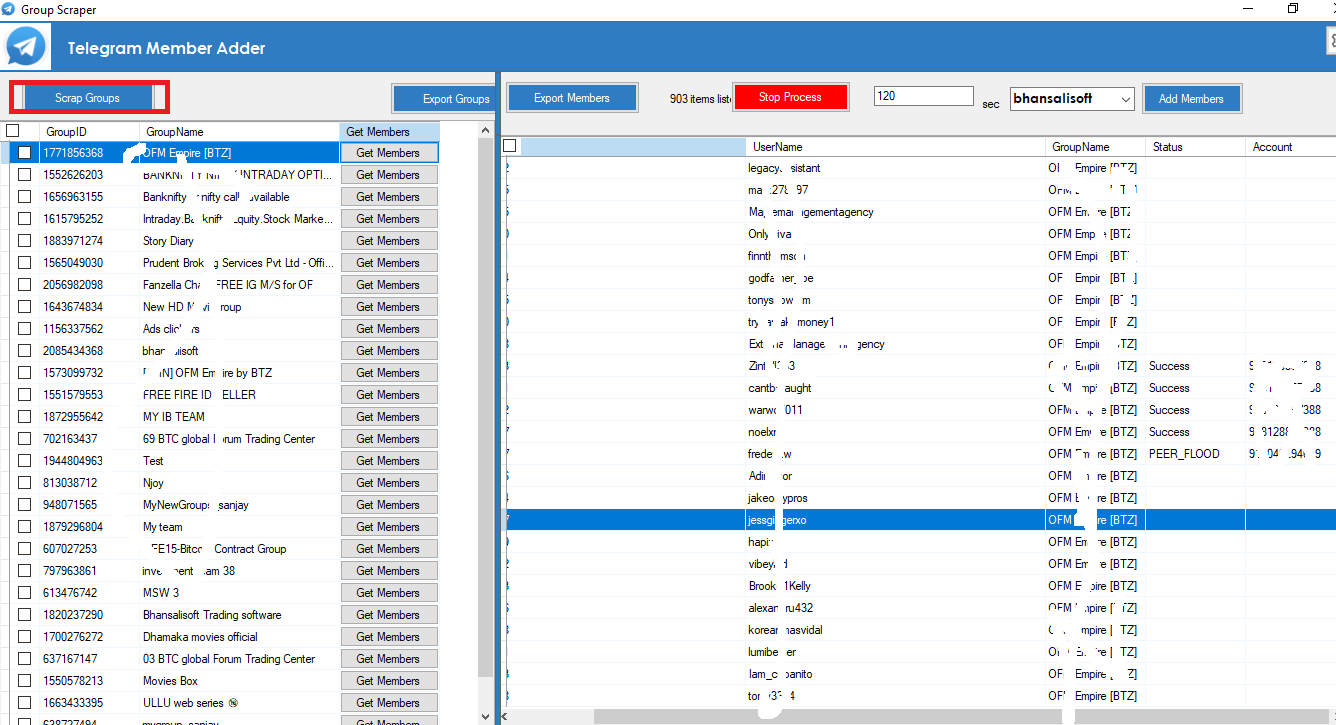
Telegram Group Scraper
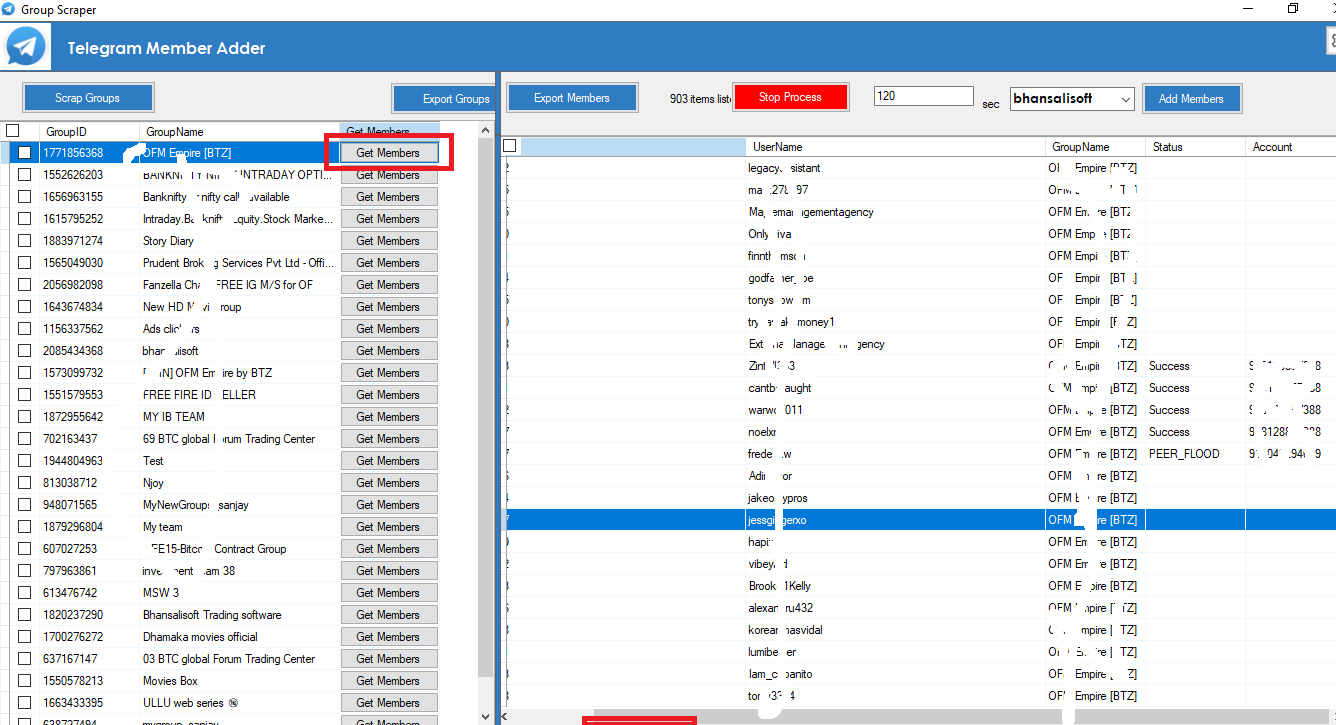
Select a group and click Get Members to process available Telegram group member information.
Telegram Member Adder
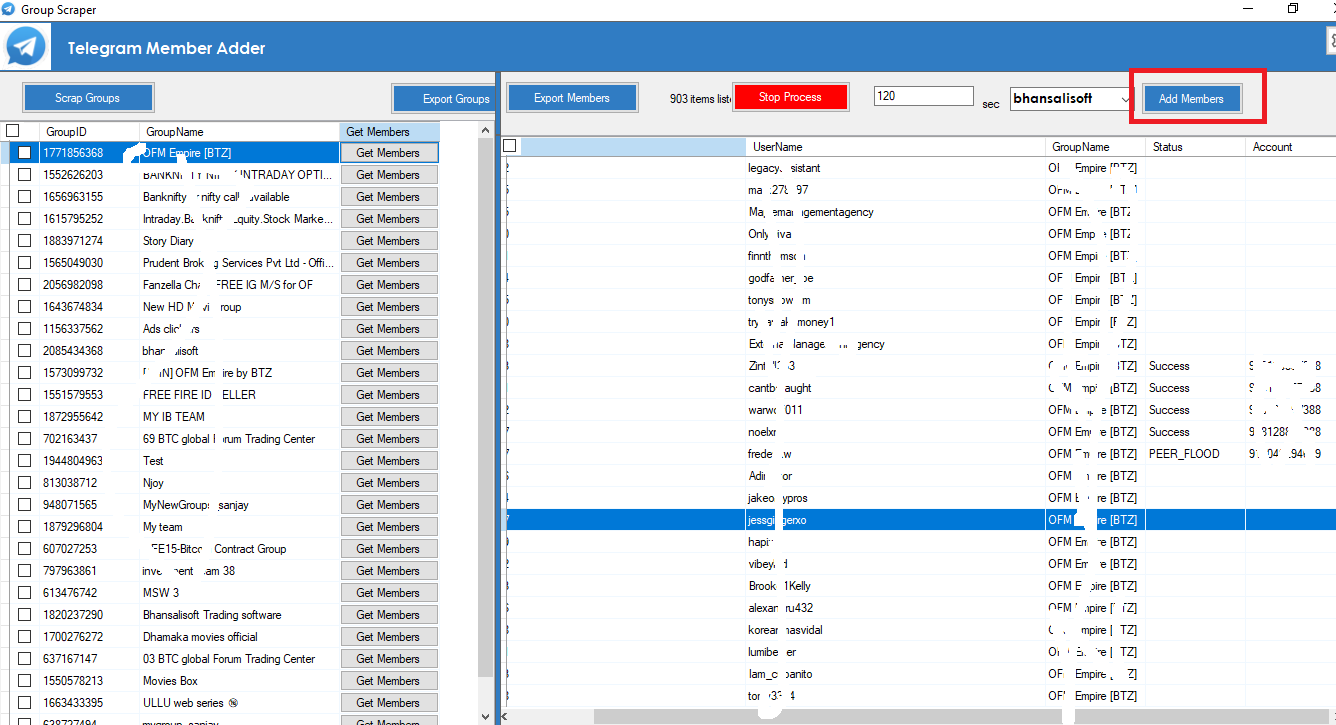
Select the destination group or channel and use the supported member-adding workflow for eligible Telegram users.
Why Choose Our Telegram Tools?
Our software provides an integrated solution for Telegram data collection and community management. Instead of using separate applications for every task, you can manage Telegram scraping, Telegram group scraping, Telegram channel scraping, Telegram member adding, Telegram adder workflows and Telegram bulk messaging using dedicated tools.
Whether you need a Telegram scraper, Telegram group scraper, Telegram channel scraper, Telegram member adder, Telegram adder, or Telegram message sender, our software provides an easy-to-use solution for supported Telegram workflows.
Explore our Telegram tools:
- Telegram Group & Channel Member Scraper
- Telegram Group & Channel Member Adder
- Telegram Bulk Message Sender
Please use Telegram tools responsibly and ensure your workflows comply with Telegram’s applicable terms, privacy requirements, API limitations and anti-spam policies.
| Type | Windows App |
|---|---|
| Author | bhansalisoft |
| Category | Apps / Windows |
| Price | $99 |
| Sales | 10 |
| Published | Feb 21, 2024 |
| Last Update | Aug 26, 2026 |
| Application Runtime | .NET 4 |
| Operating System Versions | Windows 10, Windows 8 Metro, Windows 8 Desktop, Windows 7, Windows Vista, Windows XP |
External listing. code.market does not sell this product and does not process payment for it. Pricing, payment, delivery, licensing, refunds, and support are handled by the third-party merchant on its own website. We may earn an affiliate commission from a referral. Details.
Products of the Week.
Submit🥇

STOP GUESSING WHAT TO POST
AI that learns your brand voice and builds a month of consistent, on-brand social content: carousels, posts and hooks that sound like you, not like everyone else's AI.
SaaS · 4,970 views · 45 clicksSaaS · Week 45 · 4,970 views · 45 clicks
🥈

Conversational Backlinks for Busy Founders
Place Backlink Relevant Conversation for your domain across Forums and Conversations
Website · 42,969 views · 225 clicksWebsite · Week 45 · 42,969 views · 225 clicks
🥉

upvote.club
Free Social Media Engagement that Helps Boost Your Content. Upvote Club supports 19 social networks with 100+ engagement actions in one dashboard. Add links to your posts and get free engagement from real users.
SaaS · 41,003 views · 120 clicksSaaS · Week 45 · 41,003 views · 120 clicks
#4

Substack Posting API
Onboard your Agent to Substack. Write Publish on Substack via API
SaaS · 59,948 views · 202 clicksSaaS · Week 45 · 59,948 views · 202 clicks
#5

Seenshot App
Free, Fast, MacOS Screenshot app. Make Screenshot cmd+shift+2 and send it via link
Desktop App · 29,323 views · 124 clicksDesktop App · Week 45 · 29,323 views · 124 clicks
#6

Hand-Placed Backlinks $9.99 per link. Flat rate.
Buy hand-placed forum, Q-A and directory backlinks. Flat $9.99 per link, no subscriptions — you only pay for approved listings.
Website · 5,108 views · 19 clicksWebsite · Week 45 · 5,108 views · 19 clicks
#7

Free Invoice Generator - PDF Invoices in Your Browser, No Sign-Up
A free invoice maker for freelancers and small businesses: fill in the invoice, check the live preview, and download a PDF that looks exactly like it. Any currency, tax per item, three templates, no sign-up, and nothing leaves your device.
3,756 views · 17 clicksWeek 45 · 3,756 views · 17 clicks
#8

Merge PDF Files Free - Combine PDFs in Your Browser, No Upload
A free PDF merger for office workers, students, and freelancers: combine PDFs and images into one file in the browser, reorder files and pages, pick page ranges, keep bookmarks, and open password-protected PDFs. Nothing is uploaded, no sign-up, no watermark.
3,475 views · 14 clicksWeek 45 · 3,475 views · 14 clicks