
Telegram ChatBot Pro

Description
100% working software and also best selling software for telegram chatbot. if you face any issue/ want to white label software you can email us at bhansalisoft781986@gmail.com
What is Telegram ChatBot Pro Software ?
Telegram ChatBot Pro Software – is advance unique pro software for Telegram that is Auto Respond/Reply to Every message for your business as per Reply Rule Setup.
-
- Telegram Auto Reply to Chat Message which you recieved in your Telegram profile
- Set Unlimited Telegram Reply Rule on Software
- Official Telegram Login
- Lifetime License for single machine
- 6 month support included
- You will Recieve only Software. Code is not Included
- After Purchase Product, Evanto Purchase code is software Licence code. you can check what is Purchase Code from this link : https://help.market.envato.com/hc/en-us/articles/202822600-Where-Is-My-Purchase-Code- if any issue email at : bhansalisoft781986@gmail.com
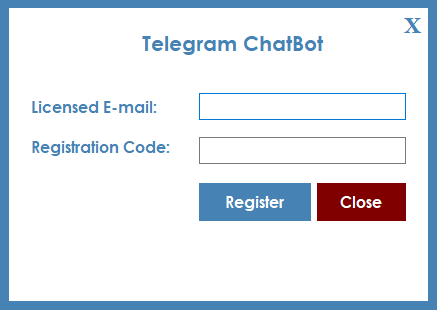
- After i Confirm your purchase Code , Please Unzip Main File and Run TelegramChatBot.exe and Register your Licence as per below Screen.
- Licence Email : Registered Email.
- Registration Code : Evanto Purchase Code.
- After Registration you can Use Software.
Getting Started
After Registration Licence , Start Software, software start with below screen
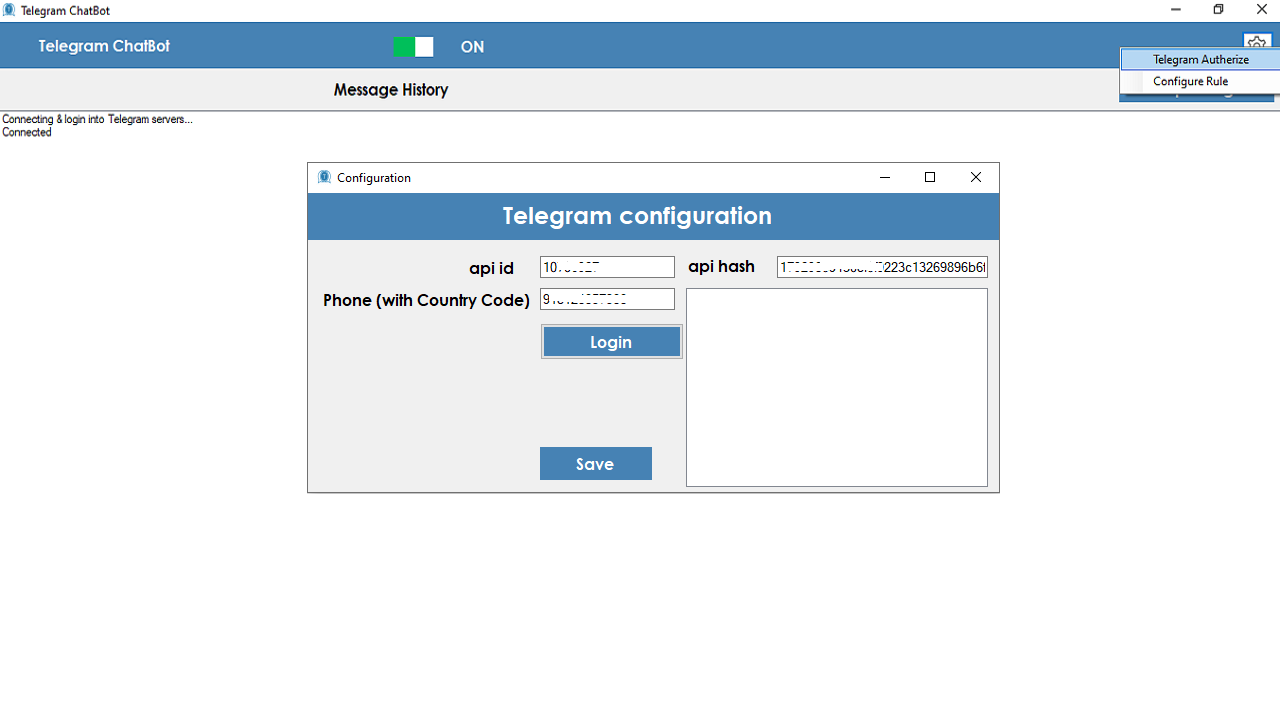
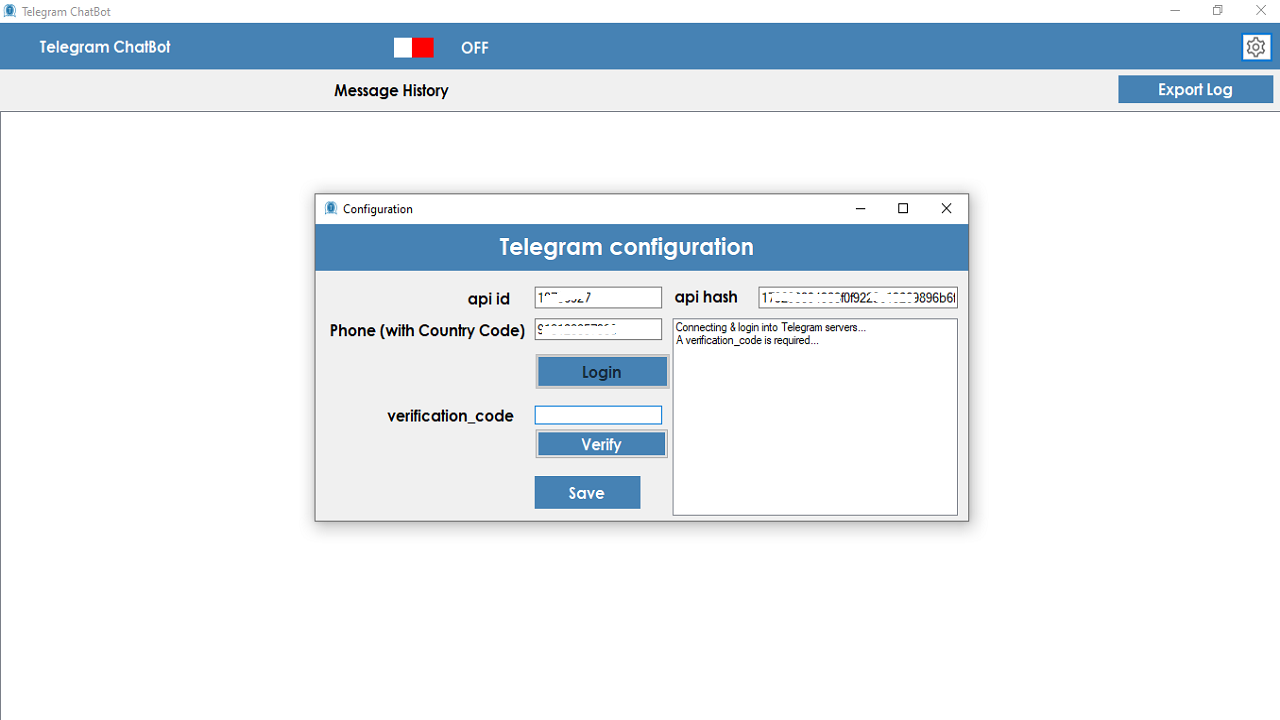
Telegram Login Configuration : Please click on Setting icon Top Right side and Click on Telegram Autherize Menu and login to your Telegram account with below detail.
- API ID : Telegram API ID.
- API Hash : Telegram API Hash.
- For Generate Telegram API ID and Hash, please check Detail ” target=”_blank”>https://core.telegram.org/api/obtaining_api_id#::text=Obtaining%20api_id&text=Log%20in%20to%20your%20Telegram,one%20api_id%20connected%20to%20it
- Phone (With Country Code) : Enter your Telegram account phone number with country code like for india Country code is : 91
- After fill detail ,click on Login button, then Telegram will send you Login Verification code, then in software please fill Code, click on Verify button
- Click on Save button for save all configuration on Software.
Configure Rules- Please click on Setting icon Top Right side and Click on Configure Rules Menu
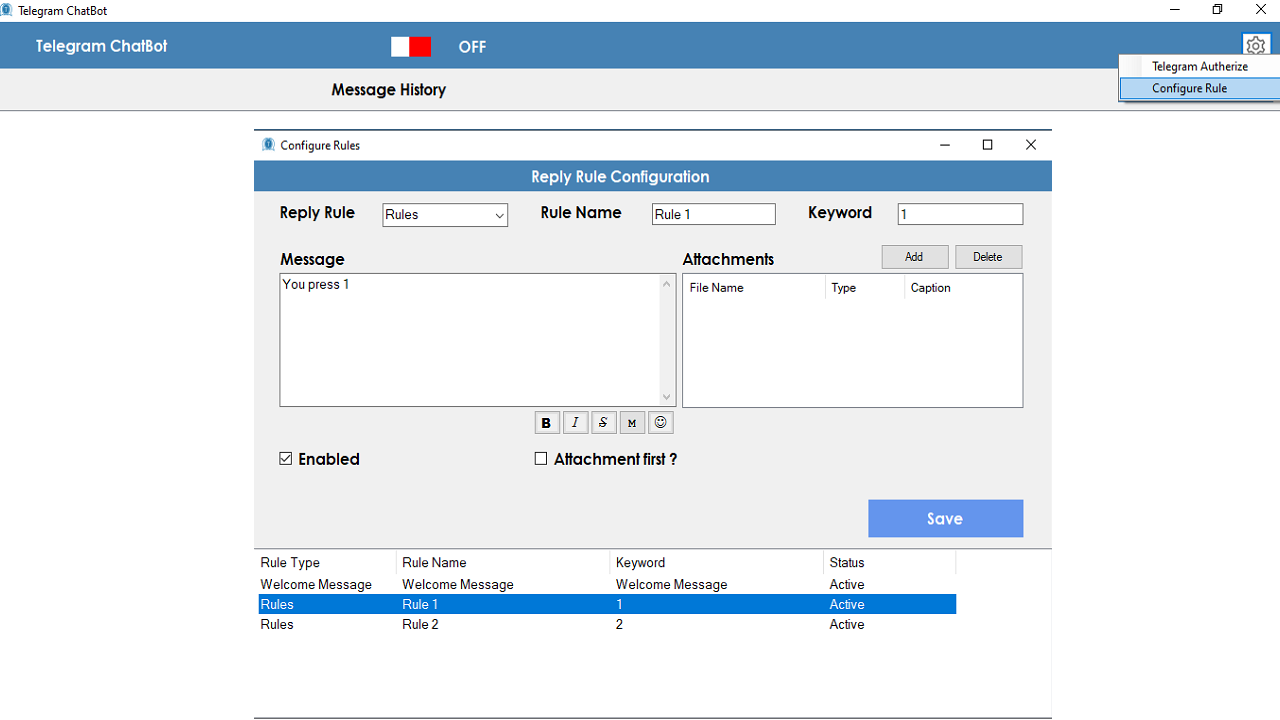
- You can create Two types of Rules :
- WelcomeMessage : This is welcome message is sent automatically when someone send message and does not match with any reply rule.
Example :
Please chooze our service
1 : you press 1
2 : you press 2
back: back to menu
- Rules : You can create Rules With your Rule Keyword : Like you want if user send message keyword: 1 then you want to send some unique message to your user
- Rule Name : Unique name of your rule
- Rule Keyword : Unique keyword of your rule like for example your add : 1
- Message :Message is sent when someone send message equal to Rule keyword
- Attachment :You can add attachment of anytype
- Enabled : you can enable or disable your rule
- isAttachmentfirst ?: if your reply rule contains message and attachment both, then if you want send Attachment first then Message then enable this option.
- Support Will provide from our profile Contact form on codecanyon .
- Support Will not Provide any types of customization.
- If you need any customization so extra cost will be charge.
- Single license support will provide for one single domain.
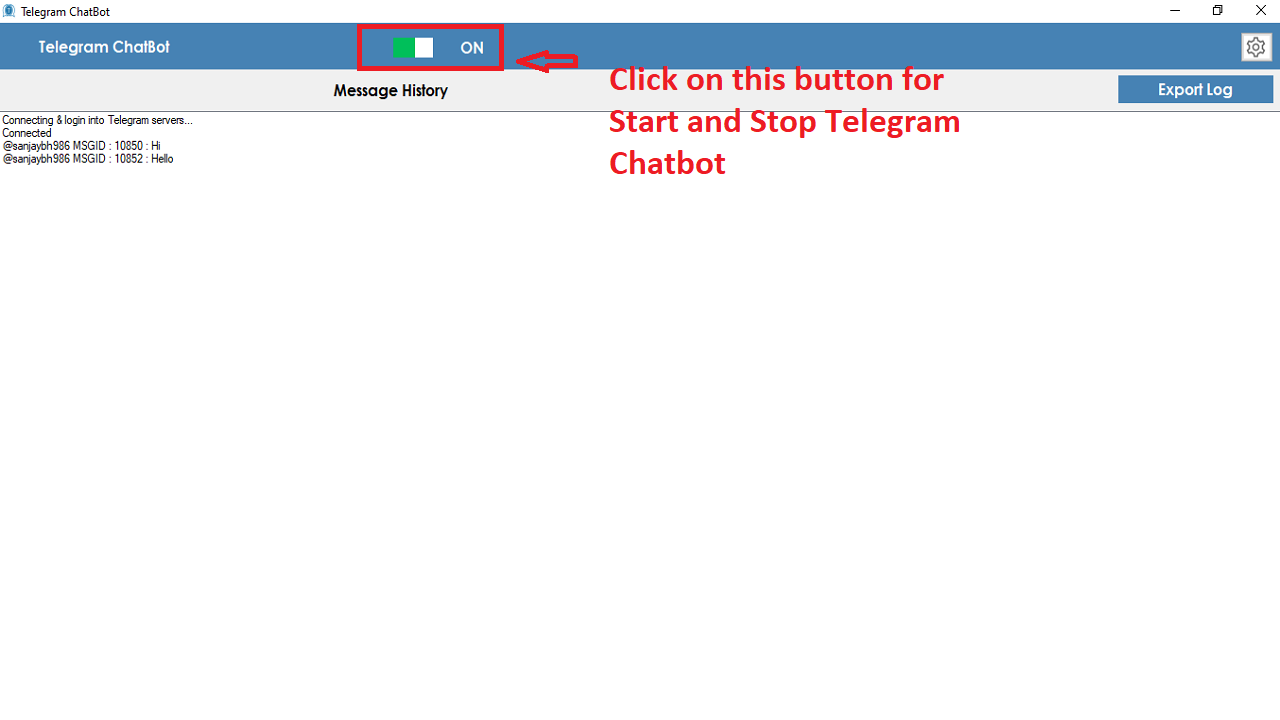
Now You can Start Telegram Chatbot Process, so that chatbot respond user message
Support Policy
Contact Us
For Support you can directly contact with us via email.
Contact Email: bhansalisoft781986@gmail.com
| Type | Windows App |
|---|---|
| Author | bhansalisoft |
| Category | Apps / Windows |
| Price | $29 |
| Sales | 1 |
| Published | Jun 22, 2023 |
| Last Update | Aug 7, 2026 |
| Application Runtime | .NET 4 |
| Operating System Versions | Windows 10, Windows 8 Metro, Windows 8 Desktop, Windows 7, Windows Vista, Windows XP |
External listing. code.market does not sell this product and does not process payment for it. Pricing, payment, delivery, licensing, refunds, and support are handled by the third-party merchant on its own website. We may earn an affiliate commission from a referral. Details.
Products of the Week.
Submit🥇

STOP GUESSING WHAT TO POST
AI that learns your brand voice and builds a month of consistent, on-brand social content: carousels, posts and hooks that sound like you, not like everyone else's AI.
SaaS · 4,284 views · 38 clicksSaaS · Week 45 · 4,284 views · 38 clicks
🥈

Conversational Backlinks for Busy Founders
Place Backlink Relevant Conversation for your domain across Forums and Conversations
Website · 41,994 views · 223 clicksWebsite · Week 45 · 41,994 views · 223 clicks
🥉

upvote.club
Free Social Media Engagement that Helps Boost Your Content. Upvote Club supports 19 social networks with 100+ engagement actions in one dashboard. Add links to your posts and get free engagement from real users.
SaaS · 40,036 views · 117 clicksSaaS · Week 45 · 40,036 views · 117 clicks
#4

Substack Posting API
Onboard your Agent to Substack. Write Publish on Substack via API
SaaS · 59,046 views · 198 clicksSaaS · Week 45 · 59,046 views · 198 clicks
#5

Seenshot App
Free, Fast, MacOS Screenshot app. Make Screenshot cmd+shift+2 and send it via link
Desktop App · 28,418 views · 122 clicksDesktop App · Week 45 · 28,418 views · 122 clicks
#6

Hand-Placed Backlinks $9.99 per link. Flat rate.
Buy hand-placed forum, Q-A and directory backlinks. Flat $9.99 per link, no subscriptions — you only pay for approved listings.
Website · 4,254 views · 19 clicksWebsite · Week 45 · 4,254 views · 19 clicks
#7

Free Invoice Generator - PDF Invoices in Your Browser, No Sign-Up
A free invoice maker for freelancers and small businesses: fill in the invoice, check the live preview, and download a PDF that looks exactly like it. Any currency, tax per item, three templates, no sign-up, and nothing leaves your device.
2,932 views · 17 clicksWeek 45 · 2,932 views · 17 clicks
#8

Merge PDF Files Free - Combine PDFs in Your Browser, No Upload
A free PDF merger for office workers, students, and freelancers: combine PDFs and images into one file in the browser, reorder files and pages, pick page ranges, keep bookmarks, and open password-protected PDFs. Nothing is uploaded, no sign-up, no watermark.
2,708 views · 13 clicksWeek 45 · 2,708 views · 13 clicks