
Team Showcase - Wordpress Plugin
Description
With this plugin you can display a set of pictures and information in different layouts. The main purpose of the plugin is to display team/staff members, but it can be used for other purposes.
It’s perfect to display the members of your staff, team or working force, even divided by categories or groups! You can also use it to display testimonials or other kinds of content that require an image and text!
You can display the entries in 4 different main ways
GRID
The members will display in a responsive grid with the number of columns you set and with the information to the right, left or below the image, depending on your settings.

GRID WITH INFORMATION ON HOVER
The members will display also in a responsive grid, but the information will display when you hover the image.

TABLE
A simple responsive table layout to display the members in a simple way.

THUMBNAILS PAGER LAYOUT
The thumbnails of the members pictures will display smaller and on click the bigger picture and information will display in a designated area. Very similar to a gallery functionality where you can navigate the content clicking on the small thumbnails.

You can customize and enhance the layout, with several layout options and pre-built styles.
Number of Columns
In the grid layouts you can choose how many columns you want to display. The Columns will be responsive and adapt in different screen sizes.
Image Shapes and effects
You will be able to choose if you want the images to display with squared corners, rounded corners or even circular shaped! In addition you can give them extra styles, like grayscale, image borders and shadow styles.
Text Align
Simple text alignment options: center, right of left.
Composition
In the layouts where this option applies, you’ll be able to choose if the image will be above, to the right or to the left of the content.
JQuery Category Filter
On the Grid and Hover Grid layouts you’ll have the option to activate and display a Jquery Groups filter! You can display all your members and in one click your visitors will be able to filter out a selected category!

THEME PRESETS!
In addition to the options above, you can choose a preset combination of options.
Examples

Future versions of the plugin will probably include more built-in styles and themes!
Filter by categories
You can group your entries by categories and display only a selected category or all of them! This way you can even have a list of your team/staff members by position or departments.Drag & Drop Re-Ordering!
When viewing the member entries archive, you can activate the Drag & Drop Ordering to easily change the order of the entries!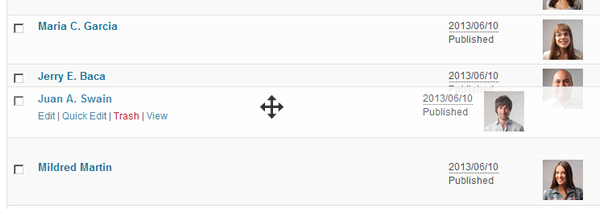
Single Pages for each entry!
You can choose if you want the entries to have a single page active or not! If you have the single page activated, you can choose if the entries in the layout will have a link to this single page or not!JSON-LD: Prepare for the future
The plugin is able to include json-ld structured data that can be read by search engines that provide information about your page and member entries. This will be compatible with possible rich snippets included in search engine result pages.Widget Ready!
The shortcode will work on widgets! Just copy the shortcode and include it in a text widget and the chosen layout will display in the widget!Shortcode and PHP Function Generator!
It couldn’t be more easy to generate the necessary code to display the entries. Just go to the Shortcode generator, choose the settings you want and the shortcode and the php function that you can use will be generated and ready to copy and paste where you want! Shortcodes are to be used in posts, pages and widgets, while the php function will be necessary if you want to hard code the team showcase layout in your theme files.The generator will make a preview of how the layout looks with the selected settings.

Input fields for specific content
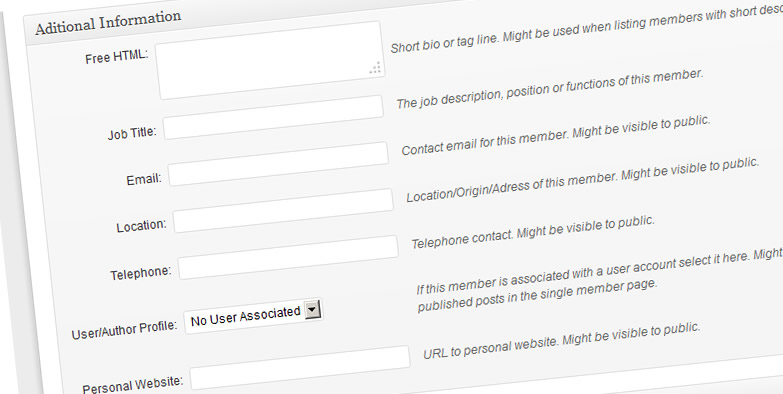 When adding a new entry, you’ll have new fields for specific content. By default this fields are:
- Free HTML – A text area where you can include HTML content. Can be used for example to include content that doesn’t fit the other input fields, or simply to place longer content like a tag line for the user.
- Job Title – Name of the position of the team member, or department definition.
- Telephone
- Location
- Personal Website
- Social Networks links (Twitter, Facebook, Google Plus, Linkedin, Youtube and Vimeo)
New fields can be added in the settings page.
Custom Feature Name!
You don’t like this feature to be called ‘Members’? Go in the plugin settings and change it to whatever you want!
Default Image sizes
You can change the default size of your images on the settings. This way, when you upload new images they will be resized to the specified dimensions.Single Page Settings
When can choose if the single page feature will be active or not and what information you want to display on it! If your team member entry is connected with a wordpress user, you can display the latest posts, for example!Other Settings
Other settings include the social icons size and shape and also if the email information has the mailto:email format or not.Multi-use! Be creative!
Although this was built to better serve as a simple way to display team or staff member in your wordpress website, you can use it for other purposes! If you have a problem that requires a plugin that will display a list of images together with information, this plugin can be useful! You can for example create a list of products or services!Updates Log
How to update this plugin? – Read the FAQ version 2.2.6 – September 2021- PHP error fixed for PHP8 compatibilityversion 2.2.4 – April 2020
- bug in autocomplete
- bug fix in pagination & search
- Option to enable block editor
- Extra spaces in image size settings fix
Version 2.1.3 – September 10th 2018
 - category will link to url added in description in table layout
 - fix bug on image link on table layout
- added 'hoverposition' display option for hover layout
- Version 2.1 – June 27th 2018
- Added code to prevent the plugin to look for updates on wordpress.org repository- Version 2.0.3 – May 22nd 2018
- updated fontawesome version to 5.0.2
- included option to add header titles to table layout
- Version 2.0.1 – April 12th 2018
- fixed css issue.
- removed option to register plugin - was not working properly
- added better integration with WPML and Polylang
- worked on option to limit one entry per user - added option on settings page
- improved order by last name option
- fixed filter+lightbox issue
- added site='' parameter for shortcode, to fetch entries from another blog/site by blog id.
- fixed function for divi
- improved isotope filter
- Version 1.9.6 – January 24th 2018
- added fix for orderby slug in dropdown for the search form
- improved code for search results with pagination
- implemented order by random (on session) to allow correct pagination with random order
- added fourth taxonomy
- edited search code to allow 'loadmore' to be kept on search results
- added 'search' parameter to shortcode
- added option to register the plugin for automatic updates
- Version 1.9.2 – November 16th
- added administration filters
- Added third taxonomy
- Added shortcode parameter to read which taxonomy to use to create live filters
- added meta_query parameter to shortcode (non documented) : meta_query='_tsposition:Position:LIKE'
- personal url link fixed in table layout
- added do_shortcode for custom fields
- Version 1.8.6 – August 29th 2017
- Added option to include JSON-LD structural data type 'Person' to single pages
- redirect user pages to associated team member entry
- lightbox feature added
- table layout now abides to field order array
- load more feature (in pagination options)
- improved global variables, replaced with apply_filters()
- improved tel: links
- workaround implemented to fix 'associated user url' option
- bug fix on table layout - link to personal URL
- Version 1.8.4 – April 18th 2017
- Isotope Filter Bug Fix
- Added IMDB social icon
- Added 'Load More' button
- Improved new 'Order by Last Word in Name Feature'
- Added 'Search' and 'All' label options in the settings
- added 'include' and 'includetax' parameters to search shortcode
- added undocumented dropdown filter option
- ajax pagination improvements
- search label fix in form
- pager js code modification
- Version 1.7.7 – January 5th 2017
- orderby slug for groups also on layouts
- meta_key='' and orderby='meta_value_num' shortcode parameters are now accepted
- Version 1.7.5 – November 3rd 2016
- hidden features implemented:
Groups might have URL if added in description
orderby='meta_value' and meta_key='' parameters added to shortcode
- Version 1.7.3 – July 18 2016
- fixed css bug
- added twitch and steam social profiles
- added new rewrite parameter when registering cpt
- bug fix ajax pagination
- bug fix category filter
- changed filter code to allow for non-latin chars as the filter identifier
- Version - Version 1.6.7 – April 30 2016
- order code improvement
- isotope filter improved
- Version 1.6.6 – March 18 2016
- Added new social network fields
- Dicontinued image icons - vector icons now are the only choice
- CSS improvements
- Ajax pagination issue fixed
- Version 1.6.2 – February 08 2016
- Added isotope hide filter
- Order by bug fixed
- Version 1.6 – January 22nd 2016
- custom js field added to settings page
- search code improved
- hidden display parameters for hover layout display='hovertitle,hovertitleup'
- filter.js code improvement
- auto complete search
- Version 1.5 – September 11th 2015
- link css option (to help lightbox integration)
- fontawesome version updated
- css improvements for filter menu
- new entry url option - personal url (defaults to inactive)
- fixed table layout bug (Name displaying twice)
- pager code improvement
- better search input sanitazing
- Version 1.4.6 – July 14th 2015
- Added breadcrumb/archive page redirect option- Version 1.4.3 – April 2nd 2015
- Added option for social nofollow links
- New link option - link to full image (works good with lightbox plugins)
- option for image shape on single page
- updated bxslider version
- Version 1.4 – February 13th 2015
- Improved code in single pages - Added 'People' rich snippets markup
- Fixed small syntax bugs
- Version 1.3.9 – January 20th 2015
- CSS bug on Safari fixed
- New tel: links option
- Version 1.3.8 – December 11th 2014
- New Feature: 'Remember Shortcode Settings'
- New option in shortcode generator: exclude ids
- Updated fontAwesome version
- Added anchor text for personal url field option
- Small bugs solved
- Version 1.3.7 – September 24th 2014
- drag & drop code updated
- small improvement to 'order by last name' option
- added 'children' support for filter navigation menu (dropdown)
- Version 1.3.6 – September 6th 2014
- search message bug fixed
- small css improvements
- Version 1.3.5 – June 27th 2014
- Font icon bug fix- Version 1.3.4 – June 15th 2014
- Added option to choose single page theme template- Version 1.3.3 – May 26th 2014
- Added custom css option field
- Added option to orderby last word (last name)
- Slider code updated (bxslider version)
- Version 1.3 – April 14th 2014
- Fontawesome Social Icons (retina ready)
- Pagination option
- New single page link options
- Version 1.2.7 -March 24th 2014
Fontawesome version updated- Version 1.2.6 – February 4th 2014
Filter Categories ordered by slug
Alt image attribute fix
Small settings page fix
- Version 1.2.4 – December 10th 2013
New admin Menu Icon (WordPress 3.8 compatible)
Admin screen now displays all entries (easier to drag&drop)
- Version 1.2.2 – November 5th 2013
Added Search Widget and Shortcode;
Added Filter option to Thumbnails Pager layout;
Possibility to select multiple categories to display;
- Version 1.2.1 – October 3rd 2013
Small jQuery improvement for the Thumbnails Pager layout- Version 1.2 – September 23rd 2013
Added IDs filter in Shortcode Generator - Ability to select specific members to display
Added Instagram Icon
- Version 1.1 – July 2nd 2013
CSS changes, Font-Awesome update
New Drag & Drop Ordering feature
New jQuery Category Filter for selected Layouts
Default Image for table layout and hover grid layout
Added email icon to Social Links
Email html enconde to prevent spam bots to grab email
Version 1.0 – June 14th 2013
Initial Release
Credits
The plugin uses the awesome bxSlider to build the thumbnails pager layout and the Font Awesome Icons to display the small icons. Demo pictures by ollyi, from PhotoDune. Drag & Drop ordering feature inspired by Jake Goldman.Categories
Tags
External listing. code.market does not sell this product and does not process payment for it. Pricing, payment, delivery, licensing, refunds, and support are handled by the third-party merchant on its own website. We may earn an affiliate commission from a referral. Details.
Products of the Week.
Submit#1

wanapi.app
Wan API is a developer platform for the Wan video model family. Compare Wan 3.0, Prime and Pro specifications and prices, then prepare a request in the preview playground.
Other · 8,073 views · 20 clicksOther · Week 42 · 8,073 views · 20 clicks
#2

wanapi.ai
Wan API is a developer platform for the Wan video model family. Compare Wan 3.0, Prime and Pro specifications and prices, then prepare a request in the preview playground.
Other · 7,422 views · 11 clicksOther · Week 42 · 7,422 views · 11 clicks
#3

yee.site
Your link in bio, but a real website. Start from beautiful templates and ready-made sections, then add a shop, bookings, a blog and as many pages as you need. Perfect for your link in bio, portfolio or personal site.
Other · 13,496 views · 22 clicksOther · Week 42 · 13,496 views · 22 clicks
#4

upvote.club
Free Social Media Engagement that Helps Boost Your Content. Upvote Club supports 19 social networks with 100+ engagement actions in one dashboard. Add links to your posts and get free engagement from real users.
SaaS · 34,397 views · 104 clicksSaaS · Week 42 · 34,397 views · 104 clicks
#5

Seenshot App
Free, Fast, MacOS Screenshot app. Make Screenshot cmd+shift+2 and send it via link
Desktop App · 22,890 views · 114 clicksDesktop App · Week 42 · 22,890 views · 114 clicks
#6

Conversational Backlinks for Busy Founders
Place Backlink Relevant Conversation for your domain across Forums and Conversations
Website · 34,667 views · 204 clicksWebsite · Week 42 · 34,667 views · 204 clicks
#7

Substack Posting API
Onboard your Agent to Substack. Write Publish on Substack via API
SaaS · 53,535 views · 190 clicksSaaS · Week 42 · 53,535 views · 190 clicks
#8

codester.com
SocialDesk+: Omnichannel Social Commerce & Business Management Platform This is stronger than simply “Social Commerce and Messaging” because it tells buyers this is a complete business platform, not just a messaging script. Turn Social Conversations Into Sales SocialDesk+ is a complete omnichannel social commerce and business management platform built for businesses that sell and communicate with customers through social media. Instead of switching between WhatsApp, Facebook, Instagram and TikTok, businesses can manage customer conversations, comments, products, leads, follow-ups, automation, teams and business reports from one professional workspace. And because the full source code is included, developers, agencies and entrepreneurs can customize, rebrand and launch SocialDesk+ as their own business solution or SaaS platform. 🚀 Build Your Own Social Commerce Business SocialDesk+ gives you the foundation to launch: - Your own SaaS platform - A white-label social CRM - A social-commerce management system - A customer communication platform - A business messaging solution - A custom solution for clients - A multi-business subscription platform 💬 Connect Your Customers Supported social channels include: WhatsApp • Facebook • Instagram • TikTok Bring supported conversations into one centralized workspace and help businesses respond faster without constantly switching between platforms. 🛍️ More Than a Messaging Platform SocialDesk+ combines communication with the tools businesses need to manage customer opportunities: Inbox Manage customer conversations from connected channels. Comments Monitor and respond to social-media comments. Customers & Leads Organize customer information and potential buyers. Products & Catalog Manage products and give your team quick access to product information. Follow-Ups Make sure potential customers don't get forgotten. Automation Automate repetitive customer questions and responses. AI Assistant Provide AI-assisted communication when configured. Team Management Give managers and staff access to the business workspace. Reports & Analytics Track activity using business reports and analytics. The current product listing already includes these capabilities. 🔥 Why Buyers Will Want It Launch Faster Start with an already-built business platform instead of developing the entire system from zero. Customize Everything The full source code is included, allowing developers to change branding, features, workflows and integrations. Build a SaaS Create multiple business workspaces and offer SocialDesk+ as a subscription-based service. Sell to Businesses Offer it to retailers, restaurants, service businesses, online sellers, agencies and other businesses that communicate with customers through social media. Mobile + Web + Backend This isn't just a mobile UI template. It includes: - Flutter mobile application - Python / FastAPI backend - Web interface - Administration tools - Database infrastructure - API-based architecture - SQLite / PostgreSQL support - Android and iOS project structure 💼 One Platform. Multiple Business Opportunities. For SaaS Entrepreneurs Launch your own subscription platform and allow multiple businesses to operate inside separate workspaces. For Software Agencies Customize and rebrand the platform for clients instead of building an omnichannel business system from scratch. For Developers Use the complete source code as a foundation for your own social-commerce or customer-management product. For Businesses Deploy a dedicated version for your own customer-service and social-commerce operations. 🧩 What's Included Mobile - Flutter / Dart - Android - iOS project Backend - Python - FastAPI - SQLAlchemy - Alembic Database - SQLite - PostgreSQL Web - HTML5 - CSS3 - JavaScript Deployment - Docker - Docker Compose - Production configuration Business Platform - Multi-workspace architecture - Authentication - Teams - Customers - Products - Messaging - Comments - Automation - Reports - Subscriptions - Administration The current listing also documents third-party integrations such as Meta, TikTok, Stripe, Firebase, SMTP and optional OpenAI configuration. ⚡ What Makes SocialDesk+ Different? You're not buying a simple: ❌ Chat UI ❌ WhatsApp clone ❌ Flutter template ❌ Admin dashboard ❌ Basic CRM You're getting a complete business platform foundation that can be customized, branded and commercialized. Connect. Automate. Manage. Grow. SocialDesk+ Omnichannel Social Commerce & Business Management Platform One important change I'd make to the current listing The current page starts with: “A simple guide to managing your social conversations, customers, products and business activity.”
Other · 20,907 views · 35 clicksOther · Week 42 · 20,907 views · 35 clicks
#9

sandbook.app
Sandbook reads EPUB, PDF, web pages and scanned pages aloud with Kokoro TTS, an open neural voice model that runs on your iPhone, free and offline. Choose from 41 natural voices in English, Spanish, French, Italian, Brazilian Portuguese and Hindi and follow each word as it is spoken. Try the same voices in your browser first with the free Kokoro TTS online demo.
Other · 20,816 views · 17 clicksOther · Week 42 · 20,816 views · 17 clicks