
Team Builder — Meet The Team WordPress Plugin

Description




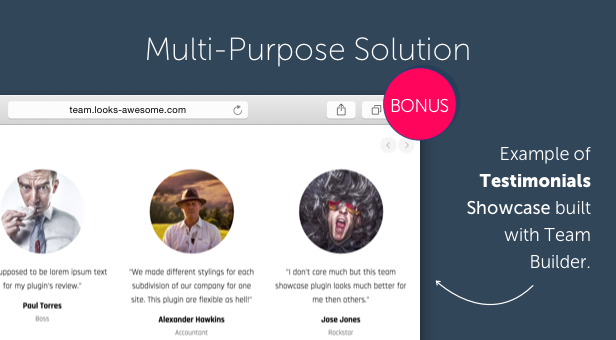
Team Builder is a premium multi-use WordPress plugin with main purpose of building awesome team showcase on your website. With this plugin you can build fantastic team showcase in very little time. It’s super easy and fun to deal with Team Builder thanks to powerful admin builder and shortcodes. And the best thing is it’s possible to use this plugin for crafting amazing testimonials or logo showcases as well. Basically it’s great for so many use cases built on image grid basis. Try your imagination and check out live demo!
Features
- New! WP Bakery Page Builder support.
- New! Profile sliding panels with 5 themes and WordPress native visual/html editor.
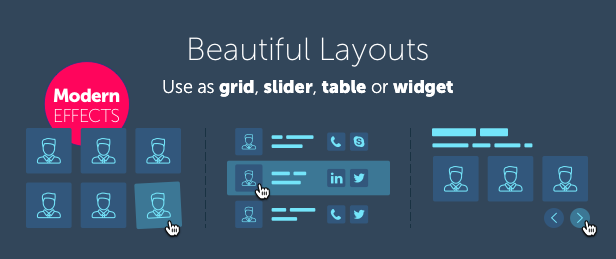
- Different layouts: grid, sliders, tables, widgets (more to go).
- Absolute freedom on design customization: colors, font settings, spacings, arrangement of elements etc.
- Visual drag and drop admin builder.
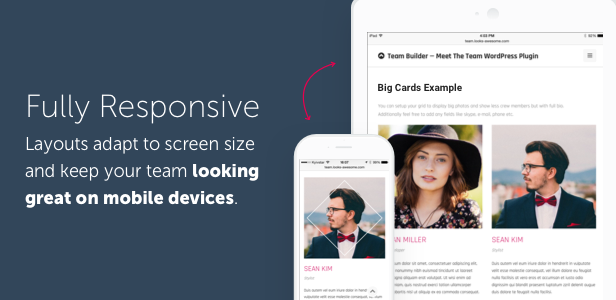
- Fully responsive.
- Modern skill bars and star bars.
- Team filtering by departments or any tags.
- Construct your card: skype, email, phone, website, bio or tagline, location etc.
- Predefined style presets for each layout.
- Multi-use plugin: team, logos, testimonials etc. (check live demo).
- Fancy hover effects on your choice (more to go).
- Store employees as contacts for unlimited use.
- Option to open any custom URL by clicking on member.
- Multiple teams, members and departments.
- Social icons bar with styling options.
- Easy to use shortcodes.
- Intuitive admin UIX with compact and clean design.

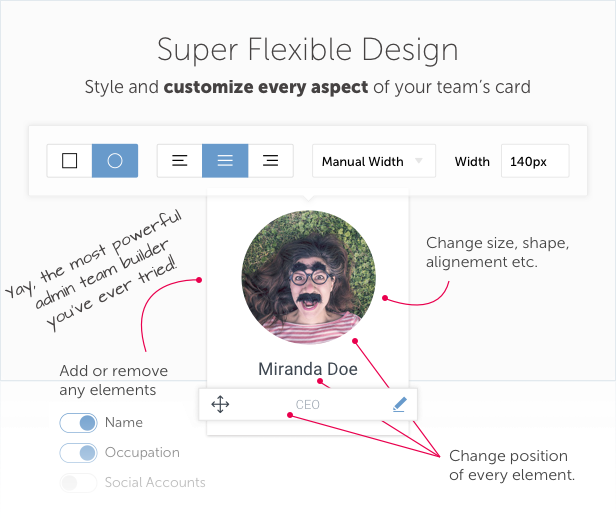
Team Builder is the most beautiful team showcase WordPress plugin with unique most advanced on market admin builder. The last thing is a huge time saver and inspires you to build something fresh and unique. Play with settings, turn On/Off or re-arrange different blocks, style it and place shortcode on your page. That’s it!
With this plugin you get unbelievable freedom on design customization. It’s possible to build any layout because you can both style and re-arrange blocks/elements. Basically you can build whole ‘About Us’ page using Team Builder only. Just use different templates and construct varied and interesting layout for your WordPress website or blog. You?ll love that handy and powerful admin builder!
Requirements:
PHP 5.3. or higher.
Known issues:
Due to browser limitations to sending/receiving data there can issue with adding new member to team after some point (like 70+ members in team). We recommend to fragment such teams into smaller ones.

Changelog
Latest Version
- [1.6.0] - Compatibility with PHP 8+ and security update
- [1.5.7] - Compatibility with latest Revolution slider
- [1.5.6] - Maintenance update
- [1.5.5] Fix: team member editing and PHP notices on PHP 7 sites
- [1.5.3-4] Update: For admin when user can't open employee edit panel more than once
- [1.5.2] Improvement: Grid initially hidden until styles are loaded
- [1.5.1] Feature: Non-admin user access option
- [1.5.1] Improvement: Order employees by Name
- [1.5.1] Fix Panel contact aligning
- [1.5.1] Fix: Reset layout UL default styles
- [1.5.1] Fix: Dropdown conflict with bootstrap JS
- [1.5.0] Feature: search through employees in admin area
- [1.5.0] Feature: optional search field for shortcode
- [1.5.0] Fix: admin UI color buttons hover color
- [1.5.0] Fix: PHP > 5.4 conflicts
Version 1.4.0–1.4.2
- [1.4.2] Fix: Rich text editor loading for employee panel
- [1.4.1] Fix: Rich text editor loading
- [1.4.0] Feature: Sorting by date, custom order or random
- [1.4.0] Feature: Slider autoslide
- [1.4.0] Feature: Adaptive height options
- [1.4.0] Improvement: remove all members from team in one click
- [1.4.0] Improvement: Pinterest social field for employee
- [1.4.0] Improvement: Employee deletion UX
- [1.4.0] Fix: Display empty cells for table layout with correct width
- [1.4.0] Fix: Limit maximum size for social icons in builder
Version 1.3.1–1.3.4
- [1.3.4] Feature: Employee panels for widget layout added
- [1.3.4] Feature: Choose animation type for Employee panel
- [1.3.4] Feature: WPML localization ready
- [1.3.4] Fix: Remove extra padding for grid items
- [1.3.4] Fix: Paint even rows for table correctly after filtering
- [1.3.4] Fix: Show round photos in IE & FF
- [1.3.3] Feature: new field "Website Label" for team members (thanks to afterglowdesigns)
- [1.3.3] Feature: "Push all employees" button in team panel
- [1.3.3] Fix: Rich text editor added to "Add employee panel"
- [1.3.3] Fix: Load plugin styles and scripts only on shortcode call
- [1.3.3] Fix: Add independent Font Awesome style to resolve conflicts with other plugins
- [1.3.3] Fix: Return back panel "Close" button for mobile screen resolution
- [1.3.2] Fix: Issue with WP Bakery Page Builder and plugin's activation
- [1.3.2] Improvement: Minor tweaks on admin page and animations
- [1.3.1] Fix: Hotfix for sliding panels
Version 1.3
- Profile sliding panels (5 themes)
- WP Bakery Page Builder support
- Filling effect for skill bars
- Minor admin improvements
Version 1.2
- Skill bars and star bars
- Option to show member's location
- More social networks added
Version 1.1
- Team filtering
- Option to show member's website
- Option to open any custom URL by clicking on member
Version 1.0.2
- Divider width option (in 1.0.2)
- Minor admin improvements and optimizations (in 1.0.2)
- Fix for links hovering (in 1.0.1)
- Plugin is approved on CodeCanyon
You May Also Like
| Type | WordPress Plugin |
|---|---|
| Author | looks_awesome |
| Category | Wordpress / Interface Elements |
| Price | $45 |
| Sales | 1,387 |
| Rating | 4.44 from 39 ratings |
| Published | Sep 3, 2015 |
| Last Update | Jul 31, 2026 |
| Compatible Browsers | IE9, IE10, IE11, Firefox, Safari, Opera, Chrome, Edge |
| Compatible Software | WordPress 7.0.x, WordPress 6.9.x, WordPress 6.8.x, WordPress 6.7.x, WordPress 6.6.x, WordPress 6.5.x, WordPress 6.4.x, WordPress 6.3.x, WordPress 6.2.x, WordPress 6.1.x, WordPress 6.0.x |
| Gutenberg Optimized | No |
| Source Files Included | JavaScript JS, CSS, PHP |
Categories
Tags
External listing. code.market does not sell this product and does not process payment for it. Pricing, payment, delivery, licensing, refunds, and support are handled by the third-party merchant on its own website. We may earn an affiliate commission from a referral. Details.
Products of the Week.
Submit🥇

STOP GUESSING WHAT TO POST
AI that learns your brand voice and builds a month of consistent, on-brand social content: carousels, posts and hooks that sound like you, not like everyone else's AI.
SaaS · 3,979 views · 35 clicksSaaS · Week 45 · 3,979 views · 35 clicks
🥈

Conversational Backlinks for Busy Founders
Place Backlink Relevant Conversation for your domain across Forums and Conversations
Website · 41,625 views · 222 clicksWebsite · Week 45 · 41,625 views · 222 clicks
🥉

upvote.club
Free Social Media Engagement that Helps Boost Your Content. Upvote Club supports 19 social networks with 100+ engagement actions in one dashboard. Add links to your posts and get free engagement from real users.
SaaS · 39,654 views · 114 clicksSaaS · Week 45 · 39,654 views · 114 clicks
#4

Substack Posting API
Onboard your Agent to Substack. Write Publish on Substack via API
SaaS · 58,683 views · 198 clicksSaaS · Week 45 · 58,683 views · 198 clicks
#5

Seenshot App
Free, Fast, MacOS Screenshot app. Make Screenshot cmd+shift+2 and send it via link
Desktop App · 28,064 views · 122 clicksDesktop App · Week 45 · 28,064 views · 122 clicks
#6

Hand-Placed Backlinks $9.99 per link. Flat rate.
Buy hand-placed forum, Q-A and directory backlinks. Flat $9.99 per link, no subscriptions — you only pay for approved listings.
Website · 3,922 views · 19 clicksWebsite · Week 45 · 3,922 views · 19 clicks
#7

Free Invoice Generator - PDF Invoices in Your Browser, No Sign-Up
A free invoice maker for freelancers and small businesses: fill in the invoice, check the live preview, and download a PDF that looks exactly like it. Any currency, tax per item, three templates, no sign-up, and nothing leaves your device.
2,601 views · 17 clicksWeek 45 · 2,601 views · 17 clicks
#8

Merge PDF Files Free - Combine PDFs in Your Browser, No Upload
A free PDF merger for office workers, students, and freelancers: combine PDFs and images into one file in the browser, reorder files and pages, pick page ranges, keep bookmarks, and open password-protected PDFs. Nothing is uploaded, no sign-up, no watermark.
2,421 views · 13 clicksWeek 45 · 2,421 views · 13 clicks