TakeawayKit - White-Label Restaurant CMS
Description
Launch beautiful restaurant and takeaway websites faster with a complete, customisable CMS. TakeawayKit is a modern white-label restaurant website and administration system designed for developers, freelancers and agencies who build websites for restaurants, takeaways, cafes and other food businesses. Built with Astro 7, TypeScript, SCSS and Cloudflare Workers, it combines a responsive customer-facing website with a powerful content management dashboard.
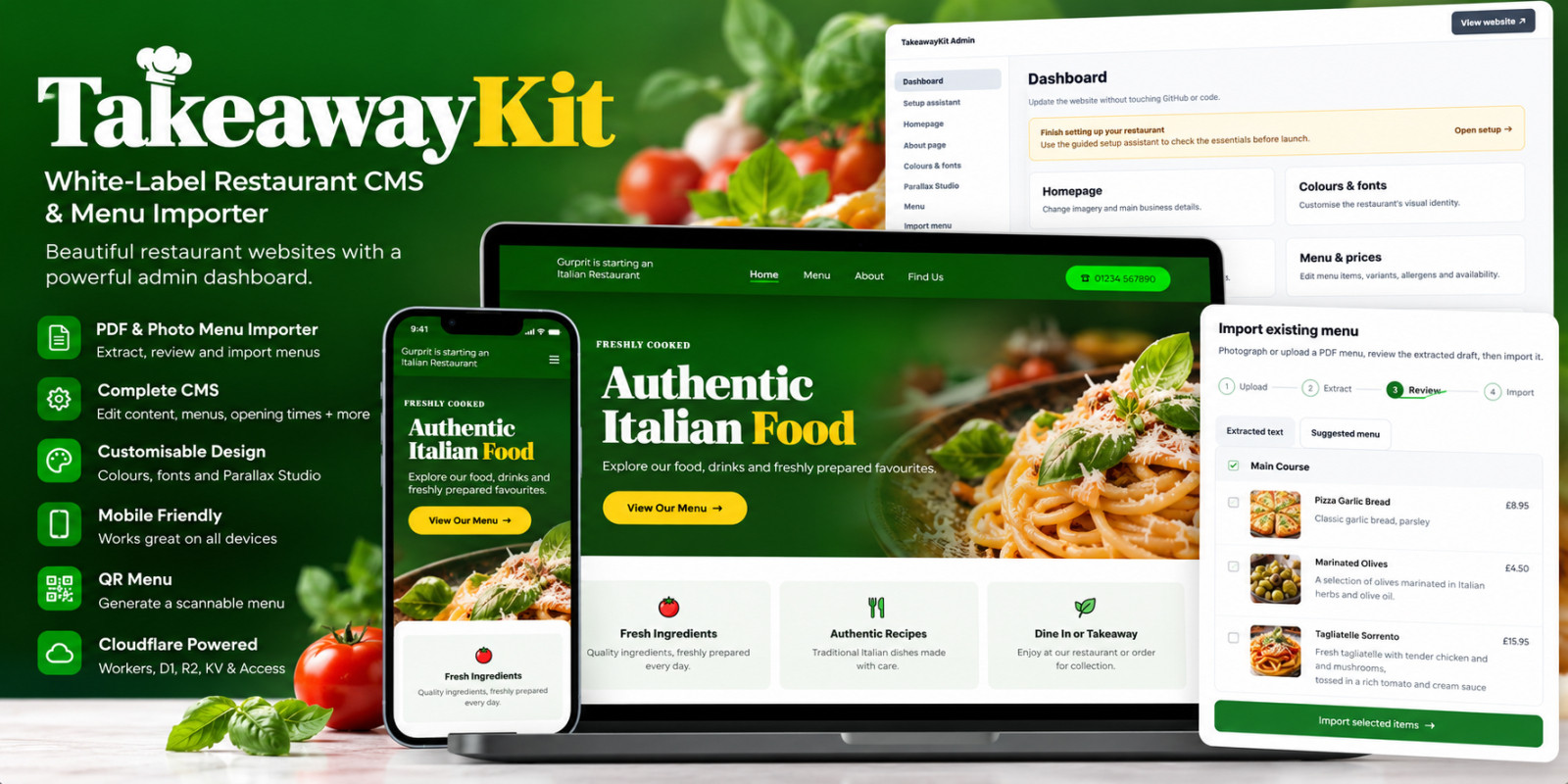
PDF & Photo Menu Importer
Save hours of manual menu entry with TakeawayKit's built-in menu importer.
- Import existing menus from PDF documents and photographs.
- Upload multiple menu files.
- Extract text directly from compatible PDFs or use browser-based OCR for images and scanned documents.
- Automatically suggest menu categories, dishes, descriptions, prices and variants.
- Review extracted text and suggested menu items in separate tabs.
- Correct mistakes, move dishes between categories and adjust prices before importing.
- Choose whether to replace or add to an existing menu.
- Review imported content before publishing.
No paid AI API or generative AI subscription is required. The importer produces an editable first draft. Complex menu layouts may require manual corrections.
Complete Restaurant CMS
Manage your website without editing code:
- Homepage content and imagery
- Restaurant identity and contact details
- Menu categories, dishes, descriptions and prices
- Product sizes and pricing variants
- Opening times
- About page content
- Promotions and offers
- WhatsApp enquiry links
- Testimonials
- Social media links
- SEO and social sharing information
- QR menu tools
White-Label Design & Parallax Studio
Make every installation unique with customisable colours, fonts, branding and homepage imagery. The included Parallax Studio allows you to customise layered hero compositions, including positioning, scaling and rotation, without rebuilding the design.
Menu & Dietary Management
Create and organise restaurant menus with support for multiple prices, product variants, vegetarian and vegan options, and allergen information. Imported dietary and allergen information requires manual verification before being treated as reviewed.
Integrations
- Google Maps links
- Optional Google Places ratings and reviews
- Facebook Page timeline embedding
- Instagram and TikTok profile links
- WhatsApp enquiries
Some third-party integrations require separate accounts or API configuration.
Modern Cloudflare Architecture
TakeawayKit uses:
- Astro 7
- TypeScript
- SCSS
- Cloudflare Workers
- Cloudflare D1 database
- Cloudflare R2 media storage
- Cloudflare KV sessions
- Cloudflare Access for admin protection
Included in Your Purchase
- Full editable source code
- Responsive restaurant website
- Administration CMS
- PDF and photo menu importer
- Database migrations
- Demo seed data
- Cloudflare configuration template
- Installation documentation
- Integration guides
- Support documentation
Ideal for developers, agencies and freelancers who want a reusable starting point for restaurant website projects. TakeawayKit is a source-code product, not a hosted subscription. Buyers deploy and configure it within their own Cloudflare environment.
Features
Responsive restaurant and takeaway website White-label CMS and admin dashboard PDF and photo menu importer Editable extracted text and suggested menu reviews Multi-file menu import Menu categories, dishes, prices and variants Dietary and allergen management Custom colours, fonts and branding Visual Parallax Studio Homepage and About page editor Opening hours and promotions QR menu tools WhatsApp enquiries Google Reviews integration (optional) Facebook, Instagram and TikTok links SEO and social metadata Cloudflare D1, R2 and KV integration Cloudflare Access-protected admin Guided setup assistant Full source code and installation documentation
Requirements
Node.js 22 or newer npm package manager Cloudflare account with Workers, D1, R2 and KV Cloudflare Access for admin authentication Wrangler CLI with Cloudflare authentication Basic technical knowledge of deploying and configuring a web application Optional: custom domain Optional: Google Places API (New) and billing-enabled Google Cloud account for live Google Reviews
Instructions
1. Download and extract the TakeawayKit ZIP archive. 2. Read BUYER-START-HERE.txt and docs/INSTALLATION.md. 3. Run npm ci to install dependencies. 4. Create a Cloudflare D1 database, R2 bucket and KV namespace. 5. Configure wrangler.jsonc with your own Cloudflare resource details. 6. Configure Cloudflare Access for the admin area. 7. Run npm run db:migrate to create the database tables. 8. Run npm run build to verify the project. 9. Run npm run deploy to publish the website. 10. Open /admin and follow the setup assistant. 11. Customise branding, business information, homepage content and menus. 12. Review the website before going live.
Full instructions and troubleshooting documentation are provided in the download.
| Author | gurpritsahota |
|---|---|
| Category | Scripts & Code / JavaScript |
| Price | $54 |
| Extended License | $162 |
| First Release | Oct 21, 2026 |
| Last Update | Oct 21, 2026 |
| Database | SQLite 3.x |
| Files included | .css, .ts, .scss, .sql, .md, JavaScript .js |
| Software version | Node.js 22 |
| Html/css framework | Sass / SCSS |
| Programming language | JavaScript, TypeScript |
Categories
Tags
External listing. code.market does not sell this product and does not process payment for it. Pricing, payment, delivery, licensing, refunds, and support are handled by the third-party merchant on its own website. We may earn an affiliate commission from a referral. Details.
Products of the Week.
Submit🥇

Actionbook
It works inside the user's own browser with the accounts already signed in. The user describes the result they need, and the agent reads, clicks and types through the pages, then delivers a dashboard or report where each data links back to its source.
Other · 714 views · 9 clicksOther · Week 44 · 714 views · 9 clicks
🥈

Free social media tools for creators & solofounders
295 free tools for growing your social media: write, plan, grow on local AI models, 100% free forever, No sign-up required, No trial. Write, check and measure posts on LinkedIn, Instagram, TikTok, X, YouTube, Reddit, Product Hunt and more: a free social media scheduler for 17 networks, engagement rate calculators, character counters, best time to post, hook generators and follower growth calculators. No login anywhere, no API or credit usage.
684 views · 6 clicksWeek 44 · 684 views · 6 clicks
🥉

STOP GUESSING WHAT TO POST
AI that learns your brand voice and builds a month of consistent, on-brand social content: carousels, posts and hooks that sound like you, not like everyone else's AI.
SaaS · 1,930 views · 21 clicksSaaS · Week 44 · 1,930 views · 21 clicks
#4

Hand-Placed Backlinks $9.99 per link. Flat rate.
Buy hand-placed forum, Q-A and directory backlinks. Flat $9.99 per link, no subscriptions — you only pay for approved listings.
Website · 1,882 views · 17 clicksWebsite · Week 44 · 1,882 views · 17 clicks
#5

Conversational Backlinks for Busy Founders
Place Backlink Relevant Conversation for your domain across Forums and Conversations
39,340 views · 211 clicksWeek 44 · 39,340 views · 211 clicks
#6

Free Invoice Generator - PDF Invoices in Your Browser, No Sign-Up
A free invoice maker for freelancers and small businesses: fill in the invoice, check the live preview, and download a PDF that looks exactly like it. Any currency, tax per item, three templates, no sign-up, and nothing leaves your device.
622 views · 11 clicksWeek 44 · 622 views · 11 clicks
#7

Merge PDF Files Free - Combine PDFs in Your Browser, No Upload
A free PDF merger for office workers, students, and freelancers: combine PDFs and images into one file in the browser, reorder files and pages, pick page ranges, keep bookmarks, and open password-protected PDFs. Nothing is uploaded, no sign-up, no watermark.
564 views · 4 clicksWeek 44 · 564 views · 4 clicks