
Syntia AI – Futuristic AI Startup Template
Description
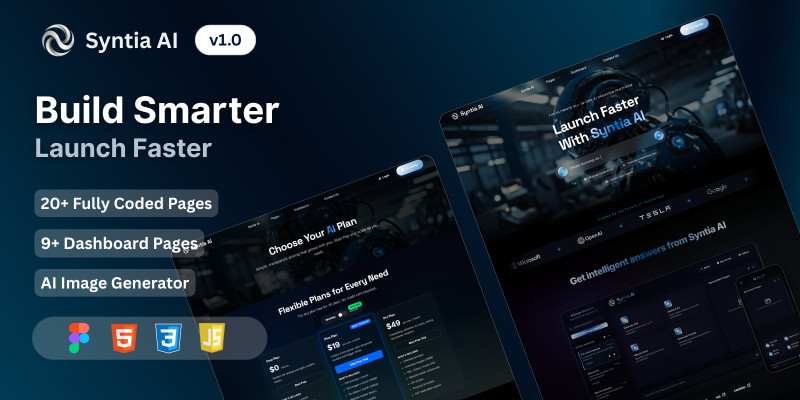
Syntia AI is a fully coded, production-ready website and dashboard kit built with modern design principles and a futuristic aesthetic.
Perfect for AI startups, tech projects, and creative platforms, it delivers a seamless blend of style, performance, and functionality that meets both today’s and tomorrow’s web standards.
With 20+ website pages, 9 dashboard pages, and an integrated AI image generator, Syntia AI gives you everything you need to launch responsive, dynamic, and professional websites in minutes.
Optimized for desktop, tablet, and mobile, it features smooth loading animations, ensuring both performance and visual appeal.
📦 What’s Inside
- 20+ Fully Coded Website Pages
- 9 Dashboard Pages
- AI Image Generator Module
- Floating Chat Widget
- Login & Signup Forms
✨ Key Features
- Retina Ready
- Fully Responsive
- Modern & Minimal Color Scheme
- Well-Organized, Developer-Friendly Code
- Quick-Start Documentation
- Smooth Loading Animations
🖥️ Website Pages
- Landing Page
- Syntia AI Image Generator
- About Us
- Contact Us
- Explore
- Pricing
- Login & Signup
- Terms & Conditions
- Privacy Policy
- Floating Chat Widget
📊 Dashboard Pages
- Dashboard
- Projects
- Analytics
- AI Models
- Data Sets
- API
- Settings
- Billing
- Help & Support
🔗 Live Preview
💡 All images and videos included are copyright-free and ready to use.
Features
1. Advanced Floating AI Chatbot
1.1 Custom-designed floating chat interface
1.2 Smooth animations and transitions
1.3 Smart mode and rule-based mode switching
1.4 Real-time typing indicators
1.5 Sample question suggestions
1.6 Message history with timestamps
1.7 Copy conversation functionality
1.8 Voice input/output support
2. Professional Image Generation UI
2.1 Dedicated image creation interface
2.2 Multiple style presets
2.3 Advanced options modal
2.4 Real-time progress tracking
2.5 Image gallery view
2.6 Mobile-responsive design
3. Professional Sidebar Navigation
3.1 Multi-theme support (Default, Purple, Teal, Dark)
3.2 Customizable color schemes
3.3 Gradient backgrounds
3.4 Modern UI components
3.5 Consistent styling across pages
4. Enhanced Accessibility Features
4.1 Adjustable font sizes (12px–20px)
4.2 High contrast mode
4.3 Screen reader compatibility
4.4 ARIA labels implementation
4.5 Keyboard navigation support
5. Comprehensive Dashboard
5.1 Analytics visualization
5.2 Project management interface
5.3 Dataset management
5.4 AI model configuration
5.5 Billing and usage tracking
6. Modern Authentication System
6.1 Professional login/signup pages
6.2 Password recovery workflow
6.3 Session management
6.4 OAuth integration ready
6.5 Security best practices
7. Responsive Layout System
7.1 Mobile-first design
7.2 Fluid grid system
7.3 Breakpoint optimization
7.4 Touch-friendly interfaces
7.5 Cross-browser compatibility
8. Interactive Hero Sections
8.1 Particle animations
8.2 Dynamic typing effects
8.3 Gradient backgrounds
8.4 Model selector interface
8.5 Voice interaction support
9. Professional Documentation
9.1 Detailed setup guides
9.2 API documentation
9.3 Code examples
9.4 Best practices
9.5 Troubleshooting guides
10. Advanced Search Functionality
10.1 Real-time suggestions
10.2 Search history
10.3 Filtered results
10.4 Category-based search
10.5 Search analytics
11. Cookie & Privacy Management
11.1 GDPR-compliant consent system
11.2 Privacy policy page
11.3 Terms of service page
11.4 Cookie preferences
11.5 Data management options
12. Performance Optimizations
12.1 Lazy loading implementation
12.2 Code splitting
12.3 Asset optimization
12.4 Cache management
12.5 CDN fallback system
13. Professional Pricing Page
13.1 Toggle between monthly/annual
13.2 Feature comparison table
13.3 Custom pricing cards
13.4 CTA buttons
13.5 FAQ section
14. Contact & Support System
14.1 Contact form validation
14.2 Support ticket interface
14.3 Help center layout
14.4 FAQ organization
14.5 Knowledge base structure
15. API Integration Ready
15.1 API key management
15.2 Provider selection
15.3 Rate limiting
15.4 Error handling
15.5 Documentation
16. Modern Footer System
16.1 Enhanced layout
16.2 Social media integration
16.3 Newsletter signup
16.4 Quick links
16.5 Contact information
17. Preloader & Animations
17.1 Custom loading animations
17.2 Smooth page transitions
17.3 Micro-interactions
17.4 SVG animations
17.5 Progress indicators
18. Professional Header
18.1 Sticky navigation
18.2 Dropdown menus
18.3 Mobile hamburger menu
18.4 Search integration
18.5 User profile menu
19. Utility Components
19.1 Toast notifications
19.2 Modal system
19.3 Tooltips
19.4 Progress bars
19.5 Action buttons
20. Developer-Friendly Structure
20.1 Organized file structure
20.2 Modular CSS/JS
20.3 Clear documentation
20.4 Consistent naming
20.5 Easy customization
Requirements
Technical Requirements
1. Server Requirements
1.1 Any modern web server (Apache, Nginx, etc.)
1.2 PHP not required (static HTML template)
1.3 No database required
1.4 HTTPS recommended for secure features
2. Browser Support
2.1 Chrome (latest 2 versions)
2.2 Firefox (latest 2 versions)
2.3 Safari (latest 2 versions)
2.4 Edge (latest 2 versions)
2.5 Opera (latest version)
3. Development Environment
3.1 Code editor (VS Code, Sublime, etc.)
3.2 Local development server recommended
3.3 Basic knowledge of HTML5, CSS3, and JavaScript
3.4 Optional: Git for version control
4. Knowledge Requirements
Required Skills:
4.1 HTML/CSS basics
4.2 JavaScript fundamentals
4.3 Responsive design understanding
4.4 Basic web hosting knowledge
Optional Skills:
4.5 AI/ML concepts
4.6 API integration
4.7 UI/UX design principles
4.8 Web performance optimization
4.9 SEO basics
5. AI Services (Optional)
5.1 OpenAI API key (chatbot)
5.2 Anthropic API (alternative)
5.3 Google AI API (alternative)
5.4 Custom AI endpoint configuration
6. System Requirements
Development:
6.1 Modern CPU (i5/Ryzen 5 or better)
6.2 8GB RAM minimum
6.3 1GB free disk space
6.4 1920x1080 screen resolution recommended
6.5 Modern web browser
Deployment:
6.6 Web hosting service
6.7 SSL certificate
6.8 Domain name
6.9 500MB minimum storage
6.10 Standard bandwidth allocation
7. Assets Required
7.1 Company logo (150x150px recommended)
7.2 Brand colors (hex codes)
7.3 Custom images (optional)
7.4 Favicon files
7.5 Company information
Instructions
Setup & Instructions
1. Required Tools
1.1 Image editing software
1.2 Text editor with syntax highlighting
1.3 FTP client (for deployment)
1.4 Browser developer tools
1.5 SVG editor (optional)
2. Design Assets
2.1 Brand style guide
2.2 Color palette
2.3 Typography selections
2.4 Image assets
2.5 Icon set
3. Installation
3.1 Server space: Minimum 500MB storage
3.2 Support for static files
3.3 Standard .htaccess support
3.4 Local development: Local server (XAMPP, Live Server, etc.)
3.5 Optional: Node.js and Git for development
4. Important Notes
4.1 No backend included (static HTML only)
4.2 AI features require separate API keys
4.3 Custom integrations require development
4.4 Mobile app features not included
4.5 Limited to web platform
5. Support Level
5.1 Documentation included
5.2 Basic setup guide
5.3 Code comments included
5.4 Community support recommended
6. Recommendations & Best Practices
6.1 Use HTTPS for security
6.2 Optimize images
6.3 Minify production code
6.4 Regular backups
6.5 Test all features before deployment
6.6 Maintain original file structure and document customizations
| Author | raliyev |
|---|---|
| Category | Themes / HTML / Technology |
| Price | $56 |
| Extended License | $168 |
| Likes | 6 |
| First Release | Oct 14, 2025 |
| Last Update | Feb 26, 2026 |
| Files included | .css, .html, JavaScript .js |
Categories
Tags
External listing. code.market does not sell this product and does not process payment for it. Pricing, payment, delivery, licensing, refunds, and support are handled by the third-party merchant on its own website. We may earn an affiliate commission from a referral. Details.
Products of the Week.
Submit🥇

STOP GUESSING WHAT TO POST
AI that learns your brand voice and builds a month of consistent, on-brand social content: carousels, posts and hooks that sound like you, not like everyone else's AI.
SaaS · 3,100 views · 28 clicksSaaS · Week 45 · 3,100 views · 28 clicks
🥈

Conversational Backlinks for Busy Founders
Place Backlink Relevant Conversation for your domain across Forums and Conversations
Website · 40,494 views · 216 clicksWebsite · Week 45 · 40,494 views · 216 clicks
🥉

upvote.club
Free Social Media Engagement that Helps Boost Your Content. Upvote Club supports 19 social networks with 100+ engagement actions in one dashboard. Add links to your posts and get free engagement from real users.
SaaS · 38,583 views · 110 clicksSaaS · Week 45 · 38,583 views · 110 clicks
#4

Substack Posting API
Onboard your Agent to Substack. Write Publish on Substack via API
SaaS · 57,623 views · 197 clicksSaaS · Week 45 · 57,623 views · 197 clicks
#5

Seenshot App
Free, Fast, MacOS Screenshot app. Make Screenshot cmd+shift+2 and send it via link
Desktop App · 27,055 views · 119 clicksDesktop App · Week 45 · 27,055 views · 119 clicks
#6

Hand-Placed Backlinks $9.99 per link. Flat rate.
Buy hand-placed forum, Q-A and directory backlinks. Flat $9.99 per link, no subscriptions — you only pay for approved listings.
Website · 2,992 views · 18 clicksWebsite · Week 45 · 2,992 views · 18 clicks
#7

Free Invoice Generator - PDF Invoices in Your Browser, No Sign-Up
A free invoice maker for freelancers and small businesses: fill in the invoice, check the live preview, and download a PDF that looks exactly like it. Any currency, tax per item, three templates, no sign-up, and nothing leaves your device.
1,688 views · 16 clicksWeek 45 · 1,688 views · 16 clicks
#8

Merge PDF Files Free - Combine PDFs in Your Browser, No Upload
A free PDF merger for office workers, students, and freelancers: combine PDFs and images into one file in the browser, reorder files and pages, pick page ranges, keep bookmarks, and open password-protected PDFs. Nothing is uploaded, no sign-up, no watermark.
1,580 views · 13 clicksWeek 45 · 1,580 views · 13 clicks