
Swipe67 | Swipe Photo Cleaner With Duplicate Finder, Storage Stats and Subscriptions - React Native
Description
Swipe67 – Photo Cleaner and Camera Roll Organizer for iOS and Android
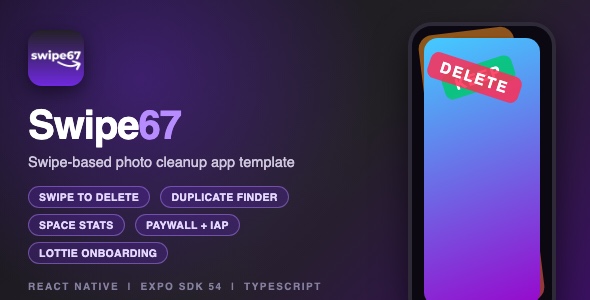
Swipe67 is a complete, production-ready React Native template for a photo cleanup app. Users swipe through their camera roll – right to keep a photo, left to delete it – and free up storage space without digging through the Photos app. It ships with a full onboarding flow, subscription paywall with in-app purchases, duplicate photo finder, statistics dashboard, bookmarks, local reminders and a polished, animation-heavy UI.
Demo Instructions
- No login and no demo credentials are required. The app is 100% offline – there is no backend and no account system.
- On first launch the app asks for Photo Library access. Grant the permission so the swipe decks, month list and duplicate finder can load your photos.
- The subscription paywall uses real in-app purchase products (weekly and yearly). In the template the product IDs are placeholders (swipe67_w and swipe67_y) – they load live pricing only after you create your own products in App Store Connect / Google Play Console. The paywall UI itself works without any configuration.
- Free users get 50 swipes per day. Premium (simulated after purchase) removes the limit.
Everything the App Does
- Swipe deck photo review – Tinder-style card stack. Swipe right to keep, left to delete, with animated card rotation, spring physics and colored KEEP / DELETE overlays.
- Five swipe modes – Recent (last 5 days), by Month, Random shuffle across the whole library, Bookmarks, and Duplicates.
- Month hub – all months with photos as colorful gradient cards, each with a live progress ring showing how many photos you already reviewed.
- Duplicate finder – heuristic detection of burst shots, same-dimension captures and screenshot pairs, grouped into a sortable grid (most recent, least recent, most photos, fewest photos).
- Results and delete confirmation – after each session, review a grid of photos marked for deletion and photos to keep, then delete with one tap via the native PhotoKit API.
- Real storage savings – file sizes are read before deletion and converted into total space saved (KB / MB / GB).
- Statistics dashboard – total swipes, photos deleted, photos kept and total space freed, in colorful stat cards.
- Bookmarks – tap a photo during a session to bookmark it; review or swipe bookmarked photos later from a dedicated screen.
- Completed-session modal – after finishing a month you get a celebratory summary with deleted / kept counts and freed space, plus a share button.
- Progress persistence – reviewed photos are remembered per month, so you can stop and resume anytime. Recent-session results stay valid for 5 days.
- 3-screen onboarding – animated Lottie screens explaining the cleanup, the swipe mechanic and the free-space benefit.
- Permission welcome screens – friendly screens for Photo Library and notification permission requests.
- Subscription paywall – weekly plan (1.99 USD / week with 3-day free trial) and yearly plan (9.99 USD / year) toggle, powered by react-native-iap (StoreKit 2 on iOS), with restore purchases.
- Free-tier limit – 50 swipes per day for free users with an automatic daily reset, upgrade prompt when the limit is reached.
- Local notifications – monthly cleanup reminders and “on this day” morning reminders via expo-notifications.
- Haptic feedback – light impact on swipe start, success notification on completing a month, distinct feedback on blocked swipes.
- Slide-out settings panel – quick access to bookmarks, stats and settings from the main hub.
- Custom design system – per-month gradient color themes, Inter + Agbalumo Google Fonts, gradient headers, glass-style cards and a purple splash screen with an animated swipe-arrow logo.
- Photo caching service – two-phase library loading (fast preview of 100 photos, then full library in batches of 300) so the app stays smooth with large camera rolls.
Technology
- React Native 0.81 (New Architecture) with Expo SDK 54 and React 19
- TypeScript throughout, with a typed navigation stack
- React Navigation 6 (native-stack) – 18 screens
- react-native-reanimated 4 + react-native-gesture-handler – swipe deck animations and gestures
- expo-media-library + expo-file-system – photo access, metadata and real deletion
- react-native-iap 14 – subscriptions and restore (StoreKit 2 / Play Billing)
- AsyncStorage – stats, progress, bookmarks, premium status
- lottie-react-native – onboarding and paywall animations
- expo-haptics, expo-notifications, expo-linear-gradient, expo-image, react-native-svg
- Google Fonts – Inter and Agbalumo, bundled locally
- iOS deployment target 17.0; Android supported through Expo prebuild
- No third-party UI kits, no backend, no API keys required
What the Buyer Gets
- Full source code of the Swipe67 app (JavaScript / TypeScript, iOS Xcode project with Podfile)
- Step-by-step documentation.html with screenshots: installation, renaming, bundle ID, icon, re-skinning, in-app purchase setup and App Store submission checklist
- Ready-made App Store preview screenshots (440 px wide JPEG)
- Clean project structure: src/screens, src/services, src/navigation, src/constants
Development Disclosure
Portions of this template’s source code were developed with AI-assisted tools. All code has been reviewed, tested and verified by the author before submission.
Please Note
This is a source code template, not a compiled app. You need React Native / Expo and Xcode knowledge to customize, build and publish it. The name “Swipe67”, icons and branding in the preview are for demonstration – you can rename and re-skin everything from a single theme file.
External services are not included in the purchase price. Publishing this app requires your own Apple Developer Program account (99 USD / year) and/or Google Play Developer account (25 USD, one-time). These are third-party services billed directly by Apple and Google, and App Store / Google Play commission rates on in-app purchases apply. In-app purchase products, developer accounts and any backend you choose to add are the buyer’s responsibility and cost.
| Type | Native Web App |
|---|---|
| Author | mefjudevllc |
| Price | $14 |
| Sales | 0 |
| Rating | 0 (0) |
| Published | Sep 24, 2026 |
| Last Update | Sep 24, 2026 |
| Compatible Software | Other, Other, Other, Other, Other |
| Mobile Files Included | JavaScript JSON |
Categories
Tags
External listing. code.market does not sell this product and does not process payment for it. Pricing, payment, delivery, licensing, refunds, and support are handled by the third-party merchant on its own website. We may earn an affiliate commission from a referral. Details.
Products of the Week.
Submit🥇

STOP GUESSING WHAT TO POST
AI that learns your brand voice and builds a month of consistent, on-brand social content: carousels, posts and hooks that sound like you, not like everyone else's AI.
SaaS · 7,345 views · 67 clicksSaaS · Week 46 · 7,345 views · 67 clicks
🥈

Conversational Backlinks for Busy Founders
Place Backlink Relevant Conversation for your domain across Forums and Conversations
Website · 46,623 views · 232 clicksWebsite · Week 46 · 46,623 views · 232 clicks
🥉

upvote.club
Free Social Media Engagement that Helps Boost Your Content. Upvote Club supports 19 social networks with 100+ engagement actions in one dashboard. Add links to your posts and get free engagement from real users.
SaaS · 44,565 views · 127 clicksSaaS · Week 46 · 44,565 views · 127 clicks
#4

Substack Posting API
Onboard your Agent to Substack. Write Publish on Substack via API
SaaS · 63,450 views · 206 clicksSaaS · Week 46 · 63,450 views · 206 clicks
#5

Seenshot App
Free, Fast, MacOS Screenshot app. Make Screenshot cmd+shift+2 and send it via link
Desktop App · 32,701 views · 127 clicksDesktop App · Week 46 · 32,701 views · 127 clicks
#6

Hand-Placed Backlinks $9.99 per link. Flat rate.
Buy hand-placed forum, Q-A and directory backlinks. Flat $9.99 per link, no subscriptions — you only pay for approved listings.
Website · 8,323 views · 19 clicksWebsite · Week 46 · 8,323 views · 19 clicks
#7

Free Invoice Generator - PDF Invoices in Your Browser, No Sign-Up
A free invoice maker for freelancers and small businesses: fill in the invoice, check the live preview, and download a PDF that looks exactly like it. Any currency, tax per item, three templates, no sign-up, and nothing leaves your device.
6,950 views · 29 clicksWeek 46 · 6,950 views · 29 clicks
#8

Merge PDF Files Free - Combine PDFs in Your Browser, No Upload
A free PDF merger for office workers, students, and freelancers: combine PDFs and images into one file in the browser, reorder files and pages, pick page ranges, keep bookmarks, and open password-protected PDFs. Nothing is uploaded, no sign-up, no watermark.
6,432 views · 18 clicksWeek 46 · 6,432 views · 18 clicks