
SwiftPasswords | Offline Security Vault App for Windows
Description
Your Passwords. Your Device. Nobody Else’s Business.
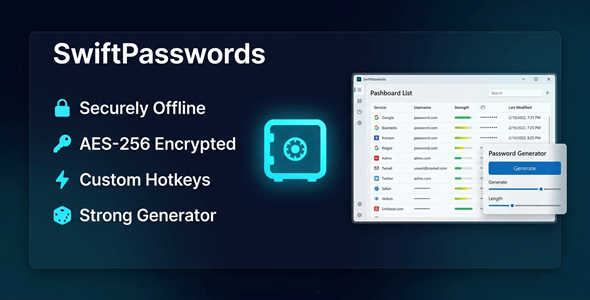
SwiftPasswords is the offline password vault that keeps your credentials 100% local.
No cloud. No subscriptions. No risk of a data breach.
Everything is encrypted and stored on your machine — right where it belongs.
You stay in full control, always.


Perfect For
✔ Freelancers managing dozens of client logins
✔ Small business owners protecting sensitive accounts
✔ Privacy-conscious professionals
✔ Remote workers handling confidential credentials
✔ Anyone who refuses to trust the cloud with their passwords
Features
 |
Local Encrypted Vault All data is stored on your device with strong encryption. Nothing ever leaves your machine. |
|
Built-in Password Generator Create strong, unique credentials instantly. Set length, complexity, and character rules. |
|
Smart Search with Typo Tolerance Find any entry in seconds — even with spelling mistakes. No more scrolling through long lists. |
|
Clipboard Protection Copied passwords auto-clear after a set time. Prevents accidental exposure in clipboard history. |
|
Bulk Entry Management Select, edit, or delete multiple entries at once. Save hours when reorganizing your vault. |
|
CSV & JSON Import Migrate from any other password manager easily. Bring all your existing data in with one click. |
|
Activity Tracking See when each entry was last accessed or modified. Stay on top of your vault’s history. |
|
Fast & Responsive UI Launches instantly. No lag. No loading screens. Designed for everyday use without friction. |
|
No Internet Required Works 100% offline — even without a Wi-Fi connection. Your vault is always available, no matter what. |
|
No Subscription. Ever. Pay once. Use forever. No monthly fees. No hidden charges. |
Why You Need This
❌ Cloud password managers get hacked — and your data is at risk
❌ Monthly subscriptions eat into your budget every single year
❌ Big tech apps track your usage and store your data on their servers
❌ Browser-saved passwords are easy targets for malware and phishing
SwiftPasswords fixes all of this.
Your data lives on your hard drive — encrypted and fully private.
No third party has access.
No breach can expose what was never online.
That’s real security.
How You Can Profit
✔ Offer it to clients as a premium security tool in your freelance packages
✔ Resell licenses to small businesses who need offline password management
✔ Bundle it with IT support or consulting services for added value
✔ Use it yourself and eliminate costly password manager subscriptions
Stop paying monthly fees for something you can own outright.
This is not just a tool — it’s a smarter, safer way to manage your digital life.
⚡ Fast Results
Install in under 2 minutes.
Import your existing passwords from CSV or JSON instantly.
Start using your vault the same day.
No configuration headaches. No tech skills required.
Example:
Import 500 passwords from LastPass in under 60 seconds — fully encrypted and ready to use.
Simple 3-Step Setup
 |
Step 1 — Download & Install Run the installer on your Windows 10 or 11 machine. Takes less than 2 minutes. |
 |
Step 2 — Create Your Vault Set your master password and create your encrypted local vault. |
 |
Step 3 — Add or Import Entries Type in credentials manually or import from CSV / JSON. You’re ready to go. |
- Version 1.0.0 – Initial release with full offline vault, password generator, smart search, clipboard protection, bulk management, and CSV/JSON import
Turn this into your own software business.
✔ Sell licenses and keep 100% of the profit
✔ No coding required
✔ High-demand privacy & security niche
✔ One-time setup — then passive income
To activate reseller features, you must enable your reseller panel first.
All details are here
 |
Does SwiftPasswords store anything online? No. Everything is stored locally on your device. No data is ever sent to any server. |
|
Is there a monthly subscription? No. This is a one-time purchase. Pay once and use it forever with no recurring fees. |
|
What Windows versions are supported? SwiftPasswords supports Windows 10 and Windows 11. Both 32-bit and 64-bit systems. |
|
Can I import passwords from another manager? Yes. SwiftPasswords supports CSV and JSON import. Works with most major password managers. |
|
What happens if I forget my master password? For maximum security, there is no cloud recovery. Keep your master password safe — it’s the only key to your vault. |
|
Does it require an internet connection to work? No. SwiftPasswords works 100% offline. Use it anywhere, even without Wi-Fi. |
| Type | Windows App |
|---|---|
| Author | GoGrowTools |
| Price | $29 |
| Sales | 0 |
| Rating | 0 (0) |
| Published | May 7, 2026 |
| Last Update | May 7, 2026 |
| Application Runtime | Native |
| Operating System Versions | Windows 11, Windows 10 |
Categories
Tags
External listing. code.market does not sell this product and does not process payment for it. Pricing, payment, delivery, licensing, refunds, and support are handled by the third-party merchant on its own website. We may earn an affiliate commission from a referral. Details.
Products of the Week.
Submit🥇

STOP GUESSING WHAT TO POST
AI that learns your brand voice and builds a month of consistent, on-brand social content: carousels, posts and hooks that sound like you, not like everyone else's AI.
SaaS · 7,363 views · 67 clicksSaaS · Week 46 · 7,363 views · 67 clicks
🥈

Conversational Backlinks for Busy Founders
Place Backlink Relevant Conversation for your domain across Forums and Conversations
Website · 46,646 views · 232 clicksWebsite · Week 46 · 46,646 views · 232 clicks
🥉

upvote.club
Free Social Media Engagement that Helps Boost Your Content. Upvote Club supports 19 social networks with 100+ engagement actions in one dashboard. Add links to your posts and get free engagement from real users.
SaaS · 44,586 views · 127 clicksSaaS · Week 46 · 44,586 views · 127 clicks
#4

Substack Posting API
Onboard your Agent to Substack. Write Publish on Substack via API
SaaS · 63,474 views · 206 clicksSaaS · Week 46 · 63,474 views · 206 clicks
#5

Seenshot App
Free, Fast, MacOS Screenshot app. Make Screenshot cmd+shift+2 and send it via link
Desktop App · 32,723 views · 127 clicksDesktop App · Week 46 · 32,723 views · 127 clicks
#6

Hand-Placed Backlinks $9.99 per link. Flat rate.
Buy hand-placed forum, Q-A and directory backlinks. Flat $9.99 per link, no subscriptions — you only pay for approved listings.
Website · 8,343 views · 19 clicksWebsite · Week 46 · 8,343 views · 19 clicks
#7

Free Invoice Generator - PDF Invoices in Your Browser, No Sign-Up
A free invoice maker for freelancers and small businesses: fill in the invoice, check the live preview, and download a PDF that looks exactly like it. Any currency, tax per item, three templates, no sign-up, and nothing leaves your device.
6,970 views · 29 clicksWeek 46 · 6,970 views · 29 clicks
#8

Merge PDF Files Free - Combine PDFs in Your Browser, No Upload
A free PDF merger for office workers, students, and freelancers: combine PDFs and images into one file in the browser, reorder files and pages, pick page ranges, keep bookmarks, and open password-protected PDFs. Nothing is uploaded, no sign-up, no watermark.
6,451 views · 18 clicksWeek 46 · 6,451 views · 18 clicks