
SumUp Payment Gateway For WooCommerce

Description

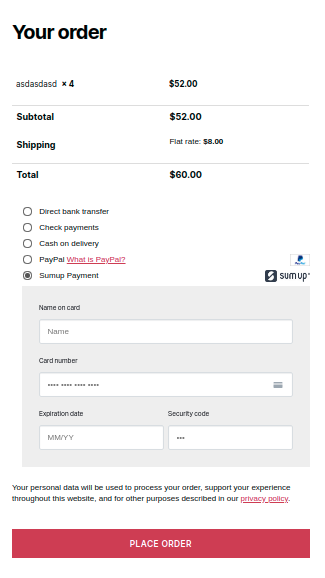
WooCommerce SumUp Payment Gateway is a WordPress plugin that allows you to pay for your products via sumup account.
If you’re looking to open an online store with WooCommerce and are still confused on selecting a payment gateway to sell your products and services, for the moment, you are fortunate enough to reach a very right place that can guide you for an appropriate solution. ‘SumUp Payment Gateway For Woocommerce’ is an ideal Wordpress plugin for your hassle-free and secure transactions through a SumUp account.SumUp processes over 500 transactions on a single charge and accepts magstripe, chip, and contactless payments. Pay only 2.65% per transaction, no other hidden fees, no monthly contract, and you have to only pay for what you use. Drum Rolls
Notice: The SumUp direct method has been removed (permanently) from the plugin.SumUp 3D secure widget is now the primary method due to the security and reliability it offers.
Plugin Features:
- Introduce 3D Secure widget to avoid any problems.
- Compatible with WooCommerce One Page Checkout
- One-click OAuth functionality to connect Woocommerce store with SumUp.
- Get paid through SumUp on manually created Woocommerce orders.
- Enable/Disable Zip Code Feature From Backend
- Added – Multi-language support WPML added
- Enable/Disable Zip Code Feature From Backend
- Same page checkout without redirecting on another page.
Prerequisite Settings For The Plugin:
- Woocommerce plugin.
- SumUp Account.
- Only Support those countries which supported by SUMUP Application.
- Note: If you are willing to use SumUp in Brazil please contact SumUp Support team at suporte@sumup.com.br
Setup Guide:
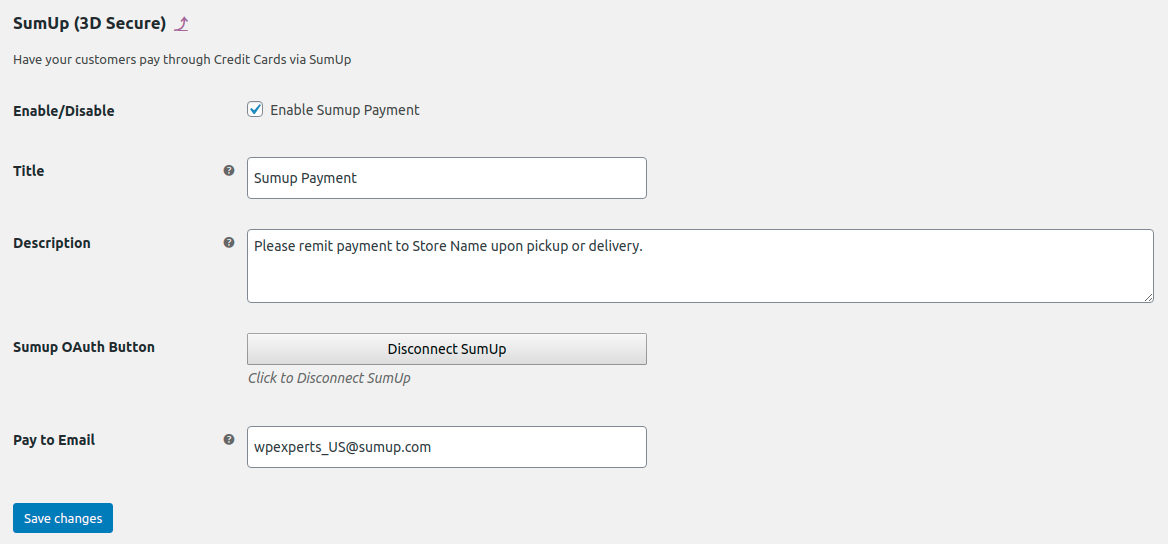
- Connect your website by clicking the “Authorize with SumUp” button.
- Fill “Pay to email” with the email address used to Authorize SumUp
- Make sure “Enable/Disable” checkbox is checked
- Make sure your Woocommerce store’s currency matches with your SumUp account currency.
PLUGIN TESTING:
Developer Account:
If you have a SumUp developer account, please authorize through your test account and use the test card below to test the payment. On successful payment, check your Woocommerce order page for transaction ID and other information.
Without Developer Account:
If you do not have a developer account you can authorize with a live account and make a test payment using the test card. If the API returns the response of INVALID CARD then your account is configured correctly since the error indicates that API can differentiate between real and test cards.
Test Card: Card Number 4111 1111 1111 1111 Card CVV 111
Disclaimer:
We are not responsible if SumUp blocks your account due to violation of their policy. Please go through SumUp’s restricted businesses guideline before you start. Click Here
LINKS TO SOME MORE SUMUP INTEGRATIONS

Changelog
Version 2.7
Date: 27 Sep 2023
* Code Optimization
Version 2.6
Date: 10 Mar 2021
* Fixed - Constant issue.
* Fixed - Conflict with booster plugin.
* Fixed - New Order email not recieve.
* Fixed - Conflict issue with JS.
* Update - Notices updated
Version 2.5
Date: 09 Dec 2020
* Fixed - woocommerce order status updated.
* Fixed - Checkout Conflict issue.
* Fixed - Support fixes..
Version 2.4
Date: 08 Oct 2020
* Fixed - Error report conflict with woocommerce and sumup.
* Added - Local support with LocoTraslate.
* Fixed - Support fixes.
Version 2.3
Date: 09 May 2020
* Added - Debug Log Added
* Added - Zip Code Feature
Version 2.2
Date: 18 April 2020
* Fixed - Javascript Optimized for better performance
Version 2.1
Date: 14 April 2020
* Removed - Direct payment method removed.
* Added - OAuth added in 3D secure widget
* Fixed - Performance Optimized
Version 2.0
Date: 12 Marach 2020
* Added -  Multi-language support WPML added
* Fixed - Zipcode issue fixed for european countries
* Update - Restricted scopes validation added
Version 1.6
Date: 29 Feb 2020
* Fixed - "Payment can not be processed for some technical reason" issues.
* Added - Add Card Widget with 3Ds functionality.
* Added - Transaction ID now saving in order notes to track transaction.
Version 1.5
Date: 16 Oct 2019
* Fixed -   "Unable to create checkout" error fixed.
Version: 1.4
Date:  17 July 2019
* Added -   Compatibility with WooCommerce One Page Checkout Plugin.
* Fixed -   An issue where order status wasn't changing after successfull payment using SumUp Direct Method.
Version: 1.3
Date: 18 June 19
Added   -  Same page checkout without redirecting on another page
Added   -  OAuth Functionality to connect Sumup application with the plugin
Version: 1.2
Date:  10 May 19
Fixed   -  Create Checkout Id Request Failed issue.
Fixed   -  An issue where card fields won't appear on frontend sometimes.
Removed -  An Extra function which was causing errors in email sending and inside emails too.
Fixed   -  An issue where SumUp payment image icon was appearing large in size at checkout.
Version: 1.0
Date:  14 January 19
intial release.
| Type | WooCommerce Plugin |
|---|---|
| Author | wpexpertsio |
| Category | Wordpress / Ecommerce / Woocommerce / Gateways |
| Price | $49 |
| Sales | 504 |
| Rating | 4.96 from 24 ratings |
| Published | Jan 14, 2019 |
| Last Update | Sep 27, 2023 |
| Compatible Browsers | IE11, Firefox, Safari, Opera, Chrome, Edge |
| Compatible Software | WordPress 5.7.x, WordPress 5.6.x, WordPress 5.5.x, WordPress 5.4.x, WordPress 5.3.x, WordPress 5.2.x, WordPress 5.1.x, WordPress 5.0.x, WordPress 4.9.x |
| Gutenberg Optimized | Yes |
| Source Files Included | JavaScript JS, HTML, CSS, PHP |
Categories
Tags
External listing. code.market does not sell this product and does not process payment for it. Pricing, payment, delivery, licensing, refunds, and support are handled by the third-party merchant on its own website. We may earn an affiliate commission from a referral. Details.
Products of the Week.
Submit🥇

STOP GUESSING WHAT TO POST
AI that learns your brand voice and builds a month of consistent, on-brand social content: carousels, posts and hooks that sound like you, not like everyone else's AI.
SaaS · 3,990 views · 35 clicksSaaS · Week 45 · 3,990 views · 35 clicks
🥈

Conversational Backlinks for Busy Founders
Place Backlink Relevant Conversation for your domain across Forums and Conversations
Website · 41,637 views · 222 clicksWebsite · Week 45 · 41,637 views · 222 clicks
🥉

upvote.club
Free Social Media Engagement that Helps Boost Your Content. Upvote Club supports 19 social networks with 100+ engagement actions in one dashboard. Add links to your posts and get free engagement from real users.
SaaS · 39,664 views · 114 clicksSaaS · Week 45 · 39,664 views · 114 clicks
#4

Substack Posting API
Onboard your Agent to Substack. Write Publish on Substack via API
SaaS · 58,693 views · 198 clicksSaaS · Week 45 · 58,693 views · 198 clicks
#5

Seenshot App
Free, Fast, MacOS Screenshot app. Make Screenshot cmd+shift+2 and send it via link
Desktop App · 28,075 views · 122 clicksDesktop App · Week 45 · 28,075 views · 122 clicks
#6

Hand-Placed Backlinks $9.99 per link. Flat rate.
Buy hand-placed forum, Q-A and directory backlinks. Flat $9.99 per link, no subscriptions — you only pay for approved listings.
Website · 3,933 views · 19 clicksWebsite · Week 45 · 3,933 views · 19 clicks
#7

Free Invoice Generator - PDF Invoices in Your Browser, No Sign-Up
A free invoice maker for freelancers and small businesses: fill in the invoice, check the live preview, and download a PDF that looks exactly like it. Any currency, tax per item, three templates, no sign-up, and nothing leaves your device.
2,610 views · 17 clicksWeek 45 · 2,610 views · 17 clicks
#8

Merge PDF Files Free - Combine PDFs in Your Browser, No Upload
A free PDF merger for office workers, students, and freelancers: combine PDFs and images into one file in the browser, reorder files and pages, pick page ranges, keep bookmarks, and open password-protected PDFs. Nothing is uploaded, no sign-up, no watermark.
2,429 views · 13 clicksWeek 45 · 2,429 views · 13 clicks