
StoreSizer | Bulk Image Optimizer for Shopify Stores | Windows Desktop App
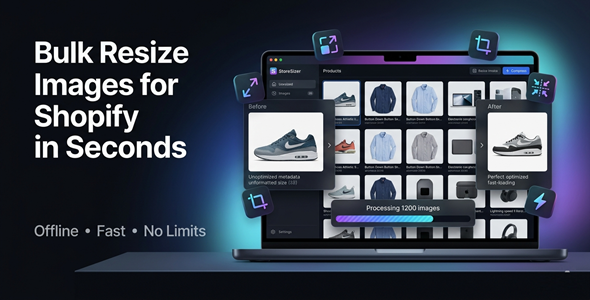
Description
Stop Wasting Hours on Product Images
Every Shopify store lives or dies by its visuals.
Slow, inconsistent, or oversized images kill conversions — and your rankings.
StoreSizer changes everything.
Resize, compress, and optimize 1000+ images in seconds — right from your Windows desktop.



Perfect For
✔ Shopify store owners
✔ Dropshipping businesses
✔ Print-on-demand sellers
✔ E-commerce agencies
✔ Product photographers
✔ Freelancers managing multiple stores
Features
 |
Bulk Image Resizing Process 1000+ images in a single batch. No more one-by-one editing — ever. |
|
Shopify-Optimized Presets One-click 2048×2048 preset built for Shopify. Perfectly formatted images every time. |
|
Aspect Ratio & Smart Crop Maintain original ratios or auto-crop to fit. Clean, consistent product visuals across your store. |
|
Multi-Format Export Convert images to JPG, PNG, or WEBP. Choose the format that loads fastest on your store. |
|
Smart Image Compression Reduce file size without sacrificing quality. Faster pages = higher Google rankings + more sales. |
|
One-Click Shopify Mode Hit one button to apply all Shopify best practices. Ideal for beginners and power users alike. |
|
Multi-Threaded Processing Engine Built for speed — handles massive image libraries fast. No lag. No crashes. No waiting around. |
|
Drag & Drop Folder Support Simply drag your folder in and let it run. Zero technical knowledge required. |
|
100% Offline — No Internet Needed Works anywhere, anytime — no Wi-Fi required. Your images never leave your machine. |
|
Clean Modern Desktop UI Designed to be simple, fast, and distraction-free. Get results without fighting a complicated interface. |
Why You Need This
❌ Manually resizing hundreds of product images takes hours
❌ Oversized images slow down your store — and hurt your SEO
❌ Inconsistent image sizes look unprofessional and kill trust
❌ Online tools require uploading your files to someone else’s server
❌ Photoshop and Lightroom are overkill — and cost a fortune
StoreSizer solves all of this in one lightweight desktop app.
Drop your folder in. Hit process. Done.
No subscriptions. No cloud uploads. No learning curve.
Just fast, clean, professional images — ready for your store.
How You Can Profit
✔ Launch new product collections in hours, not days
✔ Speed up your store and watch conversions climb
✔ Offer image optimization as a service to other Shopify sellers
✔ Handle client stores at scale — process thousands of SKUs fast
✔ Standardize image libraries for print-on-demand catalogs
✔ Deliver faster, more professional results to e-commerce clients
Faster stores rank higher, convert better, and earn more.
This is not just a tool — it’s a competitive advantage.
⚡ Fast Results
Load your image folder.
Select your output settings.
Process hundreds of images in seconds.
No Photoshop. No plugins. No subscriptions.
Just results — instantly, offline, on your desktop.
Example:
Resize and compress 500 product images in under 60 seconds.
Simple 3-Step Setup
 |
Step 1 — Install & Launch Download and install StoreSizer on your Windows PC. Open the app — no account or internet needed. |
 |
Step 2 — Load Your Images Drag and drop your product image folder into the app. Select your output format, size, and quality settings. |
 |
Step 3 — Process & Upload to Shopify Hit process and watch your images get optimized in seconds. Upload directly to your Shopify store — ready to sell. |
Requirements before installing:
✔ Windows 10 or Windows 11 (64-bit)
✔ .NET 8 Runtime — free download from Microsoft
✔ Minimum 4 GB RAM (8 GB recommended)
✔ At least 200 MB free disk space

- Version 1.0.0 – Initial release with full bulk resizing, Shopify presets, multi-format export, compression engine, and offline processing support.

 |
Does this work without an internet connection? Yes — StoreSizer is 100% offline. No internet, no API, no cloud required. |
|
How many images can I process at once? You can process 1000+ images in a single batch. The multi-threaded engine keeps it fast, no matter the volume. |
|
What image formats are supported? StoreSizer supports JPG, PNG, and WEBP. You can convert between formats in the same batch. |
|
Is this compatible with my Windows PC? Yes — it runs on Windows desktop and laptop systems. Lightweight install, no heavy system requirements. |
|
Can I use this for client stores or multiple shops? Absolutely. Many agencies and freelancers use it to manage image optimization across multiple Shopify stores. |
|
Will compressing images reduce their quality? You control the quality level with a built-in slider. Compress aggressively or lightly — the choice is yours. |
| Type | Windows App |
|---|---|
| Author | GoGrowTools |
| Price | $19 |
| Sales | 0 |
| Rating | 0 (0) |
| Published | May 7, 2026 |
| Last Update | May 7, 2026 |
| Application Runtime | Native |
| Operating System Versions | Windows 11, Windows 10 |
Categories
Tags
External listing. code.market does not sell this product and does not process payment for it. Pricing, payment, delivery, licensing, refunds, and support are handled by the third-party merchant on its own website. We may earn an affiliate commission from a referral. Details.
Products of the Week.
Submit🥇

STOP GUESSING WHAT TO POST
AI that learns your brand voice and builds a month of consistent, on-brand social content: carousels, posts and hooks that sound like you, not like everyone else's AI.
SaaS · 7,369 views · 67 clicksSaaS · Week 46 · 7,369 views · 67 clicks
🥈

Conversational Backlinks for Busy Founders
Place Backlink Relevant Conversation for your domain across Forums and Conversations
Website · 46,653 views · 232 clicksWebsite · Week 46 · 46,653 views · 232 clicks
🥉

upvote.club
Free Social Media Engagement that Helps Boost Your Content. Upvote Club supports 19 social networks with 100+ engagement actions in one dashboard. Add links to your posts and get free engagement from real users.
SaaS · 44,593 views · 127 clicksSaaS · Week 46 · 44,593 views · 127 clicks
#4

Substack Posting API
Onboard your Agent to Substack. Write Publish on Substack via API
SaaS · 63,480 views · 206 clicksSaaS · Week 46 · 63,480 views · 206 clicks
#5

Seenshot App
Free, Fast, MacOS Screenshot app. Make Screenshot cmd+shift+2 and send it via link
Desktop App · 32,730 views · 127 clicksDesktop App · Week 46 · 32,730 views · 127 clicks
#6

Hand-Placed Backlinks $9.99 per link. Flat rate.
Buy hand-placed forum, Q-A and directory backlinks. Flat $9.99 per link, no subscriptions — you only pay for approved listings.
Website · 8,349 views · 19 clicksWebsite · Week 46 · 8,349 views · 19 clicks
#7

Free Invoice Generator - PDF Invoices in Your Browser, No Sign-Up
A free invoice maker for freelancers and small businesses: fill in the invoice, check the live preview, and download a PDF that looks exactly like it. Any currency, tax per item, three templates, no sign-up, and nothing leaves your device.
6,977 views · 29 clicksWeek 46 · 6,977 views · 29 clicks
#8

Merge PDF Files Free - Combine PDFs in Your Browser, No Upload
A free PDF merger for office workers, students, and freelancers: combine PDFs and images into one file in the browser, reorder files and pages, pick page ranges, keep bookmarks, and open password-protected PDFs. Nothing is uploaded, no sign-up, no watermark.
6,458 views · 18 clicksWeek 46 · 6,458 views · 18 clicks