
StartMyVPN - WireGuard OpenVPN SaaS Platform
Description
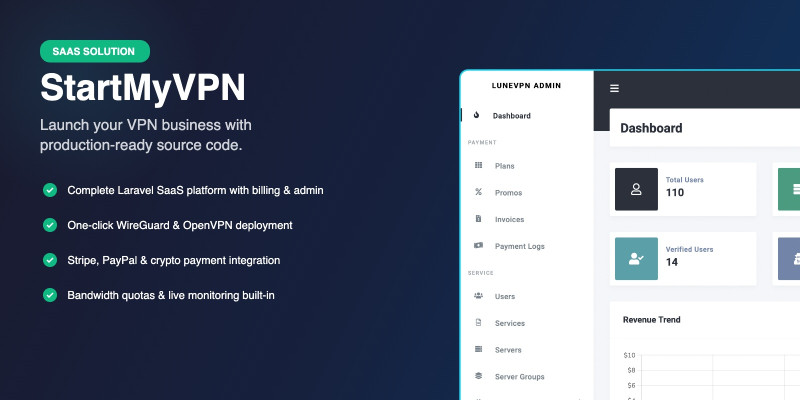
StartMyVPN is a complete, self-hosted SaaS platform that lets you launch and run your own VPN business out of the box. Built on Laravel 12, it bundles everything you need: a public marketing site, customer dashboard, billing, automated VPN server provisioning, and a full admin panel.
Sell WireGuard and OpenVPN access on recurring subscriptions, auto-deploy servers to DigitalOcean and Vultr from the admin panel, and let customers download ready-to-use configs or connect with one click. All server-side scripts, cron jobs and monitoring are installed and managed automatically.
Whether you are starting a new VPN brand or migrating off a resold white-label, StartMyVPN gives you full ownership of your stack, your users and your revenue — with no vendor lock-in and no per-user fees.
Why StartMyVPN
- One platform: storefront, billing, customer area, and admin — no glue code
- Truly self-hosted — your server, your database, your customer data
- Automated WireGuard & OpenVPN provisioning on your own VPS fleet
- Built on Laravel 12, Livewire, Tailwind, and Vite — modern and maintainable
- Clean, responsive UI out of the box, easy to re-brand
IMPORTANT: In order to get your license key, please submit a ticket through https://support.lunecore.com/
Live Demo: https://demo.startmyvpn.com
admin@demo.test / demo1234
Android App: https://www.codester.com/items/64426/startmyvpn-android-native-vpn-client
iOS App: https://www.codester.com/items/64427/startmyvpn-ios-native-vpn
Features
Customer facing
- Modern landing page with pricing, features, and FAQ sections
- Account registration, email verification and password reset
- Social login (Google, Apple)
- Customer dashboard with active subscriptions, invoices and tickets
- One-click WireGuard and OpenVPN config download
- Multi-language support (localized front-end)
VPN infrastructure
- Automated WireGuard server installation and peer management
- Automated OpenVPN server installation with per-user certificates
- One-click server deployment via DigitalOcean and Vultr APIs
- Manual server import for any VPS with SSH access
- Server groups, load balancing, and bandwidth tracking
- Per-user bandwidth quotas with monthly anniversary-based resets
- Heartbeat and latency monitoring with live server status
- Abuse detection and automatic firewall-level blocking
- Cloudflare IP list sync for DDoS protection
Billing and monetization
- Stripe (cards, SEPA) with recurring subscriptions
- PayPal Checkout and PayPal recurring subscriptions
- CryptAPI for Bitcoin, Ethereum and other cryptocurrencies
- Automated invoice generation and PDF downloads
- Service expiration, grace period and reminder emails
- Coupons, discounts and trial periods
- Google Play in-app purchase validation (for mobile apps)
Admin panel
- Full user management with roles (admin, support, customer)
- Server fleet management with real-time status
- Plan and pricing editor
- Payment gateway, email, and social login configuration from the UI
- Built-in support ticket system with attachments
- Integrations panel (Google Analytics, Cloudflare, etc.)
- Audit log and activity tracking
Under the hood
- Laravel 12 with Livewire and Tailwind CSS
- Queue workers for background server provisioning
- Cron-driven scheduler for billing, reminders and maintenance
- Localization-ready (language files included)
- Email templates included (transactional and marketing)
- REST API for mobile apps and third-party integrations
Requirements
Server
- PHP 8.4 (required — older versions are not supported)
- IonCube Loader v15 or newer (required to run the encoded files)
- MySQL 8.0 or newer
- Nginx or Apache with mod_rewrite
- Minimum 1 GB RAM (2 GB+ recommended)
- 10 GB storage (20 GB+ recommended)
- Ubuntu 22.04 or 24.04 (other Linux distros with matching PHP 8.4 work)
PHP extensions
- BCMath, Ctype, cURL, DOM, Fileinfo, JSON, Mbstring, OpenSSL, PDO, pdo_mysql, Tokenizer, XML, Zip
Build tools
- Composer 2.x
- Node.js 20+ and npm (used during installation to compile front-end assets with your branding)
Third party accounts (optional but recommended)
- DigitalOcean or Vultr account — for automated server deployment
- At least one payment gateway account — Stripe, PayPal, or CryptAPI
- SMTP or transactional email provider — for user emails
VPN server nodes
- Any Ubuntu 22.04 or 24.04 VPS with root SSH access
- WireGuard and/or OpenVPN are installed automatically during provisioning
Instructions
1. Install the IonCube Loader
StartMyVPN ships with IonCube-encoded core files, so the IonCube Loader v15 or newer for PHP
8.4 must be installed before anything else. Download it from the official IonCube website, copy
the loader file into your PHP extensions directory, and add this line at the very top of your
php.ini, above any other extension directive:
zend_extension = /path/to/ioncube_loader_lin_8.4.so
Restart PHP-FPM and confirm with php -v. You should see an ionCube PHP Loader
v15.x line in the output.
2. Upload and extract
Unzip the release archive to your web root:
unzip startmyvpn-latest.zip -d /var/www/startmyvpn
cd /var/www/startmyvpn
3. Install PHP dependencies
composer install --no-dev --optimize-autoloader
4. Build front-end assets
Assets are compiled on each install so your branding and theme customizations are baked into the final bundle. Run both commands from the release directory:
npm ci
npm run build
5. Create the environment file
cp .env.example .env
php artisan key:generate
6. Configure database and environment
Edit .env and set:
APP_ENV=production
APP_DEBUG=false
APP_URL=https://your-domain.com

DB_CONNECTION=mysql
DB_HOST=127.0.0.1
DB_PORT=3306
DB_DATABASE=startmyvpn
DB_USERNAME=your_db_user
DB_PASSWORD=your_db_password
Create the database and run the migrations and seeder:
mysql -u root -p -e "CREATE DATABASE startmyvpn CHARACTER SET utf8mb4 COLLATE utf8mb4_unicode_ci;"
php artisan migrate --force
php artisan db:seed
7. Publish Livewire assets and set permissions
php artisan livewire:publish --assets
php artisan storage:link
sudo chown -R www-data:www-data storage bootstrap/cache
sudo chmod -R 775 storage bootstrap/cache
8. Optimize for production
php artisan config:cache
php artisan route:cache
php artisan view:cache
9. Configure your web server
Point your Nginx or Apache virtual host document root at the public/ directory of the
installation and make sure rewrite rules are enabled. Full sample configs are provided in the included
documentation.
10. Queue worker and scheduler
Server provisioning, billing, and monitoring jobs run on a background queue and the Laravel scheduler. Set up the queue worker under Supervisor and add the scheduler cron entry:
* * * * * cd /var/www/startmyvpn && php artisan schedule:run >> /dev/null
  2>&1
11. First-run setup
Open your domain in a browser and follow the /setup wizard to complete initial
configuration. Full step-by-step documentation is included in the release archive.
| Author | lunecore |
|---|---|
| Category | Scripts & Code / PHP Scripts / SaaS |
| Price | $304 |
| Extended License | $912 |
| First Release | Apr 11, 2026 |
| Last Update | Apr 11, 2026 |
| Files included | .php, .css, .html, .less, JavaScript .js |
Categories
Tags
External listing. code.market does not sell this product and does not process payment for it. Pricing, payment, delivery, licensing, refunds, and support are handled by the third-party merchant on its own website. We may earn an affiliate commission from a referral. Details.