
Sprigora | Flutter AI Plant Identifier App Template
Description
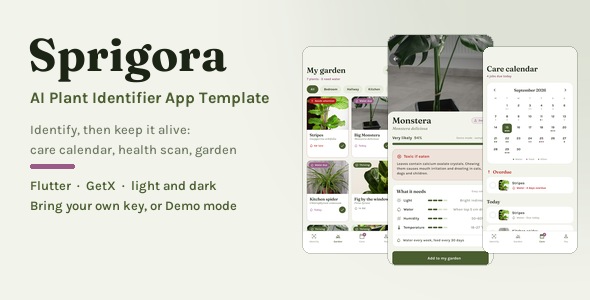
Sprigora is a complete Flutter app template for plant identification and plant care — 18 screens covering identification, a species library, a per-plant garden, a dated care calendar, health diagnosis, onboarding, auth and settings, in light and dark. It runs on your own API key, and it also runs on no key at all: Demo mode answers from bundled sample photos, so every screen works the moment you press run.

Point a phone at a plant and you get its name, how sure the model is, whether it is safe around cats, dogs and children, and what it needs to survive. Then that answer becomes a plant you own, with dated watering and feeding jobs you check off. There is no backend to deploy: no server, no Firebase, no build step of ours, and the buyer’s API keys stay in the device keychain.
What’s in the package
- Full Flutter app source code — 18 screens and sheets, null-safe, and
flutter analyzecomes back with zero issues - Light and dark themes, defined side by side in a single
app_colors.dartfile - A bundled care library of 14 real houseplant species — light, water, humidity, temperature, toxicity, propagation and common problems, written out per species
- Five runtime dependencies only —
get,http,image_picker,flutter_secure_storageandcupertino_icons. No vendor AI SDK is used anywhere, so no provider package update can break your build - Fraunces and Karla bundled as variable font assets with their SIL Open Font License files, plus 17 photographs under the Pexels License with a credits file; nothing is downloaded at runtime
- Clean GetX architecture — view to controller to service to data. No screen ever reads the mock layer, so replacing a service method body is all it takes to go live
- A deterministic demo data layer — no
DateTime.now(), noRandom(), so every screen renders the same on every run - Offline HTML documentation, 15 sections — first-run setup, a walkthrough for each provider key, a terminal command glossary, a screen tour with animated figures of the two signature interactions, re-skinning, connecting your own API, the project structure and troubleshooting
- Tests included — widget and service tests plus an integration walkthrough that drives every screen
Who is this for
- Flutter developers shipping a plant identifier who want the parts nobody else finishes — the care calendar, the toxicity panel, the per-plant garden — already solved
- Freelancers and agencies with a gardening or nursery client: re-skin one theme file, paste the client’s key and hand it over
- Founders validating a plant app who need something real in front of users this week, without paying for a server first
- Product teams at garden centres, nurseries and plant retailers who want a modern reference app to build on
The answer, not just a species name
One card carries the whole result: how sure the model is, whether the plant is safe indoors, and what it needs. The scientific name is set in italic serif the way botanical writing does it, confidence is a bar and never a dial, and toxicity is spelled out for cats, dogs and children instead of hidden behind an icon. Light, water, humidity and temperature read as four levels, and Add to my garden turns a one-off scan into a plant that is actually tracked. Not the plant you meant? Tap another candidate and the whole profile switches.

Water weekly is not a schedule
Adopting a plant writes dated jobs into a month calendar — water, feed, mist — each one you check off. Every day carries a dot per job type, overdue work gets its own section that names the plant and how late it is, and today’s list shows which plant each job belongs to. Ticking a job moves that plant’s water clock and books the next one, so the Care tab badge and the garden card update together.

Photograph the damage, get a treatment plan
A health scan names the disease, says how sure it is, and turns the fix into steps you check off as you go. When the problem spreads, the isolate-it-first warning comes before the cure rather than after it. What to look for lists the signs you can confirm by eye, and the treatment plan counts itself up from 0 of 5 done as you work — every step saying both what to do and why it works.

Identify it, then keep it alive
My garden is the part the one-shot identifiers skip: every plant you adopt becomes a specimen with its own room, history and water clock. Each card carries its status — needs attention, water due or thriving — plus the days left before the next watering, and the grid filters by room. Inside, a plant is yours and not a species page: nickname, room, the date you got it, a pet-safe badge, a watering interval you can nudge, free-text notes and the full care history underneath.

Three AI providers, or none at all
Nothing is proxied through a server of ours. The buyer picks a provider and pastes a key — and the app still works with none of them.
- Pl@ntNet — species identification from a research consortium. Free key, no credit card, 500 identifications a day. The recommended default.
- Plant.id — species plus a real health assessment that names the disease and returns a treatment plan. Free credits to start, then paid per scan.
- Google Gemini — a vision model for the questions a classifier has no field for. Free tier from AI Studio, no credit card.
- Demo mode — bundled sample answers. Always free, no key, no network call.
Each one is a small REST client, and the model id is editable in Settings rather than hard-coded, so a renamed model is a text field and not a patch. Adding a fourth provider is one class and one catalog entry — no screen changes.

Camera to calendar in five taps
Demo mode answers from bundled sample photos, so the whole path runs on a simulator with no camera, no API key and no network: identify a plant from a sample, watch it match, read the profile at 94%, add it to your garden, and find the first watering already sitting on a real date in the calendar. That is also how the preview and every screenshot on this page were made.

One palette, two themes
Both themes are defined side by side in one colors file, and the Appearance switch in Settings flips between them at runtime. Re-skinning is an afternoon, not a rewrite: every color is a token in app_colors.dart, every typeface is a family constant in app_text_theme.dart, and every corner radius and margin lives in app_spacing.dart. Swap the photography by dropping files into one folder — a missing image falls back to a drawn glyph instead of crashing the screen.

Built to be handed over
A template a buyer can run on the first try, re-skin in one file, and point at their own API without touching a screen. Views never reach into the mock layer, API keys go to the iOS keychain and to encrypted storage on Android, and the documentation says where every seam is.

Get it running in five minutes
Unzip, run flutter pub get, run flutter run. That is the whole setup — there is no server to start, no database to create, no key to register and no account to sign up for. The first thing you see is a working app in Demo mode, and you add a provider key later only if you want live identification.
Try it before you buy
The Live Preview runs the real app in your browser, in Demo mode. Tap a sample photo and watch the identification land, open the plant profile, tick a job off the care calendar and run a health scan — the four screens this template is built around are all clickable before you spend anything.
Requirements
Flutter 3.x with Dart 3.7 or newer, and a Mac or PC with the standard Flutter toolchain. iOS and Android. No server, no Firebase, no database.
Third-party costs and honest limits
- Third-party API costs are yours. Sprigora ships no keys and no included quota. Pl@ntNet and Gemini have free tiers; Plant.id charges per scan beyond its free credits. Demo mode is free forever and needs no key at all.
- AI identification can be wrong. The app labels its confidence honestly and never claims a species it was not given. It is not a substitute for expert advice and must not be used to decide whether a plant is safe to eat or safe for a pet to chew.
What’s not included
- No backend and no bundled recognition model. Identification runs against a provider you choose with your own key. Demo mode is a set of bundled sample answers, not an offline engine.
- Demo mode covers the sample photos it ships with — enough to walk every screen end to end, but it will not identify an arbitrary photo without a provider key.
- The care library covers 14 species. Anything outside it is returned with its toxicity marked unknown on purpose — the app never invents plausible-looking care or safety data for a plant it does not know.
- Reminders are in-app, not scheduled notifications. The care calendar surfaces what is due and what is overdue while the app is open; no notification scheduling plugin ships. The documentation shows where to add one.
- The garden lives in memory for the demo. Plants and completed jobs reset to the sample garden on restart; only the API keys are persisted, in the iOS keychain and in encrypted storage on Android. The service layer marks the exact place to write it to disk or to your API.
- The paywall is a mock. Plans, a free scan quota and an upgrade flow are all wired up, but no payment code ships — real purchases need your own store products and receipt validation.
- English only. No localization files or RTL layouts are included.
Support and updates
Questions about setup, providers or re-skinning get an answer through the item’s comments, normally within one to two business days on weekdays. Item support covers the template itself; it does not cover a provider’s own account, quota or billing.
Changelog
1.0.0 — Initial release.
| Type | Flutter App |
|---|---|
| Author | coderqh |
| Price | $28 |
| Sales | 1 |
| Rating | 0 (0) |
| Published | Aug 25, 2026 |
| Last Update | Aug 25, 2026 |
| Compatible Software | Flutter 3.x |
| Mobile Files Included | Dart, YAML, JavaScript JSON, .kotlin, .swift |
Categories
Tags
External listing. code.market does not sell this product and does not process payment for it. Pricing, payment, delivery, licensing, refunds, and support are handled by the third-party merchant on its own website. We may earn an affiliate commission from a referral. Details.