
Sports Booking - Venue and Court Booking System
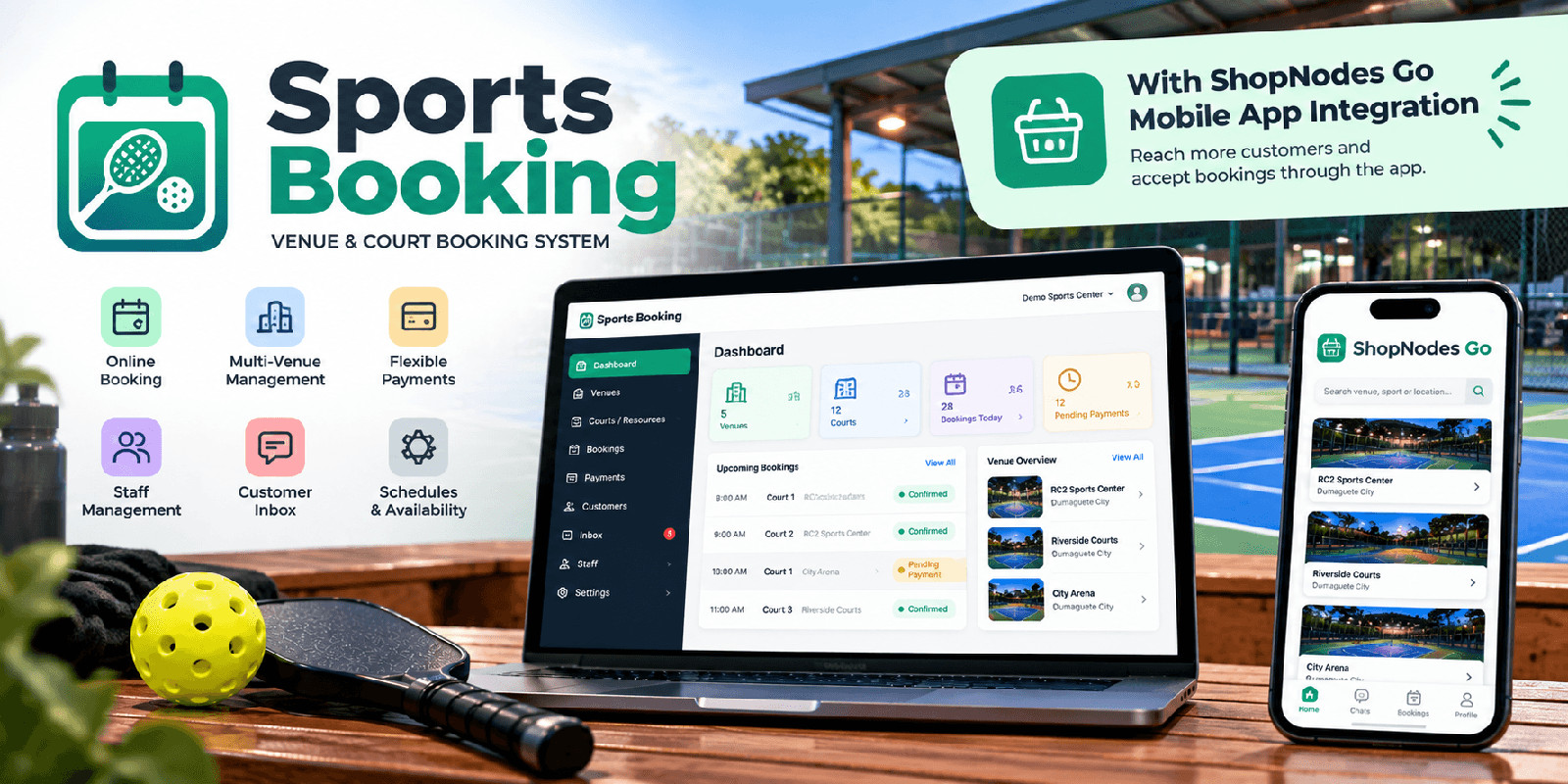
Description
It gives venue operators their own booking website and administration dashboard where they can manage venues, courts and other bookable resources, operating hours, schedules, reservations, payments, staff, and customer conversations from one system.
Customers can browse available venues, check schedules, submit bookings, and follow the payment process through a clean booking experience.
Sports Booking is installed on your own compatible PHP hosting and does not require a monthly subscription to operate the core booking system.
The system supports multiple venues and bookable resources, making it suitable for businesses operating badminton courts, pickleball courts, basketball courts, tennis courts, sports facilities, and similar reservation-based venues.
PAYMENT MANAGEMENT
Venue operators can configure their own payment options. The system includes PayPal configuration as well as manual GCash payment workflows.
For manual payments, customers can submit their payment reference information while administrators retain control over payment confirmation.
OWNER & STAFF MANAGEMENT
The administration area provides tools for managing venues, resources, schedules, bookings, payments, staff access, and customer conversations.
Staff can be given access to operational features without requiring full owner-level administration.
CUSTOMER INBOX
Sports Booking includes a built-in inbox for customer conversations.
Conversation rows clearly identify the related venue, with resource or court context where applicable, making it easier for operators managing multiple locations or facilities to respond to customers.
OPTIONAL SHOPNODES INTEGRATION
Sports Booking can optionally connect with ShopNodes for supported integration features.
This integration is completely optional. The core Sports Booking system works independently and does not require ShopNodes to manage venues, schedules, bookings, payments, staff, or customers.
EASY BROWSER INSTALLATION
A guided browser installer handles database configuration, application settings, administrator account creation, branding, and initial setup.
Both root-domain and subfolder installations are supported.
Features
• Self-hosted sports booking system • Multi-venue management • Multiple courts and bookable resources • Public customer booking interface • Availability and schedule management • Operating hours per venue/resource • Schedule blocks and availability controls • Booking reservation workflow • Booking conflict protection • Owner administration dashboard • Staff management and staff access • Customer conversation inbox • Venue context inside inbox conversations • Unread conversation indicators • Booking and payment management • Manual GCash payment workflow • Payment reference submission • PayPal configuration and integration • Venue and business branding • Customer-facing booking pages • Installation wizard • Automatic database migrations • Secure installation-specific encryption key generation • Root-domain installation support • Subfolder installation support • Optional ShopNodes integration • ShopNodes is not required for core operation • Responsive web interface • Built with CodeIgniter 4 • PHP 8.2+ compatible • MySQL / MariaDB database • No monthly subscription required to operate the self-hosted core system
Requirements
• PHP 8.2 or newer • MySQL or MariaDB • Apache web server with mod_rewrite enabled • PHP MySQLi extension • PHP mbstring extension • PHP intl extension • PHP OpenSSL extension • PHP cURL extension • Writable application directories as described in the included installation documentation • HTTPS recommended for production installations • PayPal developer/business credentials are required only when using PayPal payments • GCash account details are required only when enabling manual GCash payments • SMTP credentials are required if email delivery is enabled • ShopNodes account/integration is optional and is not required for the core booking system
Instructions
1. Upload the contents of the application folder to your web hosting.
2. Point your domain or subdomain to the application's public directory according to the included installation guide.
3. Open the application URL in your browser.
4. The installation wizard will automatically start.
5. Complete the server requirements check.
6. Enter your MySQL or MariaDB database information.
7. Configure your application URL and timezone.
8. Create your administrator account.
9. Configure the initial business branding.
10. Review the installation details and complete the installation.
11. Sign in to the administration dashboard and begin adding your venues, courts/resources, schedules, staff, and payment settings.
Detailed installation and configuration instructions are included in:
documentation/INSTALLATION.md
ShopNodes integration is optional and can be configured after the main Sports Booking installation is complete.
| Author | partnigram |
|---|---|
| Category | Scripts & Code / PHP Scripts / Booking |
| Price | $44 |
| Extended License | $132 |
| First Release | Oct 1, 2026 |
| Last Update | Oct 1, 2026 |
| Database | MySQL 8.0 |
| Files included | .php, .css, .html, .json, .md, composer.json, JavaScript .js |
| Software version | PHP 8.2, PHP 8.3, PHP 8.4, PHP 8.5 |
| Software framework | CodeIgniter |
| Programming language | PHP, JavaScript |
Categories
Tags
External listing. code.market does not sell this product and does not process payment for it. Pricing, payment, delivery, licensing, refunds, and support are handled by the third-party merchant on its own website. We may earn an affiliate commission from a referral. Details.
Products of the Week.
Submit🥇

Actionbook
It works inside the user's own browser with the accounts already signed in. The user describes the result they need, and the agent reads, clicks and types through the pages, then delivers a dashboard or report where each data links back to its source.
Other · 741 views · 10 clicksOther · Week 44 · 741 views · 10 clicks
🥈

Free social media tools for creators & solofounders
295 free tools for growing your social media: write, plan, grow on local AI models, 100% free forever, No sign-up required, No trial. Write, check and measure posts on LinkedIn, Instagram, TikTok, X, YouTube, Reddit, Product Hunt and more: a free social media scheduler for 17 networks, engagement rate calculators, character counters, best time to post, hook generators and follower growth calculators. No login anywhere, no API or credit usage.
708 views · 6 clicksWeek 44 · 708 views · 6 clicks
🥉

STOP GUESSING WHAT TO POST
AI that learns your brand voice and builds a month of consistent, on-brand social content: carousels, posts and hooks that sound like you, not like everyone else's AI.
SaaS · 1,955 views · 21 clicksSaaS · Week 44 · 1,955 views · 21 clicks
#4

Hand-Placed Backlinks $9.99 per link. Flat rate.
Buy hand-placed forum, Q-A and directory backlinks. Flat $9.99 per link, no subscriptions — you only pay for approved listings.
Website · 1,906 views · 17 clicksWebsite · Week 44 · 1,906 views · 17 clicks
#5

Conversational Backlinks for Busy Founders
Place Backlink Relevant Conversation for your domain across Forums and Conversations
39,365 views · 211 clicksWeek 44 · 39,365 views · 211 clicks
#6

Free Invoice Generator - PDF Invoices in Your Browser, No Sign-Up
A free invoice maker for freelancers and small businesses: fill in the invoice, check the live preview, and download a PDF that looks exactly like it. Any currency, tax per item, three templates, no sign-up, and nothing leaves your device.
645 views · 11 clicksWeek 44 · 645 views · 11 clicks
#7

Merge PDF Files Free - Combine PDFs in Your Browser, No Upload
A free PDF merger for office workers, students, and freelancers: combine PDFs and images into one file in the browser, reorder files and pages, pick page ranges, keep bookmarks, and open password-protected PDFs. Nothing is uploaded, no sign-up, no watermark.
590 views · 4 clicksWeek 44 · 590 views · 4 clicks