
Spoonly | Baby Solid Food Tracker With Food Library, Food Log Journal and AI Coach - SwiftUI
Description
Spoonly – Baby Solid Food Tracker With Recipe Library, Log Journal and AI Coach (SwiftUI)
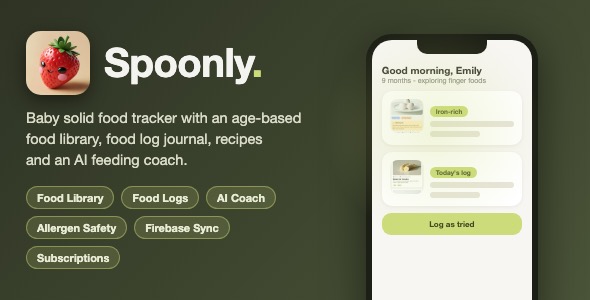
A complete, production-ready iOS baby feeding app built in SwiftUI with a rich food library (age-based preparation, allergen, nutrition and safety info), a daily food log journal with reactions and symptoms, a recipe meals collection, an AI-style feeding coach chat, emergency allergic-reaction guidance, Firebase authentication and cloud sync, and a RevenueCat subscription paywall. Premium light UI with custom icons and the Nunito font family.
SwiftUI | iOS 17+ | Firebase Auth + Firestore + Storage | RevenueCat Paywall | Google / Apple / Email Sign-In | SDWebImage Caching | Easy Re-skin
Important – Ongoing Service Costs
This app depends on two services that can generate real, recurring costs beyond their free tiers:
- Firebase – the free Spark plan covers light usage, but Firestore (reads/writes) and Firebase Storage (photo uploads/downloads) are usage-billed beyond the free quotas and require the pay-as-you-go Blaze plan at scale. Costs scale with your user count and are charged by Google.
- RevenueCat – free up to a monthly tracked-revenue threshold (currently $2,500/month); above that threshold RevenueCat takes a percentage cut of your subscription revenue.
These charges come from Firebase/Google and RevenueCat – not from the template author. Review firebase.google.com/pricing and revenuecat.com/pricing before purchasing.
Demo Instructions
Test the app immediately with the built-in demo account – no configuration, no signup, no network needed:
- Demo email:
demo@spoonly.app - Demo password:
demo1234 - Open
Spoonly.xcodeprojin Xcode 15 or newer and pressCmd + R– the app builds and launches into onboarding - On the email sign-in screen enter the demo email and password above (they are also shown on that screen). The demo account signs in locally: the full food library loads from the bundled
foodItemDetails.json, sample recipes appear in the Meals tab, and logs, photos and profile edits are kept on-device – every screen can be explored without any backend
Connecting your own backend (required for live / cloud features): this template connects to Firebase and RevenueCat, so you must add your own free accounts before sign-in, cloud sync and purchases work with real accounts:
- Create a free Firebase project, enable Auth (Email, Apple, Google, Anonymous), Firestore and Storage, download
GoogleService-Info.plistand replace the bundled placeholder one – step-by-step instructions with file paths are in the included documentation - Create a free RevenueCat account and paste your public Apple API key in
SpoonlyApp.swift(marked with a PLACEHOLDER comment) - Populate the
foodItems,mealscollections in Firestore – complete sample JSON documents with all field names and types are included in the documentation
The AI Coach chat uses built-in demo responses – no OpenAI or other AI API key is required. Wire it to any backend later if you wish.
What Spoonly Does
Spoonly helps parents navigate the weaning journey: browse an age-filtered food library with safety, allergen and nutrition guidance, log every food their baby tries with consistency, reactions, symptoms and photos, track liked / refused / allergic reactions over time, follow step-by-step meal recipes, get instant emergency guidance for allergic reactions, and ask a friendly AI-style coach for feeding advice – all synced to Firebase under the parent’s account.
Everything the App Does
- Multi-Page Onboarding – baby name, birth date and gender, solids stage, feeding style, feeding approach, allergies, concerns, meal prep style and learning preference, plus a goals selection screen and welcome / login screens
- Flexible Authentication – Firebase email / password, Apple Sign-In, Google Sign-In and anonymous mode, with a polished login screen
- 4-Tab Layout – Home, Food List, Food Logs and Meals with custom tab icons and a subscription paywall gate
- Home Dashboard – personalized greeting with baby age, profile summary card and quick actions: add a log, open the AI Coach, open log details and settings
- Food Library – searchable card grid with food images, age labels and quick status badges
- Powerful Filter Sheet – filter by age group, top allergens and food category, with live result counts
- Rich Food Detail Screen – hero photo, Iron-rich / Top allergen / Poop-friendly badges, choking-risk warning block, and 6 content tabs: Serve safely (age-based preparation chips with step-by-step instructions), Allergen, Nutrition, Learn more, FAQ (expandable rows) and Sources (tappable reference links)
- Age-Based Preparation – instructions automatically adapt to the selected age group (6 / 9 / 12 / 18 months +)
- Favorites / Bookmarks – bookmark any food and find it again instantly
- Food Log Journal – horizontal date chip strip with multi-date selection, filter tabs (Today, All, Liked, Refused, Allergic) and grouped-by-date sections
- Detailed Log Editor – date and time picker, consistency chips, eating method (spoon fed / assisted / self), reaction emojis, allergy symptom multi-select, notes and photo attachments (PhotosPicker with Firebase Storage upload)
- Edit and Delete Logs – tap any log to edit, swipe or button to delete with confirmation
- Emergency Guidance Screen – automatically presented when an allergic reaction with symptoms is logged: clear step-by-step emergency instructions
- Meals / Recipe Collection – image cards with prep time, yield and allergen chips, detailed ingredient lists and numbered cooking method
- AI Coach Chat – welcome message, suggestion chips, typing indicator, message bubbles with safety-note callouts and tappable source links opened in an in-app Safari view, dismissible medical disclaimer banner, and the baby’s profile (name, age, stage, allergies) shown in the header for context
- Profile Editing – every onboarding answer can be changed later from Settings
- RevenueCat Paywall – subscription gate fed by RevenueCat offerings with loading states and a continue button
- Cloud Sync – food items, meals, user profiles and food logs stored in Firestore; photos in Firebase Storage; favorites per user
- Polished Empty States and Loading Views – every list has dedicated loading and empty designs
- Premium Light Design – cream background, soft green accent palette, rounded cards, custom drawn icons and the bundled Nunito font family, centralized in AppColors / Fonts theme files
- Localization-Ready Strings – all UI text goes through a central L10n helper
Technology
- Language: Swift 5.9+, SwiftUI (100% native UI)
- Minimum iOS: iOS 17.0
- Backend: Firebase (Authentication, Firestore, Storage)
- Sign-In: Google Sign-In SDK + Sign in with Apple + Email
- Subscriptions: RevenueCat SDK (purchases, offerings)
- Image Loading: SDWebImageSwiftUI with disk caching (via Swift Package Manager)
- Architecture: MVVM-style services (AuthenticationManager, FoodItemService, MealService, FoodLogService, FavoritesManager)
- No hard-coded secrets: configuration uses clearly marked placeholder files – see documentation
What the Buyer Gets
- Full Xcode source project (Swift + SwiftUI) for the complete app
- All assets: custom icons, tab icons, badge graphics, Nunito fonts and the App Icon 1024 px source
- Step-by-step documentation (documentation.html) with screenshots: Xcode setup, Firebase configuration, RevenueCat setup, re-skinning the theme, populating content, renaming the app and App Store submission checklist
- Reviewer notes, a Troubleshooting / FAQ guide (permission errors, Google Sign-In URL scheme, empty offerings) and complete sample Firestore JSON documents for the foodItems and meals collections
Development Disclosure
Portions of this template’s source code were developed with AI-assisted tools, and some of the included onboarding and paywall illustration graphics were created with AI image-generation tools. All code has been reviewed, tested and organized for production use, and all graphics are included with the template – you may use them in your published app.
A Note on This Template
You are purchasing the complete Xcode source code of the app. To build and customize it you need basic Xcode knowledge (opening a project, changing a bundle ID, editing Swift files). The included documentation walks you through every step, from Firebase configuration to App Store submission.
| Type | iOS App |
|---|---|
| Author | mefjudevllc |
| Price | $14 |
| Sales | 0 |
| Rating | 0 (0) |
| Published | Sep 24, 2026 |
| Last Update | Sep 24, 2026 |
| Compatible Software | Other |
| Compatible With | Swift |
| Mobile Files Included | .h |
Categories
Tags
External listing. code.market does not sell this product and does not process payment for it. Pricing, payment, delivery, licensing, refunds, and support are handled by the third-party merchant on its own website. We may earn an affiliate commission from a referral. Details.