
Speedly | GPS Speed Tracker With Family Map, Speed Alerts, Trip Reports and Subscriptions - SwiftUI
Description
Speedly – GPS Speed Tracker and Family Driving Monitor
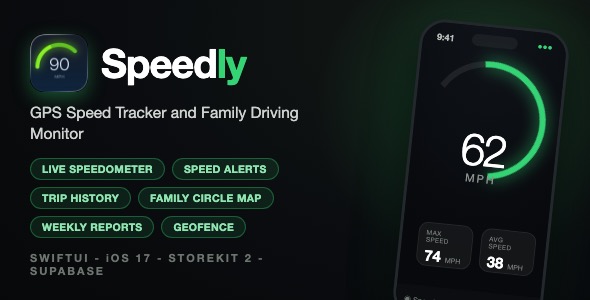
Speedly is a complete SwiftUI driving-safety app template. It turns an iPhone into a live speedometer with speed alerts, automatic trip recording, weekly driving reports and a Life360-style family circle that shows where everyone is driving and how fast – all wrapped in a polished dark UI with a custom tab bar and smooth animations.
Demo Instructions
There is no demo account or login credentials – the app has no pre-created users. Please read this carefully before reviewing:
- The template ships with placeholder backend credentials for security. The download contains no live API keys, no Supabase project URL and no Google client ID.
- The onboarding flow, welcome screens and the paywall can be run immediately after opening the project in Xcode – no configuration needed.
- Sign-in (Apple / Google), family circles and live member tracking require the buyer to connect their own free Supabase project. The full setup takes about 10 minutes and is documented step by step in
documentation.html(create project, run the included SQL schema, paste your URL and key into the app’s two config files). - External services require your own accounts and API keys. Supabase and Google OAuth are third-party services that the buyer must sign up for and configure themselves (own Supabase project URL and anon key, own Google Cloud OAuth client ID). These services have free tiers that are sufficient for development and small apps, but depending on usage and scale they may involve additional costs – please review each provider’s pricing page before purchasing.
- Live speed tracking, speed alerts, trip recording and the weekly driving report run locally on the device GPS and work without any backend configuration.
- StoreKit subscriptions require App Store Connect in-app purchase products. Product IDs and setup steps are documented.
Everything the App Does
Live Speed Tracking
- Real-time GPS speedometer with an animated arc gauge (0-120 MPH scale)
- Tap the speed to cycle units: MPH, km/h and m/s
- Max Speed and Average Speed stat cards
- Tracking Active status indicator and automatic tracking start
- Graceful “Location Access Disabled” state with deep link to Settings
Speed Alerts
- User-configurable speed limit with an orange limit indicator on the gauge
- Gauge arc changes from white to orange/red when over the limit
- Severity levels: low, medium and high
- Haptic feedback scaled to alert severity
- Local push notifications with a 30-second cooldown to avoid spam
- Complete alert history persisted in CoreData, grouped by day
- History summary with total alerts, high-severity count and average speed over the limit
Automatic Trip Recording
- Trips start automatically at 5+ MPH and end after 30 seconds stopped
- CoreMotion activity detection drives start/stop – no manual buttons
- Route points recorded every 15 seconds with Douglas-Peucker compression
- Per-trip stats: distance, duration, top speed, average speed, rapid acceleration and hard braking counts
- Trip list with map route playback
- Local storage of up to 100 trips
Weekly Driver Report
- Week selector: This Week, Last Week and two weeks ago
- Drive count and total distance card
- Summary rows: top speed, speeding events, rapid acceleration and hard braking
- Profile avatar and notification bell with alerts sheet
- Clean empty states when no data exists
Family Circle Tracking (Life360-style)
- Create or join a private family circle with 6-character invite codes
- Live map with custom member markers, speeds and online status
- Member bottom sheet with per-member speed and status cards
- Member settings: per-member speed limit slider, alerts toggle and recent trips
- Multiple circle support with a circle picker
- Share-code sheet for inviting members
- Non-blocking circle disconnect banner when an owner subscription expires
- Real-time location sync through a Supabase backend
Geofencing
- Create named geofences with map-based radius selection
- Assign a geofence to any family member – arrival and departure notifications when they cross the boundary
- Enable/disable individual geofences
- Map circles overlay and horizontal geofence card list
Premium Onboarding and Monetization
- 10-step animated onboarding: welcome, name, birthdate, three value slides, permissions, sign-in, invite code and paywall
- Native StoreKit 2 subscriptions: monthly and yearly with a 7-day free trial and “Best Value” badge
- Restore purchases, trial state handling and foreground refresh
- Pro feature gates with an upgrade upsell view
- Circle members inherit the owner’s subscription automatically
Authentication and Account
- Sign in with Apple (nonce-secured) and Sign in with Google
- Supabase-backed user profiles merged with onboarding data
- Sign out and complete account deletion with data cleanup
Settings and Permissions
- Subscription status and restore purchases
- Live permission status rows for location, notifications and motion with one-tap deep links to Settings
- Background tracking toggle and “Tracked By” list
- Privacy policy and terms of use screens included
- Background location updates and BGTaskScheduler integration
Polish
- Dark-first design with a custom floating tab bar and green accent
- Empty states, loading indicators, haptics and subtle animations throughout
- Portrait, iPhone-only layout built entirely with SwiftUI
Technology
- Language: Swift 5, SwiftUI + Combine, MVVM with service singletons
- Minimum iOS: 17.0
- Backend: Supabase (auth, Postgres, REST) – optional, only for family features. SQL schema file included.
- Apple frameworks: CoreLocation, CoreMotion, MapKit, CoreData, StoreKit 2, UserNotifications, AuthenticationServices, BackgroundTasks
- Third-party packages: GoogleSignIn-iOS (Swift Package Manager) – no CocoaPods, no Firebase
- Persistence: CoreData (alerts, member cache) and UserDefaults (trips, settings)
- Xcode project: filesystem-synchronized groups (Xcode 16+), one target plus test targets
What the Buyer Gets
- Complete Xcode source project (74 Swift files, organized by feature: App, Core, Features, Models, Services, Views)
- Supabase SQL schema for users, circles, invites, locations, alerts and presence
- Step-by-step documentation.html with screenshots: setup, bundle ID, renaming, icons, theme, backend configuration and App Store submission checklist
- 12 App Store style preview screenshots (700px tall JPEG)
- Backend placeholder values clearly marked – no secrets in the source
Development Disclosure (AI-Assisted Development)
In accordance with Envato policy, the author explicitly discloses that portions of this template’s source code were developed with AI-assisted tools. All code has been human-reviewed, tested and is provided as a fully building Xcode project.
A Note Before You Buy
This is a source code template, not a compiled app. You will need Xcode and basic iOS development knowledge to build, customize and submit it. Backend-driven features require your own Supabase account and your own Google OAuth client ID – you must set up these external services yourself with your own API keys, and depending on your usage and scale they may involve associated costs (see the providers’ pricing pages). If that sounds good, Speedly gives you a production-quality starting point that would take months to build from scratch.
| Type | iOS App |
|---|---|
| Author | mefjudevllc |
| Price | $14 |
| Sales | 0 |
| Rating | 0 (0) |
| Published | Sep 24, 2026 |
| Last Update | Sep 24, 2026 |
| Compatible Software | Other |
| Compatible With | Swift |
| Mobile Files Included | .h |
Categories
Tags
External listing. code.market does not sell this product and does not process payment for it. Pricing, payment, delivery, licensing, refunds, and support are handled by the third-party merchant on its own website. We may earn an affiliate commission from a referral. Details.