
Sniprr | AI Video Analysis App With Viral Score, Actionable Feedback and Subscriptions - SwiftUI
Description
Sniprr – AI-Powered Video Analysis App Template for iOS
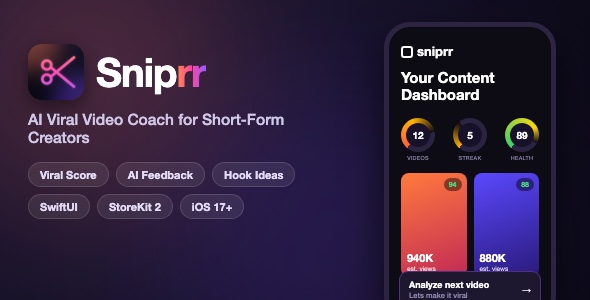
Sniprr is a complete, ready-to-publish SwiftUI template for an AI-powered video analysis app. Creators import a short-form video (TikTok, Reels, YouTube Shorts style) and get a Viral Score with hook, retention and engagement breakdowns, actionable feedback, on-screen hook ideas and follow-up content ideas – all wrapped in a polished dark neon UI with animated gradients, animated score gauges and confetti celebrations.
Demo Instructions
- No login and no demo credentials are required to try the app. The onboarding flow can be completed in a few taps and the sign-in screen offers a “Skip for now” option – the app runs locally without any account.
- The four demo videos on the dashboard ship inside the bundle, so the dashboard, detail screen and stats look fully populated out of the box.
- AI analysis of your own videos uses the Google Gemini API. You need a free Gemini API key (from Google AI Studio) and paste it into one clearly marked constant in AnalyzeViewModel.swift. The documentation shows the exact file and line.
- Cloud sync, Google Sign-In and the server-side analysis pipeline are optional extras. The app builds and runs without them; the documentation has step-by-step configuration sections for Supabase, Google Sign-In, Sign in with Apple and StoreKit products. The optional gemini-proxy Edge Function is deployed by you to your own Supabase project (full source included, deployment steps in documentation.html section 8.2.1) – the app does not depend on any third-party server.
Everything the App Does
- + Animated 5-step onboarding: welcome screen, platform / goal / content-type questions, animated Viral Score gauge reveal, demo analysis screen with confetti, completion screen
- + Sign in with Apple, Google Sign-In, email sign-in and an anonymous fallback session (Supabase auth)
- + Dashboard with three animated stat gauges: Videos Analyzed, Posting Streak and Creator Health
- + Video grid with thumbnails, viral score badges, estimated view ranges, long-press rename and delete
- + Empty state with call to action when no videos have been analyzed yet
- + Analyze tab: pick a video from the photo library, see a thumbnail preview and start the analysis
- + On-device analysis pipeline: frame extraction, scene cut detection, face detection, motion analysis, speech transcription (Speech framework) and music recognition (ShazamKit)
- + AI feedback layer via Google Gemini: overall viral score plus hook, retention and engagement subscores, summary, strengths, improvements and a Quick Win
- + Estimated view range prediction for each analyzed video
- + Detail screen with video player, Analysis and Ideas tabs, section-by-section feedback cards, on-screen hook suggestions, topic ideas with reach estimates and follow-up content ideas
- + Copy to clipboard and share sheet export of the full analysis
- + Re-analyze an existing video from the detail screen
- + Paywall with StoreKit 2 subscriptions (weekly, monthly, yearly) and a 3-day free trial presentation
- + Local notification trial reminder, plus notification permission handling
- + Profile tab: account settings, subscription management, help and support email, Terms of Service and Privacy Policy screens, sign out
- + Demo mode with four bundled demo videos and a debug “Populate Demo / Clear All” toggle
- + Dark neon theme with an animated multi-blob gradient background, animated score gauges, pulsing CTA, staggered slide-in animations and confetti
Technology
- + SwiftUI, iOS 17.0+ deployment target, Xcode 26.x
- + StoreKit 2 subscriptions and transaction listener
- + AVFoundation, Vision, Speech, ShazamKit, CoreImage for the on-device analysis pipeline
- + UserNotifications for trial reminders
- + Supabase (auth + database sync) and Google Sign-In SDK – both optional, gracefully degrade offline
- + Optional Python FastAPI backend (Railway-ready Dockerfile included) for a server-side Gemini pipeline
- + Supabase SQL schema and edge function folder included
- + No CocoaPods; Swift Package Manager only
What the Buyer Gets
- + Complete Xcode project source code (SwiftUI, 45+ Swift files, commented and organized by feature)
- + Full documentation.html setup guide with embedded screenshots
- + Four bundled demo videos and generated app icon
- + Optional Python backend worker with Dockerfile and deployment guide
- + Supabase schema, migrations and edge function scaffold
- + Preview screenshots folder
Important Cost Warning – Please Read Before You Buy
This template integrates three external services. Depending on how far you take your app, they can generate real costs that you – the buyer – are responsible for:
- Google Gemini API (required for AI analysis): The free tier at Google AI Studio has generous limits, but once you exceed them, Gemini API usage is billed per request. Every video analysis makes several AI calls (hook, body, ending and overall analysis), so heavier usage will incur charges on your Google account.
- Supabase (optional – cloud sync and auth): The free tier is sufficient for development and small apps, but Supabase charges monthly once you exceed its free limits (database size, bandwidth, monthly active users).
- Railway (optional – Python backend hosting): The included FastAPI backend is designed to deploy on Railway, which is a paid hosting platform with no permanent free tier. Hosting the backend will cost a few dollars per month or more, depending on usage.
If you only run the app locally with the free Gemini tier and skip the optional Supabase cloud sync and Railway backend, you can use this template at zero cost. The moment you publish to the App Store or scale up usage, budget for Gemini API usage and, if you use them, Supabase and Railway fees.
Development Disclosure
Portions of this template’s source code were developed with AI-assisted tools. All code has been reviewed, tested and is fully functional.
A Note Before You Buy
This is a source code template, not a compiled app. You will need Xcode and basic iOS development knowledge to build, customize and submit it to the App Store. Please read the documentation before purchasing.
| Type | iOS App |
|---|---|
| Author | mefjudevllc |
| Price | $14 |
| Sales | 0 |
| Rating | 0 (0) |
| Published | Sep 24, 2026 |
| Last Update | Sep 24, 2026 |
| Compatible Software | Other |
| Compatible With | Swift |
| Mobile Files Included | .h |
Categories
Tags
External listing. code.market does not sell this product and does not process payment for it. Pricing, payment, delivery, licensing, refunds, and support are handled by the third-party merchant on its own website. We may earn an affiliate commission from a referral. Details.