
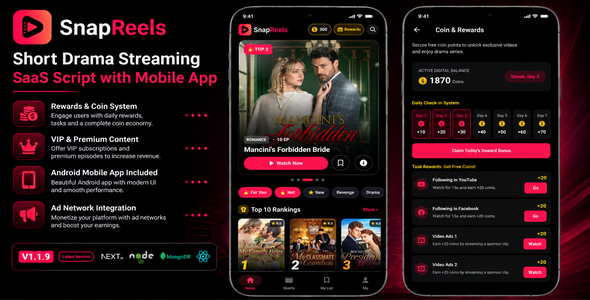
SnapReels | Short Drama Streaming SaaS Script with Android App
Description


What You’ll Get with Your Purchase
- Complete Web Platform Source Code – Includes the website landing page, user dashboard, admin control panel, and API backend (all included in this purchase).
- Android Mobile App Source Code – Native Kotlin/Jetpack Compose Android application source code ready for customization and publishing.
- Complete Documentation – Step-by-step installation, configuration, deployment, and build instructions.
- Future Version Updates – Access to future updates and improvements released for this item on CodeCanyon.
- Item Support – Assistance with installation-related questions according to Envato’s standard support terms.
SnapReels is a modern Android application for short drama streaming platforms. The app includes premium episodes, rewards system, coin wallet, AdMob monetization, Google Play Billing support, and seamless integration with the SnapReels backend platform.
Built for creators, startups, and businesses looking to launch their own mobile streaming application with a modern user experience and monetization features.
Live Demo
Explore the live demo of the Android App, Website, and Admin Panel below:
Android App Demo APK: Download Demo APK Website Demo: View Live Website Admin Panel Demo: Access Admin PanelUser App Login
Email: user@demo.com Password: demo123Admin Login
Username: admin Password: admin123 Security Notice: The credentials “admin/admin123” are for demo purposes only. You must configure secure, unique passwords in your production database.Key Features
- Short Drama Streaming System: High-performance, vertical-scrolling video feed optimized for short-form movies and series.
- Premium Episode Unlocking: Lock specific episodes and allow users to unlock them using virtual coins.
- Coin Wallet & Balance System: Built-in wallet where users can track their coin balance, purchase transactions, and claims.
- Google Play Billing Integration: In-app purchases for coin packs directly through the Android application.
- Multiple Payment Gateways: Integrated checkout systems for PayPal, Stripe, and Razorpay to buy coin packs on the web.
- Rewards & Daily Check-in: Daily reward system that encourages users to check-in regularly and earn free coins.
- Custom Reward Tasks: Configure tasks (e.g., watch a rewarded ad, invite friends) for users to earn coins.
- Continue Watching / History: Save watch history automatically, allowing users to resume dramas exactly where they left off.
- My List / Bookmarks: Users can bookmark their favorite series to a personal list for quick access.
- Live Search Functionality: Fast search indexing across dramas, tags, categories, and creators.
- Modern Android UI/UX: Sleek mobile layout built with Jetpack Compose, featuring native fluid transitions and dark mode.
- Secure User Authentication: Supports Email/Password login, Firebase Auth, and guest logins.
Dynamic Admin Control Panel
- Full Catalog Management: Easily add, edit, or delete series, seasons, and episodes with rich metadata.
- Multi-Storage Management: Configure cloud storage keys and instantly switch active storage providers from the UI.
- Monetization Controls: Set price-per-episode, configure custom coin packages, and toggle user reward values.
- Mediation & Ad Controls: Toggle, configure, and rotate ad banners, interstitials, and rewarded ads.
- Translation & Localization Editor: Edit translation keys directly from the dashboard to support any custom language.
- User Management: View user accounts, check coin balances, and review financial transaction histories.
- Report & Inbox Manager: Manage reported content, bug reports, and user feedback through a centralized admin inbox.
- Custom Pages: Dynamically publish privacy policies, terms of service, and custom landing pages.
Multi-Cloud Storage Support
- Local Server Storage: Save media assets directly on your hosting server.
- Bunny.net Storage & CDN: Ultra-fast media uploads and global low-latency CDN delivery.
- DigitalOcean Spaces: Seamless S3-compatible file storage integration.
- Amazon S3: Enterprise-grade media storage for large-scale deployments.
- Google Cloud Storage (GCS): Highly scalable cloud buckets with S3 HMAC support.
- Backblaze B2: Cost-effective cloud storage option with secure API keys.
Ads Integration & Mediation
- AdMob Integration: Show native banner, interstitial, and rewarded video ads.
- Facebook Audience Network (Meta Ads): High-yield banner and rewarded ads.
- AppLovin MAX Support: Access leading mobile ad networks through mediation.
- Multi-Ads Rotation: Dynamic client-side rotation system to maximize ad impressions and fill-rates.
Security & Performance
- WebP Image Conversion: Automatically compresses poster and thumbnail uploads to WebP for faster page load times.
- Direct File Protection: Restricts direct HTTP access to uploaded video folders on the server to prevent media theft.
- SEO & Metadata Configurator: Configure page titles, meta descriptions, and keywords directly from the admin panel.
- Fully Responsive Web: Responsive desktop and mobile browser UI featuring glassmorphic overlays and smooth loading skeletons.
Requirements
- Android Studio & Android SDK (for building the app)
- Node.js VPS or Hosting (for hosting the SnapReels Backend Platform – Backend code is included in this purchase)
- MongoDB Database (required for backend storage)
- Google AdMob Account (required if ads monetization is enabled)
- Google Play Developer Account (required to publish the app)
Installation Overview
- Open the project in Android Studio.
- Configure the API URL and API Key in the app configuration.
- Deploy the included SnapReels backend on your server.
- Configure your AdMob IDs and Google Play Billing product identifiers.
- Build the release APK or App Bundle and upload to the Google Play Console.
Included Files
- Complete Backend Source Code (Next.js SaaS Web Panel & API)
- Complete Mobile Source Code (Kotlin Native Android App)
- Detailed Setup & Deployment Documentation
- Release Changelog and History file
⚠️ Important Cost, Infrastructure, and Service Disclosures
- External VPS / Hosting Costs: Deploying the backend platform requires cloud VPS or web hosting. These are external services that the buyer must set up and purchase separately.
- Database Requirements: A MongoDB database is required. If using external managed databases (e.g., MongoDB Atlas), usage charges may apply.
- Google Play Developer Fees & Commissions: Google Play requires a standard developer registration fee. Google also retains service commissions (typically 15% to 30%) on all in-app purchases processed via Google Play Billing.
- Payment Gateways (Stripe, PayPal, Razorpay): Using integrated online checkouts requires active merchant accounts with Stripe, PayPal, or Razorpay. These platforms require separate accounts and charge transaction fees per checkout.
- Third-Party Cloud Storage (AWS, Google Cloud, Bunny.net, Backblaze, DigitalOcean): Storing large video files in the cloud requires active accounts with storage providers. Ongoing data storage and bandwidth egress fees are charged by these service providers separately.
- Firebase Integration: Using Firebase Authentication and Firestore may incur external usage costs at scale, governed by Google’s service limits.
- Proprietary Licensing & Verification Disclosure: This product includes a proprietary verification system (“DevSnaplix Central API Licensing”) for domain lock validation and automated periodic licensing checks. Verification occurs online. This service requires no subscription fees or ongoing costs to buyers. Local test environments (e.g., localhost) are pre-whitelisted and require no internet licensing check. In the unlikely event this license service is discontinued, a free product update will be released immediately to remove the validation check. The license verification is entirely non-blocking, meaning it operates silently in the background and does not interrupt, delay, or degrade the end-user experience.

Changelog
Version 1.1.9 (Current Update) – 16-09-2026
===  ===

*    Implemented a comprehensive brand protection and logo watermark system across the Admin Panel, Web Video Player, and Native Android App:
    *   **Admin Panel Settings (`/admin/settings/general`)**: Dedicated controls to toggle the watermark ON/OFF, upload transparent PNG/WEBP/SVG logos with instant live preview and single-click removal.
    *   **Customizable Placement**: 4-position selector allows positioning the watermark in any corner (Top Right, Top Left, Bottom Right, Bottom Left).
    *   **Adjustable Opacity**: Configurable transparency levels (100% Solid, 80% Recommended, 60% Subtle, 40% Ghost) ensuring an optimal balance between brand visibility and viewing immersion.
    *   **Web Video Player Overlay**: Dynamically positioned overlay on top of the web player container with non-blocking pointer events (`pointer-events-none`) for uninterrupted scrubbing and player controls.
    *   **Native Android Jetpack Compose Integration**: Seamless Coil `AsyncImage` overlay implemented in both `VideoPlayerScreen.kt` and `ShortsScreen.kt`, respecting safe window insets, camera cutouts, and bottom playback controls.

*    Integrated high-converting AdMob App Open Ads to maximize publisher revenue upon app launch:
    *   **Admin Mobile Settings (`/admin/settings/mobile`)**: Added dynamic App Open Ad controls under the Google AdMob configuration section with real-time toggle and Ad Unit ID field.
    *   **Mobile API Delivery**: Automatically synchronized to mobile devices via `/api/mobile/v1/settings`.
    *   **Native Android Integration**: Implemented in `AdsManager.kt` and triggered in `MainActivity.kt` using Google Play Services Ads SDK `AppOpenAd`, presenting an ad on application launch once remote configurations are fetched.

*    Implemented an end-to-end viral growth referral system across both Web Platform and Native Android App:
    *   Each registered user automatically receives a unique referral code (`SNAP-<UID>`) upon registration.
    *   Integrated a modern, high-converting Referral & Invite Card directly in the Web Wallet page and the Android App (`RewardsScreen`) with 1-tap clipboard copying, native Android system Share Sheet / WhatsApp fallback, and real-time invite analytics (Friends Invited, Total Coins Earned).
    *   Interactive invite code redemption modal allowing new users to redeem friend codes and instantly receive configurable bonus coins.
    *   Added dedicated Admin Settings controls (`/admin/settings/general`) to enable/disable the referral system, customize Inviter reward coins, and configure Invitee welcome bonus coins.
    *   Full transaction auditing: logs distinct `referral` ledger transactions for both inviter and invitee in MongoDB.

*    Created an intelligent social sharing landing page (`/share/[...slug]`) with cinematic presentation and responsive design:
    *   Dynamic OpenGraph and Twitter card metadata generation (`generateMetadata`) displaying high-resolution movie posters, rating ⭐, total episodes, genre chips, and synopsis when shared across WhatsApp, Facebook, X/Twitter, and Telegram.
    *   Smart action buttons:
        *   **Watch in SnapReels App**: Uses Chrome Intent URI (`intent://drama/{id}...`) to launch the installed Native Android App directly to the series, or gracefully redirects to the Google Play Store if the app is not installed.
        *   **Watch on Website**: One-tap link to stream directly via the web player (`//series/`).
        *   **Apple App Store**: Dedicated badge redirecting iOS users to the App Store.
    *   Configured Next.js `middleware.ts` to bypass i18n locale rewrites for `/share` paths, guaranteeing 100% resolution without 404 errors.

*    Implemented end-to-end deep linking integration across the Native Android application:
    *   Configured `AndroidManifest.xml` with `singleTask` launch mode and intent filters supporting both custom schemes (`snapreels://drama/...`, `snapreels://share/...`) and HTTPS URLs (`https://.../share/...`).
    *   Added intent resolution in `MainActivity.kt` and `SnapReelsViewModel.kt` to parse incoming drama IDs and automatically navigate users directly to the Series Details & Player screens on link click.

*    Added full integration for PhonePe, Cashfree, and PayU payment gateways across the Admin Panel (`/admin/settings/payment-gateway`), backend checkout endpoints (`/api/checkout`, `/api/user/...`), web wallet, and Android Native App:
    *   Added dynamic controls in Admin Panel to toggle ON/OFF and configure Merchant IDs, Secret Keys, and logos.
    *   Extended `/api/mobile/v1/settings` API endpoint to deliver real-time gateway configurations to mobile clients.
    *   Android Native App dynamically displays checkout buttons for active gateways based on live server settings.

*    Added native support for multi-language subtitles and closed captions across episodes on both Web and Android Native apps:
    *   Administrators can easily attach subtitle tracks directly from the Episode Manager (`/admin/series//episodes`) by selecting from preset languages or entering custom language codes, via direct `.vtt`/`.srt` uploads or external URLs.
    *   Dedicated `/api/subtitles` endpoint with on-the-fly SRT to WebVTT conversion: automatically injects the `WEBVTT\n\n` header and converts comma timestamps (`00:00:01,000` -> `00:00:01.000`), ensuring 100% compliance with Media3 ExoPlayer specifications.
    *   Built custom high-contrast Compose Subtitle Overlays (pill background with bold white text) in both `VideoPlayerScreen.kt` and `ShortsScreen.kt`, listening directly to ExoPlayer's `onCues()`, ensuring crisp, legible captions regardless of device OS accessibility settings or control visibility.
    *   Interactive Subtitles `` toggle and language selection dropdown menu directly within `VideoPlayerScreen` and `ShortsScreen`.

*    Introduced a high-productivity Bulk Episodes Video Uploader in the Admin Panel (`/admin/series//episodes`):
    *   Drag-and-drop dozens of video files at once (`.mp4`, `.mov`, `.webm`, `.mkv`, `.m3u8`, `.ts`) with intelligent natural numeric sorting (preventing alphabetical 1, 10, 2 ordering bugs).
    *   Automatic sequential episode numbering with customizable starting episode index.
    *   Throttled parallel worker uploads (2 concurrent streams to protect server bandwidth) with real-time progress bars per episode and overall queue.
    *   Automated single-batch database indexing with total episode count synchronization.

*    Upgraded Google Gemini AI engine to modern 2026 production models:
    *   Added support for `gemini-2.5-flash`, `gemini-3.5-flash`, and `gemini-3.8-flash` (with `gemini-flash-latest` and `gemini-2.5-pro` fallback) with automatic zero-downtime failover to absorb Google 503 high-demand and 429 rate limit spikes.
    *   Integrated OpenAI flagship models (`gpt-4o`, `gpt-4o-mini`, and `o3-mini`) with dynamic failover for structured drama metadata generation and high-precision translations.
    *   Added Groq multi-model engine (`qwen/qwen3.8-27b`, `llama-3.3-70b-versatile`, `llama-3.1-8b-instant`, `openai/gpt-oss`) with high-throughput OTPM rate-limit batching.
    *   Redesigned AI settings in `/admin/settings/plugins` with transparent model selection labels, live model badges, and an interactive "Test Connection" diagnostic button.

*    Added a dedicated "Share Page & Deep Links" configuration tab under `/admin/settings/mobile`:
    *   Empowers administrators to customize the Android package name (`com.snapreels.devsnaplix`), Google Play Store URL, and Apple App Store URL directly from the dashboard.
    *   Allows toggling individual buttons (Watch in App, Watch on Web, App Store) on or off in real-time.
    *   Extended `/api/mobile/v1/settings` API endpoint to deliver real-time share configurations to all client platforms.

===  ===

*    Resolved playback limitations for HLS streams and direct MPEG-2 Transport Stream (`.ts`) video files across both Web and Android Native:
    *   **Server Access Security Normalization**: Updated Next.js `middleware.ts` and `/api/serve-uploads/[...path]` route to safely allow direct streaming of `.m3u8`, `.ts`, `.m4s`, and `.mpd` files without 403 Forbidden interruptions, adding HTTP 206 Partial Content Range support and full CORS headers.
    *   **Dynamic Virtual HLS Manifest Generator**: Created `/api/hls` endpoint that dynamically wraps any direct `.ts` video into an RFC-8216 compliant single-segment HLS playlist (`#EXTM3U ... #EXTINF: ... video.ts ... #EXT-X-ENDLIST`), enabling standard web browsers without native TS support to play TS streams seamlessly.
    *   **Web Player HLS Engine**: Integrated and bundled `hls.js` (v1.7.3) directly into the Next.js web player (`series-detail-view.tsx`) with automatic `.ts` detection, URL rewriting, and low-latency buffer tuning.
    *   **Android Native ExoPlayer Stream Engine**: Added official `androidx.media3:media3-exoplayer-hls:1.5.1` and `media3-exoplayer-dash:1.5.1` dependencies. Updated `VideoPlayerScreen.kt` and `ShortsScreen.kt` to load `.m3u8` streams via `HlsMediaSource.Factory(VideoCacheManager.getHttpDataSourceFactory())` with chunkless preparation, and configured `.ts` streams with explicit `MimeTypes.VIDEO_MP2T` for direct hardware decoding.
    *   **URL Normalization**: Guaranteed all relative video URLs (e.g. `/uploads/videos/...`) automatically resolve with the configured backend base domain across Android API parsers.
    *   **Subtitle Synchronization & De-duplication**: Resolved duplicate subtitle track entries and synced multi-language subtitle tracks seamlessly between the Web Player and Native Android Compose captions overlay.

*    Completely re-architected the Shorts video feed to eliminate the "No Shorts available" stall and deliver instant, randomized ("3achwa2i") video streams:
    *   Replaced sequential blocking awaits with fully independent, concurrent coroutine workers across all candidate dramas (`launch(Dispatchers.IO)` with OkHttp 32-request concurrency pool).
    *   Engineered progressive unblocking: as soon as the very first candidate drama resolves its episodes (~100ms), it immediately populates the feed and dismisses the loading spinner so playback begins instantly without waiting for other dramas.
    *   Implemented a multi-tier catalog fallback chain: if the user's active language returns 0 series, the system automatically falls back to English, and then to all available dramas, guaranteeing the Shorts feed is never empty regardless of device locale.
    *   Added two-tier persistent disk caching (`snapreels_cache`) for both the aggregated Shorts playlist and individual drama episode lists, enabling instant 0ms startup on subsequent visits.
    *   Randomized episode selection: dynamically samples random distinct episodes from each drama's pool rather than repeating Episode 1, continuously shuffling the feed for fresh content.
    *   Hardened JSON parsing in `SnapReelsRepository.kt` with `optString`/`optInt` and format guards, preventing empty state triggers.

*   :
    *   Eliminated tab-switching playback freeze by removing the restrictive `isHomeActive` state constraint, allowing ExoPlayer to transition smoothly between app tabs.
    *   Added per-request timeout safety and strict video URL validation to filter out HTML iframe/embed tags that cannot be parsed by native ExoPlayer.
    *   Integrated automated prefetch on mount (`LaunchedEffect`) and an empty state fallback with an interactive "Retry" button.
    *   Added `onPlayerError` listener in `ShortsPageItem` to immediately dismiss buffering spinners and recover from network drops.

=== [SECURITY, STABILITY & UI/UX OPTIMIZATIONS] ===

*    Adjusted Home screen top header padding to safely accommodate front-facing camera cutouts (punch-hole and teardrop notches). Replaced zero-inset immersive top spacing with an ergonomic 36.dp safe buffer, ensuring logo, coins, rewards, and search buttons never overlap device camera hardware.

*    Hardened all user-data interactive triggers across the Native Android application:
    *   Integrated proactive login redirection (`navController.navigate("login")`) when unauthenticated guests tap Header Coins, Header Rewards, Hero Carousel Bookmarks, "Top Up" wallet buttons, "Join VIP" pass buttons, "Earn Rewards" tasks, locked episodes in the episode selector, or attempt to unlock episodes in `VideoPlayerScreen` and `DramaDetailScreen`.
    *   Guarded `TopUpScreen` and `RewardsScreen` with reactive auth observers to prevent unauthenticated guests from ever entering transactional or reward state flows, eliminating crashes and inconsistent states.

*    Implemented intelligent Lifecycle & Visibility detection for Social Media and External Link tasks across both the Android App and React Web App:
    *   If a user returns or switches tabs before the required duration (e.g., 15s on Facebook/Instagram), the timer automatically cancels and prevents unfair coin claiming.
    *   Added an interactive "Task Incomplete" warning dialog in the Android App that clearly displays how many seconds the user stayed versus the required duration, featuring a 1-tap "Continue Task" button to resume and complete the task seamlessly.
    *   Hardened One-Time Task Claiming with instant local SharedPreferences caching and remote database synchronization, ensuring claimed tasks permanently disappear and can never be re-farmed or re-claimed by the same user.
    *   Added full multi-language translations for the new Task Incomplete dialog system across English, Arabic (`values-ar`), Hindi (`values-hi`), and Simplified Chinese (`values-zh`, `values-zh-rCN`).
    *   Integrated HTML5 Page Visibility API on Web Rewards page to ensure users remain focused on sponsored links for the full duration.

*    Conducted an end-to-end performance audit and optimization on the Native Android App (Kotlin / Jetpack Compose) to guarantee smooth 60/120fps browsing:
    *   Created `SnapReelsApplication` implementing Coil's `ImageLoaderFactory` with a dedicated dual-layer caching engine: 25% allocated device RAM MemoryCache, 250MB persistent DiskCache (`cacheDir/image_cache`), `respectCacheHeaders(false)` (preventing repeated network requests when scrolling past posters), and hardware bitmap acceleration.
    *   Eliminated heavy GPU render-effect stutter on scrolling by removing `Modifier.blur(50.dp)` from the dynamic home backdrop, replacing it with a fluid alpha-gradient scrim.
    *   Removed `BoxWithConstraints` subcomposition from `HomeSeriesSection`, preventing expensive remeasurement passes on each scroll event.

*   :
    *   Configured dynamic server rendering across Admin panel layout to prevent Next.js dynamic server usage errors on production deployments.
    *   Updated `Documontation/android.html` with step-by-step setup for OneSignal Push Notifications on Android, clarifying Firebase Admin SDK configuration under **Settings > Authentication** and OneSignal App ID setup.
Version 1.1.8 – 07-09-2026
*    Redesigned Android Home Page Hero Carousel to a vertical portrait format (3:4 ratio) displaying the drama "Poster / Cover Image" (`coverUrl`) instead of wide landscape banners, perfectly matching commercial short-drama apps like DramaBox and ReelShort.
*    Added dynamic cinematic ambient lighting behind the Hero Carousel that dynamically blurs and glows with the colors of the active drama poster.
*    Added dedicated "Top 10 Rankings" section featuring stylized giant ranking numbers (Gold #1, Silver #2, Bronze #3) overlapping each poster card.
*    Configured true full-screen immersive mode across the entire app with auto-hiding system navigation and status bars (`BEHAVIOR_SHOW_TRANSIENT_BARS_BY_SWIPE`), eliminating bottom/top black letterboxing.
*    Removed the hardcoded 9.2 rating badge from the Featured hero carousel cards.
*    Completely revamped Series Details & Info page: removed hardcoded 4.8 rating, introduced high-contrast cinematic backdrop, localized metadata pills (HD, Episodes, Year), expandable synopsis, and fast "My List" & native Share buttons.
*    Cleaned up episode list titles to eliminate repetitive labels (e.g., duplicate "Episode 1 / Episode 1").
*    Streamlined Home Page layout by removing the redundant 4-card Quick Actions Bar (Rankings, Rewards, Coins, Shorts) for a cleaner, modern streaming aesthetic.
*    Fixed Home Page startup latency by implementing an instant Cache-First architecture with local SharedPreferences, completely removing artificial delays so the app loads in 0ms.
*    Fixed false "Check your internet connection" error when selecting empty categories: correctly distinguishes true network failures from empty filters, and automatically hides empty categories from the filter chips.
*    Completed 100% translation of all Android app strings for Hindi (`values-hi`) and Simplified Chinese (`values-zh`, `values-zh-rCN`), eliminating previous untranslated English fallbacks.
*    Added multi-language Category & Genre translation engine (`CategoryTranslator`) supporting English, Arabic, Simplified Chinese, and Hindi with automatic cross-lingual matching.
*    Fixed Android language switcher locale tag parsing for regional codes (such as `zh-CN`) to guarantee immediate UI language changes without app reload.
*    Integrated direct playback ("Watch Now"), 1-tap Watchlist bookmarking, and Series Details navigation directly on the Hero Carousel cards.
*    Replaced remote login background loading with an offline local drawable asset, completely eliminating network latency and white flashes on Sign-In.
*    Added full support for dynamic Multi-Payment Gateways: PhonePe, Cashfree, and PayU.
*    Added Payment Gateway controls to the Admin Panel to toggle ON/OFF and configure API Keys for PhonePe, Cashfree, and PayU dynamically.
*    The Android Native App now dynamically displays checkout buttons for the newly added payment methods based on real-time server settings.
*    Added UI options and automatic processing for PhonePe, Cashfree, and PayU in the React Web Frontend Wallet Checkout.
*    Implemented Server-Side Caching (Incremental Static Regeneration) on Home and Series Pages, completely eliminating slow TTFB and causing pages to load instantly.
*    Fixed severe FCP (First Contentful Paint) and CLS (Cumulative Layout Shift) issues by migrating from render-blocking Google Fonts links to optimized Next.js native fonts.
*    Created a robust MongoDB indexing script to supercharge database searches, filters, and episode loading for large catalogs without altering existing customer databases.
*    Patched a critical backend vulnerability by enforcing rigorous Admin Session Verification (`verifyAdminSession`) across 36 Next.js Server Actions to prevent unauthorized API mutations.
*    Fixed an issue where the Installation Wizard was blocked at Step 4 ("Save & Continue") due to admin session enforcement before the admin account was created. Added dedicated `installSaveSiteConfigAction` with installation-state validation and robust error recovery.
*    Added comprehensive Server & Hardware Environment Requirements (Node.js 18/20 LTS, MongoDB 5+, RAM, CPU, Storage, and 0% PHP clarification) to documentation and CodeCanyon listing metadata so buyers can evaluate environment compatibility before purchasing.
*    Replaced real/ambiguous API credentials in `AppConfig.kt` and `android.html` with clean placeholders (`YOUR_DOMAIN_HERE`, `YOUR_API_KEY_HERE`) accompanied by detailed guidance for locating and generating secret keys in Admin Panel (Settings > Mobile App).
*    Fixed responsive layout and sidebar overlap bug in `admin_guide.html` and across all documentation pages using modern sticky-flex CSS architecture.
*    Added 5 high-resolution authentic admin UI demonstration screenshots (admin_add_series.png, admin_add_episode.png, admin_coin_packs.png, admin_payment_gateways.png, admin_user_history.png) with 100% verified asset references and zero missing images.
Version 1.1.7 – 26-08-2026
*    Added new App Store and Google Play Store download badges to the website footer.
*    Automated IndexNow SEO ping to Bing/Yandex whenever a drama series is published or edited.
*    Added a Search Bar to the Users Admin Panel to quickly find accounts by Name, Email, or ID.
*    Implemented IP Rate Limiting to prevent automated bot spam on the user registration endpoints.
*    Fixed an issue with Custom Pages (like Privacy Policy) not showing in the website footer.
*    Fixed a bug preventing the Sendmail configuration from saving properly in Security Settings.
*    Upgraded Google Play Billing Library to version 9.1.0 to comply with Google Play's mandatory policies (August 2026 requirement) and support the latest monetization features.
*    Added a completely new, polished First-Time Onboarding Experience (Welcome Slides, Feature Highlights, Language Selection) for new Android app users.
*    Fixed layout glitches when switching to the Arabic language (Right-to-Left Layout is now correctly enforced instantly without app restart).
*    Added missing Arabic translations for all the new onboarding interface elements.
*    Resolved a critical backend issue that crashed the Password Reset functionality due to improper parsing of the Firebase Admin Service Account JSON.
Version 1.1.6 – 12-08-2026
*    Added IndexNow API integration to the Admin Panel (Settings > Plugins) for instant search engine indexing.
*    The IndexNow API Key is served dynamically via middleware, requiring no manual server restarts (PM2) after generation.
*    Added automatic cleanup for the old IndexNow `.txt` file in the `/public` directory when generating a new key.
*    Resolved an issue with Groq Cloud AI integration in the admin panel.
*    Fixed user management bugs in the Admin Panel to ensure proper data handling.
*    Resolved an authentication issue that was creating malformed accounts (e.g., `dev_uid@snapreels.gadohost.com`).
*    Added Architecture Overview and End-User Experience sections to the main documentation index.
*    Reorganized the Admin Guide into detailed walkthroughs for Content, Monetization, and User Management.
*    Added comprehensive instructions for setting up Firebase Cloud Messaging (FCM) Push Notifications for Android.
*    Fixed step numbering and removed duplicate configuration steps in the Android App Setup guide.
*    Added specific troubleshooting steps for "Video Player Retrying Connection / Spinning Forever" issues.
*    Added a critical "Pre-Upgrade Backup" step to the Upgrade & Migration Guide.
*    Removed sensitive plain-text admin credentials from the demo environment and public documentation.
Version 1.1.5 – 06-08-2026
*    Added full support for HLS (`.m3u8`) video streaming, allowing direct loading from external servers without heavy proxy buffering.
*    Upgraded the Admin Panel upload validation to detect and support `.m3u8` and `.ts` chunk files with correct `application/x-mpegURL` MIME types.
*    Replaced the legacy `VideoView` with Google's modern `ExoPlayer` in the Android App's Shorts feed, resolving buffering delays and adding `VideoCacheManager` background caching support.
*    Fixed an issue where Embed Videos would restart from the beginning when the device orientation (rotation) was changed by enabling configuration state persistence in `AndroidManifest.xml`.
*    Fixed an issue with Phone Authentication where the generated user email and display name would default to the long 28-character Firebase UID. It now intelligently generates a clean 8-digit random ID (e.g., `45849065@snapreels.com`).
Version 1.1.4 – 31-07-2026
*    Added Phone Number Authentication (OTP Login) support across both the Web Application and the Android App.
*    Added "Forgot Password" and secure password reset workflows for Admin users.
*    Added "Forgot Password" and secure password reset workflows for regular App users.
*    Introduced Rate Limiting controls in `/admin/settings/security` including "Max Failed Logins per IP / Day" (Number of incorrect attempts before blocking the IP address for 24 hours) and "Max Password Resets / Day" to prevent brute-force and spam attacks.
*    Fixed an issue where Embed Videos were not playing correctly in the Android App by improving the native WebView player fallback.
*   [UI/UX] Renamed "Mail Configuration" to "Security" in the Admin Panel and updated its URL slug/link references for better clarity and alignment with Firebase Service Account inputs.
*    Added dynamic default login credentials to the Admin Panel (`/admin/login`) that automatically populate only when `NEXT_PUBLIC_DEMO_MODE` is enabled.
*    Fixed an issue where the Admin Panel sidebar was incorrectly rendering on authentication pages (Forgot Password, Reset Password) by updating the `AdminLayoutShell` routing exclusions.
*    Resolved an `ESOCKET` TLS connection error preventing system emails from being sent (e.g. Password Resets) on shared hosts like cPanel by configuring the SMTP Mailer to allow self-signed certificates.
*    Fixed an issue where the "Login with Phone" button was missing from the Android App by adding `phoneLoginEnabled` to the mobile API settings synchronization endpoint.
*    Resolved the "Invalid Firebase Service Account JSON" error encountered when sending OTPs or Password Reset links by implementing a defensive regex parser that automatically fixes unescaped newlines (`\n`) introduced during copy-pasting into the Admin Panel.
*    Fixed a bug where the Firebase Service Account JSON field would sometimes fail to save in the Admin Panel Settings by ensuring it is properly tracked in the React Hook Form default values and backend allowlist.
*    Fixed a UI glitch in the Web App Authentication Modal where the phone number would get stuck in the OTP input field by resolving React DOM reconciliation key collisions.
Version 1.1.3 – 27-07-2026
*    Reorganized the FAQ & Troubleshooting page into categorized sections (GadoHost, VPS, Android App, Admin Panel) for easier navigation.
*    Added a dedicated Upgrade & Migration Guide (upgrade.html) detailing step-by-step instructions for updating on GadoHost and traditional VPS environments.
*    Expanded Android App setup documentation with detailed feature overviews, architecture notes, and Play Store release guides.
*    Added a troubleshooting guide for resolving the 500 Internal Error immediately after completing the installation wizard on GadoHost environments.
*    Upgraded Android video player to Google ExoPlayer (Media3) with DefaultMediaSourceFactory, resolving progressive streaming and playback compatibility issues.
*    Fixed video seeking interruptions and playback restarting from the beginning by implementing non-blocking slider state updates (onValueChangeFinished) in the Android App.
*    Fixed an issue in the Android App where long HD videos (14+ minutes) would reset their duration to 0 during buffering or stream transitions.
*    Fixed duplicate Range HTTP headers in the backend video proxy (api/video/route.ts) when streaming remote cloud videos.
*    Increased the local video streaming chunk size cap from 10MB to 500MB per request, supporting uninterrupted streaming and seeking for long High-Definition video reels.
*    Added background pre-buffering (pre-caching) for the next video reel in the Android App feed using Disk Cache Engine (VideoCacheManager) for instant, seamless swiping.
*    Restricted license key validation checks to only apply to the `/admin` route, ensuring the public frontend website and video streams remain 100% accessible and operational without requiring license activation on root.
*   [UI/UX] Modernized the Android App video player controls UI with a sleek custom layout featuring smooth progress bars, speed selectors, rewind/fast-forward buttons, and episode navigation.
*   [UI/UX] Polished the Web Application Series Detail page with modern dark-mode aesthetics, responsive layouts, and smooth animations.
*    Created a custom, high-converting 404 Not Found error page with a sleek "Back to Home" button and neon aesthetic for both root and localized routes.
*    Fixed a database indexing error when fetching user comments in the Web Application by updating index constraints in the user action library.
*    Resolved 500 Internal Server Error occurrences on development and production web servers caused by Next.js/Turbopack build cache conflicts.
*    Eliminated slow video loading and the blocking "RETRYING CONNECTION..." spinner overlay on the Web Application by pre-calculating secure video URLs on the server before rendering and preventing ReactPlayer DOM unmounting when switching episodes.
*    Fixed an issue in the Web Application where video duration would show as 0:00 (e.g. 0:03 / 0:00) when playing or switching between episodes by implementing dynamic duration synchronization during playback progress and ready lifecycle events.
*    Resolved a runtime crash (ReferenceError: setIsRetrying is not defined) in the Web Application video player when clearing retry indicators during playback initialization.
*    Expanded Store Currencies in `/admin/coin-packs` to support all major global currencies (including Indian Rupee INR/₹, Nigerian Naira NGN, Kenyan Shilling KES, and more).
*    Added full integration for the Flutterwave Payment Gateway across both Web Application and Android Mobile App, supporting African and global payment methods with dynamic logo customization in `/admin/settings/payment-gateway`.
*   [UI/UX] Redesigned the Web Application payment checkout dialog (`payment-dialog.tsx`) with compact, proportionate logo cards (`object-contain`) and streamlined height layouts, eliminating oversized logos and text distortion.
*    Added translation dictionary fallback text for Flutterwave checkout redirection to prevent raw underscore keys (`PAYMENT_DIALOG_FLUTTERWAVE_REDIRECT`) from displaying during payment processing.
*   [UI/UX] Simplified Google Play In-App Billing settings in the Admin Panel by replacing unnecessary service account private key inputs with a clean informative card detailing direct Product ID recognition.
*    Updated Groq Cloud AI integration from deprecated Llama 3.3 70B Versatile to the newer supported Llama 3.1 70B / Qwen 2.5 models across backend AI generation routes and Admin UI.
*    Streamlined Flutterwave Payment Gateway authentication in `/admin/settings/payment-gateway` and backend actions, allowing merchants to configure just their `Flutterwave Secret Key / API ID (FLWSECK)` without requiring a redundant Public Key.
*   [UI/UX] Completely redesigned the Web Application checkout dialog (`payment-dialog.tsx`) into a sleek, vertical selectable list of payment cards ("Wahda taht whda"), replacing cramped horizontal tabs.
*   [UI/UX] Refined checkout typography and visual layout by removing redundant description text, eliminating oversized logo containers, and formatting all payment gateway names in clean Title Case (`Stripe`, `PayPal`, `Razorpay`, `Flutterwave`).
*   [UI/UX] Updated the primary checkout action button in the Web Application from all-caps `SECURE PAY & REDIRECT` to a clean, user-friendly `Continue Payment`.
*    Added `flutterwaveEnabled`, `currency`, and `currencySymbol` to the backend mobile API endpoint (`/api/mobile/v1/settings`), enabling proper synchronization between the Admin Panel and the Android App.
*    Fixed an issue in the Android App where Flutterwave was not displayed in the payment checkout list by updating the repository setting parser to read `flutterwaveEnabled`.
*    Fixed an issue in the Android App where coin pack prices and VIP subscriptions were hardcoded to US Dollars (`$`) by dynamically linking all price tags and checkout texts to the admin-defined store currency symbol (`currencySymbol`).
Version 1.1.2 – 07-07-2026
*  Fixed redirection loop (`ERR_TOO_MANY_REDIRECTS`) on the `/install` page in production builds by forcing dynamic rendering at runtime.
*  Fixed `500 Internal Server Error` on the `/admin/login` page after finishing the installation wizard by implementing lazy MongoDB connection caching, eliminating the need for a manual server restart.
*  Fixed `Application error: a client-side exception has occurred` React crash when navigating the dashboard while Google Translate extension is active.
*  Added a comprehensive list of languages to the admin panel and fixed an issue causing AI Translate to fail for language names containing international characters or parentheses.
*  Fixed an issue where changing the language wouldn't append the corresponding slug to the URL (e.g., `/pt-BR`) by separating the user's cookie preference from the site's global default locale in the routing middleware.
*  Fixed an issue where Google Analytics (GA4) was not tracking visitors or page views by rewriting the analytics tracking script injection to ensure the correct `arguments` object is properly passed to the Google Tag Manager `dataLayer`.
*  Improved Admin User Management by sorting the user list to show the most recently registered users first.
*  Added a detailed "User History" analytics modal in the Admin Panel that allows admins to view and track all coin transactions, rewards, and payments for any user with pagination support.
*  Added a "Welcome Bonus" setting in the Admin Panel (Settings > Authentication) to customize the number of free coins given to new users upon registration.
* [UI/UX] Modernized the Admin Dashboard typography by replacing ALL CAPS text with cleaner Title Case, replacing the date range calendar picker with a streamlined preset dropdown, and significantly improving mobile responsiveness across tables and widgets.
*  Fixed an issue where the SEO Settings and Authentication Settings (Welcome Bonus) were not saving in the Admin Panel by adding their respective keys to the backend's secure settings allowlist.
* [UI/UX] Fixed the UI layout for the Featured and Premium toggle switches in the Series Add/Edit form, resolving layout cramping and truncated labels on smaller screens.
*  Added an optional "Featured Image" upload field (16:9 aspect ratio, scaled to 1920px) for Drama Series, providing a dedicated banner for sliders that automatically falls back to the standard Poster image if left empty.
*  Updated the Kotlin Android App to dynamically load the Google Sign-in Web Client ID from `google-services.json` rather than using a hardcoded string, making authentication setup plug-and-play for buyers.
* [UI/UX] Redesigned the main Website Hero Slider to be an edge-to-edge cinematic banner with an optimized viewport height (vh), allowing content below it to peek into view. Moved pagination dots inside the slider to save vertical space.
* [UI/UX] Updated the Android App Featured Slider to support the new cinematic 16:9 aspect ratio, mirroring the premium look and feel of the website's hero section.
*  Added a bypass for Dailymotion video URLs to render as native HTML5 iframes automatically, resolving playback issues and the "Video Unavailable" error caused by ReactPlayer SDK timeouts.
*  Fixed the Android App failing to load "Embed Code" video sources by implementing an embedded WebView fallback specifically for iframe HTML strings.
*  Fixed the Admin Panel "Edit Episode" modal incorrectly reverting the Source Type from "Embed Code" to "Direct Link" for embed codes wrapped in tags.
*  Fixed the Website Video Player returning a "Retrying Connection..." error for iframe and div embed codes by updating the global embed detection logic.
*  Fixed an issue where embedded video iframes would randomly reload or restart from the beginning when the user moved their mouse or triggered UI state changes.
*  Fixed slow video loading times and seek (skip) interruptions for large uploaded MP4 videos by rewriting the local video streaming API route to properly support HTTP 206 Partial Content (Range Requests) via Web ReadableStreams.
*  Fixed embedded videos (e.g., Dailymotion) appearing horizontally with a 16:9 aspect ratio inside the vertical player by forcing Tailwind overrides on inline padding CSS styles.
*  Fixed an issue where the Website only displayed the first Featured Drama in the slider if the interface language was changed to Arabic.
* [UI/UX] Added the Drama Title and a localized "Watch Now" overlay button to the Android App Featured Slider, mirroring the premium look and feel of the website.
* [UI/UX] Removed the blurred background edge-color from the Android App Featured Slider and Banner Ads to achieve a cleaner, edge-to-edge transparent appearance.
Version 1.1.1 – 26-06-2026
* Added full integration for bunny.net storage and CDN video streaming.
* Added Gemini AI support as a third AI provider for smart content automation.
* Redesigned the Website Homepage UI for better engagement and modern layouts.
* Major UI/UX redesign for the Android Mobile Application.
* Added configuration controls for Facebook Audience Network and AppLovin MAX ads.
* Added Multi-Ads Rotation Manager with ratios and priority settings.
* Optimized settings database collections for third-party plugins.
* Added AES-256-CBC token encryption for local and cloud video streams.
* Secured video routes using encrypted tokens instead of raw paths.
* Implemented middleware and API guards to block direct video access (403 Forbidden).
* Added automatic deletion of files when a Drama Series or Episode is removed.
* Added automatic cleanup for old images and videos during updates.
* Refactored Likes, Favorites and Share buttons to match Android UI.
* Integrated native Web Share API support.
* Added dynamic region extraction for cloud storage providers.
* Added client-side validation messages in the admin Series form.
* Enabled wildcard image domains support in next.config.ts.
* Updated documentation.
* Added a dedicated Mobile App settings section.
* Added Android App configuration panel.
* Added API Base URL management.
* Added API Access Key generation and management.
* Added mobile app version control and force update system.
* Added custom update URL configuration.
* Added Privacy Policy, Terms of Service and Rate Us links management.
* Added Google Play Billing support.
* Added enable/disable option for Google Play payments.
* Redesigned payment gateway settings.
* Added a dedicated Android Rewards System.
* Added separate Android Ad Rewards management.
* Added Android Daily Check-in reward configuration.
* Added Android reward task management panel.
* Added AI-powered metadata generator.
* Added automatic title, description and SEO metadata generation.
* Added automatic tags, categories and URL slug generation.
* Added OpenAI support as a second AI provider.
* Improved Groq Cloud integration and AI configuration panel.
* Added PayPal, Stripe and Razorpay payment logos.
* Improved performance, stability and mobile responsiveness.
Version 1.0.0 – 19-06-2026
* Initial release of SnapReels.
| Type | Android App |
|---|---|
| Author | DevSnaplix |
| Category | Mobile / Android |
| Price | $29 |
| Sales | 88 |
| Rating | 5.00 from 22 ratings |
| Published | Jun 18, 2026 |
| Last Update | Oct 9, 2026 |
| Compatible Software | Kotlin 1.x, Android 15.0, Android 12.0, Android 11.0, Android 10.0, Android 9.0, Other |
| Mobile Files Included | .apk, .java, .xml, JavaScript JS, CSS, HTML |
Categories
Tags
External listing. code.market does not sell this product and does not process payment for it. Pricing, payment, delivery, licensing, refunds, and support are handled by the third-party merchant on its own website. We may earn an affiliate commission from a referral. Details.
Products of the Week.
Submit🥇

Actionbook
It works inside the user's own browser with the accounts already signed in. The user describes the result they need, and the agent reads, clicks and types through the pages, then delivers a dashboard or report where each data links back to its source.
Other · 748 views · 10 clicksOther · Week 44 · 748 views · 10 clicks
🥈

Free social media tools for creators & solofounders
295 free tools for growing your social media: write, plan, grow on local AI models, 100% free forever, No sign-up required, No trial. Write, check and measure posts on LinkedIn, Instagram, TikTok, X, YouTube, Reddit, Product Hunt and more: a free social media scheduler for 17 networks, engagement rate calculators, character counters, best time to post, hook generators and follower growth calculators. No login anywhere, no API or credit usage.
715 views · 6 clicksWeek 44 · 715 views · 6 clicks
🥉

STOP GUESSING WHAT TO POST
AI that learns your brand voice and builds a month of consistent, on-brand social content: carousels, posts and hooks that sound like you, not like everyone else's AI.
SaaS · 1,961 views · 22 clicksSaaS · Week 44 · 1,961 views · 22 clicks
#4

Hand-Placed Backlinks $9.99 per link. Flat rate.
Buy hand-placed forum, Q-A and directory backlinks. Flat $9.99 per link, no subscriptions — you only pay for approved listings.
Website · 1,912 views · 17 clicksWebsite · Week 44 · 1,912 views · 17 clicks
#5

Conversational Backlinks for Busy Founders
Place Backlink Relevant Conversation for your domain across Forums and Conversations
39,372 views · 211 clicksWeek 44 · 39,372 views · 211 clicks
#6

Free Invoice Generator - PDF Invoices in Your Browser, No Sign-Up
A free invoice maker for freelancers and small businesses: fill in the invoice, check the live preview, and download a PDF that looks exactly like it. Any currency, tax per item, three templates, no sign-up, and nothing leaves your device.
651 views · 11 clicksWeek 44 · 651 views · 11 clicks
#7

Merge PDF Files Free - Combine PDFs in Your Browser, No Upload
A free PDF merger for office workers, students, and freelancers: combine PDFs and images into one file in the browser, reorder files and pages, pick page ranges, keep bookmarks, and open password-protected PDFs. Nothing is uploaded, no sign-up, no watermark.
597 views · 4 clicksWeek 44 · 597 views · 4 clicks