Smart Sidebars Slider - Plugin for WordPress
Description
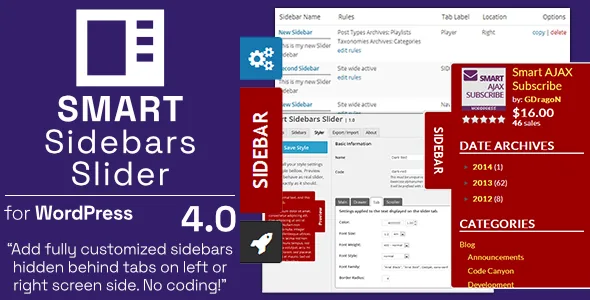
Smart Sidebars Slider is a WordPress plugin that can add one or more extra sidebars (for widgets or any other content) that will be hidden behind the tab on left or right side of the screen. You can add one or more sidebars and control their visibility across different WordPress pages.

Content for sidebars and basic features
These sidebars behave like standard sidebars, and you can add widgets into all new sidebars from standard WordPress Widgets panel. If you need it for some custom content, you can add any HTML/PHP content or use filters to add any content inside sidebar. You can set custom rules to control on which pages each sidebar will be shown, you have built in simple styler to create custom styles for sidebars, you can control open/close animation for sidebars and much more.
One or more sidebars on both screen sides

You can add one or more new sidebars that will be hidden behind the tab (custom text, icons, any HTML). Click on the tab will slide out the sidebar. You can customize rules for each sidebar activation, so it can be displayed only on some pages (archives, single posts and more). Or you can use filter to fine tune where the sidebar is displayed.
Main sidebars slider features
- Add one or more extra sidebars
- Control sidebars position (left / right side of the screen)
- Control sidebars size, tab content and size
- Control visibility rules for each sidebar
- Control sidebars size, tab content and size
- Sidebar content can be custom HTML/PHP
- Auto position tabs for sidebars
Sidebars editor to setup sidebars and adjust display rules

Main sidebars editor allows you to quickly add, copy or delete sidebars. You have main editor to setup how the sidebar will look like, and extra editor for setting up display rules.
Additional sidebars slider features
- Uses nanoScroller as sidebars replacement
- Uses jQuery Easing for extra animation effects
- 6 built in styles for sidebars
Create custom color styles to use for sidebars

To create your own color schemes for sidebars, you can use simple style builder. But, if you need more, you can always add fully custom CSS styles (more in developers guide).
Other Plugin Features Included
- Includes PDF for user and developer guide in plugin package ‘docs’ directory.
- Support for Multisite WordPress mode, each website can set plugin on it’s own.
- Support for translation and includes POT file.
System and WordPress Requirements
- PHP 7.3 or newer
- WordPress 5.5 or newer
Important
- For styling content inside the slider sidebars, plugin has default set of styles. If you don’t like the way that looks with your theme, you need to adjust slider sidebar styling for your theme.
- Included simple styler feature allows you to set up different things for the sidebar styling, and if you need more than that to adjust sidebar style, you need to add your own custom CSS.
Documentation
Plugin contains PDF user guide in the plugin package, inside the ‘documents’ directory. Check out this document to get information on plugin options, usage and more.
Changelog
Version 4.0.2 / 2023.01.25.
- Updated: few minor updates and changes
Version 4.0.1 / 2023.01.17.
- Fix: few more issues with the creation of new sidebars and styles
Version 4.0 / 2023.01.16.
- New: tested with WordPress 6.0 and 6.1
- New: tested with PHP 8.1 and 8.2
- New: major change to the admin side layout and styling
- New: many changes to the plugin core code organization
- New: many improvements to the code syntax and formatting
- New: rewritten most of the plugin styling
- New: use of the SASS to generate styling files
- Updated: minimal requirement: WordPress 5.5
- Updated: minimal requirement: PHP 7.3
- Updated: minicolors.js library updated to 2.3.6
- Removed: option and code to load FontAwesome 4.7
- Fix: several issues related to PHP 8.x
- Fix: many minor admin side visual issues

Categories
Tags
External listing. code.market does not sell this product and does not process payment for it. Pricing, payment, delivery, licensing, refunds, and support are handled by the third-party merchant on its own website. We may earn an affiliate commission from a referral. Details.
Products of the Week.
Submit🥇

STOP GUESSING WHAT TO POST
AI that learns your brand voice and builds a month of consistent, on-brand social content: carousels, posts and hooks that sound like you, not like everyone else's AI.
SaaS · 4,275 views · 38 clicksSaaS · Week 45 · 4,275 views · 38 clicks
🥈

Conversational Backlinks for Busy Founders
Place Backlink Relevant Conversation for your domain across Forums and Conversations
Website · 41,984 views · 223 clicksWebsite · Week 45 · 41,984 views · 223 clicks
🥉

upvote.club
Free Social Media Engagement that Helps Boost Your Content. Upvote Club supports 19 social networks with 100+ engagement actions in one dashboard. Add links to your posts and get free engagement from real users.
SaaS · 40,026 views · 117 clicksSaaS · Week 45 · 40,026 views · 117 clicks
#4

Substack Posting API
Onboard your Agent to Substack. Write Publish on Substack via API
SaaS · 59,036 views · 198 clicksSaaS · Week 45 · 59,036 views · 198 clicks
#5

Seenshot App
Free, Fast, MacOS Screenshot app. Make Screenshot cmd+shift+2 and send it via link
Desktop App · 28,407 views · 122 clicksDesktop App · Week 45 · 28,407 views · 122 clicks
#6

Hand-Placed Backlinks $9.99 per link. Flat rate.
Buy hand-placed forum, Q-A and directory backlinks. Flat $9.99 per link, no subscriptions — you only pay for approved listings.
Website · 4,246 views · 19 clicksWebsite · Week 45 · 4,246 views · 19 clicks
#7

Free Invoice Generator - PDF Invoices in Your Browser, No Sign-Up
A free invoice maker for freelancers and small businesses: fill in the invoice, check the live preview, and download a PDF that looks exactly like it. Any currency, tax per item, three templates, no sign-up, and nothing leaves your device.
2,927 views · 17 clicksWeek 45 · 2,927 views · 17 clicks
#8

Merge PDF Files Free - Combine PDFs in Your Browser, No Upload
A free PDF merger for office workers, students, and freelancers: combine PDFs and images into one file in the browser, reorder files and pages, pick page ranges, keep bookmarks, and open password-protected PDFs. Nothing is uploaded, no sign-up, no watermark.
2,703 views · 13 clicksWeek 45 · 2,703 views · 13 clicks