
Smart Product Viewer - 360º Animation Plugin

Description
Just Updated — Now with Full Gutenberg Block Support!
Smart Product Viewer v1.6.0 is here — featuring a native WordPress block editor integration, PHP 8 compatibility, and hardened security. Drop a stunning 360° product view anywhere on your site in seconds, no shortcodes needed.
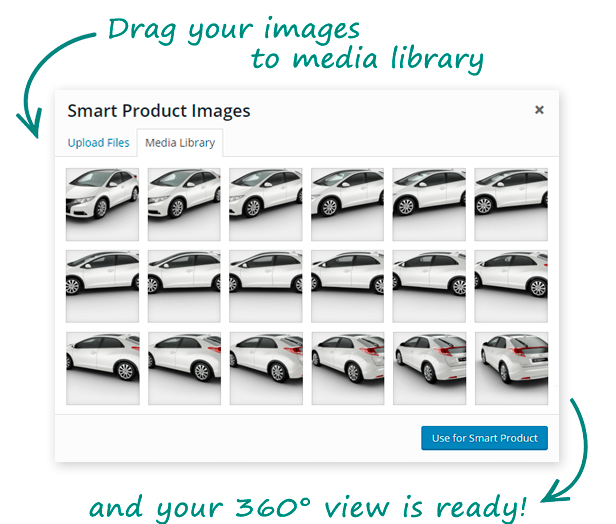
Smart Product Viewer is a best selling 360º product animation plugin designed for WordPress e-Commerce sites. This 360º WordPress Plugin is perfect to showcase products you sell, it allows a customer to see your product in detail with a full 360° spin view or understand how the product works with flawless step-by-step animation. It’s simple to install and easily customizable with lots of options to choose from.




Key Features
- NEW! Gutenberg Block – native 360° Product Viewer block for the WordPress block editor
- NEW! Lightbox – fullscreen lightbox added (view demo)
- NEW! Page Scroll – 360° spin view animates on page scroll
- Widget Integration – add 360° views to sidebar as widgets
- Shortcode Generator – easy way to customize the layout, colors and styles
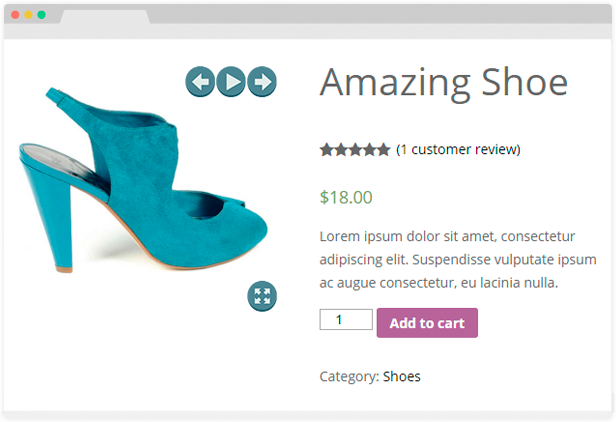
- WooCommerce – use any 360° view as WooCommerce product image
- Drag & Drop – handy drag & drop images manager
- Responsive – fully responsive layout
- Mouse Interaction – allows to spin the product using a mouse
- Touch Friendly – iPhone/iPad and Android devices supported
- Customizable – 64 navigation style and color combinations to choose from
- Smooth Animation – flawless step-by-step product animation
- Extended License – can be used in your WooCommerce theme
- Photography Examples – 360° photography examples included
- Documentation – detailed documentation included
- Support – efficient customer support
WooCommerce Integration
Smart Product Viewer is a handy tool to increase your WooCommerce sales. Product views created with our 360º animation plugin can be used as WooCommerce product images instead of regular pictures encouraging your customer to make a purchase.

Testimonials
More than 800+ happy customers, read what they say about the Smart Product Viewer, a 360º WordPress Plugin and its outstanding support.
Main reason: Design Quality Extra comments: Wow. After wasting so much time with hand made xml rotators – this is a godsend. - cbesett
 Main reason: Design Quality
Extra comments: Wow. After wasting so much time with hand made xml rotators – this is a godsend.
-
Main reason: Design Quality
Extra comments: Wow. After wasting so much time with hand made xml rotators – this is a godsend.
-
 The plugin is perfect.
-
The plugin is perfect.
-





Updates
21 April 2026 - ver 1.6.0
   - Added: native Gutenberg block "360° Product Viewer" (found under Media in the block inserter)
   - Added: PHP 8.0+ support
   - Improved: security hardening throughout (nonces, capability checks, output escaping)
   - Improved: AJAX handlers use check_ajax_referer() and current_user_can()
   - Fixed: deprecated get_page_by_title() replaced with WP_Query
   - Fixed: extract() removed from all classes; all shortcode attributes are now explicit
   - Fixed: rand() replaced with wp_rand()

18 April 2021 - ver 1.5.4
   - Updated according to latest CodeCanyon standards.

12 December 2020 - ver 1.5.3
   - Added: support for WordPress 5.6 by removing jQuery Migrate dependency

20 April 2020 - ver 1.5.2
   - Added: Categories to better organize 360 Smart Products
   - Updated: to latest CodeCanyon quality policies
   - Maintain: PHP 7.x support

12 May 2018 - ver 1.5.1
   - Added: "sensitivity" parameter to control drag speed
   - Added:  shortcode for Beaver Builder support and other
   - Added: option to show product by name instead of ID
   - Added: RTL scrollbar option to WooCommerce metabox
   - Fixed: WooCommerce stock report page conflict

20 August 2017 - ver 1.5
  - Added: Left and Right positions for scrollbar
  - Added: Start position of scrollbar handler
  - Added: display the file names under the images when editing the view
  - Added: Option to show default gallery or thumbnails together with 360 view (works with ONLY some themes, no guarantees)
  - Fixed: Some CSS and JS cleanup

21 April 2017 - ver 1.4.6
  - Added: support for WooCommerce 3.0
  - Added: move on hover option for widget
  - Added: stop on hover option for shortcodes
  - Added: RTL direction for sidebar

28 April 2016 - ver 1.4.5
  - Improved: animate view on scroll feature
  - Fixed: JavaScript error with removeClass() function

12 November 2015 - ver 1.4.4
   - stop the animation when user dragging the view and continue when user stop

30 July 2015 - ver 1.4.3
   - fullscreen button mobile bug fixed, fullscreen sizes fixed

22 July 2015 - ver 1.4.2
   - small fullscreen images bug fixed

10 June 2015 - ver 1.4.1
   - move on hover feature added for shortcodes
   - problem with PHP warnings fixed

4 February 2015 - ver 1.4
   - lightbox option to show big views in fullscreen added
   - option to make product spin on page scroll added

8 August 2014 - ver 1.3
   - shortcode generator added
   - option to start product spin on load added
   - option to control spin speed added

11 May 2014 - ver 1.2
   - noUiSlider updated to v6
   - scrollbar styles updated
   - script files compiled into one to reduce load time

6 May 2014 - ver 1.1.1
   - button to reorder images added
   - support to work from ajax loaded content added

26 April 2014 - ver 1.1
   - WooCommerce support added
Credits
Threesixty Slider - by creativeaura noUiSlider - by refreshless.com Magnific Popup - by dimsemenov| Type | WordPress Plugin |
|---|---|
| Author | topdevs |
| Category | Wordpress / Galleries |
| Price | $25 |
| Sales | 2,385 |
| Rating | 4.67 from 66 ratings |
| Published | Dec 25, 2013 |
| Last Update | Apr 23, 2026 |
| Compatible Browsers | IE6, IE7, IE8, IE9, IE10, IE11, Firefox, Safari, Opera, Chrome, Edge |
| Compatible Software | WordPress 6.9.x, WordPress 6.8.x, WordPress 6.7.x, WordPress 6.6.x, WordPress 6.5.x, WordPress 6.4.x, WordPress 6.3.x, WordPress 6.2.x, WordPress 6.1.x, WordPress 6.0.x, WordPress 5.9.x, WordPress 5.8.x, WordPress 5.7.x, WordPress 5.6.x |
| Gutenberg Optimized | Yes |
| Source Files Included | JavaScript JS, HTML, CSS, PHP, Layered PNG |
Categories
Tags
External listing. code.market does not sell this product and does not process payment for it. Pricing, payment, delivery, licensing, refunds, and support are handled by the third-party merchant on its own website. We may earn an affiliate commission from a referral. Details.
Products of the Week.
Submit🥇

STOP GUESSING WHAT TO POST
AI that learns your brand voice and builds a month of consistent, on-brand social content: carousels, posts and hooks that sound like you, not like everyone else's AI.
SaaS · 4,301 views · 38 clicksSaaS · Week 45 · 4,301 views · 38 clicks
🥈

Conversational Backlinks for Busy Founders
Place Backlink Relevant Conversation for your domain across Forums and Conversations
Website · 42,024 views · 223 clicksWebsite · Week 45 · 42,024 views · 223 clicks
🥉

upvote.club
Free Social Media Engagement that Helps Boost Your Content. Upvote Club supports 19 social networks with 100+ engagement actions in one dashboard. Add links to your posts and get free engagement from real users.
SaaS · 40,068 views · 117 clicksSaaS · Week 45 · 40,068 views · 117 clicks
#4

Substack Posting API
Onboard your Agent to Substack. Write Publish on Substack via API
SaaS · 59,077 views · 198 clicksSaaS · Week 45 · 59,077 views · 198 clicks
#5

Seenshot App
Free, Fast, MacOS Screenshot app. Make Screenshot cmd+shift+2 and send it via link
Desktop App · 28,452 views · 122 clicksDesktop App · Week 45 · 28,452 views · 122 clicks
#6

Hand-Placed Backlinks $9.99 per link. Flat rate.
Buy hand-placed forum, Q-A and directory backlinks. Flat $9.99 per link, no subscriptions — you only pay for approved listings.
Website · 4,285 views · 19 clicksWebsite · Week 45 · 4,285 views · 19 clicks
#7

Free Invoice Generator - PDF Invoices in Your Browser, No Sign-Up
A free invoice maker for freelancers and small businesses: fill in the invoice, check the live preview, and download a PDF that looks exactly like it. Any currency, tax per item, three templates, no sign-up, and nothing leaves your device.
2,960 views · 17 clicksWeek 45 · 2,960 views · 17 clicks
#8

Merge PDF Files Free - Combine PDFs in Your Browser, No Upload
A free PDF merger for office workers, students, and freelancers: combine PDFs and images into one file in the browser, reorder files and pages, pick page ranges, keep bookmarks, and open password-protected PDFs. Nothing is uploaded, no sign-up, no watermark.
2,733 views · 13 clicksWeek 45 · 2,733 views · 13 clicks