
POS & Smart Accounting.Net core 7+ User Management + Arabic Support + Full Source Code
Description
Smart Accounting & POS .Net core 7.0 + User Management + Arabic Support + Full Source Code
Version v2.0
Introduction
Smart Accounting & POS make admin able to add unlimited products, categories, units, suppliers, customers and cashiers and create (sales – purchases – return sales –return purchases) invoices with taxes and discounts and print invoices, and he can create [Journals – Accounts Tree] . also you can add unlimited companies because the system is mulitenant. Admin can create cashier user , cashier user can only create sales invoices .
This web based application is developed on .Net core 7.0 using ASP.Net Core, C#, Entity framework core, JavaScript, jQuery, JSON, Bootstrap, HTML, CSS and SQL Server.
Smart Accounting & POS System has Three default roles [Admin , CompanyAdmin – Cashier] , and you can add unlimited roles .
Framework: .Net Core 7.0
Features :
- Support English / Arabic
- Architecture : Clean Architecture
- Full User Management Module
- Users [Create –Edit – Delete – Search]
- Roles [Create –Edit – Delete – Search]
- Policies [Create –Edit – Delete – Search]
- Authentication Settings
- Bind Pages with Policies , using easy user interface
- Login
- Reset Password
- Error Log : using NLog
- Audit trail : log database actions [add – update -delete] and business actions Like:[CreateInvoice,UpdateInvoice , etc]
- Multitenant: unlimited companies
- Units [Create –Edit – Display – Delete – Search]
- Categories [Create –Edit – Display – Delete – Search]
- Products [Create –Edit – Display – Delete – Search]
- Customers [Create –Edit – Display – Delete – Search]
- Suppliers [Create –Edit – Display – Delete – Search]
- Sales Invoices [Create –Edit – Display – Delete – Search]
- Sales Returns Invoices [Create –Edit – Display – Delete – Search]
- Purchases Invoices [Create –Edit – Display – Delete – Search]
- Purchases Returns Invoices [Create –Edit – Display – Delete – Search]
- Journals [Create –Edit – Display – Delete – Search]
- Accounts Tree [Create – Edit – Delete – Search]
- Cost Centers [Create – Edit – Delete – Search]
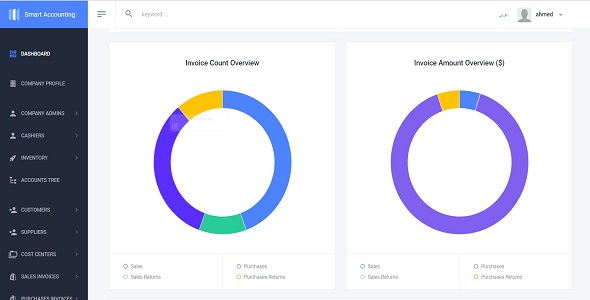
- Dashboard
- Cashier [Create – Edit – Display – Search]
- Company Admin [Create – Edit – Display – Search]
- Additional Info for [Customers – Suppliers – Products]
- Taxes
- Reports
- Sales Report
- Sales Returns Report
- Purchases Report
- Purchases Return Report
- Stock Report
- Cash Report
- Journals Report
Quick Start Guide
How to Generate Database Tables
- Open [Package manager console] and in the [Default project] list .. select [Common.Persistance] project
- Write the below commands
- add-migration CreateCommon -context CommonDbContext
- update-database -context CommonDbContext
- Open [Package manager console] and in the [Default project] list .. select [UserManagement.Persistance] project
- Write the below commands
- add-migration CreateIdentity -context ApplicationDbContext
- update-database -context ApplicationDbContext
- Open [Package manager console] and in the [Default project] list .. select [SmartAccounting.Persistance] project
- add-migration CreateSmartAccounting–context SmartAccountingDbContext
- update-database -context SmartAccountingDbContext
- Congratulations , just run the project .
Credentials
- User name : admin
- Password : P@ssw0rd
- Create Company Admin
- Company Admins à New Company Admin
- Logout from Admin user
- Login with new [Company Admin User]
- Update Tax Value & Opening Cash
- Company Profile
- Create Cashier
- Cashiers—> New Cashier
- Create Default Customer Or Real Customers
- Customers—> New Customer
- Create Default Supplier Or Real Suppliers
- Supplier—> New Supplier
- Create Units
- Inventory à Units List à New Unit
- Create Categories
- Inventory
-> Categories List -> New Category
- Inventory
- Create Products
- Inventory
-> Products List -> New Product
- Inventory
- Create Items in Accounts Tree
- Accounts Tree
- Create Cost Center
- Cost Centers—> New Cost Center
- Create Journals
- Journals—> New Journal
New Features :-
- Taxes
- Additional info
| Type | .NET Script |
|---|---|
| Author | afmelwekeel |
| Price | $34 |
| Sales | 30 |
| Rating | 0 (1) |
| Published | Jul 10, 2020 |
| Last Update | Jun 5, 2023 |
| Compatible Browsers | IE11, Firefox, Safari, Opera, Chrome, Edge |
| Compatible Software | Other |
| High Resolution | No |
| Source Files Included | C# CS, JavaScript JS, JavaScript JSON, HTML, CSS, LESS, Sass |
Categories
Tags
External listing. code.market does not sell this product and does not process payment for it. Pricing, payment, delivery, licensing, refunds, and support are handled by the third-party merchant on its own website. We may earn an affiliate commission from a referral. Details.
Products of the Week.
Submit🥇

STOP GUESSING WHAT TO POST
AI that learns your brand voice and builds a month of consistent, on-brand social content: carousels, posts and hooks that sound like you, not like everyone else's AI.
SaaS · 7,312 views · 67 clicksSaaS · Week 46 · 7,312 views · 67 clicks
🥈

Conversational Backlinks for Busy Founders
Place Backlink Relevant Conversation for your domain across Forums and Conversations
Website · 46,579 views · 232 clicksWebsite · Week 46 · 46,579 views · 232 clicks
🥉

upvote.club
Free Social Media Engagement that Helps Boost Your Content. Upvote Club supports 19 social networks with 100+ engagement actions in one dashboard. Add links to your posts and get free engagement from real users.
SaaS · 44,520 views · 127 clicksSaaS · Week 46 · 44,520 views · 127 clicks
#4

Substack Posting API
Onboard your Agent to Substack. Write Publish on Substack via API
SaaS · 63,408 views · 206 clicksSaaS · Week 46 · 63,408 views · 206 clicks
#5

Seenshot App
Free, Fast, MacOS Screenshot app. Make Screenshot cmd+shift+2 and send it via link
Desktop App · 32,651 views · 127 clicksDesktop App · Week 46 · 32,651 views · 127 clicks
#6

Hand-Placed Backlinks $9.99 per link. Flat rate.
Buy hand-placed forum, Q-A and directory backlinks. Flat $9.99 per link, no subscriptions — you only pay for approved listings.
Website · 8,282 views · 19 clicksWebsite · Week 46 · 8,282 views · 19 clicks
#7

Free Invoice Generator - PDF Invoices in Your Browser, No Sign-Up
A free invoice maker for freelancers and small businesses: fill in the invoice, check the live preview, and download a PDF that looks exactly like it. Any currency, tax per item, three templates, no sign-up, and nothing leaves your device.
6,907 views · 29 clicksWeek 46 · 6,907 views · 29 clicks
#8

Merge PDF Files Free - Combine PDFs in Your Browser, No Upload
A free PDF merger for office workers, students, and freelancers: combine PDFs and images into one file in the browser, reorder files and pages, pick page ranges, keep bookmarks, and open password-protected PDFs. Nothing is uploaded, no sign-up, no watermark.
6,392 views · 18 clicksWeek 46 · 6,392 views · 18 clicks