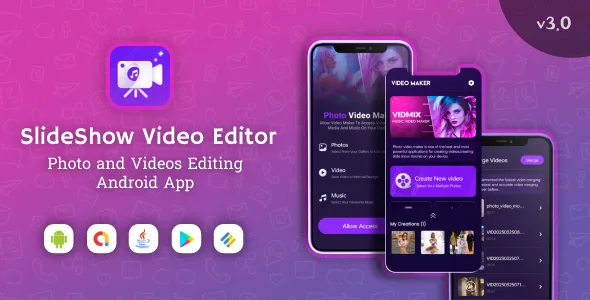
Slideshow Maker - Image & Video Editor | Admob
Description


✭ Free Photo Slideshow Maker with Music ✭ Video FX ✭ Animated Emoji ✭ No Watermark ✭ Video FX Effects Add beautiful movie style video FX effects to video with one-tap.

Change video aspect ratio Fit your photo slideshow in aspect ratio: 16:9 for YouTube and 9:16 for TikTok, etc.
SlideShow Photo Video Maker is the fastest and easiest photo video maker that helps you create videos with diverse themes, effects, music, images, and more. It’s designed to make the photo music video creation experience as easy and intuitive as possible.
SlideShow Maker is one of the most powerful apps for creating videos from images even if you don’t know anything about music video production. With just a few simple steps, you’ve got a professional Photo Video Maker that you can share with family and friends via social networks like WhatsApp, Instagram, Facebook, and Twitter…
The festive season is coming and SlideShow Maker is ready to serve you with unlimited festival themes. Save every memorable moment in your life with Photo Video Maker for Halloween, Christmas, Happy New Year, Valentine’s Day, Happy Day…
In order to save time creating SlideShow for everyone, we have provided some melodies, transitions, and frames… SlideShow Maker also supports editing, adding, and removing images after creating, giving you a unique look the final video is really satisfying. HangNT
How to SlideShow Maker: 1. Select the photo from the gallery and choose an unlimited number of photos 2. Music Video Maker can easily add music to video 3. Edit video with features: transition effects, frames, change the transition time 4. Recheck the video, you can add/remove photos as you like 5. Share your videos with your friends via social networks
SlideShow main features: - Image To Video Slide - Collage Image Editor - Video Speed Controler - Video Triming - Video Cutter - Video Reversing - Video To MP3 Conveter - Audio Cutter - Video Theming - Video Efects - Set Diffrent Audio On Video - Image Background Chang - Slow Motions - Edited Image & Video Sharing - Clip Efects - Admob Ads integreted
✭ The application has an extremely simple interface, friendly to all users, even novices can combine photos into videos that only take a few minutes to learn.
✭ Simple photo editor: reposition the photo, let you crop and rotate the photo…
✭ Various effects with rich colours make your videos stand out.
✭ Transition effects between images: video editor makes videos more professional and attractive with transition effects.
✭ You can customize the video duration, the transition duration between two images as long or short as you want.
✭ Different colourful frames to decorate your Video Maker.
✭ You can add multiple images or delete images in your video after editing quickly.
✭ Video editor makes it easy to share videos quickly with social networking sites.

Contact
If you have any questions, problems or recommendations, please do not hesitate to contact me anytime. I will try to answer you as quickly as possible. Email address: errorhunt3@gmail.comVersion v3.0
- Collage photo editing
- Speed video editing
- Reverse video creator added
- Convert video to MP3
Version v2.0
 - Android 13 Supported
 - Replace app in bluish dark mode
 - Change app UI Design
 - Video saving crashing issues fixed
 - Replace video buffering
 - Fix Ads Issues
 - Create full animated UI
 - Added 12 different languages
 - Improve Photo editing functionality
 - Added Video merger features
 - Fix video crashing issues
Version v1.0
 - Free Photo Slideshow Maker with Music
 - Video FX
 - Animated Emoji
 - No Watermark
 - Video FX Effects Add beautiful movie style video FX effects to video with one-tap
Categories
Tags
External listing. code.market does not sell this product and does not process payment for it. Pricing, payment, delivery, licensing, refunds, and support are handled by the third-party merchant on its own website. We may earn an affiliate commission from a referral. Details.
Products of the Week.
Submit🥇

STOP GUESSING WHAT TO POST
AI that learns your brand voice and builds a month of consistent, on-brand social content: carousels, posts and hooks that sound like you, not like everyone else's AI.
SaaS · 4,294 views · 38 clicksSaaS · Week 45 · 4,294 views · 38 clicks
🥈

Conversational Backlinks for Busy Founders
Place Backlink Relevant Conversation for your domain across Forums and Conversations
Website · 42,008 views · 223 clicksWebsite · Week 45 · 42,008 views · 223 clicks
🥉

upvote.club
Free Social Media Engagement that Helps Boost Your Content. Upvote Club supports 19 social networks with 100+ engagement actions in one dashboard. Add links to your posts and get free engagement from real users.
SaaS · 40,051 views · 117 clicksSaaS · Week 45 · 40,051 views · 117 clicks
#4

Substack Posting API
Onboard your Agent to Substack. Write Publish on Substack via API
SaaS · 59,060 views · 198 clicksSaaS · Week 45 · 59,060 views · 198 clicks
#5

Seenshot App
Free, Fast, MacOS Screenshot app. Make Screenshot cmd+shift+2 and send it via link
Desktop App · 28,437 views · 122 clicksDesktop App · Week 45 · 28,437 views · 122 clicks
#6

Hand-Placed Backlinks $9.99 per link. Flat rate.
Buy hand-placed forum, Q-A and directory backlinks. Flat $9.99 per link, no subscriptions — you only pay for approved listings.
Website · 4,269 views · 19 clicksWebsite · Week 45 · 4,269 views · 19 clicks
#7

Free Invoice Generator - PDF Invoices in Your Browser, No Sign-Up
A free invoice maker for freelancers and small businesses: fill in the invoice, check the live preview, and download a PDF that looks exactly like it. Any currency, tax per item, three templates, no sign-up, and nothing leaves your device.
2,944 views · 17 clicksWeek 45 · 2,944 views · 17 clicks
#8

Merge PDF Files Free - Combine PDFs in Your Browser, No Upload
A free PDF merger for office workers, students, and freelancers: combine PDFs and images into one file in the browser, reorder files and pages, pick page ranges, keep bookmarks, and open password-protected PDFs. Nothing is uploaded, no sign-up, no watermark.
2,719 views · 13 clicksWeek 45 · 2,719 views · 13 clicks