
Skyline Stunt Car - Unity Source Code
Description
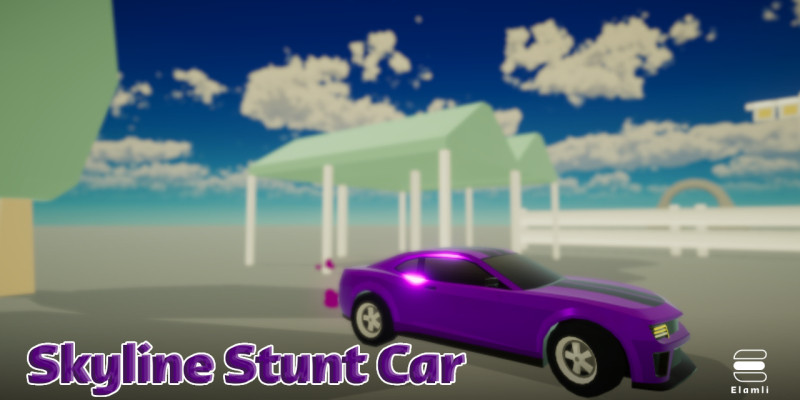
Dive into the heart-pounding world of Skyline Stunt Car, an offline mobile gaming sensation that brings high-speed driving, precision parkour, and integrated ad networks to your fingertips. In this solo adventure, players tackle daring stunts on elevated roads, pushing their skills to the limit in a visually stunning and immersive journey
Now, you have the opportunity to bring the excitement of Skyline Stunt Car to a broader audience with the game code source. Perfect for developers seeking an engaging offline game with integrated ad networks or entrepreneurs looking to enter the mobile gaming market with a captivating and revenue-generating experience. Don't miss out on the chance to acquire the source code of this popular offline game with a sleek UI and integrated ad networks. Purchase Skyline Stunt Car today and drive into a thrilling world of high-octane, gravity-defying stunts and limitless possibilities!
Features
Skyline Stunt Car features:
- Breathtaking Environments: Explore visually stunning landscapes as you traverse high-altitude roads, each level offering a unique and immersive experience.
- Customizable Cars: Personalize your experience by choosing from a variety of cars, each with its own unique attributes. Upgrade and modify your vehicles to enhance performance and style.
- Offline Gameplay: Enjoy the freedom of playing anytime, anywhere, without the need for an internet connection. Skyline Stunt Car is the ultimate offline adventure.
- Sleek UI Design: Immerse yourself in a visually appealing and user-friendly interface that enhances your gaming experience.
- Integrated Ad Networks: Monetize your game seamlessly with Unity Ads, AdMob, Meta Audience Network, and more. Maximize revenue potential while providing players with a rewarding gaming experience.
Requirements
Unity 2019 and above.
Instructions
- Unzip the Source Code:
- Locate the downloaded ZIP file containing the source code.
- Extract the contents of the ZIP file to a folder on your computer using a file archiver tool like WinRAR, 7-Zip, or the default extraction tool on your operating system.
- Open Unity3D:
- Launch the Unity3D editor on your computer.
- If you don't have Unity3D installed, download and install it from the official Unity website (https://unity.com/).
- Create a New Unity Project:
- In Unity, create a new project or open an existing one where you want to import the Skyline Stunt Car source code.
- Import Source Code:
- Copy the extracted source code folder to your Unity project's "Assets" folder. This is a common convention for organizing assets and scripts within Unity projects.
- Check for Dependencies:
- Open the source code folder and check for any third-party libraries, plugins, or assets that the project might depend on. Ensure you have them installed in your Unity project.
- Open the Main Scene:
- Locate the main scene file within the source code. Scenes are typically stored in the "Scenes" folder. Double-click on the main scene file to open it in the Unity editor.
- Configure Game Settings:
- Adjust any game settings, such as screen resolution, graphics quality, or input configurations, based on your preferences or the requirements of the source code.
- Set Up Ad Networks:
- If the source code integrates ad networks like Unity Ads, AdMob, or Meta Audience Network, follow the instructions provided in the source code documentation to set up and configure these ad networks.
- Test the Game:
- Use the Unity Play mode to test the game within the editor. Check for any errors, glitches, or missing assets. Resolve any issues that may arise during testing.
- Build and Deploy:
- Once you're satisfied with the game, build the project for your target platform (Android, iOS, etc.).
- Deploy the built game to your device or an emulator for further testing.
- Documentation and Support:
- Refer to any documentation that accompanies the source code for specific instructions, features, or customization options.
- Check online forums, developer communities, or the developer's website for additional support or updates related to the source code.
| Author | elamli |
|---|---|
| Category | App Templates / Unity / Templates / Action |
| Price | $80 |
| Extended License | $240 |
| First Release | Dec 18, 2023 |
| Last Update | Dec 18, 2023 |
| Files included | .cs, .apk, .unityproj, .prefab, .fbx |
| Operating systems | iOS 10.0, Android 7.0, Android 8.0, iOS 11.0, Android 9.0, iOS 12.0, Unity 2019, Android 10.0, iOS 14.0, iOS 13.0, iOS 15.0, Android 11.0, Android 12.0, iOS 8.0, iOS 9.0, Android 4.0, Android 5.0, Android 6.0 |
Categories
Tags
External listing. code.market does not sell this product and does not process payment for it. Pricing, payment, delivery, licensing, refunds, and support are handled by the third-party merchant on its own website. We may earn an affiliate commission from a referral. Details.
Products of the Week.
Submit🥇

STOP GUESSING WHAT TO POST
AI that learns your brand voice and builds a month of consistent, on-brand social content: carousels, posts and hooks that sound like you, not like everyone else's AI.
SaaS · 6,660 views · 62 clicksSaaS · Week 46 · 6,660 views · 62 clicks
🥈

Conversational Backlinks for Busy Founders
Place Backlink Relevant Conversation for your domain across Forums and Conversations
Website · 45,670 views · 229 clicksWebsite · Week 46 · 45,670 views · 229 clicks
🥉

upvote.club
Free Social Media Engagement that Helps Boost Your Content. Upvote Club supports 19 social networks with 100+ engagement actions in one dashboard. Add links to your posts and get free engagement from real users.
SaaS · 43,652 views · 124 clicksSaaS · Week 46 · 43,652 views · 124 clicks
#4

Substack Posting API
Onboard your Agent to Substack. Write Publish on Substack via API
SaaS · 62,582 views · 204 clicksSaaS · Week 46 · 62,582 views · 204 clicks
#5

Seenshot App
Free, Fast, MacOS Screenshot app. Make Screenshot cmd+shift+2 and send it via link
Desktop App · 31,826 views · 125 clicksDesktop App · Week 46 · 31,826 views · 125 clicks
#6

Hand-Placed Backlinks $9.99 per link. Flat rate.
Buy hand-placed forum, Q-A and directory backlinks. Flat $9.99 per link, no subscriptions — you only pay for approved listings.
Website · 7,516 views · 19 clicksWebsite · Week 46 · 7,516 views · 19 clicks
#7

Free Invoice Generator - PDF Invoices in Your Browser, No Sign-Up
A free invoice maker for freelancers and small businesses: fill in the invoice, check the live preview, and download a PDF that looks exactly like it. Any currency, tax per item, three templates, no sign-up, and nothing leaves your device.
6,132 views · 21 clicksWeek 46 · 6,132 views · 21 clicks
#8

Merge PDF Files Free - Combine PDFs in Your Browser, No Upload
A free PDF merger for office workers, students, and freelancers: combine PDFs and images into one file in the browser, reorder files and pages, pick page ranges, keep bookmarks, and open password-protected PDFs. Nothing is uploaded, no sign-up, no watermark.
5,663 views · 16 clicksWeek 46 · 5,663 views · 16 clicks