
Skinora | Flutter AI Skincare Ingredient Analyzer App Template
Description
A model transcribes. Your phone decides.
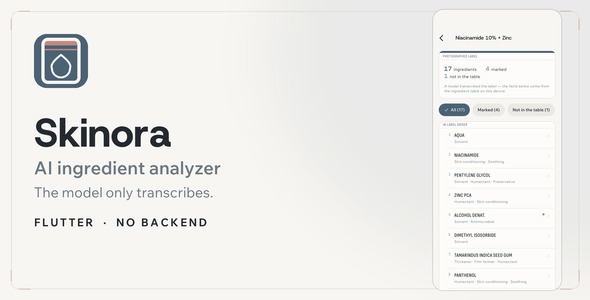
Skinora photographs the back of a bottle and reads the ingredient list. The AI model is asked to do exactly one thing: type out what is printed. What every name is, and what it does in a formula, comes from a 634-ingredient table bundled with the app and looked up on the device.
That is not a slogan, it is the architecture. The reply schema the model answers into has no field for a function, a rating or a comment, and the rows on screen are built from the bundled table after the reply is parsed. There is no code path in which a model’s opinion about an ingredient can reach a user.

Runs out of the box
Demo Instructions — the sign-in screen is a mock and contacts no server, so any credentials are accepted. Use demo@skinora.app / demo1234, or simply tap Sign in with the fields left empty. There is no account to register, no API key to enter and no network required: Demo mode is on out of the box, so every screen works on the device.
AI disclosure — one thing in this app is produced by a third-party AI model at run time: transcribing the ingredient list off a photograph of a label. Nothing else is AI-driven — what each name is, what it does in a formula, the six neutral marks, the ten routine findings and the period-after-opening dates are all looked up or computed in plain Dart on the device, against a table that ships inside the app. The model is bring-your-own-key: you or your users supply a key for Google Gemini, OpenAI or Anthropic Claude, those services bill their own usage directly, and no key, credit or trial is included with this item. With no key at all the app still runs end to end, because Demo mode decodes the sample shelf through the same engine and the same matcher. No photography, illustration, audio or video is bundled, and no artwork in the package is AI-generated: every surface in the app is drawn by Flutter at run time. The only bitmaps in the download are the platform launcher and splash icons — generated from the assets/icon/make_icon.py script included with them, plus Flutter’s own default launch image — and the documentation’s screenshots and its two screen recordings, captured from the running app. The three typefaces are SIL Open Font License 1.1 releases with the full license text in the package, and the ingredient table’s function vocabulary follows CosIng, the European Commission’s public database.
Demo mode ships switched on. Every screen works before anyone signs up for anything. No backend, no Firebase, no real account anywhere. Everything lives on the device: the 634 ingredients, the 10 routine rules, the period-after-opening dates, your shelf, your skin log, and your API keys in the keychain. On a server: nothing. One request leaves the phone, only when you ask for one, and it carries the photo of a label.
flutter pub get
flutter run
That is the whole setup — 3 providers, bring your own key, 5 dependencies, no vendor SDKs.

The model transcribes. The phone decides.
It is asked to type out what is printed, and nothing else. Every function and every mark is a lookup. Photograph the back — the small print, not the whole bottle. A model types it out: transcription only, no opinions, no numbers. The device looks it up, against 634 ingredients, offline.

634 ingredients, on the device
Curated by hand. Function classifications follow the public CosIng vocabulary published by the European Commission. One row carries the INCI name as a label prints it, what it does in a formula, and — for six of them — a neutral mark: fragrance, named on the label, fast-drying alcohol, acid exfoliant, retinoid, UV filter.
6 neutral marks. No score, no rating, no verdict — anywhere in the app. And a name the table does not know is shown as “not in the table yet” rather than being matched to the nearest thing it does know.

Every finding names the ingredients behind it
10 rules, kept in a data file rather than in code, so the wording you read is the wording that runs. Morning and evening, side by side. The rules look for pairings routine advice usually separates, two products doing the same job, the usual order thin to thick, and a morning with no sunscreen in it.
Nothing is called dangerous. Nothing is scored.

The little jar, finally doing something
Printed on nearly every cosmetic in Europe, and read by almost nobody. Six months, twelve months, twenty-four months — or nothing printed at all. The shelf turns that symbol into an order: past its window, running out, in use, no period on the label, not opened yet.
Three of the five are the app saying it does not know — because a countdown for a jar whose opening date was never entered is a number the app made up.

Four words, six observations, no photographs kept
A picture can propose an entry. The bytes are released as soon as the answer comes back. Today: pick it, or let a photo propose it. A month as a filmstrip — a skipped day is a gap, not a blank. Any two days, side by side, counted up on the device.

Nothing is a placeholder
16 screens, all of them wired up. Every screen runs on the sample shelf and the bundled table, with no key and no network: one ingredient, a product, providers and keys, about the data — and the twelve others.

Everything, and the reasons
- Full Flutter source, 16 screens, GetX — view to controller to service, no mock data in a view
- The 634-ingredient table and its builder — add rows to a CSV, run one script, ship a bigger table
- 3 providers over plain REST, no vendor SDKs — Gemini, OpenAI and Claude, plus Demo mode
- Light and dark, one file of color tokens — re-skinning is an afternoon, not a rewrite
- Offline documentation, 18 chapters — written for the buyer who has never touched Flutter
5 dependencies · no Firebase · no backend · no real account.

Built to survive its first year
- Model names are a setting, not a constant. When a provider retires an id, the app says so in plain language and offers a button that goes to the field where the fix is typed.
- Ten named error states, each with a sentence written for a person, and a Settings button only on the failures actually settled there.
- 135 unit tests, run against the shipped data rather than fixtures — the matcher against the real table, every routine rule positive and negative, the jar arithmetic across month ends, leap years and daylight-saving changes.
flutter analyzereports zero issues. Android compileSdk and targetSdk are pinned to 36.
Who this is for
Developers shipping a skincare, beauty or personal-care app who want a complete, working product to start from rather than a screen kit — and who would rather explain to their users where a fact came from than hope nobody asks.
What is not included
- No backend and no cloud sync. The shelf and the log are held in a service layer; closing the app restores the sample data. The documentation shows exactly where your storage goes.
- No payment code. The Pro screen is a mock end to end — plans, a counter, one flag. Wire your store’s purchase call into one method.
- No push or local notifications. The shelf tells you when you open it; it does not send you anything.
- No camera barcode scanner. A barcode is typed in, and the sample codes are one tap. That keeps the dependency list at five and the live preview working.
- No API keys. Every provider is bring-your-own-key, and your users’ usage is billed to whoever owns the key.
- Auth is a mock. Any email and password get you in; nothing leaves the device.
- The ingredient table is a curated subset, not the whole of INCI. A name it does not know says so rather than guessing — and adding more is a CSV edit and one command.
Third-party data
Function classifications follow CosIng, the European Commission’s public cosmetic ingredient database. Barcode lookups use Open Beauty Facts under the Open Database License; the attribution is in the app’s About screen as well as in the documentation. The three typefaces ship under the SIL Open Font License 1.1.
Requirements
Flutter SDK 3.29 or newer, Dart 3.7+, Android Studio or VS Code. Android and iOS. No backend to set up.
Support
Questions about setup, providers or re-skinning are answered through this item’s comments. Item support covers the template itself; it does not cover a provider’s own account, quota or billing.
Please note
Skinora is for informational purposes only and is not a substitute for professional medical or dermatological advice. It does not score, rate or grade anything, and it never names a medical condition.
| Type | Flutter App |
|---|---|
| Author | coderqh |
| Price | $28 |
| Sales | 0 |
| Rating | 0 (0) |
| Published | Sep 4, 2026 |
| Last Update | Sep 4, 2026 |
| Compatible Software | Flutter 3.x |
| Mobile Files Included | Dart, YAML, JavaScript JSON, .kotlin, .swift |
Categories
Tags
External listing. code.market does not sell this product and does not process payment for it. Pricing, payment, delivery, licensing, refunds, and support are handled by the third-party merchant on its own website. We may earn an affiliate commission from a referral. Details.