
SiteGuard - CodeIgniter Advanced PHP Login & User Management Script
Description

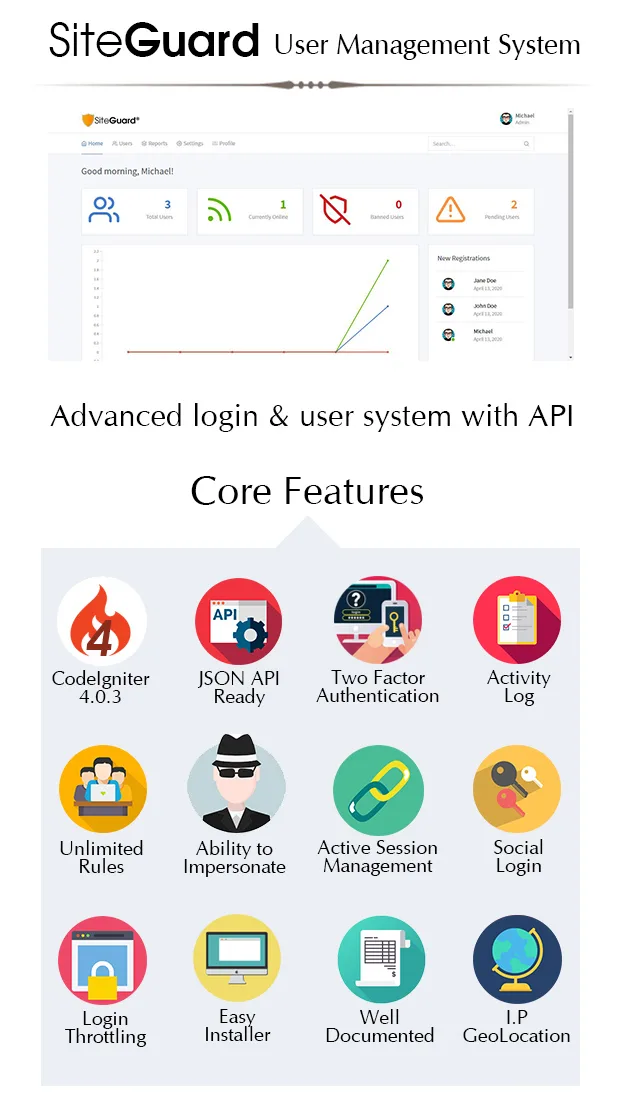
SiteGuard – Codeigniter PHP Login & User Management System – the simplest, most powerful authentication tool for your website (CodeIgniter 4 Version).
Script Guide
Live Demo
Username: : admin Password: adminSiteGuard Features
- Two factor authentication ready.
- Account Self Activation.
- Automatic Throttling for wrong login attempts with IP logging.
- Social authentication from Facebook and Google plus.
- JSON API Ready with Public & Secret keys for authentication with your android or web application.
- Secure PHP login and registration script features easy one-line integration with your current website or application.
- Admin can impersonate other users.
- Activity logging for every action happens on your site.
- Manage active sessions, know what users are viewing on your site right now with ability to end any session with just one click.
- Access Levels and roles that can be easily updated according to your needs.
- Limit max. number of logins for users in each access level.
- Ability to add unlimited custom privileges so you don’t need to hard-code anything.
- Ability to define custom index page for each access level.
- API Explorer script to easily test our API and know how to write the syntax.
- Announcements module with expiration date for each announcement.
- Supports Google reCaptcha.
- Remember Me, Password reset and other features.
- Users can upload their avatars with crop and resize functions.
- Supports SMTP.
- Supports IPv6.
- Responsive design, built on bootstrap 4.
- Well documented with detailed description of each function and API call.
Security Measures
- Secured API calls with JWT
- CSRF Protection – all forms include CSRF token
- XSS Filtering
- One way password Hashing
- Session protection
- Secret and Public API Keys
Server Requirements
- PHP version: 7.2
- Extensions: intl, mbstring, php-json, php-mysqlnd, php-xml
- One way password Hashing
- Session protection
- Secret and Public API Keys
Auto Installer script
Upload the script to your webserver (better to upload framework files outside the (public) folder, in your server root), open installer link [https://your-siteguard-site.com/install/] and follow each step to easily install everything in a matter of seconds.

If you want to store the application in a sub-directory, please change the relative path to the (app) folder inside index.php (refer to documentation for more information)
How to Update?
First, take a database backup, upload the new version and replace files, run auto updater script [https://your-siteguard-site.com/install/update/]. That's it!
ChangeLog
version 1.3 [01.06.2020]- Upload PNG files turns black if crop outside canvas. - Add API JWT Header tokens, Separate Public API and User API keys to make api connections more secureVersion 1.2 [26/05/2020]
-  Account self activation, now registered users can activate their accounts via activation email.
-  Admin email notification on new registrations.
-  Ability to view 'closed' accounts and re-activate them.
-  Ability to limit max. number of active sessions per user in specific access level.
-  Custom index page, dashboards for each access level.
-  SMTP Support, IPv6 Support.
-  Announcements module - admin can add announcements for users of each access level and set its expiration date.
-  Minor typos in language & Bugfixes.
Version 1.1 [23/05/2020]
 Googe social login
 Password hashing
 Language typo fixes
 File Upload class improvements
 Admin can now see closed accounts and re-activate them
Version 1.0 [18/05/2020]
Initial Release
Categories
Tags
External listing. code.market does not sell this product and does not process payment for it. Pricing, payment, delivery, licensing, refunds, and support are handled by the third-party merchant on its own website. We may earn an affiliate commission from a referral. Details.
Products of the Week.
Submit🥇

STOP GUESSING WHAT TO POST
AI that learns your brand voice and builds a month of consistent, on-brand social content: carousels, posts and hooks that sound like you, not like everyone else's AI.
SaaS · 4,290 views · 38 clicksSaaS · Week 45 · 4,290 views · 38 clicks
🥈

Conversational Backlinks for Busy Founders
Place Backlink Relevant Conversation for your domain across Forums and Conversations
Website · 42,002 views · 223 clicksWebsite · Week 45 · 42,002 views · 223 clicks
🥉

upvote.club
Free Social Media Engagement that Helps Boost Your Content. Upvote Club supports 19 social networks with 100+ engagement actions in one dashboard. Add links to your posts and get free engagement from real users.
SaaS · 40,043 views · 117 clicksSaaS · Week 45 · 40,043 views · 117 clicks
#4

Substack Posting API
Onboard your Agent to Substack. Write Publish on Substack via API
SaaS · 59,053 views · 198 clicksSaaS · Week 45 · 59,053 views · 198 clicks
#5

Seenshot App
Free, Fast, MacOS Screenshot app. Make Screenshot cmd+shift+2 and send it via link
Desktop App · 28,429 views · 122 clicksDesktop App · Week 45 · 28,429 views · 122 clicks
#6

Hand-Placed Backlinks $9.99 per link. Flat rate.
Buy hand-placed forum, Q-A and directory backlinks. Flat $9.99 per link, no subscriptions — you only pay for approved listings.
Website · 4,263 views · 19 clicksWebsite · Week 45 · 4,263 views · 19 clicks
#7

Free Invoice Generator - PDF Invoices in Your Browser, No Sign-Up
A free invoice maker for freelancers and small businesses: fill in the invoice, check the live preview, and download a PDF that looks exactly like it. Any currency, tax per item, three templates, no sign-up, and nothing leaves your device.
2,939 views · 17 clicksWeek 45 · 2,939 views · 17 clicks
#8

Merge PDF Files Free - Combine PDFs in Your Browser, No Upload
A free PDF merger for office workers, students, and freelancers: combine PDFs and images into one file in the browser, reorder files and pages, pick page ranges, keep bookmarks, and open password-protected PDFs. Nothing is uploaded, no sign-up, no watermark.
2,715 views · 13 clicksWeek 45 · 2,715 views · 13 clicks