
SilentTrim | Offline Video Silence Remover Windows App
Description
Stop Wasting Hours on Manual Video Editing
Every silent pause in your video is killing your viewer’s attention.
Dead air, awkward gaps, and long pauses push people away — and cost you views.
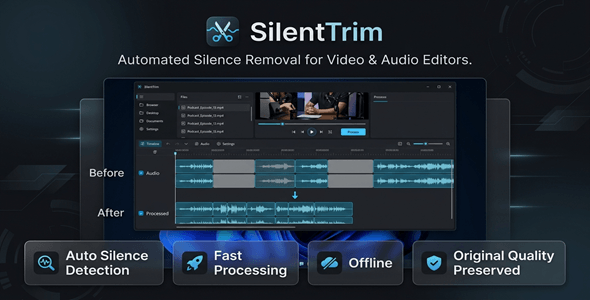
SilentTrim automatically detects and removes every silent section from your videos.
In minutes. With zero manual effort.
Perfect For
✔ YouTube Creators
✔ Podcast Editors
✔ Online Course Creators
✔ Video Marketers
✔ Educators & Coaches
✔ Social Media Managers
✔ Freelancers & Agencies
Features
 |
Automatic Silence Detection Instantly scans your video and identifies every silent section. No manual scrubbing. No guesswork. |
|
Perfect Audio/Video Sync Removes silence while keeping your audio and video perfectly aligned. No glitches. No drift. |
|
Adjustable Sensitivity Controls Set your own silence threshold and duration. Full control over what gets cut and what stays. |
|
Process Full Videos or Selected Ranges Trim the entire video — or focus on a specific section. You decide exactly how much to process. |
|
Wide Format Support Works with MP4, MOV, MKV, AVI, and WEBM files. No conversion needed before you start. |
|
Export in Original Quality Output files match your source video quality. No re-encoding. No quality loss. |
|
FFmpeg-Powered Speed Processing is fast, reliable, and battle-tested. Built on the industry-standard FFmpeg engine. |
|
Works 100% Offline No internet. No cloud. No data uploads. Your videos stay private on your machine. |
|
No Subscription. Ever. Pay once. Use forever. No monthly fees, no hidden costs. |
|
Lightweight & Low Resource Usage Runs smoothly on standard Windows machines. Won’t slow down your workflow. |
|
Modern, Easy-to-Use Interface Clean design that anyone can learn in minutes. No technical skills required. |
Why You Need This
❌ Manually scrubbing through hours of footage to find pauses
❌ Losing viewers because your videos feel slow and padded
❌ Paying expensive editors just to cut dead air
❌ Wasting time on repetitive editing that should be automated
Silence kills engagement.
Every extra second of dead air is a second your viewer is reaching for the skip button.
SilentTrim solves this automatically.
Load your video. Set your threshold. Export a tight, professional result.
What used to take hours now takes minutes.
How You Can Profit
✔ Post higher-quality YouTube videos that keep viewers watching longer
✔ Deliver polished course content that students actually finish
✔ Edit client videos faster and take on more projects per week
✔ Grow your podcast audience with tighter, more engaging episodes
✔ Charge premium rates for faster video turnaround as a freelancer
✔ Save hours every week and reinvest that time into creating more content
More output. Less effort. Better results.
This is not just a tool — it’s a competitive advantage for every video creator.
⚡ Fast Results
No complex setup. No learning curve.
You can process your first video in under 5 minutes.
Trim a 30-minute interview down to its best moments automatically.
Cut hours of silent footage in a single click.
Export a clean, fast-paced video ready to publish.
Example:
A 60-minute raw recording with frequent pauses can be trimmed and exported
in just a few minutes — with zero manual editing.
Simple 3-Step Setup
 |
Step 1 – Import Your Video Open SilentTrim and load your video file. Supports MP4, MOV, MKV, AVI, and WEBM. |
 |
Step 2 – Set Your Silence Settings Adjust the silence sensitivity and minimum duration threshold. Choose to process the full video or a specific time range. |
 |
Step 3 – Export & Publish Click process and get your trimmed video in minutes. Original quality preserved. Ready to upload anywhere. |
- Version 1.0.0 – Initial release with full silence detection, multi-format support, adjustable thresholds, and FFmpeg-powered export engine
 |
What operating system does SilentTrim support? SilentTrim is a Windows desktop application. It runs on Windows 10 and Windows 11. |
|
Does it require an internet connection? No. SilentTrim works 100% offline. Your videos never leave your computer. |
|
Which video formats are supported? MP4, MOV, MKV, AVI, and WEBM are all supported. No pre-conversion required. |
|
Will the export quality be reduced? No. SilentTrim exports using your original quality settings. There is no re-encoding or quality degradation. |
|
Is there a monthly subscription fee? No. This is a one-time purchase. Pay once and use SilentTrim forever. |
|
Can I control how aggressively silence is removed? Yes. You can adjust the silence detection sensitivity and set a custom minimum silence duration threshold. |
|
Does it require an API key or external service? No. SilentTrim requires no API key, account, or third-party service. Install it and start trimming immediately. |
|
Is it suitable for long videos like webinars or courses? Absolutely. SilentTrim handles long-form content efficiently. You can even target specific time ranges within a video. |
| Type | Windows App |
|---|---|
| Author | GoGrowTools |
| Price | $19 |
| Sales | 0 |
| Rating | 0 (0) |
| Published | Jun 11, 2026 |
| Last Update | Jun 11, 2026 |
| Application Runtime | Native |
| Operating System Versions | Windows 11, Windows 10 |
Categories
Tags
External listing. code.market does not sell this product and does not process payment for it. Pricing, payment, delivery, licensing, refunds, and support are handled by the third-party merchant on its own website. We may earn an affiliate commission from a referral. Details.
Products of the Week.
Submit🥇

STOP GUESSING WHAT TO POST
AI that learns your brand voice and builds a month of consistent, on-brand social content: carousels, posts and hooks that sound like you, not like everyone else's AI.
SaaS · 7,369 views · 67 clicksSaaS · Week 46 · 7,369 views · 67 clicks
🥈

Conversational Backlinks for Busy Founders
Place Backlink Relevant Conversation for your domain across Forums and Conversations
Website · 46,653 views · 232 clicksWebsite · Week 46 · 46,653 views · 232 clicks
🥉

upvote.club
Free Social Media Engagement that Helps Boost Your Content. Upvote Club supports 19 social networks with 100+ engagement actions in one dashboard. Add links to your posts and get free engagement from real users.
SaaS · 44,593 views · 127 clicksSaaS · Week 46 · 44,593 views · 127 clicks
#4

Substack Posting API
Onboard your Agent to Substack. Write Publish on Substack via API
SaaS · 63,480 views · 206 clicksSaaS · Week 46 · 63,480 views · 206 clicks
#5

Seenshot App
Free, Fast, MacOS Screenshot app. Make Screenshot cmd+shift+2 and send it via link
Desktop App · 32,730 views · 127 clicksDesktop App · Week 46 · 32,730 views · 127 clicks
#6

Hand-Placed Backlinks $9.99 per link. Flat rate.
Buy hand-placed forum, Q-A and directory backlinks. Flat $9.99 per link, no subscriptions — you only pay for approved listings.
Website · 8,349 views · 19 clicksWebsite · Week 46 · 8,349 views · 19 clicks
#7

Free Invoice Generator - PDF Invoices in Your Browser, No Sign-Up
A free invoice maker for freelancers and small businesses: fill in the invoice, check the live preview, and download a PDF that looks exactly like it. Any currency, tax per item, three templates, no sign-up, and nothing leaves your device.
6,977 views · 29 clicksWeek 46 · 6,977 views · 29 clicks
#8

Merge PDF Files Free - Combine PDFs in Your Browser, No Upload
A free PDF merger for office workers, students, and freelancers: combine PDFs and images into one file in the browser, reorder files and pages, pick page ranges, keep bookmarks, and open password-protected PDFs. Nothing is uploaded, no sign-up, no watermark.
6,458 views · 18 clicksWeek 46 · 6,458 views · 18 clicks