ShreeQMSP - Queue Management System for Pharmacy Stores in VB.Net and MySQL
Description
Introduction
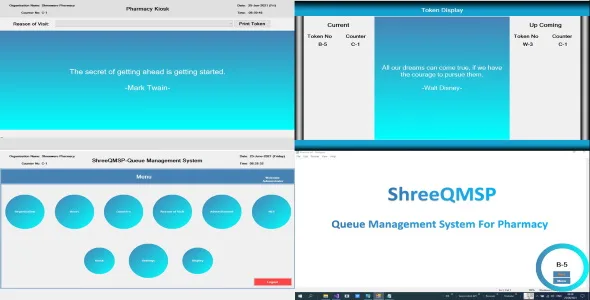
ShreeQMSP is an incredible Queue Management System for pharmacy store and is meant to make the life easy by reducing waiting time of the customers. We know that long queues and waiting are among the prime causes of customers dissatisfaction at busy pharmacy counters. ShreeQMSP solve this problem with an ease. It also increases the revenue of the organisation by making them more systemized. In short it facilitates a seamless customer journey.ShreeQMSP is a windows desktop software and can work in a LAN/Internet environment easily. It is easy to install and can be deployed with no expensive hardware.
Main Modules
1. Pharmacy Kiosk
 Kiosk module is meant to issue token to the customer as per his purpose of visit.
2. Customer Display
 Customer display module is meant to show the current and upcoming token no.
3. Counter Software
 Counter software module is for the concerned operator.
4. Separate Menu For Admin And Staff
 A seperate menu is meant for the administrator and staff from which they can select the different part of the software.
5. MIS-Management Information System
 MIS module helps the admin and staff to understand the various reports in summerised format using charts.
Features
- Multi counter based.
- Assign role to the counters.
- Eligent design.
- Password protected login and logout system.
- Easy to change password.
- Overall MIS.
- Individual MIS.
- Advertisement display board helps to display latest discounts and important instructions to customers(Like covid19 social distancing and safeguarding tips).
- If advertisement entry not made in the database, the kiosk and display board automatically switch over to display default quotes.
- Can add/update and delete advertisement.
- Can add/update and delete quotes.
- Can increase or decrease the time of text scroller.
- Can increase or decrease the time between advertisement slides.
- Organisation tab can be used to feed the organisation details.
- Users can be added from users tab.
- Can select default kiosk printer from the automatically scanned printer list.
- Kiosk part is meant to print token/tickets.
- Only administrator can start and exit Kiosk.
- Customer token display part is meant to display current/upcoming token no in process.
- Automatically assign tickets/token to assigned counter.
- Counter part is meant to solve the current ticket and jump over to next till it finishes.
- Most of the code is SQL injection based and hence protected.
- Easy to install and deploy.
- Can easily work on 10 inch windows tablet and any laptop/pc.
- Automatically adjust itself as per screen size (Minimum screen size should be 10 inch).
Login Details
1. Administrator
User ID : Administrator Password: 1234562. Staff
User ID : Staff Password: 123456File Types
- .vb
- .vbproj
- .dll
- .xml
- .exe
- .msi
- .sql
System Requirements
- Visual Studio 2019
- Wamp Server = 3.2.3
- OS = Windows 10
- .Net Framework = 4.6.1
- Connection Drivers = and its dependent packages
For any query, please contact: shreewaretechnologies@gmail.com
Categories
Tags
External listing. code.market does not sell this product and does not process payment for it. Pricing, payment, delivery, licensing, refunds, and support are handled by the third-party merchant on its own website. We may earn an affiliate commission from a referral. Details.
Products of the Week.
Submit🥇

STOP GUESSING WHAT TO POST
AI that learns your brand voice and builds a month of consistent, on-brand social content: carousels, posts and hooks that sound like you, not like everyone else's AI.
SaaS · 6,691 views · 64 clicksSaaS · Week 46 · 6,691 views · 64 clicks
🥈

Conversational Backlinks for Busy Founders
Place Backlink Relevant Conversation for your domain across Forums and Conversations
Website · 45,717 views · 230 clicksWebsite · Week 46 · 45,717 views · 230 clicks
🥉

upvote.club
Free Social Media Engagement that Helps Boost Your Content. Upvote Club supports 19 social networks with 100+ engagement actions in one dashboard. Add links to your posts and get free engagement from real users.
SaaS · 43,695 views · 125 clicksSaaS · Week 46 · 43,695 views · 125 clicks
#4

Substack Posting API
Onboard your Agent to Substack. Write Publish on Substack via API
SaaS · 62,623 views · 204 clicksSaaS · Week 46 · 62,623 views · 204 clicks
#5

Seenshot App
Free, Fast, MacOS Screenshot app. Make Screenshot cmd+shift+2 and send it via link
Desktop App · 31,867 views · 125 clicksDesktop App · Week 46 · 31,867 views · 125 clicks
#6

Hand-Placed Backlinks $9.99 per link. Flat rate.
Buy hand-placed forum, Q-A and directory backlinks. Flat $9.99 per link, no subscriptions — you only pay for approved listings.
Website · 7,557 views · 19 clicksWebsite · Week 46 · 7,557 views · 19 clicks
#7

Free Invoice Generator - PDF Invoices in Your Browser, No Sign-Up
A free invoice maker for freelancers and small businesses: fill in the invoice, check the live preview, and download a PDF that looks exactly like it. Any currency, tax per item, three templates, no sign-up, and nothing leaves your device.
6,171 views · 21 clicksWeek 46 · 6,171 views · 21 clicks
#8

Merge PDF Files Free - Combine PDFs in Your Browser, No Upload
A free PDF merger for office workers, students, and freelancers: combine PDFs and images into one file in the browser, reorder files and pages, pick page ranges, keep bookmarks, and open password-protected PDFs. Nothing is uploaded, no sign-up, no watermark.
5,701 views · 16 clicksWeek 46 · 5,701 views · 16 clicks