
ShotMind | Smart Screenshot Organizer and Private Assistant Android App
Description

|

|
✨ ShotMind – Smart Screenshot Organizer & Private Screenshot Assistant
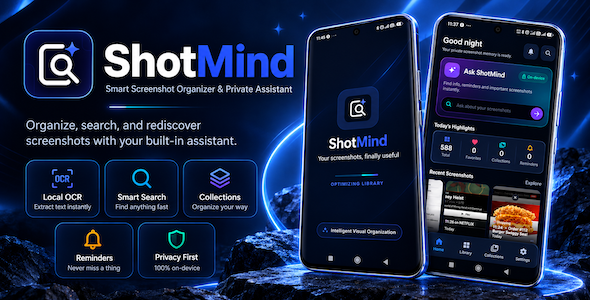
ShotMind is a premium Android screenshot organizer app that turns messy screenshots into a clean, searchable, and useful private library. It scans screenshots, reads text with local OCR, organizes them into smart categories, helps users find important information, creates collections, manages reminders, and keeps everything processed on the device.
ShotMind is designed for users who save bills, receipts, chats, travel tickets, documents, shopping orders, notes, links, and important visual information as screenshots. Instead of scrolling endlessly through the gallery, users can search, organize, revisit, and manage screenshots from one modern app.
Live Demo APK

Click the image above to download the demo APK
✨ Key Features
- Smart Screenshot Library – View screenshots in a premium grid/list layout with filters, sorting, favorites, and quick access.
- Local OCR Text Recognition – Extract searchable text from screenshots directly on the device.
- Smart Categories – Automatically organize screenshots into categories like Finance, Shopping, Travel, Documents, Conversations, Education, and more.
- Smart Collections – Automatically grouped collections for receipts, bills, shopping orders, travel, work, learning, recently added items, and attention items.
- Ask ShotMind Assistant – A private local assistant that helps users find screenshots using natural questions and shows real screenshot evidence.
- Advanced Search – Search by title, category, OCR text, notes, tags, dates, reminders, links, amounts, and more.
- Screenshot Details – See preview, title, category, date, OCR text, smart summary, tags, suggested actions, notes, collections, and reminder status.
- Favorites – Mark important screenshots and access them quickly.
- Reminders – Add reminders to screenshots and receive local reminder notifications.
- Daily Brief – Review new screenshots, upcoming reminders, cleanup opportunities, and items needing attention.
- Memory Timeline – Browse screenshots grouped by time, such as today, yesterday, last week, and earlier.
- Safe Cleanup – Review old, large, duplicate, similar, or low-information screenshots before deleting anything.
- Privacy Controls – Mark screenshots private and keep sensitive content hidden from assistant previews and notifications.
- App Lock – Protect the app with PIN, fingerprint, or face unlock where supported.
- Backup & Restore – Export and restore ShotMind metadata such as titles, notes, collections, reminders, favorites, and privacy flags.
App Highlights
- Modern premium dark UI design
- Local-first screenshot organization
- No cloud AI or backend required for smart features
- Offline OCR and local smart metadata
- AdMob integrated
- Google UMP consent support for GDPR regions
- OneSignal push notification support
- Room offline database
- WorkManager background processing
- Glide optimized image loading
- Supports large screenshot libraries
- Supports Android 7.0 up to Android 16
- Target SDK 36 ready
- 16 KB page size support for latest Google Play requirements
⚙️ Technical Details
- Programming Language: Java
- UI: XML layouts
- Minimum SDK: 24
- Target SDK: 36
- Compile SDK: 36
- Database: Room local database
- Background Work: WorkManager
- OCR: ML Kit local text recognition
- Image Loading: Glide
- Ad Network: AdMob
- Consent: Google UMP
- Push Notifications: OneSignal
- Hosting: No external hosting required
- Cloud AI: Not required
Full App Reskin Support (PAID)
- Change app name
- Change package name
- Change app icon and splash logo
- Change colors and theme resources
- Replace AdMob IDs
- Add OneSignal App ID
- Update privacy policy, support email, and app links
- Prepare release APK/AAB
Play Store Design Assets
- App icon 512 × 512
- Feature graphic / banner
- App screenshots
- App logo
- Short and full app description
Refund Policy
No refunds will be provided.
Please review the demo application carefully before purchasing.
| Type | Android App |
|---|---|
| Author | SoftexSolutions |
| Price | $19 |
| Sales | 0 |
| Rating | 0 (0) |
| Published | Sep 1, 2026 |
| Last Update | Oct 13, 2026 |
| Compatible Software | Android 15.0, Android 12.0, Android 11.0, Android 10.0, Android 9.0, Other |
| Demo Url | https://www.dropbox.com/scl/fi/gv8sbohvup5lmdz7owkdl/ShotMind-App.apk?rlkey=u0b30m3jz662zzxzog61nw1ik&st=3ffk9r83&dl=0 |
| Mobile Files Included | .apk, .java, .xml |
Categories
Tags
External listing. code.market does not sell this product and does not process payment for it. Pricing, payment, delivery, licensing, refunds, and support are handled by the third-party merchant on its own website. We may earn an affiliate commission from a referral. Details.
Products of the Week.
Submit🥇

Perceptle
Perceptle is a daily browser-based game that challenges you to test your sensory intuition through five quick estimation and rhythm-based rounds.
Other · 1 views · 0 clicksOther · Week 47 · 1 views · 0 clicks
🥈

Free LinkedIn Likes From Real
Get free LinkedIn likes on your posts from real members who react by hand. No
SaaS · 124 views · 2 clicksSaaS · Week 47 · 124 views · 2 clicks
🥉

STOP GUESSING WHAT TO POST
AI that learns your brand voice and builds a month of consistent, on-brand social content: carousels, posts and hooks that sound like you, not like everyone else's AI.
SaaS · 7,686 views · 71 clicksSaaS · Week 47 · 7,686 views · 71 clicks
#4

aaas.market
407 reliable micro tools for solo founders, marketers and creators. They work in your browser
SaaS · 122 views · 0 clicksSaaS · Week 47 · 122 views · 0 clicks