
Shop Management System
Description
Shop Management & Billing System: Multi-Shop SaaS in PHP/MySQL
A complete billing and shop management platform for small and medium retail and service businesses. One installation serves many shops. A Super Admin controls every shop and subscription, and each shop works inside its own isolated workspace.
It is built in plain PHP with PDO/MySQL and has no framework or Composer dependencies, so it is easy to host, read and customize.
Highlights
- Multi-shop (SaaS) architecture with a store-code login for each shop
- Super Admin panel to create, activate, disable and renew shops
- Free and Premium themes with per-shop feature toggles
- Billing with VAT support, discounts, printable invoices and receipts
- Credit (udhar) ledger, purchases and supplier accounts
- Built-in accounting reports and audit tools
Super Admin Panel
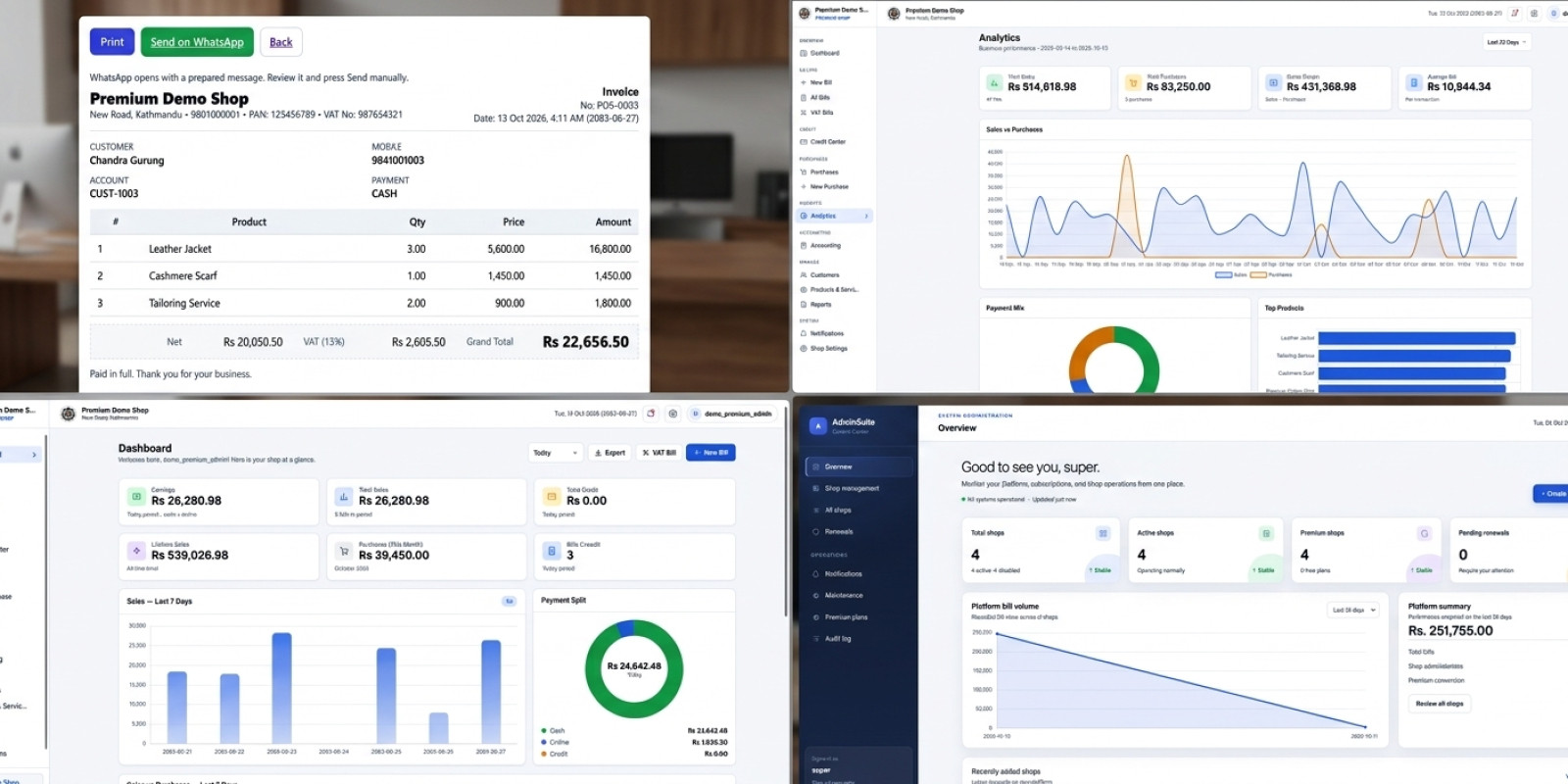
- Dashboard with shop counts, sales today, 7 days, 30 days and lifetime, and a sales chart
- Create and manage shops, with activation start and end dates
- Enable or disable features per shop: credit, notifications, settings, recent transactions, purchases, accounting and products
- Switch shops between Free and Premium themes
- Renewal, reactivation and premium-upgrade request handling
- Broadcast or targeted notifications to shops
- Global maintenance mode
- Audit log of administrator actions
- Upload login, dashboard and bill screenshots for each shop
Shop Features
- Billing: multiple line items, percentage or fixed discounts, and payment by cash, online or credit
- VAT billing: configurable VAT rate (13% default), VAT and PAN numbers, a separate VAT bills view, and print and export
- Customers: customer accounts keyed by bike or vehicle number for workshops, or by mobile number for other shops
- Credit ledger: charges, payments, settlement, due statements and receipts
- Purchases: supplier purchases, supplier credit accounts and purchase charts
- Products and services: a catalog with live search while creating bills (Premium)
- Accounting (Premium): balance sheet, cash flow, ledger summary, income and expense entries, and an audit center with PDF download
- Analytics and reports: sales overview and reports
- Notifications: an in-app inbox with unread tracking
- Settings: shop profile, logo, invoice prefix and footer, VAT settings and password change
Shop Types Supported
Bike shop, workshop, kirana (grocery), cloth shop and mobile shop.
Security Basics Included
- Passwords stored with bcrypt
- Prepared statements (PDO) for database queries
- Session hardening: HttpOnly cookies, session ID regeneration and idle and absolute timeouts
- Login rate limiting
- CSRF tokens on key forms
- Validated image uploads
- Role separation between Super Admin and shop users
Requirements
- PHP 8.0 or higher with PDO MySQL
- MySQL 5.7+ or MariaDB 10.4+
- Apache with
mod_rewriteenabled (a.htaccessfile is included) - Works on XAMPP or WAMP locally, and on shared hosting or a VPS
Installation
- Upload the files to your server or
htdocs. - Create a database named
digital_shopand importdatabase/digital_shop.sql. - Run the SQL files in
migrations/in date order. - Set your database credentials in
config.php. - Create the Super Admin account with the included CLI script (
auth/seed_super.php). - Log in through
auth/index.php.
What’s Included
- Full source code
- Database schema and migration files
- Ready-made styles and UI scripts, including a bundled chart library
Notes
- Replace the demo data in the SQL file before going live.
- Always review and test any software before using it with real business data.
Features
Multi-Shop (SaaS) System
- One installation serving unlimited shops
- Store-code login for each shop
- Separate Super Admin and Shop Admin roles
- Data isolated per shop
- Shop activation start and end dates
- Automatic expiry page for inactive shops
- Renewal request system for shops
Super Admin Panel
- Dashboard with total shops, active and disabled counts, and Free and Premium counts
- Sales statistics for today, 7 days, 30 days and lifetime
- Sales chart for the last 7 to 90 days
- Create, edit, activate and disable shops
- Switch shops between Free and Premium themes
- Per-shop feature toggles: credit, notifications, settings, recent transactions, purchases, accounting and products
- Renewal, reactivation and premium-upgrade request handling
- Broadcast or shop-specific notifications
- Global maintenance mode
- Audit log of administrator actions
- Upload login, dashboard and bill screenshots for each shop
Billing
- Multiple line items per bill
- Percentage or fixed discount
- Payment types: cash, online and credit
- Printable bills and receipts
- Printable due statements
- All bills list with search, filters and pagination
- Bill export
- Automatic bill numbering
VAT and Tax
- Optional VAT bills
- Configurable VAT rate (13% by default)
- VAT and PAN number support
- Separate VAT bills view
Customers and Credit Ledger
- Customer accounts per shop
- Vehicle number for bike shops and workshops, mobile number for other shops
- Credit charges and payments
- Due settlement
- Credit center overview
- Payment receipts
Purchases and Suppliers
- Record supplier purchases
- Payment methods: cash, online and credit
- Supplier credit accounts
- Supplier ledger with charges and payments
- Printable purchase records
- Purchase charts
Products and Services (Premium)
- Product and service catalog
- Active and inactive toggle
- Live search when adding bill items
Accounting (Premium)
- Balance sheet
- Cash flow report
- Ledger summary
- Manual income and expense entries
- Audit center with bill lookup
- Audit PDF download
Reports and Analytics
- Sales analytics
- Business reports
- Dashboard overview with recent transactions
Notifications
- In-app notification inbox
- Read and unread tracking
- Live notification fetching
Shop Settings
- Shop profile: name, type, address, phone and email
- Logo upload
- Invoice prefix and footer text
- VAT and PAN settings
- Password change
Supported Shop Types
- Bike shop
- Workshop
- Kirana (grocery)
- Cloth shop
- Mobile shop
Design
- Free and Premium themes
- Responsive layout
- Dark login screen
- Charts powered by the bundled Chart.js
Security
- Passwords hashed with bcrypt
- Prepared statements (PDO)
- HttpOnly session cookies with session ID regeneration
- Idle and absolute session timeouts
- Login rate limiting
- CSRF protection on key forms
- Validated image uploads
- CLI-only Super Admin creation
Technical
- Plain PHP with no framework or Composer
- MySQL or MariaDB database
- Apache
.htaccessURL routing - SQL schema and migration files included
- Timezone set to Asia/Kathmandu (changeable)
- Works on XAMPP, WAMP, shared hosting or a VPS
Requirements
Server
- Apache 2.4 with
mod_rewriteenabled andAllowOverride All, because the included.htaccesshandles URL routing - Works on XAMPP or WAMP locally, and on shared hosting, cPanel or a VPS
PHP
- PHP 8.0 or higher (PHP 8.2 recommended)
pdo_mysqlextensionmbstringextensiongdextension (optional, used to resize uploaded shop logos)json,sessionandfileinfo(enabled by default in standard PHP builds)file_uploadsenabled for logo and screenshot uploads
Database
- MySQL 5.7+ or MariaDB 10.4+ with InnoDB and utf8mb4 support
- MariaDB 10.4+ or MySQL 8.0+ is recommended for running the migration files without errors
Browser (for users)
- Any modern browser: Chrome, Edge, Firefox or Safari
- Internet access for the CDN-loaded Tailwind CSS and Google Fonts (the chart library is bundled locally)
Folder permissions
- ###licode###storage/uploads/ folder must be writable by the web server
Setup
- Create a database named
digital_shop, or any name you set inconfig.php - Import
database/digital_shop.sql, then run the files inmigrations/in date order - Update the database host, name, user and password in
config.php - Create the Super Admin from the command line with
auth/seed_super.php, which needs shell access (CLI) and a bootstrap token set as an environment variable - Use HTTPS in production so that the secure session cookie flag takes effect
Instructions
1. Prepare the files
- Unzip the package. The application is inside the
billing softwarefolder. - Rename that folder to something without a space, such as
billing. - Upload it to your server’s web root (
htdocsorpublic_html), or into a subfolder.
2. Create the database
- Open phpMyAdmin or your MySQL client.
- Create a database named
digital_shopwith theutf8mb4_general_cicollation. - Import
database/digital_shop.sql. - Open the
migrations/folder and run these files in this order:20250928_add_purchases.sql20250929_purchase_payment_and_ledger.sql20261010_super_admin_upgrade.sql20261011_premium_ui.sql
3. Configure the database connection
Open config.php and edit the first four lines:
php
$db_host = '127.0.0.1';
$db_name = 'digital_shop';
$db_user = 'your_db_user';
$db_pass = 'your_db_password';
Do not use the root user with an empty password on a live server.
4. Remove the demo data
The SQL file includes a sample shop (“King’s Choice”) and a default Super Admin account whose password is not documented. Remove both before going live by running:
sql
DELETE FROM admins WHERE role = 'super';
DELETE FROM shops WHERE id = 16;
5. Create your Super Admin
Run this from the server command line, inside the auth folder. Use the same random value for both variables. The username must be 4 to 64 characters, and the password at least 12.
Linux / macOS
bash
cd auth
SUPER_ADMIN_BOOTSTRAP_TOKEN='your-long-random-value'
SUPER_ADMIN_BOOTSTRAP_TOKEN_EXPECTED='your-long-random-value'
php seed_super.php yourusername 'YourStrongPassword123'
Windows (XAMPP)
bat
cd auth
set SUPER_ADMIN_BOOTSTRAP_TOKEN=your-long-random-value
set SUPER_ADMIN_BOOTSTRAP_TOKEN_EXPECTED=your-long-random-value
C:xamppphpphp.exe seed_super.php yourusername YourStrongPassword123
The script only runs from the command line and refuses to run if a Super Admin already exists. That is why step 4 comes first.
6. Secure the installation
- Delete
auth/seed_admin.php, which is an old script that creates an admin without any protection. - Delete or block
auth/seed_super.phpafter use. - Make sure the
storage/uploads/folder is writable by the web server. - Enable HTTPS so the secure cookie setting takes effect.
- Make sure Apache has
mod_rewriteenabled andAllowOverride Allset, so the.htaccessfile works.
7. First login
- Open
yoursite.com/billing/(it redirects to the login page). - Click the administrator access option on the login screen.
- Sign in with the Super Admin account you created.
8. Add your first shop
- Go to Shops in the Super Admin panel.
- Create a shop with its name, type, admin username and password, and set the activation start and end dates.
- Choose the Free or Premium theme and switch on the features that shop should have (credit, purchases, accounting, products and so on).
- Give the shop owner their store code, which is shown in the shop list.
9. Shop login
- ###listrong###store code. ###li/li### ###li/li###
10. Renewals
When a shop’s end date passes, its users see an expiry page and can send a renewal request. You can approve it from Renewals in the Super Admin panel and extend the dates.
Troubleshooting
- Blank page or 503 message: check the database details in
config.php. - Pages show 404:
mod_rewriteor.htaccessis not active. - Logo upload fails: check the folder permissions on
storage/uploads/. seed_super.phpsays provisioning is complete: a Super Admin row still exists, so run the delete command from step 4.- Migration errors on older MySQL: use MariaDB 10.4+ or MySQL 8.0+, or add the missing columns by hand.
| Author | reinfadmin |
|---|---|
| Category | Scripts & Code / PHP Scripts / POS |
| Price | $55 |
| Extended License | $165 |
| Likes | 1 |
| First Release | Oct 13, 2026 |
| Last Update | Oct 13, 2026 |
| Database | MySQL 8.0, MariaDB 10.x |
| Files included | .php, .css, .html, .sql, JavaScript .js |
| Software version | PHP 8.0, PHP 8.1, PHP 8.2, PHP 8.3 |
| Html/css framework | Tailwind CSS |
| Programming language | PHP |
Categories
Tags
External listing. code.market does not sell this product and does not process payment for it. Pricing, payment, delivery, licensing, refunds, and support are handled by the third-party merchant on its own website. We may earn an affiliate commission from a referral. Details.
Products of the Week.
Submit🥇

Actionbook
It works inside the user's own browser with the accounts already signed in. The user describes the result they need, and the agent reads, clicks and types through the pages, then delivers a dashboard or report where each data links back to its source.
Other · 718 views · 9 clicksOther · Week 44 · 718 views · 9 clicks
🥈

Free social media tools for creators & solofounders
295 free tools for growing your social media: write, plan, grow on local AI models, 100% free forever, No sign-up required, No trial. Write, check and measure posts on LinkedIn, Instagram, TikTok, X, YouTube, Reddit, Product Hunt and more: a free social media scheduler for 17 networks, engagement rate calculators, character counters, best time to post, hook generators and follower growth calculators. No login anywhere, no API or credit usage.
687 views · 6 clicksWeek 44 · 687 views · 6 clicks
🥉

STOP GUESSING WHAT TO POST
AI that learns your brand voice and builds a month of consistent, on-brand social content: carousels, posts and hooks that sound like you, not like everyone else's AI.
SaaS · 1,933 views · 21 clicksSaaS · Week 44 · 1,933 views · 21 clicks
#4

Hand-Placed Backlinks $9.99 per link. Flat rate.
Buy hand-placed forum, Q-A and directory backlinks. Flat $9.99 per link, no subscriptions — you only pay for approved listings.
Website · 1,885 views · 17 clicksWebsite · Week 44 · 1,885 views · 17 clicks
#5

Conversational Backlinks for Busy Founders
Place Backlink Relevant Conversation for your domain across Forums and Conversations
39,344 views · 211 clicksWeek 44 · 39,344 views · 211 clicks
#6

Free Invoice Generator - PDF Invoices in Your Browser, No Sign-Up
A free invoice maker for freelancers and small businesses: fill in the invoice, check the live preview, and download a PDF that looks exactly like it. Any currency, tax per item, three templates, no sign-up, and nothing leaves your device.
625 views · 11 clicksWeek 44 · 625 views · 11 clicks
#7

Merge PDF Files Free - Combine PDFs in Your Browser, No Upload
A free PDF merger for office workers, students, and freelancers: combine PDFs and images into one file in the browser, reorder files and pages, pick page ranges, keep bookmarks, and open password-protected PDFs. Nothing is uploaded, no sign-up, no watermark.
567 views · 4 clicksWeek 44 · 567 views · 4 clicks