
Shipping Tracking for WooCommerce orders

Description
WooCommerce AliExpress Shipment Tracking plugin features
This plugin utilizes functions to add tracking numbers to WooCommerce orders, track them using a special tracking service (get detailed information about tracking codes you get from AliExpress suppliers), and send those data to your customers by email. Please note: you need to use this plugin together with Ali2Woo plugin if you want to get tracking data from AlIExpress automatically.Main features:
- Show tracking numbers in email notifications for your customers
- Show them in your client personal accounts and on the order page for site administrator
- Integrate with tracking services: 17Track, Cainiao, AfterShip
- Add a tracking form on your website using a special short-code. The tracking form is an iframe widget provided by 17track.
- Customize the tracking templates for email notifications, personal accounts and admin panel.
Features that require AfterShip API Key
- Daily automatic synchronization of tracking information
- Automatic detection of carrier code by tracking number
- Automatic changing of the WooCommerce order status if related tracking numbers get the “Delivered” state
- Manual synchronization function for specific tracking numbers
- Split tracking numbers into groups depending on their state: Pending, Shipped, Delivered, etc.
Do you need step-by-step documentation for the plugin? It’s available here. Also there is the video instruction.
1) Tracking numbers and links in emails, customers accounts and in WooCommerce admin panel
Attach tracking numbers to email notifications for your clients. Also the tracking link of the appropriate tracking service will be included in the email.

Displaying tracking numbers in orders section of your customers accounts.
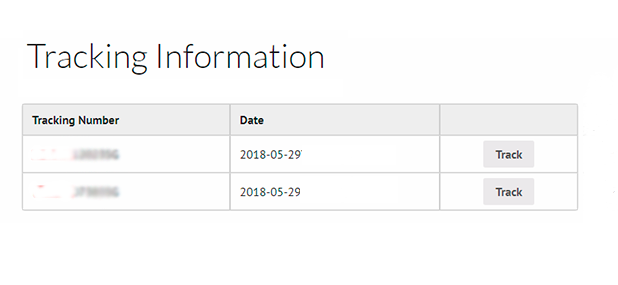
Displaying tracking numbers in orders section in WooCommerce backend.

2) Tracking services
Setting up the tracking service (17track, cainiao, aftership) you want to use.

3) Tracking page and special short-code
Adding order tracking page for your customers using special short-code . It’ll let your customers to check their tracking codes right on your website frontend. The tracking form is an iframe widget provided by 17track
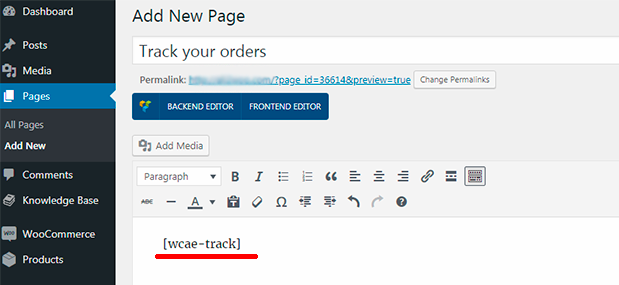
How to install WooCommerce AliExpress tracking plugin
Method 1:

Method 2:

Change Log
Version 1.1.11 - 17 October 2021
### 1) Fixed bug: now ALL tracking numbers are sent by email and displayed in the customer account
### 2) Fixed bug: now duplicated tracking numbers are not sent by email and not displayed in the customer account
Version 1.1.10 - 01 October 2021
### 1) Fixed bug with displaying the tracking numbers values on the product editing page.
Version 1.1.9 - 24 September 2021
### 1) Fixed bug when tracking numbers are not included to the email and user account order details.
### 2) Fixed minor bugs
Version 1.1.8 - 21 September 2021
### 1) Added support of the new Ali2Woo plugin (v.1.18.10)
### 2) Fixed minor bugs
Version 1.1.6 - 25 November 2020
### 1) Added new option in the plugin settings allowing to create "wc_shipped" order status. Also, it creates a new email notification for this status and email template. The template can be customized by overriding the template in /woocommerce/emails/customer-shipped-order.php file.
### 2) Fixed minor bugs
Version 1.1.3 - 7 April 2019
### 1) Changed the tracking synchronization schedule. It runs each 15 minutes (per 10 tracking codes per time)
### 2) Added a new field to input the providers slugs for AfterShip auto-detection courier feature
### 3) Added an ability to choose the order status if related tracking numbers have the delivered state
### 4) Added an ability to synchronize the specific tracking numbers only
Version 1.1.2 - 26 November 2018
### 1) Added a feature to use the local pages (having the tracking shortcode) as tracking service
### 2) Fixed a bug with the placing a content of the tracking shortcode
### 3) Added the 'num' URL parameter that directly inserted into the tracking code field on the tracking shortcode page
### 4) Added a feature to add several AliExpress order IDs to one WooCommerce order
Version 1.1.0 - 7 August 2018
### 1) Added the integration with AfterShip API (require AfterShip API Key)
### 2) Added the Tracking List page in WordPress backend
### 3) Added an ability to set up auto-synchronization of tracking codes through AfterShip
### 4) Added a feature "Enable auto-detect courier mode" (in test mode for now)
Version 1.0.0 - 8 June 2018
### Initial release

| Type | WooCommerce Plugin |
|---|---|
| Author | ma-group |
| Category | Wordpress / Ecommerce / Woocommerce |
| Price | $60 |
| Sales | 611 |
| Rating | 4.22 from 9 ratings |
| Published | Jun 7, 2018 |
| Last Update | Apr 4, 2023 |
| Compatible Browsers | IE9, IE10, IE11, Firefox, Safari, Opera, Chrome, Edge |
| Compatible Software | WordPress 5.8.x, WordPress 5.7.x, WordPress 5.6.x, WordPress 5.5.x, WordPress 5.4.x, WordPress 5.3.x, WordPress 5.2.x, WordPress 5.1.x, WordPress 5.0.x |
| Compatible With | WooCommerce 6.x.x, WooCommerce 5.x.x, WPML |
| Gutenberg Optimized | No |
| Source Files Included | JavaScript JS, CSS, PHP |
External listing. code.market does not sell this product and does not process payment for it. Pricing, payment, delivery, licensing, refunds, and support are handled by the third-party merchant on its own website. We may earn an affiliate commission from a referral. Details.
Products of the Week.
Submit🥇

STOP GUESSING WHAT TO POST
AI that learns your brand voice and builds a month of consistent, on-brand social content: carousels, posts and hooks that sound like you, not like everyone else's AI.
SaaS · 4,291 views · 38 clicksSaaS · Week 45 · 4,291 views · 38 clicks
🥈

Conversational Backlinks for Busy Founders
Place Backlink Relevant Conversation for your domain across Forums and Conversations
Website · 42,004 views · 223 clicksWebsite · Week 45 · 42,004 views · 223 clicks
🥉

upvote.club
Free Social Media Engagement that Helps Boost Your Content. Upvote Club supports 19 social networks with 100+ engagement actions in one dashboard. Add links to your posts and get free engagement from real users.
SaaS · 40,046 views · 117 clicksSaaS · Week 45 · 40,046 views · 117 clicks
#4

Substack Posting API
Onboard your Agent to Substack. Write Publish on Substack via API
SaaS · 59,055 views · 198 clicksSaaS · Week 45 · 59,055 views · 198 clicks
#5

Seenshot App
Free, Fast, MacOS Screenshot app. Make Screenshot cmd+shift+2 and send it via link
Desktop App · 28,432 views · 122 clicksDesktop App · Week 45 · 28,432 views · 122 clicks
#6

Hand-Placed Backlinks $9.99 per link. Flat rate.
Buy hand-placed forum, Q-A and directory backlinks. Flat $9.99 per link, no subscriptions — you only pay for approved listings.
Website · 4,265 views · 19 clicksWebsite · Week 45 · 4,265 views · 19 clicks
#7

Free Invoice Generator - PDF Invoices in Your Browser, No Sign-Up
A free invoice maker for freelancers and small businesses: fill in the invoice, check the live preview, and download a PDF that looks exactly like it. Any currency, tax per item, three templates, no sign-up, and nothing leaves your device.
2,940 views · 17 clicksWeek 45 · 2,940 views · 17 clicks
#8

Merge PDF Files Free - Combine PDFs in Your Browser, No Upload
A free PDF merger for office workers, students, and freelancers: combine PDFs and images into one file in the browser, reorder files and pages, pick page ranges, keep bookmarks, and open password-protected PDFs. Nothing is uploaded, no sign-up, no watermark.
2,717 views · 13 clicksWeek 45 · 2,717 views · 13 clicks