
SDK Monitor - Detect app updates
Description


Features
This app contains the following screens:
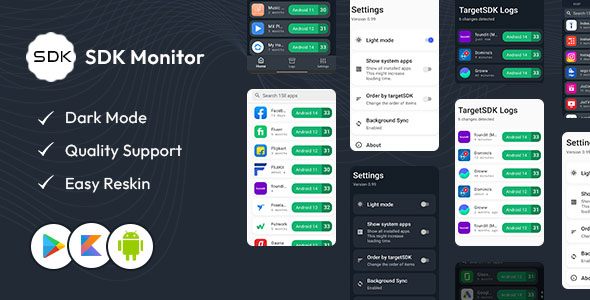
A list of all installed apps that were downloaded from Play Store.
A settings view, that allows user to toggle auto-sync on/off and configure what is required for a sync to occur.
[Eventually] The plan is to have a filter screen (sort by name/last update/targetSDK value) and an about screen.
1. Features: Look for an SDK monitor that offers comprehensive features such as real-time monitoring of SDKs, detection of performance issues caused by SDKs, tracking of SDK versions, and the ability to identify potential privacy or security concerns.
2. User Reviews: Check the user reviews and ratings for the app on the Play Store. This can give you an idea of the user experience and the effectiveness of the monitor in detecting and managing SDKs.
3. Developer Reputation: Research the developer or company behind the SDK monitor. Check their website, customer testimonials, and any other information that can help establish their credibility and expertise.
4. Updates and Support: Ensure that the SDK monitor is regularly updated to support the latest Android versions and SDK changes. Additionally, look for reliable customer support channels in case you encounter any issues.
5. Privacy and Security: Given that the monitor will likely have access to data from your device, make sure to review the privacy policy and permissions required by the app. Ensure that your data is handled securely and in accordance with your preferences.
6. Ease of Use: Look for an app with an intuitive and user-friendly interface. A well-designed app can save you time and frustration when monitoring and managing SDKs.
To find the most up-to-date and relevant SDK monitors for Android apps, I recommend searching the Google Play Store directly using keywords such as “SDK monitor,” “SDK analysis,” or “Android app analytics.” Always read the app descriptions, reviews, and permissions carefully before downloading and installing any app from the Play Store.
| Type | Android App |
|---|---|
| Author | heltersquad |
| Price | $9 |
| Sales | 0 |
| Rating | 0 (0) |
| Published | Aug 20, 2023 |
| Last Update | Nov 25, 2023 |
| Compatible Software | Kotlin 1.x, Android 12.0, Android 11.0, Android 10.0, Android 9.0, Other |
| Mobile Files Included | .apk, .dex, .dat, .xml |
Categories
Tags
External listing. code.market does not sell this product and does not process payment for it. Pricing, payment, delivery, licensing, refunds, and support are handled by the third-party merchant on its own website. We may earn an affiliate commission from a referral. Details.
Products of the Week.
Submit🥇

Perceptle
Perceptle is a daily browser-based game that challenges you to test your sensory intuition through five quick estimation and rhythm-based rounds.
Other · 1 views · 0 clicksOther · Week 47 · 1 views · 0 clicks
🥈

Free LinkedIn Likes From Real
Get free LinkedIn likes on your posts from real members who react by hand. No
SaaS · 124 views · 2 clicksSaaS · Week 47 · 124 views · 2 clicks
🥉

STOP GUESSING WHAT TO POST
AI that learns your brand voice and builds a month of consistent, on-brand social content: carousels, posts and hooks that sound like you, not like everyone else's AI.
SaaS · 7,686 views · 71 clicksSaaS · Week 47 · 7,686 views · 71 clicks
#4

aaas.market
407 reliable micro tools for solo founders, marketers and creators. They work in your browser
SaaS · 122 views · 0 clicksSaaS · Week 47 · 122 views · 0 clicks