
Screen Recorder - Mac Screen Recorder- Voice Recorder | Flutter - Swift
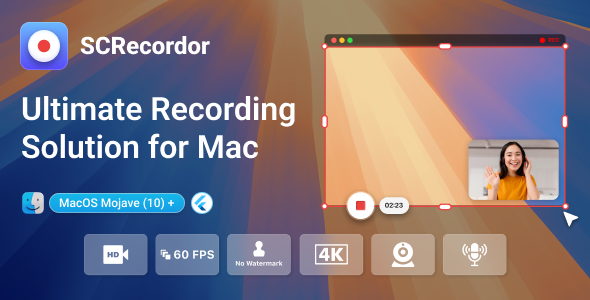
Description
Introduction
SC Recorder – Mac Screen Recorder App (Built with Flutter & Swift Native) is an advanced, next-generation screen recording tool built specifically for macOS devices. Designed with simplicity and power in mind, SC Recorder offers a complete screen capture experience tailored for professionals, educators, gamers, content creators, and anyone who values high-performance screen recording.
Whether you’re recording tutorials, meetings, webinars, online classes, or high-FPS gameplay, SC Recorder delivers ultra-smooth, high-definition results — all packed in a lightweight, Mac-optimized package. With full support for multiple screen setups, customizable quality settings, seamless audio capture, and instant sharing, SC Recorder is your all-in-one screen recording solution.
Crafted by expert Flutter and Swift developers, SC Recorder combines the best of cross-platform UI flexibility and native macOS performance, ensuring your screen recordings are always flawless, lag-free, and professional.



Key Feature List
- One-Click Screen Recording – Instantly start capturing with a sleek, intuitive interface.
- Multi-Screen Support – Effortlessly switch between screens or record selected regions only.
- HD, 2K & 4K Output – Capture in your preferred resolution, from 720p to ultra-clear 4K.
- Audio Recording Modes – Choose between system audio, microphone input, or both.
- Unlimited Recording Duration – Record without worrying about time limits.
- Smooth Gameplay Capture – Record gaming sessions at 24, 30, or 60 FPS with high stability.
- Quick Export & Sharing – Instantly export and share your recordings via email, AirDrop, or file sharing tools.
- macOS Optimized – Built with Swift native code for speed, stability, and seamless integration with all modern Mac devices.
App Modules & Experience
- Flutter + Swift Hybrid Architecture – A powerful blend of UI efficiency and native performance
- 100% Mac Exclusive – Developed specifically for macOS devices with M1, M2, and Intel chip support
- Clean Codebase – Fully documented and developer-friendly for future customization
- One-Time Purchase – No subscription, lifetime access with free updates
- All-in-One Recording Tool – Combines screen, audio, and camera support into one unified tool
- Professional-Grade Output – Ideal for content creators, educators, gamers, and teams
- Zero-Lag Capture – High FPS, low CPU usage — record like a pro without system drain
- Responsive Support Team – Get assistance quickly from our dedicated Mac development team
Ideal Use Cases
- Educators recording online classes & training materials
- Teams capturing meeting sessions & webinars
- Gamers streaming and saving high-FPS content
- Professionals recording tutorials, walkthroughs, and reviews
- Developers capturing app demos and bug reports
SC Recorder is built to be simple yet powerful, combining elegant UI with high-tech performance for Mac users who need a reliable, no-compromise screen recording solution.
Ready to elevate your Mac recording experience?
SC Recorder – Your screen. Captured perfectly.

Important Note for macOS Build (Code Signing & App Store Deployment)
This project includes macOS build support; however, due to Apple’s code signing policies, the default configuration requires customization based on the buyer’s own Apple Developer Account.
Key Points:
- The macOS build references Team ID and Bundle ID specific to our development environment. These are placeholders and will not match your Apple Developer identity.
- To successfully build and run the macOS version, buyers must replace the Team ID and Bundle Identifier with their own credentials from App Store Connect.
Steps to Configure:
- Enroll in the Apple Developer Program (if not already).
- Create a new App Identifier (Bundle ID) in App Store Connect.
- Generate or download the necessary Mac App Distribution certificates and Provisioning Profiles.
- Update the project’s code signing settings in Xcode:
- Replace the Team ID with your own.
- Replace the Bundle ID with your registered identifier.
- Ensure that Automatic signing is configured properly or use manual profiles.
These steps are standard for all macOS/iOS apps distributed outside of the development environment.
Disclaimer:
Due to Apple’s security and signing requirements, it is the buyer’s responsibility to configure their own Apple Developer account, Team ID, Bundle ID, and certificates for deployment. This process ensures your app complies with App Store Connect policies.
For detailed guidance, refer to Apple’s documentation: Apple Code Signing Guide
| Type | macOS App |
|---|---|
| Author | CVInfotechTemplates |
| Price | $50 |
| Sales | 1 |
| Rating | 0 (0) |
| Published | May 8, 2025 |
| Last Update | May 8, 2025 |
| Application Runtime | Native |
| High Resolution | Yes |
| Operating System Versions | Mac OS X 10.9 |
Categories
Tags
External listing. code.market does not sell this product and does not process payment for it. Pricing, payment, delivery, licensing, refunds, and support are handled by the third-party merchant on its own website. We may earn an affiliate commission from a referral. Details.
Products of the Week.
Submit🥇

STOP GUESSING WHAT TO POST
AI that learns your brand voice and builds a month of consistent, on-brand social content: carousels, posts and hooks that sound like you, not like everyone else's AI.
SaaS · 6,531 views · 59 clicksSaaS · Week 46 · 6,531 views · 59 clicks
🥈

Conversational Backlinks for Busy Founders
Place Backlink Relevant Conversation for your domain across Forums and Conversations
Website · 45,456 views · 229 clicksWebsite · Week 46 · 45,456 views · 229 clicks
🥉

upvote.club
Free Social Media Engagement that Helps Boost Your Content. Upvote Club supports 19 social networks with 100+ engagement actions in one dashboard. Add links to your posts and get free engagement from real users.
SaaS · 43,450 views · 124 clicksSaaS · Week 46 · 43,450 views · 124 clicks
#4

Substack Posting API
Onboard your Agent to Substack. Write Publish on Substack via API
SaaS · 62,385 views · 204 clicksSaaS · Week 46 · 62,385 views · 204 clicks
#5

Seenshot App
Free, Fast, MacOS Screenshot app. Make Screenshot cmd+shift+2 and send it via link
Desktop App · 31,637 views · 125 clicksDesktop App · Week 46 · 31,637 views · 125 clicks
#6

Hand-Placed Backlinks $9.99 per link. Flat rate.
Buy hand-placed forum, Q-A and directory backlinks. Flat $9.99 per link, no subscriptions — you only pay for approved listings.
Website · 7,339 views · 19 clicksWebsite · Week 46 · 7,339 views · 19 clicks
#7

Free Invoice Generator - PDF Invoices in Your Browser, No Sign-Up
A free invoice maker for freelancers and small businesses: fill in the invoice, check the live preview, and download a PDF that looks exactly like it. Any currency, tax per item, three templates, no sign-up, and nothing leaves your device.
5,959 views · 20 clicksWeek 46 · 5,959 views · 20 clicks
#8

Merge PDF Files Free - Combine PDFs in Your Browser, No Upload
A free PDF merger for office workers, students, and freelancers: combine PDFs and images into one file in the browser, reorder files and pages, pick page ranges, keep bookmarks, and open password-protected PDFs. Nothing is uploaded, no sign-up, no watermark.
5,512 views · 16 clicksWeek 46 · 5,512 views · 16 clicks