
Scientis - HTML Web Template by OxygenThemes
Description
Scientis - HTML Web Template
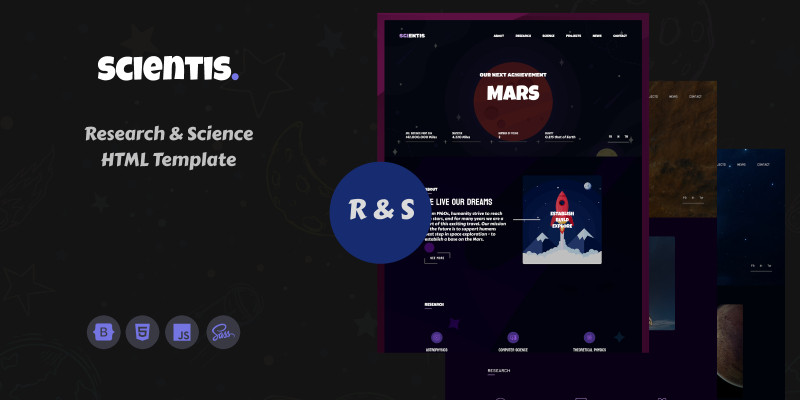
From the cradle of the humanity to the modern day, our society progressed from first success of light the fire, to the robotic rovers on the Mars. And every new day, we strive to improve our lives, to break the borders. That's because we are curious, we want to push progress forward, we work hard to invent new technologies. And, in background of whole of our progress is the science, which gives to us powerful tools to improve our society, and to reach the stars. When we talk about science, there are many research labs and complexes around the world, and all of these need quality presentation on the internet, and that's an answer on the question - why we have created Scientis - HTML Web Template. Scientis offers the best experience for users, for people who work with the science, for people who improve and make comfortable our life. We tailored this template with using of cutting edge technologies, to give the best experience to the users.
Support, Features and More

NOTICE: Template images aren't included in this package. They are only there for preview purposes. Instead, there are appropriate image placeholders with sizes in pixels.
Features
- Bootstrap 5,
- Copyright Document,
- Crossbrowser Support,
- Organized Files,
- Responsive Design,
- Table of Contents for Code,
- Validated HTML Code,
- Validated SCSS Code,
- Well Commented,
- Well Written Code.
Requirements
- At least 1.6 Ghz processor,
- Editor (Brackets, Komodo Edit, Visual Studio Code, Sublime Text or some other),
- Preferable Win 10 or 11 operating system,
- SCSS compiler (Live Sass compiler - Visual Studio Code, or some other),
- Stable internet connection.
Instructions
To install Scientis - HTML Web Template you can use two methods:
Upload files to the server using cPanel (cPanel provide to you your hosting provider)
To upload files to the server: Log in to your account (hosting), Upload your choosen template version to the server - ZIP file (all versions can be found in "Versions" folder). Unzip files in following folder on server: public_html You are ready to go.
Upload files to the server using some ftp client (example - FileZilla)
FileZilla website: https://filezilla-project.org/ Please, download the newest FileZilla version. For more info how to upload your website/template on the server, check these links: https://www.hostinger.com/tuto...
| Author | OxygenThemes |
|---|---|
| Category | Themes / HTML / Miscellaneous |
| Price | $10 |
| Extended License | $30 |
| Likes | 1 |
| First Release | Aug 21, 2022 |
| Last Update | Aug 21, 2022 |
| Files included | .php, .css, .html, JavaScript .js |
Categories
Tags
External listing. code.market does not sell this product and does not process payment for it. Pricing, payment, delivery, licensing, refunds, and support are handled by the third-party merchant on its own website. We may earn an affiliate commission from a referral. Details.
Products of the Week.
Submit🥇

STOP GUESSING WHAT TO POST
AI that learns your brand voice and builds a month of consistent, on-brand social content: carousels, posts and hooks that sound like you, not like everyone else's AI.
SaaS · 3,951 views · 35 clicksSaaS · Week 45 · 3,951 views · 35 clicks
🥈

Conversational Backlinks for Busy Founders
Place Backlink Relevant Conversation for your domain across Forums and Conversations
Website · 41,595 views · 222 clicksWebsite · Week 45 · 41,595 views · 222 clicks
🥉

upvote.club
Free Social Media Engagement that Helps Boost Your Content. Upvote Club supports 19 social networks with 100+ engagement actions in one dashboard. Add links to your posts and get free engagement from real users.
SaaS · 39,623 views · 114 clicksSaaS · Week 45 · 39,623 views · 114 clicks
#4

Substack Posting API
Onboard your Agent to Substack. Write Publish on Substack via API
SaaS · 58,654 views · 198 clicksSaaS · Week 45 · 58,654 views · 198 clicks
#5

Seenshot App
Free, Fast, MacOS Screenshot app. Make Screenshot cmd+shift+2 and send it via link
Desktop App · 28,038 views · 122 clicksDesktop App · Week 45 · 28,038 views · 122 clicks
#6

Hand-Placed Backlinks $9.99 per link. Flat rate.
Buy hand-placed forum, Q-A and directory backlinks. Flat $9.99 per link, no subscriptions — you only pay for approved listings.
Website · 3,894 views · 19 clicksWebsite · Week 45 · 3,894 views · 19 clicks
#7

Free Invoice Generator - PDF Invoices in Your Browser, No Sign-Up
A free invoice maker for freelancers and small businesses: fill in the invoice, check the live preview, and download a PDF that looks exactly like it. Any currency, tax per item, three templates, no sign-up, and nothing leaves your device.
2,574 views · 17 clicksWeek 45 · 2,574 views · 17 clicks
#8

Merge PDF Files Free - Combine PDFs in Your Browser, No Upload
A free PDF merger for office workers, students, and freelancers: combine PDFs and images into one file in the browser, reorder files and pages, pick page ranges, keep bookmarks, and open password-protected PDFs. Nothing is uploaded, no sign-up, no watermark.
2,395 views · 13 clicksWeek 45 · 2,395 views · 13 clicks