Schoolwink - Modern School Management System by Anassch20
Description
Schoolwink is a feature-rich and elegantly designed platform that brings efficiency to educational institutions. Manage classes, schedules, exams, and more in a centralized system with distinct user roles for administrators, teachers, and students. Schoolwink ensures a seamless and intuitive user experience, promoting data-driven decision-making and simplifying daily tasks. 1. Comprehensive Solution
Schoolwink offers a complete solution for managing educational and administrative tasks in one platform. From scheduling and administration to analytics and reporting, Schoolwink covers all aspects of school management, providing a centralized system for efficiency.
2. Modern Design
With a sleek and modern design, Schoolwink provides an intuitive user interface that is easy to navigate. The user-friendly design enhances the overall user experience, making it accessible for administrators, teachers, and students alike.
3. Beautiful User Interface
The beautiful and visually appealing user interface of Schoolwink not only makes the software enjoyable to use but also contributes to an enhanced user experience. The design is crafted to be aesthetically pleasing while maintaining functionality.
4. User-Focused Roles
Schoolwink understands the diverse needs of different users in the education system. The software offers distinct roles for administrators, teachers, and students, ensuring that each user has access to the relevant features and data required for their role.
5. Centralized Data Management
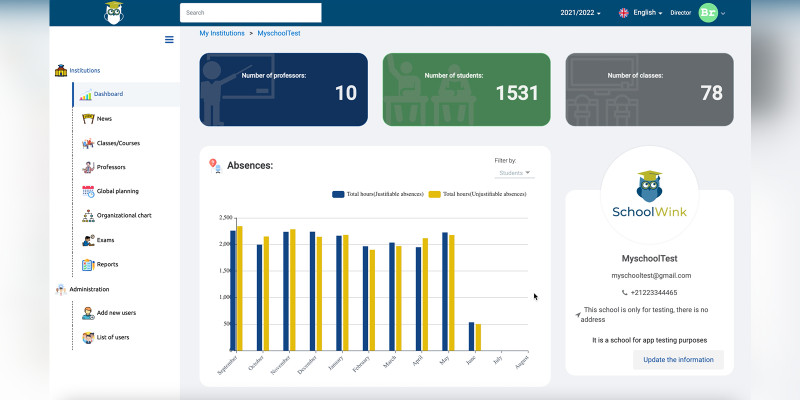
Directors and administrators have superpowers over their school data. They can efficiently manage cycles, levels, specialities, sections, and more from a centralized dashboard, providing a streamlined approach to data management.
6. Data-Driven Decision Making
The analytics and reporting features of Schoolwink empower users with understandable data representations. This allows educational institutions to make informed, data-driven decisions for the betterment of their schools.
7. Time-Saving for Teachers
Teachers benefit from simplified tasks, especially in exams, tests, and daily reporting. The system is designed to reduce administrative burden, allowing teachers to focus more on delivering quality education.
8. Efficient Payment Management
The payment management system in Schoolwink enables accurate tracking of admissions, library fees, transactions, and other financial aspects. This ensures financial processes are streamlined, transparent, and error-free.
9. Multilingual Support
Schoolwink recognizes the importance of language diversity. With support for both French and English versions, the platform caters to a wider audience, making it accessible and inclusive.
10. Responsive Support
Our dedicated support team is committed to providing timely assistance. Users can reach out for help, clarification, or guidance at any time, ensuring a smooth and supported experience with Schoolwink.
Features
Key Features
Scheduling
- Manage class and session schedules.
- Schedule school events and holidays.
Administration
● Specific actions and users data access based on user roles.
Analytics and Reports
● Access understandable analytics and reports for data-driven decisions.
Exams and Tests
● Easily organize student data and simplify tasks for teachers.
Payment Management
● Keep track of admissions, library fees, and transactions.
Manage School Data
● Organize school cycles, levels, specialities, and sections.
Manage Courses
● Organize courses and store related documents.
Attendances and Leaves
● Manage teacher and student attendances and leaves.
Manage Students
● Organize student sections and access detailed student information.
Events and News
- Manage school events and holidays.
- Share news and announcements. Teachers Daily Reporting
● Manage daily teacher reporting.
Internationalization
● Switch between French and English versions.
User Roles
1. Administrator
● Actions:
- Manage user accounts.
- Set user roles and permissions.
- Access all features and data.
● Full access to all school data.
2. Teacher
● Actions:
-
Manage attendances and leaves.
-
Input daily reporting.
-
Access student information and discipline notes.
● Access limited to assigned classes and students.
3. Student
● Actions:
-
View own attendance.
-
Access personal academic information.
-
Submit assignments (if applicable).
● Limited to personal academic and attendance records.
Requirements
- Docker (for Docker/docker-compose installation)
- PHP (>=7.4), Composer, Node.js (14), Angular CLI (for installation without Docker)
- MySQL 5
- Apache or Nginx web server
Instructions
Docker/docker-compose Installation:
- Get into the repository.
- Navigate to the project directory.
- Build and run Docker Compose:
docker-compose up --build -d. - Access the applications: Laravel Backend http://localhost:8000, Angular Frontend http://localhost:4200, PhpMyAdmin http://localhost:8080.
- Check PhpMyAdmin for the existence of the
schoolwink_dbdatabase. If empty, import data fromlaravel-backend/dump.sql. - Or, Execute Laravel migrations and seed:
docker-compose exec laravel-backend php artisan migrate:fresh --seed.
Installation Without Docker:
- Get into the repository.
- Set up the Laravel backend and Angular frontend as per instructions in the source code.
- Access applications: Laravel Backend http://localhost:8000, Angular Frontend http://localhost:4200.
- Check PhpMyAdmin for the existence of the
schoolwink_dbdatabase. If empty, import data fromlaravel-backend/dump.sql. - Execute Laravel migrations and seed:
php artisan migrate:fresh --seed.
| Author | anassch20 |
|---|---|
| Category | Scripts & Code / PHP Scripts / Management / School |
| Price | $85 |
| Extended License | $255 |
| Likes | 2 |
| First Release | Nov 22, 2023 |
| Last Update | Nov 22, 2023 |
| Files included | .php, .css, .html, .sql, JavaScript .js |
| Software framework | Angular, Laravel |
Tags
External listing. code.market does not sell this product and does not process payment for it. Pricing, payment, delivery, licensing, refunds, and support are handled by the third-party merchant on its own website. We may earn an affiliate commission from a referral. Details.
Products of the Week.
Submit🥇

STOP GUESSING WHAT TO POST
AI that learns your brand voice and builds a month of consistent, on-brand social content: carousels, posts and hooks that sound like you, not like everyone else's AI.
SaaS · 3,959 views · 35 clicksSaaS · Week 45 · 3,959 views · 35 clicks
🥈

Conversational Backlinks for Busy Founders
Place Backlink Relevant Conversation for your domain across Forums and Conversations
Website · 41,603 views · 222 clicksWebsite · Week 45 · 41,603 views · 222 clicks
🥉

upvote.club
Free Social Media Engagement that Helps Boost Your Content. Upvote Club supports 19 social networks with 100+ engagement actions in one dashboard. Add links to your posts and get free engagement from real users.
SaaS · 39,632 views · 114 clicksSaaS · Week 45 · 39,632 views · 114 clicks
#4

Substack Posting API
Onboard your Agent to Substack. Write Publish on Substack via API
SaaS · 58,663 views · 198 clicksSaaS · Week 45 · 58,663 views · 198 clicks
#5

Seenshot App
Free, Fast, MacOS Screenshot app. Make Screenshot cmd+shift+2 and send it via link
Desktop App · 28,047 views · 122 clicksDesktop App · Week 45 · 28,047 views · 122 clicks
#6

Hand-Placed Backlinks $9.99 per link. Flat rate.
Buy hand-placed forum, Q-A and directory backlinks. Flat $9.99 per link, no subscriptions — you only pay for approved listings.
Website · 3,904 views · 19 clicksWebsite · Week 45 · 3,904 views · 19 clicks
#7

Free Invoice Generator - PDF Invoices in Your Browser, No Sign-Up
A free invoice maker for freelancers and small businesses: fill in the invoice, check the live preview, and download a PDF that looks exactly like it. Any currency, tax per item, three templates, no sign-up, and nothing leaves your device.
2,583 views · 17 clicksWeek 45 · 2,583 views · 17 clicks
#8

Merge PDF Files Free - Combine PDFs in Your Browser, No Upload
A free PDF merger for office workers, students, and freelancers: combine PDFs and images into one file in the browser, reorder files and pages, pick page ranges, keep bookmarks, and open password-protected PDFs. Nothing is uploaded, no sign-up, no watermark.
2,405 views · 13 clicksWeek 45 · 2,405 views · 13 clicks