
Scenio | AI Camera Scanner With Live Translation - SwiftUI Template
Description
Scenio – AI Camera Scanner for iOS
MANDATORY THIRD-PARTY COST DISCLOSURE – PLEASE READ BEFORE PURCHASING: the app’s core AI features depend entirely on your own paid account with an external AI provider (OpenAI, Google Gemini, Groq, OpenRouter, or a self-hosted server). No API key is included. You must obtain your own credentials and the provider bills you for usage – a mandatory, recurring third-party cost for as long as your app operates. Full details in the “Costs and Account Requirements” section immediately below and in the documentation. On-device features (camera, QR/barcode detection, OCR overlays, text-to-speech) work without any key.
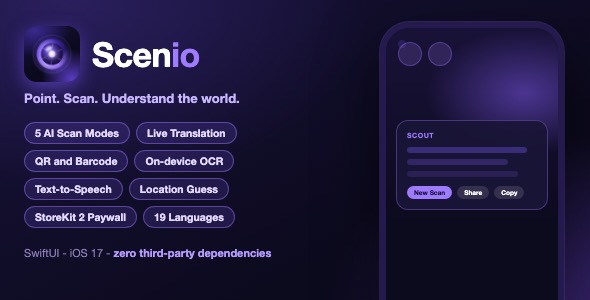
Point your camera at the world – AI explains, reads, translates and locates it. Scenio turns the iPhone camera into a real-world assistant. Scan a street, sign, menu, document or landmark and a cloud AI vision model describes it, reads its text aloud, translates it, guesses where in the world it was taken, or answers your questions about it – all from one beautiful glassmorphic interface.
Important – Costs and Account Requirements (read before purchasing)
- AI features REQUIRE your own AI provider API key – this is a mandatory ongoing cost. The Scout, Lingo, Here and Ask results are produced by an AI vision model reached through any OpenAI-compatible endpoint (OpenAI, Google Gemini, Groq, OpenRouter, or a self-hosted server). The template ships with a clearly marked API key placeholder in one configuration file and no key is included. For App Store release the required setup is to route the requests through your own server-side proxy (complete, ready-to-deploy Cloudflare Worker implementation included) so the real key stays private on your server; for quick local testing you can point the app directly at the provider. All API usage costs are at your own expense and recur for as long as you operate the app. On-device features (camera, QR/barcode detection, OCR overlays, text-to-speech) work with no key and no cost.
- Subscriptions charge end-users real money. The paywall is powered by StoreKit 2 auto-renewable subscriptions (weekly, monthly, yearly). To sell subscriptions you need a paid Apple Developer account and must create matching products in App Store Connect (step-by-step in the documentation). Apple takes its standard commission on every sale. Without this setup the paywall displays but no purchases can complete.
- Placeholder legal/support links must be replaced before publishing. The template intentionally ships with placeholder URLs (
https://example.com/support,/privacy-policy,/terms) in SettingsView.swift and PaywallView.swift. Each one is marked with aTODO - REQUIRED BEFORE PUBLISHINGcomment in the code and Section 6 of the documentation explains exactly where to paste your own URLs. The documentation’s App Store checklist includes a final search forexample.comthat must return zero results.
Privacy and Data Handling (plain language)
- What leaves the device: a photo you deliberately capture or pick from your gallery is sent as base64 to the AI endpoint you configure in the template’s single configuration file – either your own server-side proxy (recommended, key stays private on your server) or the provider directly for local testing. Nothing is transmitted until you tap the shutter.
- What never leaves the device: QR/barcode detection, the OCR highlight boxes, text-to-speech, scan history (stored locally) and all settings stay on the device.
- Storage: the template itself stores no user data on any server; retention is governed by whichever AI provider you configure. You are responsible for your app’s privacy policy in App Store Connect (camera and photo usage are declared).
- Compliance: camera and photo library permission prompts are included; review Apple’s privacy nutrition labels and your region’s requirements (e.g. GDPR) before publishing.
Free Credits – How They Work
- Every cloud scan costs exactly 1 credit in every mode (Scout, Lingo, Here, Voice, Ask). On-device features cost nothing.
- A new user’s starting balance is granted locally on first launch: every new device starts with 10 free scans (one number to change in the code if you prefer a different amount).
- When the balance reaches zero the app automatically presents the paywall before any further scan; the user subscribes to scan without limits.
Demo Instructions
- No login and no demo credentials are needed – the app opens directly into the camera viewfinder.
- On-device features work immediately: live camera, QR code and barcode detection, OCR highlight boxes, text-to-speech, history, settings and the paywall.
- AI analysis (Scout / Lingo / Here / Ask results) requires configuration: the template ships with a clearly marked API key placeholder in
Scenio/Services/AIConfig.swift. No key ships with the template. For App Store release the recommended setup is to route AI requests through your own server-side proxy (a ready-to-deploy Cloudflare Worker example with step-by-step instructions is included in the package: Docs/Backend_Spec.md and documentation.html Section 4), keeping the real API key private on your server. For quick local testing you can point the app directly at OpenAI, Google Gemini, Groq, OpenRouter or any self-hosted OpenAI-compatible server. Without configuration the app still builds and runs; AI scans simply return an error message. - Approximate running cost: with the default OpenAI gpt-4o-mini setup a scan costs roughly US$0.30-0.50 per 1,000 scans (about a third of a cent per scan; a Lingo scan makes two calls). Figures are a ballpark based on published pricing at the time of writing – see documentation Section 4.3 for the full calculation and how to size the free-credit balance.
Everything the App Does
- Live camera viewfinder with real-time QR code and barcode detection
- Tap any detected QR or barcode for instant actions: Copy, Open Link
- Five smart scan modes: Scout, Lingo, Here, Voice and Ask
- Scout mode: rich AI description of the whole scene
- Lingo mode: reads foreign text and translates it to the device language
- Here mode: AI location guess with one-tap Open in Maps (Google Maps with web fallback)
- Voice mode: extracts text from signs, menus and documents
- Ask mode: follow-up questions about the scanned scene with multi-turn conversation
- Frozen-frame capture review with animated on-device OCR highlight boxes and tap to dismiss
- Gallery upload – analyze photos you already have, same pipeline as camera capture
- Vision Impaired accessibility mode with automatic text-to-speech readout
- Scan history with thumbnails, stored locally on the device
- Share and Copy actions on every result
- Free-credit system with paywall and StoreKit 2 auto-renewable subscriptions (weekly, monthly, yearly)
- Haptic feedback, animated result cards and loading indicators
- Glassmorphism dark design with electric-violet brand colors in one asset catalog
- Localized in 19 languages: Arabic, Czech, Danish, German, English, Spanish, Finnish, French, Indonesian, Japanese, Korean, Malay, Norwegian Bokmal, Dutch, Polish, Portuguese (Brazil), Swedish, Thai, Vietnamese
- Error states and no-credit handling throughout
Technology
- SwiftUI with UIKit interop – deployment target iOS 17.0
- AVFoundation capture session (photo output plus QR/metadata output)
- Apple Vision framework on-device OCR
- AVSpeechSynthesizer text-to-speech
- StoreKit 2 subscriptions and credits
- URLSession networking directly to any OpenAI-compatible AI provider (OpenAI, Google Gemini, Groq, OpenRouter, self-hosted)
- Zero third-party dependencies
What the Buyer Gets
- Complete Xcode source project (Swift / SwiftUI)
- App icon and full asset catalog
- Step-by-step HTML documentation with screenshots
- Theme customization guide (re-skin from one place)
- App Store submission checklist
Development Disclosure
Portions of this template’s source code were developed with AI-assisted tools. All code has been reviewed, tested and is fully functional.
Support
- Contact: mefjudevllc@gmail.com – or use the comments section on this item page (both are monitored).
- The included documentation has a Troubleshooting / FAQ section covering the most common issues (camera permission, API token errors, StoreKit sandbox testing).
Known Limitations
- The iOS simulator has no camera – live scanning requires a physical device (gallery upload works in the simulator).
- AI results need an internet connection and a valid, funded API account with your chosen provider.
- On-device OCR works best on printed text; handwriting and stylized fonts may be misread.
- Here mode returns an AI estimate of where a photo was taken – it is not GPS-accurate.
- Free credits are tracked per device and granted locally on first launch; they do not sync across devices.
- Subscriptions only work after you create matching products in App Store Connect and accept the Paid Applications agreement.
Note: this is a source-code template. Xcode and basic iOS development knowledge are required to build and customize it.
| Author | mefjudevllc |
|---|---|
| Price | $14 |
| Sales | 0 |
| Rating | 0 (0) |
| Published | Oct 26, 2026 |
| Last Update | Oct 26, 2026 |
| Compatible Software | Other |
| Compatible With | Swift |
| Mobile Files Included | .xib/.nib |
Categories
Tags
External listing. code.market does not sell this product and does not process payment for it. Pricing, payment, delivery, licensing, refunds, and support are handled by the third-party merchant on its own website. We may earn an affiliate commission from a referral. Details.