
Sable | Flutter VPN App With NestJS Backend and Next.js Admin Panel
Description
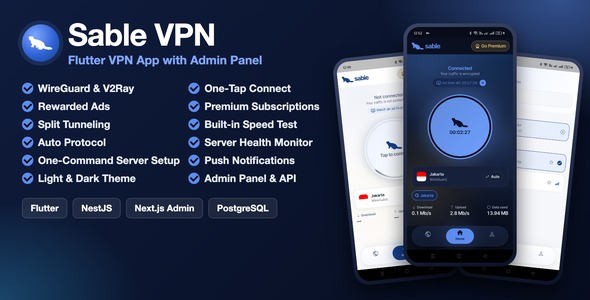
 Sable | Flutter VPN App with NestJS Backend and Next.js Admin Panel
Launch your own VPN service on Android and iOS – three complete projects in one package
Sable is a complete, self-hosted VPN platform. Your users get a clean Flutter app for Android and iOS with one-tap connect, WireGuard and V2Ray protocols, split tunneling and a built-in speed test. You get a NestJS + PostgreSQL backend, a node agent for your VPN servers, and a Next.js admin panel to run servers, regions, plans, rewarded ads and push notifications.
Earn from day one with Premium subscriptions through RevenueCat and AdMob rewarded ads that give free users more VPN time. All three projects ship as full source code in one download. Nothing is delivered separately.
Click Live Preview to download the Android demo app and open the admin panel demo. The demo logins are in the Demo Instructions section below.
Demo Instructions
Try the app and the admin panel before you buy.
1. Mobile App (Android)
Download the demo APK from the Live Preview page and install it on a real Android phone. Sign in with this account, or create your own with any email address:
Email: mosarofdiu123@gmail.com
Password: 11223344@aA
2. Admin Panel
Open the admin panel from the Live Preview page and sign in with:
Email: admin@demo.com
Password: sable@#2026
3. Documentation
mh152796.github.io/sable-vpn-documentation
Feature walkthrough and step-by-step setup for the app, backend, admin panel and VPN servers, plus API reference, database schema and FAQ. Publicly accessible – no purchase required.
Demo accounts are shared and the demo database is reset periodically, so any changes you make there are temporary. The VPN tunnel needs a real device; it does not run in an emulator.
Important – Third-Party Services and Possible Costs
Sable is a self-hosted package. You receive the full source code for all three projects, with no licence keys and no subscription payable to us.
Some features connect to third-party services. Those services are not included in this purchase. Each one is billed to you directly by its provider, under that provider’s own terms and pricing.
Please note: buyers are responsible for any and all fees charged by external services. This includes hosting, VPN servers and their bandwidth, developer accounts, app store commissions, email sending and any usage beyond a provider’s free tier. None of these fees are part of the item price, and none of them are collected by us.
- Hosting for the backend and admin panel (required): a VPS or cloud server with Node.js 24 and PostgreSQL 14 or newer. Billed by your hosting provider.
- VPN servers (required): one or more Ubuntu or Debian servers, one per location you offer. Each runs WireGuard and the included node agent. Servers and their bandwidth are billed by your hosting provider. No VPN servers are included.
- Email sending – SMTP (required for email sign-up): OTP codes for sign-up and password reset are sent through any SMTP provider you choose. Many providers have a free tier; usage beyond it is billed by that provider.
- Google Play Developer account (required to publish on Android): USD 25 one-time, paid to Google.
- Apple Developer Program (required to publish on iOS): USD 99 per year, paid to Apple. The paid account is also needed for the Network Extension capability that the iOS VPN tunnel uses.
- Firebase – your own project (optional): Google sign-in (Firebase Authentication), push notifications (Cloud Messaging), Analytics and Crashlytics. You create and maintain your own Firebase project and accept Google’s Firebase Terms of Service. The free Spark plan covers typical usage; usage-based beyond it, billed by Google. The package contains placeholder Firebase files only. Without Firebase, the app runs with email sign-in and these features switched off.
- Payments – Google Play Billing and Apple In-App Purchase through RevenueCat (optional): Premium subscriptions are sold through the app stores. Google and Apple take a commission on every sale, typically 15-30%. RevenueCat manages the store purchases and sends verified webhooks to your backend. It has a free tier and then charges a share of tracked revenue, billed by RevenueCat. You need your own RevenueCat account and API keys.
- Not included – Stripe, PayPal, bKash, Nagad and other payment gateways: this version has no checkout integration for them. bKash and Nagad appear only as switched-off placeholder entries in the database and are not integrated. Adding a gateway is your own development work.
- Advertising – Google AdMob (optional): rewarded and interstitial ads. Free to join and integrate; you earn revenue with your own AdMob account. You are responsible for following AdMob and Google ad network policies and for any costs related to your account or traffic. Only Google’s official test ad IDs are included.
- Image storage – Cloudflare R2 (optional): stores images uploaded from the admin panel. Includes a free tier; usage-based beyond it, billed by Cloudflare.
- Microsoft Clarity and Axiom (optional): session analytics and remote logs. Both are switched off until you add your own project ID or token, and both have free tiers.
- Speed test (free): the built-in speed test uses Cloudflare’s public speed test endpoints by default. You can point it to your own server.
Running a VPN service is regulated in some countries. You are responsible for following the laws of the countries where you operate and offer the app, the terms of your server providers, and the Google Play and App Store policies for VPN apps.
The item price covers the source code and documentation only. To go live you need hosting for the backend and admin panel, at least one VPN server, an SMTP provider, and a Google Play (and optionally Apple) developer account; for Premium subscriptions, your own RevenueCat account; for push notifications and social sign-in, your own Firebase project. Every service marked optional can be left out; the platform runs without it, with the matching feature switched off. Third-party pricing is outside our control and may change, so please check each provider’s current rates before you buy. We support our own code, but we cannot support, waive or refund any third-party fees or account approvals.
Important – Licence of the VPN Core (GPL-3.0)
The VPN tunnel in the mobile app runs on libbox, the mobile library of sing-box, which is licensed under the GNU General Public License v3.0 or later. Parts of the native Android and iOS VPN code are adapted from sing-box-for-android, sing-box-for-apple and shadowsocks-android, also GPL-3.0. Sable is not affiliated with or endorsed by sing-box or SagerNet.
Because of this, the Flutter app’s source code is licensed under GPL-3.0-or-later. You may use, change and publish it, commercially too. When you publish it, you must:
- make the complete source code of your app available to its users under GPL-3.0 (a public link or a written offer);
- include the GPL-3.0 licence and the notices (the app’s About us page is pre-filled with them);
- not name your app after sing-box or suggest any association with it.
The backend and admin panel do not include sing-box; they are licensed under the Envato Market licence you purchase. Full details are in the app’s LICENSE.md, NOTICE, LICENSE-GPL-3.0 and the documentation (section 22). Please read them before you buy.
Everything Is Included in the Download
Your purchase includes the complete source code for all three projects in a single download. There is nothing to request, unlock, or contact us for.
- Flutter App – full Android and iOS source, including the iOS tunnel extension, built with clean architecture and BLoC
- Backend – full NestJS + PostgreSQL source, with database migrations, Swagger API docs and the VPN node agent
- Admin Panel – full Next.js source
- Documentation – feature walkthrough and step-by-step setup for all three projects and your VPN servers, plus API reference, database schema and FAQ
Why Choose Sable?
A VPN business needs an app, an API, an admin panel and a way to manage servers. Sable gives you all four, already connected and ready to customise.
- Real VPN protocols: WireGuard and V2Ray (VMess over TLS), with an Auto mode that chooses the protocol for each connection.
- Built to earn: Premium subscriptions on Google Play and the App Store through RevenueCat, plus rewarded ads that give free users more VPN time.
- Your own servers: add a VPN server from the admin panel, run one install command on it, and it goes live with health and load reporting.
- Controlled from the admin panel: regions, servers, plans, ads, announcements, in-app pages, minimum app version and push notifications, without a new app release.
- Secure by default: per-session VPN peers, server-verified ad rewards and store purchases, device limits per plan, rate limiting and an audit log of every admin change.
- Clean, maintainable code: clean architecture in the app, modular NestJS services, typed Next.js pages, and every environment variable documented.


Connect and Servers
- One-tap connect: a large connect button, live connection timer, upload and download speed, and data used.
- Protocols: WireGuard and V2Ray (VMess over TLS), or Auto to let the app decide.
- Server locations: search locations, see recent and favourite servers, and check each server’s live load.
- Access levels: each location is Free, Ads or Premium, set from the admin panel.
- Light and dark themes: the whole app follows the system theme or the user’s choice.

Monetisation
- Daily free time: free users get a daily VPN time allowance, set per plan from the admin panel.
- Rewarded ads: users watch a short ad to add more time or unlock an Ads location. Each step on the ad reward ladder adds more minutes.
- Server-verified rewards: ad rewards are confirmed with AdMob server-side verification before time is added.
- Premium subscriptions: Google Play and App Store subscriptions through RevenueCat, with restore purchases and verified webhooks.
- Plans and limits: Free, reward and Premium plans with their own device limits, time limits and speed limits.
- Promo codes: create codes that give a plan, such as Premium, for a set time, with total and per-user limits.

Speed Test and Split Tunneling
- Built-in speed test: measure latency, jitter, download and upload speed through the tunnel.
- Split tunneling: on Android, choose which apps skip the VPN. On iOS, choose which domains skip it, because iOS does not allow per-app splitting.
- Kill switch: on iOS, block traffic when the VPN drops, from the app’s settings. On Android, the app guides users to the system’s always-on VPN setting.

Accounts and Settings
- Sign in: email and password with OTP email codes for sign-up and password reset, plus Google sign-in through Firebase Authentication.
- Your devices: see every signed-in device and sign any of them out. The number of devices follows the user’s plan.
- Account: change password, view the current plan, and delete the account from the app. The account is blocked at once and deleted automatically after a grace period you set in the admin panel (30 days by default; 0 deletes at once).
- Support: users send support messages from the app, and you answer them in the admin panel. Debug logs help you trace connection problems.
- Five languages: English, Bangla, Arabic, Russian and Ukrainian, with a simple way to add more.

Next.js Admin Panel
Run the whole VPN service from one web dashboard.
- Dashboard: live connections, active users, sign-ups, ad rewards, bandwidth and server health, refreshed every 30 seconds.
- Servers: filter by region, status, health and protocol. Open a server to see load, peers, CPU, memory and bandwidth.
- Server actions: drain a server, put it in maintenance, rotate its token or disconnect all its users.
- Add server wizard: details, IP pool, install, verify and go live, in five steps.
- Regions: flag, city, map position, access level (Free, Ads or Premium) and display order.
- Plans and billing: plans, store products, subscriptions, payment events, promo codes and rewarded-ad settings.
- Users: search users, see their devices, plan and sessions, and manage their access.
- App config: push notifications, announcements, in-app pages (privacy policy, terms, about) and the minimum app version.
- Support: read and answer support messages from app users.
- Audit log and settings: see who changed what, and set API keys for Firebase, RevenueCat and AdMob from the panel.


Backend and VPN Servers
The backend is built with NestJS 11, TypeORM and PostgreSQL, organised into clear feature modules.
- Connect flow: each session gets its own WireGuard peer or V2Ray user, created on connect and removed when it ends.
- Node agent: a small agent on each VPN server applies peers every 5 seconds and reports health and load every 30 seconds.
- One-command server setup: the install command from the admin panel sets up WireGuard and the agent on Ubuntu or Debian.
- Verified payments and rewards: RevenueCat webhooks and AdMob server-side verification are checked before access is granted.
- Hardened API: security headers, rate limits, CORS allowlist, input validation and consistent error responses.
- Migrations and docs: database migrations run on first start, with Swagger API documentation at
/api/docs. - Configuration: every environment variable is documented in
.env.example, with secrets kept out of the source code.

What You Need to Get Started
- Node.js 24 LTS and PostgreSQL 14 or newer, for the backend and admin panel.
- Flutter 3.47.6 and Java 21, for Android builds.
- Xcode 26.2 or newer and CocoaPods, for iOS builds on a Mac.
- A server for the backend and admin panel, at least one Ubuntu or Debian server for VPN traffic, and an SMTP account for email codes.
- A real Android or iOS device to test the VPN tunnel. Emulators and the iOS Simulator cannot run it.
- Basic familiarity with Flutter, Node.js and Linux servers is recommended for setup and customisation.
AI Disclosure
Yes, AI tools were used to help create parts of this item:
- Code: AI-assisted writing and review of source code in the app, backend and admin panel.
- Documentation and description: the documentation, README files and this item description were written and edited with AI assistance.
- Graphics: the preview images and screenshots were edited with AI tools.
All of it was reviewed, tested and finished by the author, who supports the item. The same disclosure is in the documentation (section 23).
The item itself includes no AI features: the app, backend and admin panel do not use or call any AI service.
Changelog
Version 1.0.0 (Initial Release)
- Initial Release
Support
Questions before or after purchase? Please use the Support tab on this item page. All support is handled through the official Envato item support system.
| Author | mosarofdiu123 |
|---|---|
| Price | $63 |
| Sales | 0 |
| Rating | 0 (0) |
| Published | Nov 2, 2026 |
| Last Update | Nov 2, 2026 |
| Compatible Software | Flutter 3.x |
| Mobile Files Included | Dart, YAML, JavaScript JSON, .java, .kotlin, .h, .storyboard, .plist, .swift, CSS, HTML |
Categories
Tags
External listing. code.market does not sell this product and does not process payment for it. Pricing, payment, delivery, licensing, refunds, and support are handled by the third-party merchant on its own website. We may earn an affiliate commission from a referral. Details.
Products of the Week.
Submit🥇

Perceptle
Perceptle is a daily browser-based game that challenges you to test your sensory intuition through five quick estimation and rhythm-based rounds.
Other · 1 views · 0 clicksOther · Week 47 · 1 views · 0 clicks
🥈

Free LinkedIn Likes From Real
Get free LinkedIn likes on your posts from real members who react by hand. No
SaaS · 124 views · 2 clicksSaaS · Week 47 · 124 views · 2 clicks
🥉

STOP GUESSING WHAT TO POST
AI that learns your brand voice and builds a month of consistent, on-brand social content: carousels, posts and hooks that sound like you, not like everyone else's AI.
SaaS · 7,686 views · 71 clicksSaaS · Week 47 · 7,686 views · 71 clicks
#4

aaas.market
407 reliable micro tools for solo founders, marketers and creators. They work in your browser
SaaS · 122 views · 0 clicksSaaS · Week 47 · 122 views · 0 clicks