RSSPlus - Titanium Full App
Description
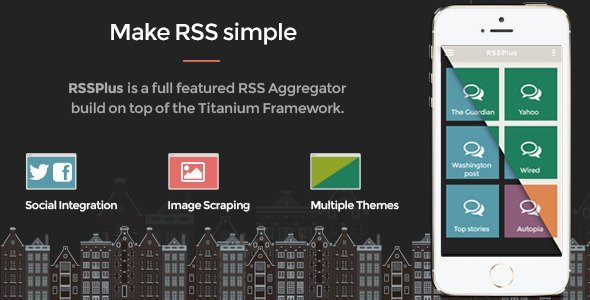
RSSPlus App is a full working full featured RSS aggregator build on top of Titanium framework. It is a well structured, well organized and implemented, full working app that comes with all the ingredients a modern application needs. Best practices, proven techniques and experienced software architecture are packed with a well crafted design.
Navigation The application follows the modern trends of the “Slide menu”. Each RSS feed has its own entry in this menu. In addition to this, each particular window has it’s own context menu. This menu carries options like “Refresh”, “Share to …”, “Open in browser” etc.
The construction of the “Slide menu” is driven by the application’s configuration file. No extra code is needed for that. The context menu is automatically binded to the right button of the navigation bar.
Remote data / RSS The application is fetching data from online remote feeds and sources by using the RSS protocol. The source URLs for these feeds are set in the application’s configuration file.
Image scraping – Node.js Images, related to each article, are automatically detected and used in the Application’s “Feed” and “Details” windows. The application is configured to communicate and uses a node.js web-service especially created for this purpose.
The source code of the Node.JS “Image Scraping” service is coming along with this application. Detailed installation instructions for the Heroku Platform are also part of the pack.
Social networks integration Integration with Facebook and Twitter is part of the build-in features of the RSSPlus Application. No additional code is required in order to provide the “Post to Facebook” and “Share to Twitter” options for any particular article. Detailed instructions on how to configure a Facebook app is also part of the documentation.
URL shortener – Bit.ly When posting to Twitter the creation of short URLs is a crucial part. RSSPlus Application is already configured to make use of the bit.ly service. Again, no additional code is required for that. You need just set your bit.ly account credential.
Theme framework RSSPlus application introduces our powerful flexible and extensible “Theme Framework” for Titanium Applications. All the information related to the “Look and Feel” of the application is completely separated from the business code. A theme file, following a declarative approach, controls information like the colors and the color schemes, the font family and the font sizes, etc.
RSSPlus comes already with two special designed special crafted themes. A “Dark” and a “Bright” one.
Configuration A configuration file is responsible for all business related aspects of the application like:
- The structure of the “Slide menu”
- The remote RSS sources
- The “theme” selection and activation
PSD templates The titanium project is accompanied with it’s full layered PSD file. In addition to this a set of separate PSD files are part of the pack. These files, with their proper size and guides, are an important addition to your toolkit. Use them and they will guide you on how to create your own icons and other resources for home screen, slide menu, navigation bar, etc.
Categories
Tags
External listing. code.market does not sell this product and does not process payment for it. Pricing, payment, delivery, licensing, refunds, and support are handled by the third-party merchant on its own website. We may earn an affiliate commission from a referral. Details.
Products of the Week.
Submit🥇

STOP GUESSING WHAT TO POST
AI that learns your brand voice and builds a month of consistent, on-brand social content: carousels, posts and hooks that sound like you, not like everyone else's AI.
SaaS · 3,993 views · 35 clicksSaaS · Week 45 · 3,993 views · 35 clicks
🥈

Conversational Backlinks for Busy Founders
Place Backlink Relevant Conversation for your domain across Forums and Conversations
Website · 41,641 views · 222 clicksWebsite · Week 45 · 41,641 views · 222 clicks
🥉

upvote.club
Free Social Media Engagement that Helps Boost Your Content. Upvote Club supports 19 social networks with 100+ engagement actions in one dashboard. Add links to your posts and get free engagement from real users.
SaaS · 39,668 views · 114 clicksSaaS · Week 45 · 39,668 views · 114 clicks
#4

Substack Posting API
Onboard your Agent to Substack. Write Publish on Substack via API
SaaS · 58,696 views · 198 clicksSaaS · Week 45 · 58,696 views · 198 clicks
#5

Seenshot App
Free, Fast, MacOS Screenshot app. Make Screenshot cmd+shift+2 and send it via link
Desktop App · 28,079 views · 122 clicksDesktop App · Week 45 · 28,079 views · 122 clicks
#6

Hand-Placed Backlinks $9.99 per link. Flat rate.
Buy hand-placed forum, Q-A and directory backlinks. Flat $9.99 per link, no subscriptions — you only pay for approved listings.
Website · 3,938 views · 19 clicksWebsite · Week 45 · 3,938 views · 19 clicks
#7

Free Invoice Generator - PDF Invoices in Your Browser, No Sign-Up
A free invoice maker for freelancers and small businesses: fill in the invoice, check the live preview, and download a PDF that looks exactly like it. Any currency, tax per item, three templates, no sign-up, and nothing leaves your device.
2,615 views · 17 clicksWeek 45 · 2,615 views · 17 clicks
#8

Merge PDF Files Free - Combine PDFs in Your Browser, No Upload
A free PDF merger for office workers, students, and freelancers: combine PDFs and images into one file in the browser, reorder files and pages, pick page ranges, keep bookmarks, and open password-protected PDFs. Nothing is uploaded, no sign-up, no watermark.
2,434 views · 13 clicksWeek 45 · 2,434 views · 13 clicks