
Rippora | AI Pool Water Test and Dosing App With Laravel Key Proxy
Description
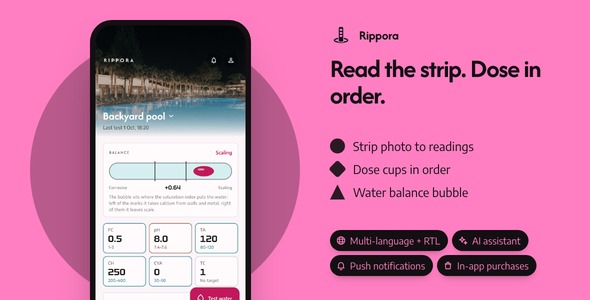
Rippora turns one photo of a pool test strip into confirmed readings, a row of measured doses in the order to add them and a water balance verdict, and it arrives with the sign-in, purchase, push and language work already finished: 22 screens, three AI providers behind one switch, a Laravel key proxy with its own admin panel, and a product website in the box. Light and dark are both complete, and a scripted walk opens every screen before a release goes out.
Demo Instructions
The Live Preview starts on a page of four demos; the section Open every piece before you buy lists them. The app’s sign-in screen is a mock: type the pair below, any other pair, or nothing at all, and tap Sign in. Demo mode is already on, so there is no account to create, no key to paste and no connection to make: Home shows a sample backyard pool, and Read the strip under the Test tab reads a sample strip on the device and opens the pad ladder.
- Email: demo@rippora.app — Password: demo1234 (the app’s sign-in screen)
- Email: admin@rippora.test — Password: password (the admin panel of the included back end, once you have installed it)
Costs not included in the price
The AI features call OpenAI, Anthropic or Gemini, and each of them bills every request, an ongoing cost for as long as the app is in use, to whoever’s key is used (the person’s own, or yours through the included key proxy). Google Sign-In, Sign in with Apple and push notifications only work with your own paid developer accounts and services (an Apple Developer Program membership, a Google Play Console account, a Firebase project), and so do analytics, in-app purchases and publishing to the stores. The proxy’s hosting is one more account of your own. Each provider charges you on that account, and their charges are not included in the purchase price.
AI disclosure
AI-assisted tools were used to help write and review the source code and the documentation of this item. The author reviewed, tested and finalized every part before release.
In addition, Rippora’s test strip analysis is AI-powered. At run time an AI model produces three things in Rippora: the position chosen on each pad’s printed scale from a strip photo, the product type and strength read off a label photo, and the three sentences under In plain words. Every target band, saturation index, dose, order and wait time is worked out on the phone by the app’s own engines from readings the person confirmed. The item ships no AI service, key or credit: buyers connect their own Gemini, OpenAI or Anthropic account, or deploy the included key proxy with their own keys, and pay those providers directly. With no key the app stays in Demo mode and answers on the device from its sample strips. The bundled photographs are Pexels-licensed stock listed in assets/images/pool/LICENSES.txt, the sample strips and color scales are drawn by the app’s own code, and the typefaces are under the SIL Open Font License.
Three reasons to pick Rippora
- Every account, store and device integration is wired: Google and Apple sign-in, in-app purchases with a paywall that lifts the 50-test limit of the free plan, push, analytics and crash reports, biometric lock, update prompts, three languages with RTL, a share sheet and remote images, each switched on from one config file.
- Your keys stay on your server:
backend/is a Laravel key proxy with a Filament admin panel that keeps the OpenAI, Anthropic and Gemini keys, answers only the app’s three strip and label jobs, caps spending per device and across the server, and writes every call to a usage ledger;landing/is a one-page site in Rippora’s palette. - Demo-ready the minute it builds: 22 screens with their empty states, four AI routes plus an on-device demo, a scripted walk through every screen; 143 app tests pass, and the back end carries 138 of its own.
Nine things you will not have to build
- AI strip and label reading on your key or your server: Gemini, OpenAI and Claude behind one adapter when the buyer pastes a key, the included key proxy when they do not, and a Demo route that answers from sample strips; model names are settings.
- Google and Apple sign-in: one tap on the sign-in screen; the buttons show only for the providers you configured, and the id token is swapped with the included server for a session.
- In-app purchases and the Pro paywall: App Store and Play products behind one gateway, prices read from the store, the unlock kept offline, restore in one tap from the Pro screen.
- Push notifications: a service reminder or a retest nudge sent from the admin panel to every install, each naming the screen it opens; the permission is asked from Settings and foreground display is handled.
- Analytics and crash reports: screen views from Home to the pool builder, plus the exceptions people actually hit, behind a consent switch.
- Face ID, Touch ID or fingerprint lock: lock at launch so a borrowed phone cannot open the pool’s test history and strip photos; off on devices with nothing enrolled.
- Three languages with RTL: English, Spanish and Arabic on every pad label and dose line; a fourth language is one copied file, and the server answers in the same one.
- Update prompts: a soft or forced update banner driven by the App updates page of the admin panel, the day you ship a release.
- Share sheet and remote images: a test’s readings and the dose sheet go to whoever services the pool through the system share sheet, anchored on iPad; pool pictures load from your server or bundled files with placeholders and fallbacks.
Open every piece before you buy
The Live Preview is more than the app: its first page holds four demos, each with an All demos link back.
- The app: Rippora in your browser inside a phone frame, three sample pools and five weeks of tests already loaded.
- The manual: the same offline HTML documentation that ships in the download, all 43 chapters of it.
- The admin panel: a read-only snapshot of a live install of the key proxy: dashboard, Devices, the Usage ledger, the AI proxy settings and every sidebar page.
- The product site: the landing page from the download, in Rippora’s colors and type.
The full source code is included with every license type, Regular and Extended alike.
Four screens a pool owner will talk about
- The test pad ladder: each pad sits on its own row of printed swatches with the pick ringed; the pad the model was least sure of comes first, and a tap moves the pick before anything is saved.
- The dose bench: one measuring cup per product in the order to add them, filled to the dose for this pool’s volume and the strength on the label; acid goes in half at a time, and every cup carries its wait and the retest time.
- The balance vial: a spirit level whose bubble rests at the water’s saturation index, corrosive at one end and scaling at the other, from pH, alkalinity, calcium, stabilizer and temperature, with three plain sentences on what is off.
- The pool builder: choose a shape, type the length and width, drag the shallow and deep ends on a side view, and the volume behind every dose updates while you drag.
Around them sit the screens every finished app needs: onboarding, sign-in and sign-up, test history and detail, a chemical shelf with a label reader, equipment and service reminders, strip profiles with an editor for your own brand of strip, AI and key proxy settings, Settings, About and the Pro screen.
Landing page included
Inside landing/ is a one-page site for Rippora: a hero with two phone mock-ups, three feature tiles, a gallery of screens, a FAQ and store buttons, in the app’s own palette and type. Change the copy and the store links, then host it anywhere static files are served.
Laravel back end included
backend/ is the key proxy: a Laravel server with a Filament admin panel that keeps your OpenAI, Anthropic and Gemini keys, registers each install as a device, answers only the app’s three jobs with prompts fixed on the server, caps requests per device and spending across the server by day and by month, logs every call with its tokens and timing, keeps the strip and label photos read through it on a Pictures page, and adds App updates, Send notification now or later, Push history, the social sign-in exchange, App Check enforcement you can switch on and a Docker compose file. Build the app with --dart-define=API_BASE_URL or type the address in Settings, and every strip is read through your server. It needs PHP 8.4 or Docker.
Under the hood, for whoever maintains it
- GetX, kept honest: View, Controller and Service layers, with every calculation in plain Dart engines the screens only call; screens never import the sample data.
- Four pure Dart engines: target bands, saturation index, dosing and trends, each with its own tests and liftable into another app.
- Four AI routes behind one adapter: Gemini, OpenAI, Claude and your own server share one interface and one error vocabulary, and model names live in settings, not constants.
- Strips and products are data: a new strip brand is a profile of printed scale values, a new product is a type plus the strength on its label; neither needs a code change on the bench.
- One color file drives the app, the icon and the landing page: change the palette once and regenerate the other two.
What you get: the complete Flutter source with its nine integration packages, the Laravel key proxy and its admin panel, the landing page, a README, offline HTML documentation (43 chapters, 19 figures), the sample household, light and dark themes, metric and US units, and 12 licensed photographs.
Notes
Every dose is an estimate from common rules of thumb applied to the volume and product strengths the person entered; the product label is final, and the app leans toward adding less and retesting before the next dose. Rippora reads test strips and keeps equipment reminders inside the app; it does not talk to pumps, automatic dosers or chemical controllers.
Until a server address is set, the app runs in Demo mode on its bundled sample pools; once the included back end is deployed, provider usage through it is billed to your own provider accounts. Design files (Figma, Sketch) are not shipped; the screens exist as Flutter code only.
| Author | coderqh |
|---|---|
| Price | $69 |
| Sales | 0 |
| Rating | 0 (0) |
| Published | Oct 9, 2026 |
| Last Update | Oct 9, 2026 |
| Compatible Software | Flutter 3.x |
| Mobile Files Included | Dart, YAML, JavaScript JSON, .kotlin, .swift, JavaScript JS, CSS, PHP, HTML |
Categories
Tags
External listing. code.market does not sell this product and does not process payment for it. Pricing, payment, delivery, licensing, refunds, and support are handled by the third-party merchant on its own website. We may earn an affiliate commission from a referral. Details.
Products of the Week.
Submit🥇

Perceptle
Perceptle is a daily browser-based game that challenges you to test your sensory intuition through five quick estimation and rhythm-based rounds.
Other · 1 views · 0 clicksOther · Week 47 · 1 views · 0 clicks
🥈

Free LinkedIn Likes From Real
Get free LinkedIn likes on your posts from real members who react by hand. No
SaaS · 124 views · 2 clicksSaaS · Week 47 · 124 views · 2 clicks
🥉

STOP GUESSING WHAT TO POST
AI that learns your brand voice and builds a month of consistent, on-brand social content: carousels, posts and hooks that sound like you, not like everyone else's AI.
SaaS · 7,686 views · 71 clicksSaaS · Week 47 · 7,686 views · 71 clicks
#4

aaas.market
407 reliable micro tools for solo founders, marketers and creators. They work in your browser
SaaS · 122 views · 0 clicksSaaS · Week 47 · 122 views · 0 clicks