Ringtone Maker - Android Source Code
Description
Complete Java Android Studio project · Waveform trimmer · MP3 / M4A / WAV output · Voice recorder · Set as Ringtone / Notification / Alarm · Assign to contact · AdMob ready · Publish on Google Play in minutes
⬇️ Try the Live Demo APK Before You Buy
Install the demo APK on your Android phone, pick any song, trim a 15-second cut with the waveform editor and set it as your default ringtone before purchasing the source code.
Tip: enable "Install unknown apps" for your browser on Android to install the APK file.
📖 About This Ringtone Maker Android Source Code
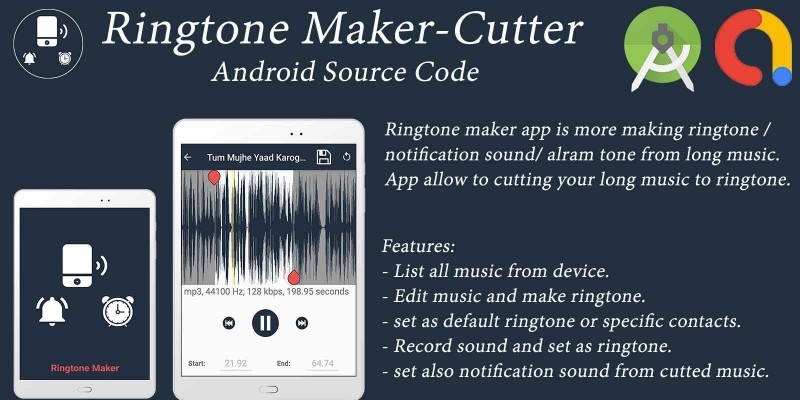
Ringtone Maker is a complete, ready-to-publish Android audio editor source code written in Java using Android Studio. The app browses every audio file on the device (music, ringtones, notifications and alarms) via the modern MediaStore, lets the user search the library and open any track in a real-time waveform editor with draggable start & end markers, rewind / fast-forward / play-preview transport buttons and millisecond-accurate "Mark Start" / "Mark End" actions. The user can also record new audio directly from the device microphone. The trimmed cut is saved as MP4/AAC (.m4a) with an automatic WAV (.wav) fallback, inserted into the Android MediaStore with the modern RELATIVE_PATH + IS_PENDING flow so it appears in the system's Sound picker without any storage permission. From the post-save dialog the user can set the cut as default Ringtone / Notification / Alarm or assign it to a specific contact in one tap. With AdMob banner + interstitial ads already integrated, this is one of the fastest complete Android utility apps to rebrand, reskin and upload to Google Play.
What end-users get:
- 🎚️ A precise MP3 cutter / audio trimmer with a live waveform and millisecond accuracy.
- 🎙️ An in-app voice recorder so users can create ringtones from their own voice.
- 📞 One-tap "Set as default" for Ringtone / Notification / Alarm and "Assign to contact" flow.
- 🔐 Modern scoped-storage — saved cuts land in the system Sound picker with no manual permission.
✨ Key Features
Feature What It Does 🎵 Full Audio Library Browser Lists every song, ringtone, notification and alarm on the device usingMediaStore.Audio with a live search bar and category badges.
✂️ Real-Time Waveform Trimmer
Custom waveform View with draggable start & end markers, zoom in / zoom out, fling-scroll and a moving playhead during preview.
▶️ Live Segment Preview
Tap play to hear exactly the start → end cut. Rewind / Fast-Forward step buttons jump 5 s at a time. "Mark Start" / "Mark End" snap the markers to the current playhead.
🎙️ Built-in Voice Recorder
Tap the mic icon to record directly into the editor (MediaRecorder + custom WAV writer). Stop, trim, save - all in one screen.
💾 MP4/AAC + WAV Output
Saves as .m4a (AAC inside MP4) by default and automatically falls back to lossless .wav if the device encoder fails.
📂 Modern MediaStore Save
Uses RELATIVE_PATH + IS_PENDING on Android 10+ so the cut appears in the system Sound picker without any storage permission. Legacy _data path is kept for Android 7 - 9.
📞 Set as Default Ringtone / Notification / Alarm
Handles the Android 6+ WRITE_SETTINGS grant flow automatically and calls RingtoneManager.setActualDefaultRingtoneUri() for the user.
👤 Assign Ringtone to a Contact
Built-in contact picker (ContactsContract) with circular avatars; one tap binds the new cut to that contact's CUSTOM_RINGTONE.
🗑️ Delete & Manage
Long-press / overflow menu on any list row to delete, edit, re-assign or set as default - all from the main song list.
⚡ Fast Scroller
Custom alphabetic fast-scroller with bubble preview for long song libraries.
💰 Google AdMob Integrated
Banner on editor + contact-picker + list screens and an interstitial after Save. Change all 3 ad IDs in a single XML file.
📱 Edge-to-Edge UI
Status bar and gesture nav bar never overlap toolbars - system-bar insets applied via WindowInsetsCompat on Android 14 / 15 / 16.
🔐 Granular Permissions
Uses READ_MEDIA_AUDIO on Android 13+, scoped READ_EXTERNAL_STORAGE on 7-12, and WRITE_EXTERNAL_STORAGE only up to Android 10 - cleanest possible Play Store data-safety declaration.
🌍 Multi-Language Ready
All UI strings in strings.xml - add any language with a new values-xx/ folder.
⚡ Easy Reskin
Change package name, app name, icon, AdMob IDs, theme colour and transport icons in under an hour.
📚 Detailed Documentation
Step-by-step README.md plus inline // RESKIN: code comments showing exactly what to change for a custom build.
🕹️ How the App Works for the End User
- Open the app - the splash screen plays a 2 s shake animation, then the song list opens.
- On first launch the app asks for the Audio media permission (Android 13+) and shows a clean "Allow" gate.
- Scroll or use the search bar to find any song, ringtone, notification or alarm.
- Tap any row to open the waveform editor.
- Drag the green start marker and red end marker to choose the cut. Use Rewind / Play / Fast-Forward to preview, or "Mark Start" / "Mark End" to snap markers to the playhead.
- Optional: tap the mic icon in the list toolbar to record fresh audio from the microphone and immediately trim it.
- Tap Save in the toolbar. A dialog asks for the cut name and category (Music / Alarm / Notification / Ringtone).
- The cut is written as
.m4a(or.wavfallback) and inserted into MediaStore - it instantly shows up in the system Sound picker. - A post-save dialog offers "Set as Default", "Assign to Contact" or "Close". Default-ringtone flow auto-opens the Android
WRITE_SETTINGSgrant screen the first time.
🛠️ Technical Specifications
- Programming Language: Java 11
- IDE: Android Studio Ladybug (2024.2) or newer
- Build System: Gradle 9.4 · AGP 9.x · Version Catalog (
gradle/libs.versions.toml) - compileSdk / targetSdk: 36 (latest)
- minSdk: 24 (Android 7.0+) - covers ~98% of active Android devices
- UI: AndroidX AppCompat, Material 3, Activity-KTX (EdgeToEdge + ActivityResult APIs)
- Lists: AndroidX
RecyclerView+ custom alphabetic fast-scroller - Audio Decode/Encode:
MediaExtractor+MediaCodec(AAC) + custom WAV / MP4 header writers - Recording:
MediaRecorder(AAC inside MP4 container) - Waveform UI: custom
View+ draggableMarkerView - Contacts:
ContactsContract+RingtoneManager.setActualDefaultRingtoneUri() - Image Loading: Universal Image Loader (contact avatars)
- Circular Images:
de.hdodenhof:circleimageview - Storage: Modern
MediaStore.Audio.MediawithRELATIVE_PATH+IS_PENDINGon Android 10+; legacy_dataon Android 7-9 - Backend: None - 100% offline app
- Monetisation: Google AdMob (banner + interstitial, Mobile Ads SDK 25.x)
- Output: APK and AAB (Android App Bundle) ready for Google Play
📦 What You Get In This Package
- ✅ Full Android Studio project with complete Java source code.
- ✅ All resources included: launcher icons (6 densities), transport icons, waveform markers, layouts, themes and colour palette.
- ✅ Working MediaStore browser with search and category badges.
- ✅ Working waveform trimmer with draggable markers, zoom, fling-scroll, live preview, transport buttons and Mark-Start / Mark-End snap.
- ✅ Working in-app voice recorder with WAV writer.
- ✅ Working Save flow that writes to MediaStore on Android 10+ and falls back to the legacy
_datapath on Android 7-9. - ✅ Working "Set as default" Ringtone / Notification / Alarm flow with
WRITE_SETTINGSgrant. - ✅ Working "Assign to contact" picker with circular avatars.
- ✅ Working AdMob banner + interstitial integration (Google Mobile Ads SDK 25.x).
- ✅ Detailed README.md with rebrand, reskin and Google Play publish guide.
- ✅ Inline // RESKIN: code comments showing exactly where to change AdMob IDs, package name, app name, theme colour, splash duration, default trim length and save folders.
- ✅ Free future bug fixes.
⚡ Reskin & Publish on Google Play in Under an Hour
You can launch your own branded ringtone maker on Google Play very quickly:
- Open the project in Android Studio & let Gradle sync.
- Change the package name &
applicationIdinapp/build.gradle(Refactor → Rename). - Replace the launcher icon via Image Asset Studio.
- Re-colour the theme from
res/values/colors.xml-colorPrimarydrives the toolbar in one shot. - (Optional) Replace the transport icons -
play.xml,pause.xml,skip_forward.xml,skip_backward.xml, marker drawables,microphone.xml,content_save.xmlinres/drawable/. - (Optional) Tune the editor:
SPLASH_DELAY_MSinSplashActivity.java,DEFAULT_END_POS_SECandSKIP_MILLISinEditRingtoneActivity.java(all marked with// RESKIN:). - Edit 3 strings in
res/values/strings.xmlto set your own AdMob App ID, Banner ID and Interstitial ID. - Generate a signed AAB and upload to Google Play Console.
💡 No advanced coding required for the basic rebrand - everything important lives in resource files and is clearly marked with // RESKIN: comments in code. Just search the project for RESKIN to jump to every touch-point.
🎯 Perfect For
- Indie Android developers who want a complete ringtone maker source code.
- App resellers and reskin agencies who need a quick Google Play launch.
- Music / DJ apps that want to bundle a fast MP3 cutter and trimmer.
- Caller-screen / Flash-call apps that need per-contact ringtone assignment baked in.
- Voice-memo apps that want to add a built-in voice recorder + trimmer in one screen.
- Beginners learning Android Studio with a real-world Java audio editor project (custom View, MediaCodec, MediaRecorder, MediaStore, RingtoneManager, ContactsContract).
- Educators teaching Android, MediaCodec / AAC pipeline, custom-View drawing, scoped storage, AdMob integration and EdgeToEdge insets.
📋 Requirements
- Android Studio Ladybug (2024.2) or newer
- JDK 17+ (auto-provisioned by Android Studio / Gradle)
- Android SDK 36 installed
- A test device or emulator running Android 7.0+ (API 24+)
- An AdMob account for ad monetisation (optional)
🏷️ Tags
android source code, ringtone maker android, mp3 cutter app, audio trimmer android, waveform editor, ringtone cutter source code, set ringtone android, assign ringtone to contact, mp3 to ringtone, audio recorder android, voice recorder android, android studio project, java audio editor, complete android app, reskin android app, admob integrated app, android utility template, google play ready, offline android app, mediastore android, ringtone app source code.
💬 Support
Need help with rebranding, publishing or adding a new feature (e.g. cloud ringtone packs, share-to-WhatsApp, fade-in / fade-out effects, MP3 metadata editor)? Send us a message and we will be happy to help. Free updates and bug fixes are included.
Launch Your Own Ringtone Maker Today 🚀
Buy once, brand it, publish it on Google Play. No subscriptions, no hidden costs.
Android, Google Play, AdMob and the Android robot are trademarks of Google LLC.
Features
- List all music, ringtones, notifications and alarms from device.
- Search audio library by title with live filter.
- Edit music with real-time waveform editor and make ringtone.
- Draggable start & end markers with zoom, rewind, fast-forward and live playback preview.
- Mark Start / Mark End buttons to snap markers to current playhead.
- Save trimmed cut as MP4/AAC (.m4a) with automatic WAV fallback.
- Save as Music, Alarm, Notification or Ringtone category.
- Set as default ringtone or assign to specific contacts.
- Set as default notification sound from cut music.
- Set as default alarm sound from cut music.
- Record sound from microphone and set as ringtone.
- Delete saved ringtones directly from the list.
- Modern MediaStore save flow (RELATIVE_PATH + IS_PENDING) — works on Android 7 to Android 14+.
- Granular runtime permissions (READ_MEDIA_AUDIO on Android 13+).
- Edge-to-edge UI — status bar and navigation bar never overlap content.
- Material toolbar with fast scroller on song list.
- Contact picker with circular avatars for ringtone assignment.
- Admob ads integration (banner + interstitial). 64-bit supported.
Requirements
Android Studio Should be Installed
JDK 17+ Should be Installed
Android SDK 36 Should be Installed
Developer Account
Admob Account
Read attach Document carefully.
Instructions
Open Project in Android Studio Replace your Icon, AdMob Ids, change title, change package name, generate signed APK / AAB - There you Go - Upload that new APK / AAB to your Google play console. Export it as Apk / AAB and publish it.
| Author | radhi1995 |
|---|---|
| Category | App Templates / Android / Applications / Music |
| Price | $14 |
| Extended License | $42 |
| Likes | 2 |
| First Release | Nov 6, 2019 |
| Last Update | May 18, 2026 |
| Files included | .html, .apk, .java, .xml |
| Operating systems | Android 8.0, Android 9.0, Android 10.0, Android 11.0, Android 12.0, Android 4.0, Android 5.0, Android 6.0 |
Categories
Tags
External listing. code.market does not sell this product and does not process payment for it. Pricing, payment, delivery, licensing, refunds, and support are handled by the third-party merchant on its own website. We may earn an affiliate commission from a referral. Details.
Products of the Week.
Submit🥇

Perceptle
Perceptle is a daily browser-based game that challenges you to test your sensory intuition through five quick estimation and rhythm-based rounds.
Other · 3,957 views · 16 clicksOther · Week 47 · 3,957 views · 16 clicks
🥈

Free LinkedIn Likes From Real
Get free LinkedIn likes on your posts from real members who react by hand. No
SaaS · 4,075 views · 18 clicksSaaS · Week 47 · 4,075 views · 18 clicks
🥉

STOP GUESSING WHAT TO POST
AI that learns your brand voice and builds a month of consistent, on-brand social content: carousels, posts and hooks that sound like you, not like everyone else's AI.
SaaS · 11,557 views · 80 clicksSaaS · Week 47 · 11,557 views · 80 clicks
#4

aaas.market
407 reliable micro tools for solo founders, marketers and creators. They work in your browser
SaaS · 3,936 views · 7 clicksSaaS · Week 47 · 3,936 views · 7 clicks