
Reviva - Android Photo and File Recovery

Description
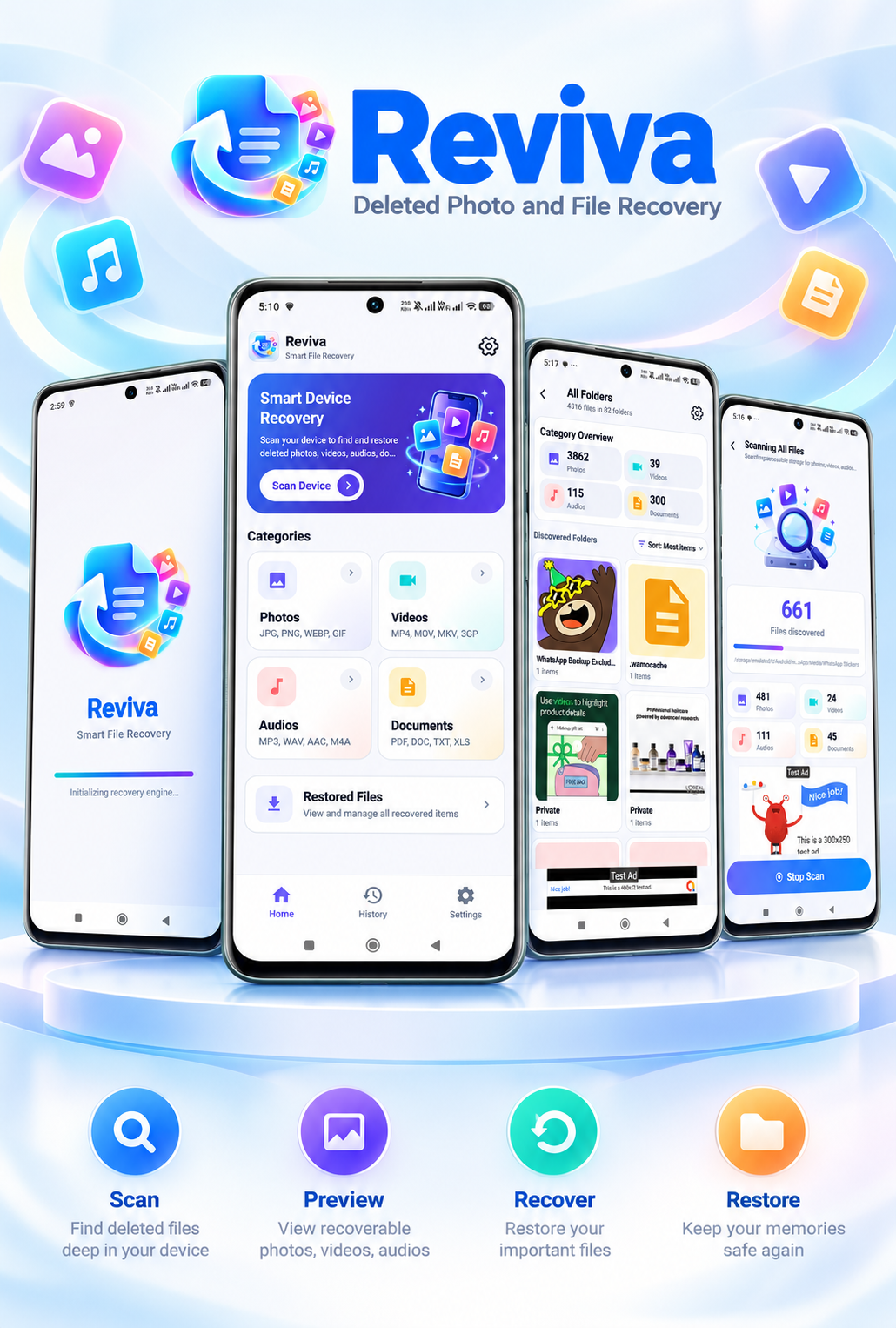
Reviva | Deleted Photo and File Recovery Android App
Reviva is a modern Android recovery application designed to help users scan storage, browse recoverable files, preview supported formats, select items, and restore recoverable photos, videos, audio, and documents through a streamlined interface.
Built with Kotlin and XML, Reviva includes category-based recovery, file and folder browsing, a Recovery Vault, Restore History, storage permission guidance, responsive layouts, and built-in ad monetization. It is intended for developers seeking a customizable Android source-code product.
Try the Demo APK
Demo login: No account or password required.
How to test: Install the demo, grant the requested storage permission, select a category, run a scan, review and preview results, choose files, and test the restore flow.
Recovery limitation: Results depend on the device, Android version, available storage data, and whether deleted data has been overwritten. Recovery of every deleted file is not guaranteed.
Highlights
Complete Scan-to-Restore Workflow
Guide users from storage permission through category selection, scan results, file preview, multi-selection, and restore.
Multiple File Categories
Scan photos, videos, audio, documents, or all supported file categories. Browse results by category and folder to locate recoverable content.
File Preview and Details
Preview supported media and documents, and view useful file information such as name, path, size, type, and date before restoring.
Recovery Vault and Restore History
Access restored files from the Recovery Vault and review past recovery actions through Restore History.
AdMob Monetization
Built-in banner, interstitial, and rewarded ad placements support monetization. Recover-all actions use rewarded ads, while configurable thresholds manage selected interstitial placements. Google UMP consent and Privacy Choices support are included.
Developer-Friendly Customization
Customize the app name, icon, splash artwork, package name, UI text, colors, supported category labels, ad IDs, legal links, and notification configuration. The project uses Kotlin with XML layouts, View Binding, and Material components.
Important Information
The app uses Android All files access for its core scanning and restoring workflow. Buyers are responsible for verifying their use case against Google Play policies, completing applicable permission and Data Safety declarations, and providing their own privacy policy and third-party service credentials.
Features
- Photo, video, audio, document, and all-supported-file scanning
- Category-based results and folder browsing
- Selection of individual, multiple, or all scan results
- Preview for supported image, video, audio, and document files
- File information: name, location, size, type, and date
- Recovery Vault for restored files
- Restore History for previous recovery activity
- Storage permission guidance and All files access workflow
- AdMob banner, interstitial, and rewarded ads
- Rewarded ads for recover-all actions and threshold-based interstitial display
- Google UMP consent and Privacy Choices
- OneSignal push notification integration
- Google Play in-app update support
- Responsive edge-to-edge layouts for phones, tablets, and larger displays
- Kotlin and XML with customizable resources and branding
Requirements
- Android Studio
- Basic knowledge of Android development
- Kotlin development knowledge for source-code customization
- Android SDK installed
- Minimum Android SDK 24
- Target SDK 36
- Compile SDK 36
- JDK compatible with the included Android Gradle configuration
- Internet connection for initial Gradle dependency synchronization
- AdMob account if advertisements will be used
- OneSignal account if push notifications will be used
Instructions
- Extract the source package and open the project root containing settings.gradle in Android Studio using JDK 17 and Android SDK 36.
- Allow Gradle sync to finish, then change namespace, applicationId and the Kotlin package through Android Studio refactoring.
- Customize strings.xml, colors.xml and launcher assets, and replace the buyer-specific advertising, OneSignal and legal values in res/values/ads.xml.
- Follow Documentation/index.html for configuration, branding, permissions and release setup.
- Choose Build > Generate Signed Bundle / APK, select Android App Bundle, create or select your own keystore, choose the release variant and generate the signed AAB.
- Test the signed bundle through a Play Console internal testing track before publication.
| Author | appsoft |
|---|---|
| Category | App Templates / Android |
| Price | $39 |
| Extended License | $117 |
| First Release | Oct 16, 2026 |
| Last Update | Oct 19, 2026 |
| Files included | .apk |
| Operating systems | Android 8.0, Android 9.0, Android 10.0, Android 11.0, Android 12.0, Android 13.0, Android 14.0, Android 15.0, Android 16.0 |
| Programming language | Kotlin |
Categories
Tags
External listing. code.market does not sell this product and does not process payment for it. Pricing, payment, delivery, licensing, refunds, and support are handled by the third-party merchant on its own website. We may earn an affiliate commission from a referral. Details.
Products of the Week.
Submit🥇

Perceptle
Perceptle is a daily browser-based game that challenges you to test your sensory intuition through five quick estimation and rhythm-based rounds.
Other · 3,205 views · 15 clicksOther · Week 47 · 3,205 views · 15 clicks
🥈

Free LinkedIn Likes From Real
Get free LinkedIn likes on your posts from real members who react by hand. No
SaaS · 3,323 views · 17 clicksSaaS · Week 47 · 3,323 views · 17 clicks
🥉

STOP GUESSING WHAT TO POST
AI that learns your brand voice and builds a month of consistent, on-brand social content: carousels, posts and hooks that sound like you, not like everyone else's AI.
SaaS · 10,823 views · 79 clicksSaaS · Week 47 · 10,823 views · 79 clicks
#4

aaas.market
407 reliable micro tools for solo founders, marketers and creators. They work in your browser
SaaS · 3,224 views · 7 clicksSaaS · Week 47 · 3,224 views · 7 clicks